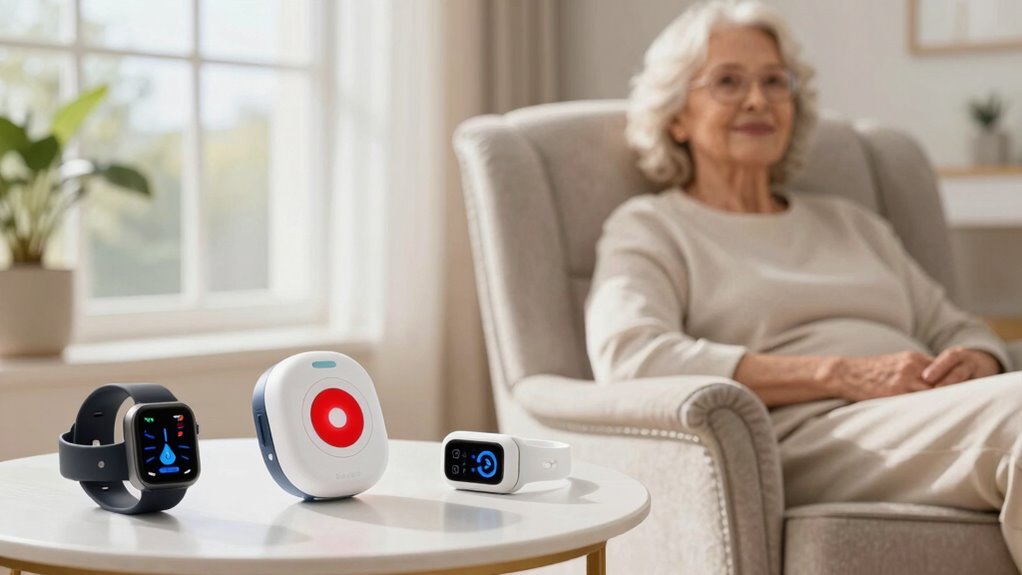
A medical alert system device for seniors at home can be a professionally monitored pendant, a direct-to-911 device, or a simpler call button that alerts family or a caregiver. My best overall pick is the ADT On-The-Go Emergency Medical Alert for shoppers who want a dedicated mobile alert service, while StackCare stands out for camera-free passive home monitoring and Daytech for straightforward caregiver alerts. The main tradeoff is between professional emergency response and lower-cost, family-managed systems that depend on a working phone, Wi-Fi, or nearby helper. Coverage, fall detection, water resistance, and who receives an alert can matter more than the number of buttons included. Read on for the full breakdown and guidance on matching a device to the senior’s home and support plan.

Get privacy and security gear delivered free with Prime
- Fast, free delivery on millions of items
- Prime Video, Amazon Music and more included
- Member-only deals all year
Key Takeaways
- Monitoring model matters more than button count: ADT and other alert-service options are built around emergency response, while Daytech, CallToU, and app-controlled systems are better understood as ways to reach a caregiver.
- Home-only alerts and mobile protection solve different problems: Wi-Fi and receiver-based devices suit someone who is usually at home; ADT On-The-Go and SecuLife add a mobile-use angle, with location and service details to verify.
- StackCare is the distinct camera-free monitoring pick: Its passive monitoring approach differs from systems that require the senior to press a call button, but buyers should check what monitoring and response are included.
- No monthly fee does not mean no dependencies: Several app-based and direct-call options avoid a monitoring subscription but rely on Wi-Fi, a compatible phone, family availability, or a functioning landline.
- Water exposure and wearability can decide everyday use: Pendants, wristbands, and call buttons fit different routines; check device water resistance and whether the senior will keep the alert within reach, especially in the bathroom.


| medical alert system device for seniors at home | Maximum range | Connectivity |
|---|---|---|
| Daytech Caregiver Pager Call B | 30 meters | — |
| Life Alert Systems for Seniors | 300 feet | — |
| ADT On-The-Go Emergency Medica | — | Cellular |
| WiFi Caregiver Pager Life Aler | Up to 656 feet (200 meters) | — |
| SecuLife Medical Alert Pendant | — | 4G LTE |
| StackCare by Connected Caregiv | — | — |
| ADT On-The-Go Mobile Medical A | — | Cellular LTE with GPS |
| Freedom Alert Landline Persona | — | Existing landline phone service |
| CallToU Caregiver Pager with 2 | Up to 500 feet | — |
| Guardian Alert 911 Plus | — | — |
| PILSAMAS WiFi Caregiver Pager | 230 feet | 2.4 GHz Wi-Fi; smartphone app |
| Life Alert System for Seniors | 300 feet | 2.4 GHz Wi-Fi and independent wireless channel; smartphone app |
More Details on Our Top Picks
Daytech Caregiver Pager Call Button for Elderly and Seniors, Wireless Emergency Alert System with Portable Receiver
Daytech is the straightforward choice for a senior who needs to summon a nearby caregiver at home, rather than contact a monitoring center or call for help while away. Its 30-meter wireless range and portable receiver let a caregiver move around the home while keeping the alert within reach. Multiple tones and adjustable volume offer practical flexibility for different rooms and hearing needs. Compared with the app-connected Life Alert Systems for Seniors No Monthly Fee, Daytech avoids reliance on Wi-Fi or a smartphone, but its shorter range makes it less suitable for larger homes. It is water-resistant, not waterproof, so the button needs to be removed before bathing. The battery-powered setup is simple, though replacement batteries are an ongoing task.
Pros:- Simple setup and touch control suit users who prefer not to rely on a smartphone.
- Wireless range of up to 30 meters supports alerts across many smaller homes.
- Multiple ringtones and adjustable volume allow caregivers to tailor alerts.
- Portable receiver lets a caregiver move around while remaining reachable.
Cons:- The 30-meter range may not cover larger homes or outbuildings.
- Water resistance does not make the button suitable for wearing while bathing.
- Four included batteries require replacement as they run down.
Best for: Seniors living in a smaller home with a nearby caregiver who wants a simple alert button and portable receiver without app setup.
Not ideal for: People who need coverage across a large property, waterproof protection in the bathroom, or professional monitoring and help outside the home.
- Maximum range:30 meters
- Power source:4 x 12V alkaline batteries, included
- Control method:Touch
- Audible noise:55 dB
- Mounting type:Wall mount
- Color:White
- Compatibility:Smartphone, tablet
Our verdict“Choose Daytech for a basic caregiver-to-senior alert system in a smaller home, but skip it if you need wider coverage or monitored emergency response.”
Life Alert Systems for Seniors No Monthly Fee App-Controlled with Call Buttons and LED Display
This app-connected system suits families who want home alerts sent to their phones without a monthly fee for basic caregiver notifications. Its 300-foot stated range gives it more reach than the Daytech pager, which may help when a caregiver is elsewhere in the home or nearby. App sharing also lets multiple family members receive alerts, while the LED display helps identify a call. The tradeoff is dependence on a 2.4GHz Wi-Fi network and smartphone setup; it is less self-contained than Daytech’s receiver-based approach. The system includes only two call buttons, and SMS notifications require an additional subscription. The product description mentions fall detection, but the supplied details do not explain how it works, so I would not choose it as a substitute for a clearly specified monitored fall-detection service.
Pros:- Basic caregiver alerts do not require a monthly fee.
- Stated range of up to 300 feet exceeds the Daytech pager’s 30-meter range.
- App sharing can notify multiple caregivers.
- LED display helps distinguish or identify incoming alerts.
Cons:- Requires a 2.4GHz Wi-Fi network and smartphone-based setup.
- Only two call buttons are included.
- SMS notifications require an additional subscription, and fall-detection details are limited.
Best for: Families with reliable 2.4GHz Wi-Fi who want basic app notifications shared among caregivers and only need two call buttons.
Not ideal for: Seniors without dependable Wi-Fi or a caregiver able to manage a smartphone app, and buyers seeking included SMS alerts or clearly detailed professional monitoring.
- Maximum range:300 feet
- Compatible devices:Smartphone
- Power:2 A batteries required, included
- Control method:App
- Audible noise:110 dB
- Call buttons:2
- Network requirement:2.4GHz Wi-Fi
Our verdict“Pick this for shared smartphone alerts over a larger home area, but choose a simpler receiver system if Wi-Fi or app access is a concern.”
ADT On-The-Go Emergency Medical Alert for Seniors, All-in-One
ADT’s all-in-one device takes a different approach from home caregiver pagers: it connects the wearer to 24/7 professional monitoring over cellular service, with GPS to help locate them beyond the home. That makes it a stronger fit for a senior who may be alone or mobile and needs more than a family phone notification. Its built-in microphone, rechargeable design, and lack of external accessories keep the setup compact compared with the separate button-and-receiver arrangement of the Daytech system. The tradeoff is a required monitoring plan, with an additional charge for optional automatic fall detection. It is water-resistant to IP57, not described as fully waterproof, and fall detection cannot catch every fall. Buyers seeking alerts only to family may find the subscription model excessive.
Pros:- 24/7 professional monitoring provides a response path beyond family app alerts.
- Cellular connectivity and built-in GPS support use at home and on the go.
- All-in-one design avoids carrying a separate call button and receiver.
- IP57 water resistance supports everyday wear.
Cons:- Professional monitoring requires a monthly plan.
- Optional automatic fall detection adds a cost and may not detect every fall.
- Rechargeable wearable needs regular charging.
Best for: Seniors who spend time outside the home and want GPS-supported access to professional monitoring through one wearable device.
Not ideal for: Households seeking a no-monthly-fee button that alerts family directly, or seniors who prefer not to wear and recharge a device.
- Model:MD5
- Dimensions:2.75 x 1.75 x 0.63 inches
- Weight:1.76 ounces
- Connectivity:Cellular
- GPS location:Built in
- Built-in microphone:Yes
- Power:Rechargeable
- Water resistance:IP57
- Professional monitoring:Required
Our verdict“Choose ADT when professional monitoring and location support matter more than avoiding a subscription or keeping alerts within the family.”
WiFi Caregiver Pager Life Alert System for Seniors – No Monthly Fee, App-Controlled Medical Alert with Waterproof Call Button, Watch Button, and Receiver (2.4GHz Wi‑Fi only)
This Wi-Fi pager is the reach-focused home option in this group, with a stated range of up to 656 feet and buttons that can be mounted or worn. Waterproof buttons make placement near a bathroom more practical than with the Daytech caregiver pager, whose button must be removed before bathing. Basic app alerts have no monthly fee, and the included receiver adds an in-home alert path. The range and mounting flexibility can suit a multi-room home, but they do not make this a mobile medical alert: it depends on home Wi-Fi and caregiver access to the app. Only 2.4GHz Wi-Fi is supported, while SMS and phone call alerts require an extra subscription. Compared with the ADT On-The-Go device, it favors family notifications and home coverage over cellular service and professional monitoring.
Pros:- Stated range of up to 656 feet is the longest among the home pager options here.
- Waterproof buttons are more suitable for bathroom placement than Daytech’s water-resistant button.
- Includes a receiver as well as app alerts.
- Screw, adhesive, and lanyard mounting options offer flexible placement.
Cons:- Works only with 2.4GHz Wi-Fi.
- SMS and phone call notifications require an additional subscription.
- Designed for home use rather than cellular alerts while away.
Best for: Families in a larger home who want waterproof call buttons, an in-home receiver, and app alerts without a fee for basic notifications.
Not ideal for: Seniors who need alerts away from home, households using only 5GHz Wi-Fi, or buyers who expect SMS and phone calls without an added subscription.
- Maximum range:Up to 656 feet (200 meters)
- Supported Wi-Fi:2.4GHz only
- Package dimensions:4.13 x 4.13 x 3.11 inches
- Item weight:7.4 ounces
- Included alert components:Call button, watch button, receiver
- Button water resistance:Waterproof, as described in product title
- Basic app alerts:No monthly fee
Our verdict“Choose this pager for flexible, broad home coverage with waterproof buttons, but not for off-site protection or subscription-free calls and texts.”
SecuLife Medical Alert Pendant for Seniors with Fall Detection and GPS Tracking
SecuLife is the family-connected wearable pick for a senior who needs help both at home and while out, but whose relatives want to receive alerts directly rather than use a professional monitoring center. Its 4G LTE, GPS tracking, and two-way calling add mobility that the Wi-Fi pager from MT EXESPR cannot provide. Geo-fence zones can help family members follow location changes, while the stated battery life of up to six days means less frequent charging than a daily-charge device may require. The tradeoff is that full features require a monthly subscription, and the supplied product details do not specify alert routing or fall-detection performance. Compared with ADT’s On-The-Go model, SecuLife emphasizes family contact and tracking rather than stated 24/7 professional monitoring.
Pros:- 4G LTE connectivity and GPS support use beyond the home.
- Two-way calling allows direct communication through the pendant.
- Geo-fence zones add location-based awareness for family.
- Stated battery life of up to six days can reduce charging frequency.
Cons:- A monthly subscription is required for full features.
- The supplied information does not detail fall-detection limits or alert routing.
- Family-directed alerts do not provide the stated professional monitoring offered by ADT.
Best for: Families who want a wearable with GPS, two-way calling, and location alerts for a senior who moves between home and community activities.
Not ideal for: Buyers who want no recurring subscription, professional monitoring, or a device with clearly documented fall-detection performance.
- Connectivity:4G LTE
- Water resistance:IP67
- Battery life:Up to 6 days
- Battery capacity:1000 mAh
- GPS tracking:Yes
- Two-way calling:Yes
- Supported devices:Android, iOS, smartphone
- Included items:Charging cable, SIM card, user manual
- Subscription:Required for full features
Our verdict“Choose SecuLife for family GPS tracking and calling in a wearable, but select ADT if professional monitoring is the priority.”
StackCare by Connected Caregiver Medical Alert System, Fall Detection for Seniors, WiFi Home Passive Monitoring with No Cameras, Emergency Call Button, Virtual Caregiver
StackCare is the most useful fit here for households that want activity monitoring without asking a senior to wear a device. Motion and contact sensors track patterns around the home, and the app sends updates and daily summaries to caregivers. That differs from the Guardian Alert 911 Plus, which is a wearable-style pendant designed for direct emergency communication rather than ongoing activity awareness. StackCare’s camera-free setup may feel more private, but it also means placing multiple sensors around the home and relying on working Wi-Fi. Its fall detection is described as AI-driven, though this is not the same as a direct voice link to emergency services. The monitoring subscription becomes $75 per month after the first month, so it makes more sense for families who will actively use the summaries and alerts than for those seeking a low-cost call button.
Pros:- Monitors activity with motion and contact sensors without cameras or wearables.
- Sends caregiver alerts and daily summaries through an iOS or Android app.
- AI-driven fall detection can notify caregivers when a sudden inactivity pattern is detected.
- Sensor-based monitoring can provide context about routine activity, not just button presses.
Cons:- A $75 monthly charge applies after the first free month.
- Multiple sensors need to be placed around the home for useful coverage.
- Monitoring depends on reliable Wi-Fi and does not provide the listed two-way voice connection of some pendants.
Best for: Families who want camera-free activity updates and fall alerts for a senior who may not consistently wear a pendant.
Not ideal for: Households seeking a no-subscription device, direct two-way emergency calling, or coverage in a home with unreliable Wi-Fi.
- Brand:Connected Caregiver
- Model number:860012166565
- Sensor technology:Motion and contact sensors
- Compatible devices:iOS and Android
- Control method:App
- Batteries:8 included
- Monitoring:24/7 passive monitoring; $75 per month after the first month
Our verdict“Choose StackCare for discreet, app-based home activity monitoring, but skip it if you want a simple emergency pendant or want to avoid a recurring fee.”
ADT On-The-Go Mobile Medical Alert System for Seniors – White Wristband
This ADT wristband is the strongest match in this group for seniors who need help while out of the house. LTE/GPS connectivity and a built-in microphone support location-aware communication with professional monitoring, while the waterproof design suits everyday wear and water-related activities. Compared with the Freedom Alert Landline Personal Emergency Device, it does not depend on a home phone line and is better suited to errands or outdoor activity. That mobility comes with a recurring monitoring-plan requirement, unlike Freedom Alert’s no-monthly-fee model. The listed 40-hour battery life also calls for a regular charging routine; it is a practical compromise for a mobile system, but less appealing to someone who may forget to recharge. I’d choose it for a senior who leaves home independently and is comfortable wearing and charging a device.
Pros:- LTE/GPS connectivity supports use away from the home.
- SOS button and built-in microphone allow voice communication with monitoring support.
- Waterproof wristband is suited to active routines and wet environments.
- No long-term contract is required.
Cons:- Professional monitoring requires a monthly plan.
- Battery life is listed at about 40 hours, so frequent recharging is part of ownership.
- The mobile wristband may be unnecessary for seniors who stay at home and prefer a landline device.
Best for: Independent seniors who go out regularly and want GPS-enabled access to professional monitoring from a waterproof wristband.
Not ideal for: People seeking a no-subscription home-only system or anyone unlikely to recharge a device about every 40 hours.
- Brand:ADT
- Model number:MD5
- Connectivity:Cellular LTE with GPS
- Battery life:Up to 40 hours
- Waterproof:Yes
- Built-in microphone:Yes
- Professional monitoring:Required; monthly plan, no long-term contract
- Dimensions:0.63 x 1.75 x 2.75 inches
Our verdict“Pick the ADT On-The-Go wristband for an active senior who needs monitored help outside the home and can keep up with regular charging.”
Freedom Alert Landline Personal Emergency Device – 2-Way Call with Family and Police
Freedom Alert favors straightforward emergency calling over app features or passive monitoring. A press of the pendant connects the user by two-way voice to emergency services or selected family members through an existing landline, with a rechargeable battery providing up to 24 hours of backup. That makes it a better fit for a landline household seeking to avoid recurring fees than the ADT On-The-Go Mobile Medical Alert System, which adds cellular GPS and professional monitoring but requires a monthly plan. The tradeoff is range: Freedom Alert is tied to the home phone connection and is not designed for outdoor use. It also lacks the ongoing activity summaries offered by StackCare. I’d favor this option when a senior can reach the pendant and the household prioritizes direct voice contact and simple operation over mobile coverage.
Pros:- Uses an existing standard landline connection.
- No monthly subscription fee is required.
- Two-way voice communication can connect users with emergency services or selected family members.
- Rechargeable battery provides up to 24 hours of backup.
Cons:- Requires an active landline, limiting suitability in homes without phone service.
- Not designed for mobile or outdoor emergencies.
- Does not provide passive activity tracking or the GPS functionality of the ADT On-The-Go system.
Best for: Landline households that want a wearable or mountable emergency button with two-way calls and no monthly subscription.
Not ideal for: Seniors without landline service, people who need help while away from home, or families seeking passive activity monitoring.
- Connectivity:Existing landline phone service
- Device type:Handheld pendant; wearable or mountable
- Communication:Two-way voice
- Power:Rechargeable battery
- Battery backup:Up to 24 hours
- Emergency contacts:911 dispatchers, police, fire services, or selected family members
Our verdict“Choose Freedom Alert if the senior has a landline and wants direct voice calls without a recurring fee, rather than coverage beyond the home.”
CallToU Caregiver Pager with 2 Wireless Call Buttons for Elderly
CallToU is a caregiver alert pager, not a replacement for a monitored medical alert service. Its two call buttons can be worn or mounted, and two plug-in receivers sound an alert when someone presses a button. The stated range of up to 500 feet through walls can help a caregiver hear a call from another room, while the adjustable volume and ringtone choices make the alert easier to tailor. Compared with the Freedom Alert, CallToU is aimed at summoning a nearby caregiver rather than speaking directly with emergency services. Its waterproof buttons suit bathrooms, but the receivers need outlets and the system depends on someone nearby responding. It has no listed professional monitoring or two-way voice connection, so I’d treat it as an at-home communication aid, not a standalone emergency response plan.
Pros:- Includes two call buttons and two plug-in receivers for multiple rooms.
- Listed range reaches up to 500 feet through walls.
- Waterproof and dustproof design supports use in bathrooms and outdoor areas.
- Adjustable volume up to 110 dB and 55 ringtone choices help caregivers tailor alerts.
Cons:- Plug-in receivers need nearby outlets and are not fully mobile.
- Requires two 12V alkaline batteries for the call buttons, which need replacement.
- A loud alert does not provide professional monitoring or two-way emergency communication.
Best for: Seniors living with or near a caregiver who need a simple way to call for help from different rooms, including the bathroom.
Not ideal for: People living alone who need professional monitoring, direct emergency-service calls, or an alert that works beyond the home.
- Unit contents:2 wireless call buttons and 2 plug-in receivers
- Maximum range:Up to 500 feet
- Audible alert:Adjustable up to 110 dB
- Ringtones:55 selectable
- Water and dust resistance:Buttons and receivers are described as waterproof and dustproof
- Button power:Two included 12V alkaline batteries
- Mounting:Tabletop receivers; buttons can be worn on a neck strap or mounted
- Warranty:1 year
Our verdict“Choose CallToU as an in-home way to alert a nearby caregiver, but pair it with another plan if the senior needs monitored emergency response.”
Guardian Alert 911 Plus – No Monthly Fees, 2-Way Emergency Pendant for Seniors with Fall Detection, Water Resistant, Direct 911 Connection Without a Landline
Guardian Alert 911 Plus stands out for a senior who wants a cellular emergency pendant without a monthly monitoring plan. It offers two-way voice communication and automatic fall detection, and its water-resistant design allows use in the shower or bath. Unlike the Freedom Alert, it does not require a landline, while the ADT On-The-Go adds GPS and professional monitoring through a monthly plan. Guardian Alert’s direct 911 connection is a simpler route, but it depends on 4G LTE coverage and the provided details do not list GPS location or a caregiver app. The battery also needs periodic recharging, and the product information does not specify its battery life. I’d choose it for home use where cellular reception is reliable and avoiding recurring fees matters more than mobile location features.
Pros:- No monthly fee is required according to the product description.
- Automatic fall detection can alert even when the user cannot press the button.
- Two-way voice communication supports direct contact with emergency responders.
- Water-resistant design is intended for use in the shower or bath.
Cons:- Cellular coverage is required and may be limited in some areas.
- Battery requires periodic recharging, but battery life is not specified in the provided details.
- No GPS location feature is listed, unlike the ADT On-The-Go mobile system.
Best for: Seniors who want fall detection and two-way 911 communication at home without a landline or monthly monitoring fee.
Not ideal for: People in areas with weak 4G LTE coverage, those who need GPS location sharing, or anyone who may not recharge a battery-powered device.
- Brand:LogicMark
- Model number:40711
- Network compatibility:4G LTE
- Power source:Battery powered, lithium-ion
- Communication:Two-way voice; direct 911 connection
- Fall detection:Automatic
- Water resistance:Water resistant
- Mounting:Wearable or tabletop
Our verdict“Pick Guardian Alert 911 Plus if you want a no-monthly-fee cellular pendant with fall detection and direct 911 voice contact, provided LTE coverage is dependable.”
PILSAMAS WiFi Caregiver Pager Wireless Call Button with App Alert
The PILSAMAS CF100-3P suits households where a senior may need help from more than one room: it comes with two call buttons and a wearable wristband button, so alerts can be triggered from several spots. Its stated 230-foot range and pre-paired setup make it a more flexible in-home arrangement than a basic single-button pager such as the Daytech Caregiver Pager. Caregivers can also receive app alerts, and basic operation has no monthly fee. The tradeoff is that the system depends on 2.4 GHz Wi-Fi; it is not a cellular medical alert service or a substitute for emergency-response monitoring. The listed alarm reaches 95 dB, which may be hard to hear through closed doors or in a noisy home, while SMS, phone, or email alerts require a subscription.
Pros:- Includes two call buttons plus a wearable wristband button for coverage across several locations.
- Stated 230-foot range can suit larger homes or care spaces.
- Pre-paired devices and multiple mounting options simplify initial setup.
- Basic alert functionality has no monthly fee, with lifetime free app updates listed.
Cons:- Requires 2.4 GHz Wi-Fi for operation.
- The 95 dB alarm may not be loud enough in noisy rooms or for users with hearing loss.
- SMS, phone, or email notifications require a subscription.
Best for: Households seeking several in-home call points and app alerts without a required monthly fee, with a caregiver nearby to respond.
Not ideal for: Seniors who need professionally monitored or cellular emergency response, or homes without 2.4 GHz Wi-Fi and dependable caregiver app access.
- Model:CF100-3P
- Included alert devices:Two call buttons and one wearable wristband panic button
- Maximum range:230 feet
- Audible alarm:95 dB
- Connectivity:2.4 GHz Wi-Fi; smartphone app
- Power:Battery powered; listed battery description: 12-volt
- Mounting:Wall mount
- Dimensions:3.1 × 0.8 × 3.1 inches
Our verdict“Choose the PILSAMAS for multiple in-home call points and app alerts without a mandatory fee, but skip it if you need monitored emergency response or alerts independent of Wi-Fi.”
Life Alert System for Seniors – No Monthly Fee, App-Controlled Medical Alert with Dual Call Buttons, Waterproof Wristband, Receiver, and LED Number Display (2.4 GHz Wi-Fi)
This system stands out for its dual-channel connection: alerts can reach the receiver over an independent wireless signal as well as Wi-Fi, offering a backup path if internet service drops. That makes it a stronger fit for homes concerned about local connection reliability than the PILSAMAS CF100-3P, which is described as Wi-Fi dependent. The package includes a waterproof wrist remote for shower use, a handheld panic button, and app notifications; its stated range is up to 300 feet. Basic functionality has no required monthly fee, but the product description does not establish professional monitoring or automatic emergency-service dispatch, so caregivers still need to act on alerts. SMS notifications cost extra, and Wi-Fi support is limited to 2.4 GHz.
Pros:- Independent wireless signaling supplements Wi-Fi for alerts to the receiver.
- Waterproof wrist remote can be worn in the shower.
- Stated range reaches up to 300 feet.
- Basic alerts and app notifications do not require a mandatory monthly service fee.
Cons:- Only supports 2.4 GHz Wi-Fi.
- SMS notifications require an additional subscription.
- The described system relies on caregivers to respond and does not specify professional monitoring or emergency dispatch.
Best for: Seniors who want a shower-safe wearable and a local receiver with a backup wireless path, while relying on family or caregivers to respond.
Not ideal for: People who need professional monitoring, direct emergency-service dispatch, or a system that works with 5 GHz-only Wi-Fi.
- Included alert devices:Dual call buttons, including a handheld panic button and waterproof wristband
- Receiver:Included; LED number display
- Maximum range:300 feet
- Audible alarm:110 dB
- Connectivity:2.4 GHz Wi-Fi and independent wireless channel; smartphone app
- Batteries:Two A batteries, included
- Monthly service:No mandatory fee for basic alerts; SMS notifications require a subscription
Our verdict“Pick this system for a waterproof wearable and backup receiver connection at home, but choose a monitored service if alerts must trigger professional emergency response.”

How We Picked
I ranked these options for home safety and practical emergency access, not by the length of their feature lists. The main criteria were how an alert reaches help, whether the device depends on a caregiver, app, Wi-Fi, landline, or paid response service, and how suitable its form is for everyday wear. I also weighed fall detection claims, mobility beyond the home, water resistance, and the likely setup burden, while treating feature names as prompts for buyers to verify service terms rather than guarantees of response.
The highest positions go to options that offer a clearer emergency-response path or solve a meaningful home-safety need beyond a basic call button. That places ADT On-The-Go first for a service-oriented mobile alert setup, with StackCare distinguished by passive camera-free monitoring and Daytech by simple caregiver calling. The remaining products serve more specific situations: app-and-Wi-Fi alerting, landline calling, direct 911 access, or multiple household call buttons. A simple pager ranks lower for emergency independence because it may alert a nearby helper without connecting to professional responders.
Factors to Consider When Choosing Medical Alert System Device For Seniors At Home
Before choosing a device, decide who is expected to respond and what happens if that person is unavailable. A button that alerts a family phone can work well in a staffed household, but it is not interchangeable with a monitored service or a device that directly contacts emergency services. These broader checks can help prevent a mismatch between the device and the senior’s routine.
Decide Who Receives the Alert
Start with the response chain, not the hardware. Some devices notify a family member or caregiver, some connect to an emergency monitoring service, and some offer direct contact with 911. Ask what happens if the first contact does not answer, whether the device gives the wearer two-way voice communication, and whether anyone is expected to check alerts around the clock. A family-managed system can be a good fit when a reliable helper is nearby and willing to respond, but it can leave gaps during work, sleep, or travel. Do not assume that the phrase “medical alert” means professional monitoring is included.
Match Coverage to the Senior’s Routine
A receiver or Wi-Fi call button is generally aimed at use inside the home, while a mobile pendant or GPS device may be intended for outings as well. Ask where the device will work, including the yard, garage, apartment corridors, and places the senior visits regularly. Wi-Fi systems can be affected by router outages, network changes, or a weak signal in parts of the home. Mobile systems can depend on cellular coverage, battery charge, and an active service plan. A common mistake is buying for the address rather than checking the actual locations where help may be needed.
Treat Fall Detection as One Layer, Not a Guarantee
Fall detection can add a way to request help when someone cannot press a button, but it should not be treated as a promise that every fall will be detected. Ask how the feature works, whether it is automatic or optional, and which response center or contact receives its alert. A manual call button remains useful because automatic detection can miss some incidents or send an alert when no emergency occurred. Consider the senior’s fall history, ability to reach and press a button, and willingness to wear the device every day. If the person has medical needs, discuss the response plan with their clinician or care team rather than relying on device features alone.
Check Wearability and Water Exposure
The best device is one the senior will keep close and use without frustration. Compare pendant, wristband, and portable-button designs against dexterity, comfort, clothing preferences, and the likelihood of removing the device at home. Bathroom use deserves special attention: verify the exact water-resistance rating and care instructions instead of assuming “waterproof” covers every kind of exposure. A receiver-based call button may be convenient beside a bed or in a bathroom, but it may not travel with the wearer. Ask the senior to try the wearing method and practice calling for help before making it part of the household routine.
Compare the Full Ongoing Cost and Service Terms
A no-monthly-fee device can reduce recurring charges, but the household may take on responsibility for setup, network access, phone compatibility, and answering alerts. Paid monitoring can add a dedicated response path, though buyers should check activation requirements, cancellation terms, battery replacement, and whether service is needed for every advertised feature. Confirm whether app alerts require a particular phone or operating system and whether notifications can reach more than one caregiver. For landline equipment, check that the home still has a compatible line and ask what happens during a power outage. Compare the ongoing commitment and support arrangement, not just the device’s initial feature list.
Plan for Power, Connectivity, and Setup
Every alert system has a dependency: a charged wearable, powered receiver, working router, cellular signal, landline, smartphone, or staffed response service. Ask how the device signals low battery or lost connectivity and what backup power is available. If a senior has limited technical confidence, fewer setup steps may be more valuable than app features they are unlikely to use. Have a family member or caregiver test the alert route, explain what each tone or notification means, and repeat the test after changing Wi-Fi or phone settings. A device should be selected alongside a realistic backup plan for outages and missed notifications.
Frequently Asked Questions
Is a caregiver pager the same as a professionally monitored medical alert system?
No. A caregiver pager such as Daytech or CallToU is generally meant to alert someone nearby or a designated contact, while professional monitoring routes alerts through a response service under its service terms. That can make a pager a practical choice in a home where a caregiver is present, but it may not help if nobody hears or answers it. Before buying, confirm exactly which people or services receive a press, whether two-way communication is available, and what happens after an unanswered alert. Choose based on the response plan you need, not the product label.
Can a Wi-Fi alert button work if the internet or power goes out?
Do not assume it will. Wi-Fi-dependent models may lose app notifications when the router or internet connection is unavailable, while a receiver-based system may also need household power unless it has backup power. Check the specific device’s outage behavior, battery backup, and any cellular fallback before relying on it for emergencies. If outages are common, consider whether a landline or professionally monitored mobile option offers a more suitable backup. Keep a separate plan for contacting help if the device cannot connect.
Should I choose a device that contacts family or one that connects to emergency services?
That depends on who can reliably respond and how quickly help may be needed. Family alerts can suit a senior whose trusted caregiver is close by and regularly reachable, while a monitored service or direct 911 connection may fit households without dependable caregiver coverage. Verify whether the device calls contacts in sequence, supports two-way voice, and can reach emergency responders without a family member acting as a relay. Also ask whether location details are available if the senior is away from home. The response route should match the household’s actual availability, not an ideal schedule.
Does fall detection mean help will be called automatically every time?
No fall-detection feature should be treated as infallible. Detection can vary by device and event, and alerts may still require a response service, a working connection, or follow-up from a contact. Ask whether the feature is included, how it is activated, and who receives its signal; also check whether the wearer can cancel an alert if it is triggered by accident. A manual button remains an important backup for situations the sensor does not identify. Discuss the limits with the senior and any caregiver so they know what the device can and cannot do.
What should I check before buying a system advertised as having no monthly fee?
Find out how alerts reach a real person and what the household must supply. A no-fee option may rely on a smartphone app, Wi-Fi, a landline, or family members who can answer promptly, and some features may require separate service or compatible equipment. Check whether the wearable needs charging, how connectivity loss is reported, and whether the system works outside the home. Also read the instructions for setup, range, water exposure, and any optional service terms. The right comparison is between the complete response arrangement and a monitored alternative, not between device labels alone.
Conclusion
For a best overall, service-oriented mobile option, I would start with ADT On-The-Go Emergency Medical Alert, then verify current coverage and service terms for the senior’s routine. Best for camera-free home monitoring: StackCare, especially for households that want passive monitoring in addition to a call button. Best value for a simple caregiver setup: Daytech, provided a helper is reliably available and the household understands it is not a substitute for professional response. Best for beginners: a straightforward call-button setup such as Daytech or CallToU may be easier to learn than an app-dependent system, as long as its response limits fit. For mobile location needs, compare SecuLife and ADT’s mobile options; for landline households, consider Freedom Alert; and for a direct emergency-call route, examine Guardian Alert 911 Plus closely. The final choice should follow one question: who will answer when the senior needs help?