A WiFi 6E router for a crowded neighborhood can use the less congested 6GHz band for compatible devices, though walls, distance, and router placement still shape results. I’d choose the TP-Link Archer AXE75 as the best overall fit for many homes because it balances tri-band features with a straightforward standalone-router setup. For larger layouts, the TP-Link Deco XE75 Pro 3-Pack offers a mesh approach, while the NETGEAR Nighthawk RAXE500 is a stronger premium-style choice for buyers prioritizing a high-end standalone router. The main tradeoffs are coverage versus simplicity, mesh versus one-router performance, and whether your devices can use 6GHz at all. Read on for the full breakdown and help matching a router to your home.

Get privacy and security gear delivered free with Prime
- Fast, free delivery on millions of items
- Prime Video, Amazon Music and more included
- Member-only deals all year
Key Takeaways
- The Archer AXE75 is the balanced standalone pick: it offers tri-band WiFi 6E without requiring a mesh system, making it a practical starting point for homes that do not need multiple access points.
- Mesh is a coverage decision, not a congestion cure: the Deco XE75 Pro 3-Pack and eero Pro 6E are better suited to spread-out or multi-room layouts than a single router, but placement still matters.
- 6GHz helps only where compatible devices can reach it: its extra wireless space may reduce competition nearby, but its shorter reach through walls means it is not a whole-home replacement for 2.4GHz and 5GHz.
- Premium hardware is not automatically the best fit: the Nighthawk RAXE500 and Archer AXE7800 target buyers who want higher-end standalone options, while many households may benefit more from better placement or mesh coverage.
- Renewed, single-pack, and themed options call for closer fit checks: the renewed Archer AXE7800 and Deco XE75 Pro 3-Pack, one-unit Deco models, and Minions-branded router should be judged by condition, system size, and support details—not just WiFi 6E labeling.
| NETGEAR Nighthawk WiFi 6E Router (RAXE500) |  | Best for Maximum Standalone Capacity | WiFi technology: WiFi 6E | Bands: Tri-band | Maximum speed: Up to 10.8 Gbps | VIEW ON AMAZON | See Our Full Breakdown |
| Amazon eero Pro 6E Mesh Wi-Fi Router – Like-New |  | Best for Easy Mesh Expansion | WiFi standard: WiFi 6E (802.11ax) | Coverage: Up to 2,000 sq. ft. | Device capacity: 100+ devices | VIEW ON AMAZON | See Our Full Breakdown |
| TP-Link Deco XE75 Pro AXE5400 Tri-Band WiFi 6E Mesh Router |  | Best for Mesh Coverage in a Larger Home | WiFi bands: Tri-band | Maximum speed: Up to 5,400 Mbps | Coverage: Up to 2,900 sq. ft. | VIEW ON AMAZON | See Our Full Breakdown |
| TP-Link Tri-Band AXE5400 Wi-Fi 6E Gaming Router Archer GXE75 | 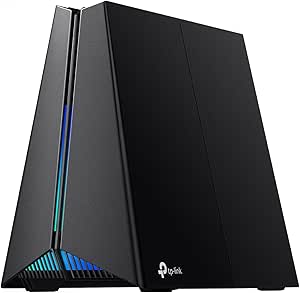 | Best for Gaming in a Busy Household | WiFi speed: Up to 5.4 Gbps | Bands: Tri-band: 2.4 GHz, 5 GHz, 6 GHz | Ports: 1 x 2.5 Gbps WAN/LAN, 3 x 1 Gbps LAN, 1 x USB | VIEW ON AMAZON | See Our Full Breakdown |
| TP-Link AXE5400 Tri-Band WiFi 6E Router (Archer AXE75) |  | Best for Flexible Whole-Home Expansion | WiFi speed: Up to 5,400 Mbps | Frequency bands: Tri-band: 6 GHz, 5 GHz, 2.4 GHz | Processor: 1.0 GHz dual-core CPU | VIEW ON AMAZON | See Our Full Breakdown |
| NETGEAR Nighthawk Tri-Band WiFi 6E Router (RAXE300) |  | Best Overall for a Busy Single-Router Home | WiFi standard: WiFi 6E (802.11ax) | Maximum WiFi speed: 7.8 Gbps | Bands: Tri-band: 2.4 GHz, 5 GHz, 6 GHz | VIEW ON AMAZON | See Our Full Breakdown |
| TP-Link Deco XE75 AXE5400 Tri-Band WiFi 6E Mesh System, 1-Pack | 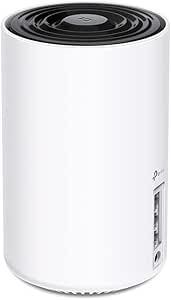 | Best for Easy App-Based Setup | WiFi standard: WiFi 6E (802.11ax) | Maximum speed: 5,400 Mbps | Bands: Tri-band | VIEW ON AMAZON | See Our Full Breakdown |
| TP-Link Archer AXE7800 Tri-Band Wi-Fi 6E Router – Black (Renewed) |  | Best for Wired Connections | Model: Archer AXE7800 | Condition: Renewed | WiFi generation: WiFi 6E | VIEW ON AMAZON | See Our Full Breakdown |
| TP-Link Deco AXE5400 Tri-Band WiFi 6E Mesh System (Deco XE75 Pro) – 3-Pack (Renewed) | 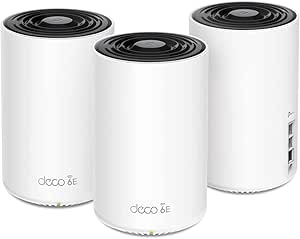 | Best for Large Homes | Model: Deco XE75 Pro | Condition: Renewed | Number of units: 3 | VIEW ON AMAZON | See Our Full Breakdown |
| Minions WiFi 6E Router, AXE5400 Tri-Band, 2.4GHz, 5GHz & 6GHz, 2.5GbE WAN, Mesh System, WPA3, Gigabit LAN (Kevin) |  | Best for a Playful, Device-Heavy Home | WiFi generation: WiFi 6E | Maximum wireless speed: 5.4 Gbps | Bands: 2.4 GHz, 5 GHz, 6 GHz | VIEW ON AMAZON | See Our Full Breakdown |
| eero Pro 6E Mesh Wi-Fi Router – Supports Internet Plans up to 2.5 Gbps, Coverage up to 2,000 sq. ft., Connects 100+ Devices, 1-Pack |  | Best for Simple Mesh Expansion | Wi-Fi standard: Wi-Fi 6E | Coverage: Up to 2,000 sq. ft. | Supported speed: Up to 2.3 Gbps | VIEW ON AMAZON | See Our Full Breakdown |
| wifi 6e router for crowded neighborhood | Bands | Processor | Security |
|---|---|---|---|
| NETGEAR Nighthawk WiFi 6E Rout | Tri-band | 1.8 GHz quad-core | WPA2/WPA3 |
| Amazon eero Pro 6E Mesh Wi-Fi | — | — | — |
| TP-Link Deco XE75 Pro AXE5400 | — | — | — |
| TP-Link Tri-Band AXE5400 Wi-Fi | Tri-band: 2.4 GHz, 5 GHz, 6 GHz | Quad-core CPU | WPA3, DoS protection, SPI firewall |
| TP-Link AXE5400 Tri-Band WiFi | — | 1.0 GHz dual-core CPU | — |
| NETGEAR Nighthawk Tri-Band WiF | Tri-band: 2.4 GHz, 5 GHz, 6 GHz | 1.7 GHz quad-core | WPA2-PSK, WPA3-PSK; NETGEAR Armor listed |
| TP-Link Deco XE75 AXE5400 Tri- | Tri-band | — | — |
| TP-Link Archer AXE7800 Tri-Ban | Tri-band | 1.7 GHz quad-core | WPA2-PSK, WPA3 |
| TP-Link Deco AXE5400 Tri-Band | Tri-band: 6 GHz, 5 GHz, 2.4 GHz | — | TP-Link HomeShield |
| Minions WiFi 6E Router | 2.4 GHz, 5 GHz, 6 GHz | — | WPA3 |
| eero Pro 6E Mesh Wi-Fi Router | — | 1 GHz dual-core | — |
More Details on Our Top Picks
NETGEAR Nighthawk WiFi 6E Router (RAXE500)
For a crowded neighborhood where many devices compete for airtime, the RAXE500’s 12 WiFi streams and tri-band design give it a strong case as a high-capacity standalone router. Its 6 GHz band can offer compatible nearby devices a less congested path, while the stated 3,500 sq. ft. coverage suits a larger home better than the compact eero Pro 6E’s 2,000 sq. ft. figure. Six Ethernet ports also give me more room for wired consoles, PCs, and access points than the Deco XE75 Pro’s listed three ports. The tradeoff is that this is a single-router setup, not a mesh kit, so difficult layouts may need extra equipment. It also requires a separate modem, and its extensive controls may feel like more work than the app-led Deco system.
Pros:- Tri-band WiFi 6E with 12 streams can handle simultaneous device activity
- Stated coverage of up to 3,500 sq. ft. exceeds the listed coverage of the eero Pro 6E and Deco XE75 Pro
- Six Ethernet ports provide more wired connection options than the mesh alternatives here
- WPA2/WPA3 security and Nighthawk app setup
Cons:- A separate modem is required for internet service
- A single router may not cover homes with thick walls or separated floors as evenly as a mesh system
- The feature set and setup may be difficult for less technical users
Best for: Households with many WiFi devices, a large open home, and several wired consoles or computers that want a powerful single-router setup.
Not ideal for: People who need multiple mesh nodes for a sprawling or obstacle-heavy home, or beginners who want the simplest setup and controls.
- WiFi technology:WiFi 6E
- Bands:Tri-band
- Maximum speed:Up to 10.8 Gbps
- Coverage:Up to 3,500 sq. ft.
- Device capacity:Up to 60 devices
- Processor:1.8 GHz quad-core
- Ethernet ports:6
- Security:WPA2/WPA3
Our verdict“Choose the RAXE500 if you want substantial standalone capacity and wired connections, but favor mesh if your home has coverage dead zones.”
Amazon eero Pro 6E Mesh Wi-Fi Router – Like-New
The eero Pro 6E makes the most sense for buyers who value straightforward mesh coverage and a large number of connected devices over headline wireless speed. It supports 100+ devices and covers a stated 2,000 sq. ft. per unit, while its mesh design offers a path to extend coverage with compatible eero units. Compared with the NETGEAR RAXE500, it gives up much higher listed maximum speed and more Ethernet ports, but its simpler app-oriented approach may suit households that do not want to manage a gaming-focused router. A built-in Zigbee and Thread smart home hub is another useful distinction. This is a like-new refurbished unit, so packaging may be generic; some functions also depend on compatible service or devices, and certain features require a subscription.
Pros:- Mesh format can be expanded with compatible eero units to address coverage gaps
- Supports more than 100 connected devices
- Built-in Zigbee and Thread compatibility adds smart-home hub functions
- Includes a 2.5 Gb Ethernet port for a compatible high-speed internet connection
Cons:- Refurbished condition may mean generic packaging
- Listed wireless speed is lower than the RAXE500 and the TP-Link AXE5400 routers
- Some features require a subscription, and full functionality depends on compatible devices and service
Best for: Households with many connected smart-home devices that want app-managed mesh coverage and are comfortable buying a like-new refurbished router.
Not ideal for: Buyers seeking the highest listed WiFi speed, multiple wired connections, or a new-in-box product without subscription-dependent features.
- WiFi standard:WiFi 6E (802.11ax)
- Coverage:Up to 2,000 sq. ft.
- Device capacity:100+ devices
- Wireless speed:Up to 1.6 Gbps
- Internet plan support:Up to 2.5 Gbps
- Ethernet ports:1 x 2.5 Gb, 1 x 1 Gb
- Wired speed:Up to 1 Gbps
- Warranty:1-year limited
Our verdict“Pick the eero Pro 6E for simple, expandable mesh and smart-home integration, not for the fastest listed WiFi or a large wired setup.”
TP-Link Deco XE75 Pro AXE5400 Tri-Band WiFi 6E Mesh Router
For crowded neighborhoods, the Deco XE75 Pro’s strongest argument is its combination of a 6 GHz band and mesh coverage. The newer band can give compatible devices a less congested connection nearby, while the mesh format is a better fit than a single-router design when walls or room placement weaken signals. Its listed 2,900 sq. ft. coverage sits between the NETGEAR RAXE500’s larger single-router figure and the eero Pro 6E’s 2,000 sq. ft. figure. The 2.5 Gbps WAN port also gives it an advantage over the standard Archer AXE75 for connecting a faster internet service. In return, it has fewer Ethernet ports than the RAXE500, and the supplied data does not specify a device limit. HomeShield’s premium features may require a subscription, and a modem is generally needed.
Pros:- Tri-band WiFi 6E includes 6 GHz for compatible devices in crowded airspace
- Mesh design and stated 2,900 sq. ft. coverage suit larger or divided homes
- 2.5 Gbps WAN port supports a compatible multi-gig internet connection
- Deco App provides setup and network management
Cons:- Only three Ethernet ports are listed, fewer than the NETGEAR RAXE500
- A separate modem is required for most internet providers
- Some HomeShield security features may require a subscription
Best for: Families in multi-room homes who want 6 GHz access and mesh-style coverage, plus a multi-gig WAN connection for compatible internet service.
Not ideal for: Buyers who need many built-in wired ports, a specified high device limit, or a single router with maximum listed speed.
- WiFi bands:Tri-band
- Maximum speed:Up to 5,400 Mbps
- Coverage:Up to 2,900 sq. ft.
- Ports:1 x 2.5 Gbps WAN, 2 x 1 Gbps LAN
- Antenna count:6
- Supported WiFi standards:802.11ax, 802.11ac, 802.11b, 802.11g, 802.11n
- Security protocols:WPA3, WPA2, WPA
- Management:Deco App
Our verdict“Choose the Deco XE75 Pro when room-to-room mesh coverage matters more than having the fastest standalone router or abundant Ethernet ports.”
TP-Link Tri-Band AXE5400 Wi-Fi 6E Gaming Router Archer GXE75
The Archer GXE75 is the gaming-focused choice for homes where competitive play shares bandwidth with streaming and other devices. Its tri-band WiFi 6E design gives compatible nearby gaming devices access to 6 GHz, while dedicated gaming acceleration and software controls target traffic management. That makes it more tailored to gamers than the TP-Link Archer AXE75, which lists similar 5.4 Gbps speed but emphasizes general home networking and EasyMesh compatibility. The GXE75 also lists support for up to 100 devices and a 2.5 Gbps WAN/LAN port. Its tradeoffs are practical: the product data gives no coverage-area figure, its gaming settings may be more involved for beginners, and its larger body needs room. Compared with the mesh-oriented Deco XE75 Pro, it is a single-router gaming pick rather than a coverage-first system.
Pros:- Dedicated gaming acceleration and software options focus on managing game traffic
- Tri-band WiFi 6E includes a less congested 6 GHz option for compatible nearby devices
- Supports up to 100 devices
- 2.5 Gbps WAN/LAN port plus three gigabit LAN ports
Cons:- Setup and customization may be challenging for beginners
- No coverage-area figure is provided in the supplied specifications
- Larger dimensions may make placement harder than with compact mesh units
Best for: Households with console or PC gamers who want configurable gaming controls, WiFi 6E, and capacity for many concurrent devices.
Not ideal for: Beginners seeking simple setup, homes that need mesh nodes for dead zones, or buyers who need a stated coverage range before choosing.
- WiFi speed:Up to 5.4 Gbps
- Bands:Tri-band: 2.4 GHz, 5 GHz, 6 GHz
- Ports:1 x 2.5 Gbps WAN/LAN, 3 x 1 Gbps LAN, 1 x USB
- Processor:Quad-core CPU
- Device capacity:Up to 100 devices
- Security:WPA3, DoS protection, SPI firewall
- Dimensions:9.33 x 7.6 x 5.1 inches
Our verdict“Choose the GXE75 for gaming controls and wired flexibility, but choose the Deco XE75 Pro if mesh coverage is your main problem.”
TP-Link AXE5400 Tri-Band WiFi 6E Router (Archer AXE75)
The Archer AXE75 is a general-purpose WiFi 6E router for buyers who want a conventional standalone unit now and the option to expand later. Its tri-band AXE5400 design adds 6 GHz for compatible devices, which can reduce competition with older devices on the other bands in a crowded neighborhood. Unlike the Deco XE75 Pro, it is not presented as a mesh router, but EasyMesh compatibility offers a route to broader coverage with compatible equipment. Five LAN ports give it more wired flexibility than the GXE75’s three listed gigabit LAN ports, though the GXE75 adds a 2.5 Gbps WAN/LAN port and gaming-specific controls. The AXE75’s listed 1.0 GHz dual-core processor and lack of a stated coverage figure make it a less compelling pick for especially demanding homes. A separate modem is generally required.
Pros:- Tri-band WiFi 6E adds 6 GHz for compatible devices in crowded neighborhoods
- Five LAN ports provide multiple wired connection options
- EasyMesh compatibility can support later coverage expansion
- WPA3 support and TP-Link HomeShield security features
Cons:- A separate modem is required for most internet service providers
- No coverage-area figure is included in the supplied specifications
- The 1.0 GHz dual-core processor and general-purpose feature set are less specialized than the RAXE500 or GXE75
Best for: Households wanting a WiFi 6E standalone router with several wired connections and the option to add compatible EasyMesh coverage later.
Not ideal for: Gamers who want dedicated traffic controls, buyers needing a listed multi-gig WAN port, or anyone choosing strictly by a confirmed coverage range.
- WiFi speed:Up to 5,400 Mbps
- Frequency bands:Tri-band: 6 GHz, 5 GHz, 2.4 GHz
- Processor:1.0 GHz dual-core CPU
- Memory:512 MB RAM
- Antenna count:8
- Ports:5 LAN ports, 1 WAN port
- Security protocols:WPA2, WPA2-Enterprise, WPA3
- Warranty:2 years
Our verdict“Pick the Archer AXE75 for wired connections and potential EasyMesh expansion, but choose the GXE75 for gaming controls or the Deco XE75 Pro for a mesh-first setup.”
NETGEAR Nighthawk Tri-Band WiFi 6E Router (RAXE300)
The RAXE300 is a strong fit for crowded neighborhoods when you want a standalone router with a dedicated 6 GHz band, rather than a multi-unit mesh kit. Its listed 7.8 Gbps maximum speed, support for up to 40 devices, and 2,500-square-foot coverage give a busy household room to separate newer, 6E-capable devices from older ones using 2.4 or 5 GHz. Compared with the TP-Link Deco XE75 Pro 3-Pack, it has fewer options for extending coverage across a large or awkward floor plan, but it offers several wired connections, including 2.5G Ethernet. That makes it a better match for a central router location and wired gaming or desktop gear. The tradeoffs are a separate modem requirement, U.S.-only use, and a more involved hardware choice than a simple mesh setup.
Pros:- Tri-band WiFi 6E adds a 6 GHz option for compatible devices in busy wireless environments.
- Listed coverage reaches up to 2,500 square feet and support extends to 40 devices.
- Seven Ethernet ports include a 2.5G connection for compatible high-speed wired equipment.
- App, Alexa, and Google Assistant control provide several management options.
Cons:- Requires a separate modem for internet service.
- U.S.-only use limits its suitability for buyers in other regions.
- A single router cannot match the multi-node reach of the Deco XE75 Pro 3-Pack.
Best for: Households with many devices, a central router location, and wired gaming or work equipment that want WiFi 6E without a multi-unit mesh system.
Not ideal for: People outside the U.S. or households with large, spread-out homes that need multiple access points to reach dead zones.
- WiFi standard:WiFi 6E (802.11ax)
- Maximum WiFi speed:7.8 Gbps
- Bands:Tri-band: 2.4 GHz, 5 GHz, 6 GHz
- Listed coverage:Up to 2,500 sq. ft.
- Supported devices:Up to 40
- Ethernet ports:7 total: 1 x 2.5G, 5 x Gigabit listed
- Processor:1.7 GHz quad-core
- Security:WPA2-PSK, WPA3-PSK; NETGEAR Armor listed
Our verdict“Choose the RAXE300 if you want a well-connected standalone WiFi 6E router for a busy home that fits within its listed coverage area.”
TP-Link Deco XE75 AXE5400 Tri-Band WiFi 6E Mesh System, 1-Pack
The Deco XE75 1-Pack suits buyers who want the Deco app’s guided setup and a path to adding mesh units later. Its 6 GHz band can give compatible devices another frequency option when nearby networks crowd the conventional bands, while the listed 2,900-square-foot coverage is generous for a single unit. That coverage figure alone does not make it a multi-node system, though: compared with the Deco XE75 Pro 3-Pack, this listing lacks the same three-unit layout for spreading coverage through a large home. Its 5,400 Mbps maximum is also below the 7.8 Gbps listed for the NETGEAR RAXE300. In return, it keeps management straightforward and supports WPA, WPA2, and WPA3. Buyers should account for a separate modem and check which advanced features require a subscription.
Pros:- Tri-band WiFi 6E provides 6 GHz access for compatible devices in crowded wireless surroundings.
- Listed coverage reaches up to 2,900 square feet for the single-pack listing.
- Deco app control makes setup and network management approachable.
- Security protocol support includes WPA, WPA2, and WPA3.
Cons:- A modem is required for most internet service providers.
- One unit may not provide reliable coverage throughout a large or multi-story home.
- Some advanced features may require a subscription.
Best for: WiFi 6E newcomers who want app-guided setup, a single-unit starting point, and the option to expand with compatible Deco mesh units.
Not ideal for: Owners of large or multi-story homes who need several access points out of the box, or buyers prioritizing higher listed peak speeds and wired ports.
- WiFi standard:WiFi 6E (802.11ax)
- Maximum speed:5,400 Mbps
- Bands:Tri-band
- Listed coverage:Up to 2,900 sq. ft.
- Ports:3
- Antennas:4
- Security protocols:WPA, WPA2, WPA3
- Management:Deco app
Our verdict“Pick the Deco XE75 1-Pack if easy app setup matters more than getting a multi-node mesh system or the higher listed speed of the RAXE300.”
TP-Link Archer AXE7800 Tri-Band Wi-Fi 6E Router – Black (Renewed)
With a 2.5 Gbps WAN/LAN port, several additional Ethernet connections, and two USB ports, the renewed Archer AXE7800 is a practical choice for a crowded home where desktops, consoles, or storage gear can use wires instead of adding to wireless traffic. Its listed 7.8 Gbps tri-band WiFi 6E speed matches the NETGEAR RAXE300 on paper, and both provide a 6 GHz band for compatible devices. The Archer’s mesh networking and beamforming features offer flexibility, but the supplied data gives no specific coverage figure, so I would not select it on an assumed range advantage. The bigger caveat is its renewed condition: warranty coverage may be limited, and setup may take more effort for less technical owners than the app-first Deco XE75.
Pros:- Listed 7.8 Gbps tri-band WiFi 6E speed with a dedicated 6 GHz band.
- Port selection includes a 2.5 Gbps WAN/LAN port, four other Ethernet ports, and two USB ports.
- Mesh networking and beamforming provide added network configuration options.
- WPA2-PSK and WPA3 security support is listed.
Cons:- Renewed condition may come with limited warranty coverage.
- The product data does not specify a coverage area, making range comparisons difficult.
- Setup may be complex for buyers who want the guided experience of the Deco XE75 app.
Best for: Technically confident buyers seeking a renewed WiFi 6E router with multiple wired connections for gaming, desktop computers, and network storage.
Not ideal for: Buyers who need a clearly specified coverage area, prefer a new unit, or want the simplest guided setup.
- Model:Archer AXE7800
- Condition:Renewed
- WiFi generation:WiFi 6E
- Maximum speed:7.8 Gbps
- Bands:Tri-band
- Ports:1 x 2.5 Gbps WAN/LAN, 1 x 1 Gbps WAN/LAN, 3 x Gigabit LAN, 2 USB
- Processor:1.7 GHz quad-core
- Security:WPA2-PSK, WPA3
Our verdict“Choose the renewed Archer AXE7800 if wired connectivity is a priority and you are comfortable with the warranty and setup tradeoffs.”
TP-Link Deco AXE5400 Tri-Band WiFi 6E Mesh System (Deco XE75 Pro) – 3-Pack (Renewed)
For a crowded neighborhood and a home with coverage gaps, the Deco XE75 Pro 3-Pack addresses two problems at once: its 6 GHz band gives compatible devices another band to use, and three units can distribute WiFi across a listed 7,200 square feet. That layout makes it a better fit for larger or multi-room homes than the single-unit Deco XE75, even though both list 5,400 Mbps maximum speed. Each unit has a 2.5G WAN/LAN port plus two Gigabit LAN ports, giving you wired options near multiple nodes. The tradeoff is that mesh hardware does not remove interference for every client, and WiFi 6E benefits depend on compatible devices. This is also a renewed system, so warranty coverage may be less reassuring than a new router; HomeShield Pro features may add subscription costs.
Pros:- Three units are listed to cover up to 7,200 square feet.
- Tri-band WiFi 6E adds a 6 GHz band for compatible devices.
- Each unit includes a 2.5G WAN/LAN port and two Gigabit LAN ports.
- Deco app control supports setup and network management.
Cons:- Renewed condition may mean limited warranty coverage.
- A modem is required for most internet providers.
- HomeShield Pro security service costs extra, and some advanced settings may take effort to configure.
Best for: Households in larger homes with multiple coverage zones, compatible WiFi 6E devices, and a need for wired ports at more than one location.
Not ideal for: People in small homes who need only one router, or buyers unwilling to accept renewed-product warranty uncertainty and possible security-service fees.
- Model:Deco XE75 Pro
- Condition:Renewed
- Number of units:3
- Listed coverage:Up to 7,200 sq. ft.
- Maximum speed:5,400 Mbps
- Bands:Tri-band: 6 GHz, 5 GHz, 2.4 GHz
- Ports per unit:1 x 2.5G WAN/LAN, 2 x Gigabit LAN
- Security:TP-Link HomeShield
Our verdict“Choose this renewed three-pack over the single Deco XE75 when your larger home needs distributed coverage more than a one-unit setup.”
Minions WiFi 6E Router, AXE5400 Tri-Band, 2.4GHz, 5GHz & 6GHz, 2.5GbE WAN, Mesh System, WPA3, Gigabit LAN (Kevin)
The Minions Kevin AXE5400 pairs WiFi 6E with a distinctive licensed character design, but its neighborhood value rests on the tri-band radio rather than the styling. A 6 GHz band gives compatible devices a separate frequency option from the more commonly used 2.4 and 5 GHz bands. The listing claims support for up to 128 devices, a useful headline for busy households, though it supplies little hardware detail to help judge performance under heavy simultaneous use. Its 5.4 Gbps maximum is below the 7.8 Gbps figures listed for both the RAXE300 and Archer AXE7800. The 2.5GbE WAN and mesh capability add flexibility, but just one internal antenna is specified and the processor is not disclosed. I would choose it for its design and stated device capacity, not for a well-documented performance profile.
Pros:- Tri-band WiFi 6E includes 2.4, 5, and 6 GHz bands.
- Listed maximum wireless speed is 5.4 Gbps.
- A 2.5GbE WAN port and Gigabit LAN support wired connections.
- The product listing states support for up to 128 devices and mesh capability.
Cons:- Processor specifications and coverage area are not provided.
- Only one internal antenna is specified, leaving the radio design less documented than the RAXE300.
- Its 5.4 Gbps listed speed is lower than the 7.8 Gbps listed for the Archer AXE7800.
Best for: Families or fans who want a character-themed router, have compatible WiFi 6E devices, and value the listed 128-device capacity.
Not ideal for: Buyers who need detailed processor, antenna, or coverage specifications to plan a demanding network or compare expected performance.
- WiFi generation:WiFi 6E
- Maximum wireless speed:5.4 Gbps
- Bands:2.4 GHz, 5 GHz, 6 GHz
- Supported devices:Up to 128
- WAN port:2.5GbE
- LAN port:Gigabit LAN
- Security:WPA3
- Memory:256 MB RAM
- Antenna and design:1 internal antenna; Minions Kevin licensed character design
Our verdict“Pick the Minions Kevin router if its design and stated device capacity appeal to your household, but choose a more fully specified model for performance-led planning.”
eero Pro 6E Mesh Wi-Fi Router – Supports Internet Plans up to 2.5 Gbps, Coverage up to 2,000 sq. ft., Connects 100+ Devices, 1-Pack
For a crowded neighborhood, the eero Pro 6E offers a useful way to add a less-congested 6 GHz connection for compatible devices, while its mesh design leaves room to expand coverage. One unit is rated for up to 2,000 sq. ft. and more than 100 devices, making it a practical fit for busy homes where many connections compete for airtime. Compared with the standalone NETGEAR Nighthawk RAXE500, this eero is more compelling when you may add mesh units to address coverage gaps; it is less suited to shoppers seeking a feature-rich single-router setup. The 2.5 Gb Ethernet port supports a fast wired connection, but there are only two Ethernet ports total. The 6 GHz benefit also depends on compatible devices, and a single unit may not resolve interference or weak signal throughout a larger home.
Pros:- Wi-Fi 6E adds a 6 GHz band for compatible devices in crowded wireless environments.
- Rated to cover up to 2,000 sq. ft. per unit.
- Supports more than 100 connected devices.
- Mesh system can be expanded with additional units.
Cons:- Only two Ethernet ports, including just one 2.5 Gb port.
- The 6 GHz band requires compatible client devices to provide its benefit.
- A single unit may not cover larger homes, and adding mesh units means more hardware.
Best for: Households with many connected devices that want an easy-to-expand Wi-Fi 6E system and may add mesh coverage later.
Not ideal for: Buyers who need several wired connections, have no Wi-Fi 6E clients, or want a single router to cover a large or complex home without adding nodes.
- Wi-Fi standard:Wi-Fi 6E
- Coverage:Up to 2,000 sq. ft.
- Supported speed:Up to 2.3 Gbps
- Wired ports:1 x 2.5 Gb Ethernet; 1 x 1 Gb Ethernet
- Supported devices:100+
- Processor:1 GHz dual-core
- Dimensions:5.6 x 5.4 x 2.0 in.
- Warranty:1 year
Our verdict“Choose the eero Pro 6E if you want a straightforward Wi-Fi 6E router that can grow into a mesh system, but look elsewhere for more wired ports or a stronger single-router feature set.”

How We Picked
I compared these routers for the specific challenge of neighboring networks competing for airtime. The main criteria were tri-band capability and access to 6GHz, whether a model is a standalone router or part of a mesh system, stated wired connectivity, and how clearly its design suits a compact or larger home. I also weighed practical ownership factors: setup expectations, the benefit of adding nodes, and whether a single unit is likely to leave distant rooms underserved.
The ranking favors products that make a clear case for crowded-home use without asking buyers to pay for coverage they do not need. The Archer AXE75 leads as a balanced standalone option; mesh picks rise for homes where coverage across rooms matters more than a single-router design. Higher-end Nighthawk and Archer models suit buyers seeking a more premium standalone route, while renewed products and the Minions-branded option rank lower because condition, support, or product-fit details deserve extra scrutiny. WiFi 6E alone does not guarantee better performance: device compatibility, wall layout, placement, and internet service all affect the outcome.
| wifi 6e router for crowded neighborhood | Security |
|---|---|
| NETGEAR Nighthawk WiFi 6E Rout | WPA2/WPA3 |
| Amazon eero Pro 6E Mesh Wi-Fi | — |
| TP-Link Deco XE75 Pro AXE5400 | — |
| TP-Link Tri-Band AXE5400 Wi-Fi | WPA3, DoS protection, SPI firewall |
| TP-Link AXE5400 Tri-Band WiFi | — |
| NETGEAR Nighthawk Tri-Band WiF | WPA2-PSK, WPA3-PSK; NETGEAR Armor listed |
| TP-Link Deco XE75 AXE5400 Tri- | — |
| TP-Link Archer AXE7800 Tri-Ban | WPA2-PSK, WPA3 |
| TP-Link Deco AXE5400 Tri-Band | TP-Link HomeShield |
| Minions WiFi 6E Router | WPA3 |
| eero Pro 6E Mesh Wi-Fi Router | — |
Factors to Consider When Choosing Wifi 6e Router For Crowded Neighborhoods
Choosing a WiFi 6E router for a dense neighborhood is partly about radio congestion, but it is also a home-layout and device-mix decision. I’d use these factors to decide whether 6GHz, a single router, or mesh will make a practical difference in your setup.
Check whether your devices can use 6GHz
WiFi 6E adds a 6GHz band, but only compatible devices can connect to it. Before paying extra for that band, check the WiFi specifications of the phones, laptops, and other devices you actually use. Older devices can still connect through 2.4GHz or 5GHz, so a 6E router does not make the entire home a 6GHz network. In a crowded area, a compatible device may benefit from less competition on 6GHz, but that advantage is most useful when the device is within good range. If most of your equipment cannot use 6GHz, prioritize dependable coverage and wired ports over the WiFi 6E label alone.
Treat 6GHz range as a room-by-room advantage
Do not assume the least crowded band will also be the strongest throughout the home. Higher-frequency signals such as 6GHz generally lose strength more quickly across distance and obstacles than lower-frequency signals. A router in a closet or at one end of a home may deliver a weaker 6GHz connection where you need it most. Place the router in an open, central location before deciding that you need more hardware. If the rooms that need better service are separated by several walls or floors, a mesh system may solve a coverage problem more directly than upgrading to a more powerful single unit.
Choose mesh for layout problems, not just busy airwaves
Mesh systems are designed to extend coverage across a home by using multiple nodes, while a standalone router concentrates service around one location. In a neighborhood with many competing networks, adding mesh nodes does not remove outside interference; it can improve how reliably your own signal reaches distant rooms. More nodes also need thoughtful placement, since a node with a weak connection to the main unit may pass along a weak link. For an apartment or compact home, a single router may be simpler and easier to position. For a long, multi-level, or unusually divided home, plan node locations before choosing between a one-pack and a multi-pack.
Match wired ports and internet service to your needs
A fast wireless standard cannot raise the speed of an internet plan or fix a bottleneck in a modem, switch, or wired connection. Check the router’s WAN and LAN ports against your service and any devices that benefit from Ethernet, such as a desktop, console, or network storage device. A multi-gigabit WAN port can make sense when the internet plan and modem can deliver more than gigabit speeds, but it adds little for a slower service tier. Wired connections can also keep stationary, high-demand devices off the shared wireless airtime. Compare the complete path from modem to device instead of choosing by a headline WiFi speed class.
Account for buildings and neighboring networks
Dense apartment blocks, older masonry, foil-backed insulation, and neighboring access points create different wireless conditions. A router cannot make every channel free of interference, and available channel choices vary by region and setup. If you live in a small apartment, a centrally placed standalone unit may avoid the cost and complexity of extra nodes. In a larger home, a mesh system can help with internal dead zones even when nearby networks remain present. When possible, use the router’s management tools to select or automate channels, and avoid placing networking equipment beside dense electronics or inside closed cabinets.
Weigh setup, support, and renewed-product details
Convenience features can matter as much as radio specifications if you do not want to manage a complex home network. App-led mesh systems may simplify initial setup, while standalone routers often provide a different mix of control and configuration options; check what management features are included before buying. For a renewed router or mesh pack, verify the seller’s condition policy, included power supplies, warranty terms, and whether every unit needed for the system is present. A one-unit mesh product may be expandable, but the cost and compatibility of additional nodes should be part of the decision. Avoid choosing a model based on a themed exterior or product name unless its support, software, and network requirements also fit your home.
Frequently Asked Questions
Will a WiFi 6E router fix interference from neighbors by itself?
No router can remove interference from nearby networks, but WiFi 6E can give compatible devices access to the 6GHz band, which may have less competition in some locations. Results depend on local conditions, device support, distance, and walls between the router and device. Older devices will continue to use the bands they support. Good placement and a suitable channel setting can matter as much as buying a higher-tier model. If the main issue is a weak signal in distant rooms, improve coverage rather than expecting 6GHz alone to solve it.
Should I buy a mesh system or a single WiFi 6E router for my apartment?
For a compact apartment with an open layout, a single router is often the simpler starting point. Mesh is more useful when the signal must reach rooms separated by multiple walls, a long hallway, or another floor. Nearby networks do not automatically mean you need several mesh nodes; extra nodes address your home’s coverage and may add setup overhead. If you are unsure, place one router centrally and see whether the weak areas are caused by distance or obstacles. Choose mesh when those internal dead zones persist and you can position the nodes where they still receive a strong link.
Do I need WiFi 6E devices to benefit from one of these routers?
You need a WiFi 6E-compatible client device to connect to the 6GHz band. Devices without that support can still connect to the router on compatible bands, but they will not gain the direct 6GHz connection. That can make a WiFi 6E router a sensible upgrade if you expect to keep the router for several years and will add compatible devices. If your current devices are older and your main complaint is dead zones, coverage improvements may matter more right now. Check the specifications of the devices that handle your busiest tasks before choosing.
Is a multi-gigabit WAN port useful if my internet plan is below gigabit speed?
Usually, the WAN port will not make an internet plan deliver more speed than the provider supplies. A multi-gigabit port can be useful if you plan to upgrade service or connect to compatible multi-gigabit equipment, but it may not change everyday browsing on a slower plan. Also check LAN ports if you want faster wired links inside the home; WAN and LAN capabilities are not interchangeable. For many buyers, reliable coverage and enough Ethernet connections are more practical priorities. Compare the router ports with your modem, service tier, and wired devices before paying for capacity you cannot use.
What should I verify before choosing a renewed router or mesh pack?
Confirm the condition grade, return window, warranty coverage, and which accessories are included. For a mesh pack, check how many units are actually in the listing and whether those units can work together as intended. Also review software support and any account or app requirements before committing, since these can shape long-term ownership. A renewed product may be a reasonable fit when its condition and support terms are clear, but a lower upfront commitment is not helpful if key hardware is missing. Compare those details with the simplicity and support offered by a new single-router option.
Conclusion
For most buyers seeking a balanced standalone router, I’d start with the TP-Link Archer AXE75. My best value direction is the same model when you do not need mesh coverage; for a wider home, compare the Deco XE75 Pro system rather than buying extra standalone power. Buyers seeking a premium standalone option can look at the NETGEAR Nighthawk RAXE500, while beginners who want an app-led mesh setup may prefer the eero Pro 6E, provided its coverage model fits their home. For specific needs, choose the Deco XE75 Pro 3-Pack for multiple rooms and floors, and consider the Archer AXE7800 renewed model only after checking its condition and support terms. The right choice is the one that matches your device compatibility and floor plan—not simply the router with the biggest spec label.