
Hidden malware can quietly infect your smart TV, turning it into a spying tool while showing no obvious signs. It often enters through malicious apps, insecure networks, or outdated firmware, leaving your privacy at risk. To remove such threats, perform a factory reset, verify your device’s firmware is updated, and avoid installing untrusted apps. Staying alert to unusual behavior and security tips can help keep your TV safe — learn more to stay protected.
Get ready for Prime Big Deal Days — try Prime free
Exclusive member deals on October 6–7, plus fast free delivery. Cancel anytime.
As an affiliate, we earn on qualifying purchases.
Key Takeaways
- Hidden malware can infiltrate smart TVs through malicious apps or compromised firmware updates.
- Signs include unexplained pop-ups, sluggishness, or unexpected device behavior indicating possible infection.
- Performing a factory reset removes most malware but requires immediate firmware updates afterward.
- Disabling unused features and only installing apps from official stores reduce infection risks.
- Regular firmware updates and vigilant security practices are essential for ongoing protection against under-the-radar threats.
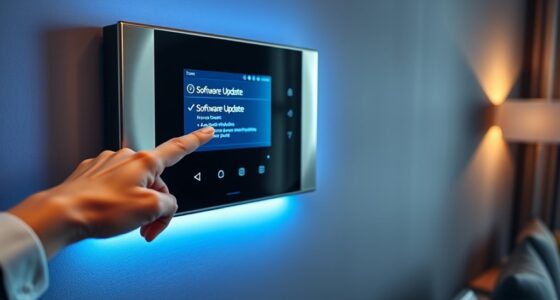
As smart TVs become more popular in households, hackers are increasingly targeting them with malware. These malicious programs can compromise your privacy, turning your entertainment device into a tool for spying. You might not even realize your TV is infected until you notice unusual behavior, such as pop-up ads, sluggish performance, or unauthorized access to your personal information. One of the main reasons smart TVs are vulnerable is that many users neglect to keep their firmware updated. Firmware updates are essential because they patch security flaws and fix vulnerabilities hackers often exploit. When manufacturers release updates, they close security gaps that malware could otherwise use to infiltrate your device. However, many users ignore these updates or delay installing them, leaving their TVs exposed to potential threats. Regularly updating your device can also improve overall performance and add new features, making it a crucial step in smart TV maintenance. Privacy concerns are at the heart of malware targeting smart TVs. These devices are constantly connected to the internet and often have cameras and microphones, making them ideal targets for espionage. Malware can enable hackers to listen in on conversations or watch your activities without your knowledge. Once infected, your device could send sensitive data back to cybercriminals, putting your personal and financial information at risk. To protect yourself, you should prioritize making firmware updates a regular part of your smart TV maintenance routine. Setting your TV to automatically update, if that feature is available, guarantees you’re always running the latest security patches. If automatic updates aren’t an option, check for updates manually every few weeks.
Neglecting firmware updates leaves your smart TV vulnerable to malware and security threats.
Beyond updating firmware, you need to be cautious about the apps you install and the websites you visit. Hackers often distribute malware through seemingly legitimate apps or malicious links. Always download apps from official app stores and verify their permissions before installation. Additionally, disable unnecessary features like voice recognition or camera access if you don’t use them, reducing potential entry points for malware. Using a strong Wi-Fi password and enabling network security protocols can also prevent unauthorized access to your home network, further safeguarding your smart TV. Being aware of cybersecurity vulnerabilities and how to mitigate them can significantly reduce your risk of infection. If you suspect your smart TV has malware, performing a factory reset is often the most effective way to remove it. This process wipes all settings, apps, and data, returning your device to its original state. Remember, after a reset, you should immediately update the firmware and review your app permissions to restore security. Regularly monitoring your device’s behavior and staying vigilant about firmware updates will help you stay one step ahead of hidden malware lurking in your smart TV. By taking these precautions, you can enjoy your smart TV without constantly worrying about privacy breaches or cyber threats.
As an affiliate, we earn on qualifying purchases.
Frequently Asked Questions
Can Smart TVS Be Permanently Infected With Malware?
Yes, your smart TV can be permanently infected with malware through firmware vulnerabilities and remote access exploits. These weaknesses can allow malicious software to embed deeply into the device’s system, making removal difficult. To protect yourself, regularly update your firmware, disable unnecessary remote access, and perform factory resets if you suspect infection. Staying vigilant helps prevent long-term malware issues on your smart TV.
Are There Specific Brands More Vulnerable to This Malware?
Certain brands are more vulnerable due to brand vulnerabilities and device-specific risks. For example, some smart TV brands with infrequent firmware updates or weaker security measures face higher malware risks. You should regularly check for updates, avoid downloading untrusted apps, and disable features like remote access when not needed. Staying vigilant about brand vulnerabilities helps protect your device from targeted malware attacks.
How Often Should I Update My Smart Tv’s Firmware?
You should update your smart TV’s firmware as soon as new updates and security patches become available. Regular updates help protect against malware and vulnerabilities, so don’t delay. Even if it feels inconvenient, keeping your firmware current ensures your device stays secure and performs at its best. Most manufacturers recommend checking for updates monthly or enabling automatic updates, so you’re always safeguarded against emerging threats.
Is It Safe to Use Third-Party Apps on Smart TVS?
Using third-party apps on your smart TV can be risky if you don’t prioritize app security. These apps may not go through the same vetting process as official ones, increasing the chance of malware or vulnerabilities. Always research the app, read reviews, and download from trusted sources. Keep your firmware updated, and consider installing security software if available, to protect your device and personal data.
Can Malware on a Smart TV Steal Personal Information?
Yes, malware on your smart TV can steal your personal information, exposing data privacy and hacking vulnerabilities. When malicious software infiltrates your device, it can access login details, credit card info, or viewing habits. To protect yourself, stay vigilant with app sources, keep firmware updated, and avoid suspicious downloads. Regularly monitor your device’s activity, because a compromised smart TV can quietly compromise your privacy and open doors to cyber threats.
smart TV malware removal software
As an affiliate, we earn on qualifying purchases.
As an affiliate, we earn on qualifying purchases.
Conclusion
Smart TVs are more vulnerable than you might think, with recent reports indicating that over 30% of smart device users have experienced some form of malware attack. Staying vigilant is essential; regularly update your firmware, avoid suspicious apps, and perform security checks. By taking these simple steps, you can protect your device and personal information. Don’t let hidden malware disrupt your viewing experience—stay informed and proactive to keep your smart TV secure.
As an affiliate, we earn on qualifying purchases.
smart TV privacy protection accessories
As an affiliate, we earn on qualifying purchases.
As an affiliate, we earn on qualifying purchases.
Fall yard work Picks
leaf blowers
As an affiliate, we earn on qualifying purchases.