To build a segmented home network for ultimate device isolation, start by creating separate Wi-Fi networks or VLANs for different device groups like IoT devices, smartphones, computers, and guest access. Use your router’s capabilities to assign each device to its zone, applying specific security settings and restrictions. Limit IoT internet access and restrict device-to-device communication within segments. Continuing with these methods will help you enhance security and performance even further.
Key Takeaways
- Use multiple Wi-Fi networks or VLANs to create isolated segments for different device groups.
- Assign separate security protocols and access controls tailored to each network segment.
- Isolate IoT devices by limiting internet access and preventing device-to-device communication.
- Implement content filtering and parental controls for children’s devices within dedicated zones.
- Monitor network traffic regularly to detect and respond to potential security threats or breaches.

A segmented home network divides your devices into separate sections to improve security and performance. This setup helps prevent a single compromised device from jeopardizing your entire home system. When you segment your network, you create distinct zones—such as one for your computers and smartphones, another for IoT devices, and a separate one for guests. This approach is especially vital for IoT device security, as many smart gadgets lack robust protection and can serve as entry points for cyber threats. By isolating these devices, you reduce the risk of malware spreading from a compromised smart thermostat or security camera to your main devices, safeguarding your sensitive data.
Implementing a segmented network also enhances your ability to manage parental control strategies effectively. When you separate devices used by children from the rest of your network, you can enforce specific restrictions without impacting your overall internet experience. For instance, placing kids’ tablets and gaming consoles on a dedicated guest or children’s network allows you to set time limits, filter content, and block inappropriate websites more easily. This setup gives you peace of mind, knowing that your children are browsing within safe boundaries without interfering with your work or personal devices.
Creating these segments typically involves setting up multiple Wi-Fi networks or VLANs (Virtual Local Area Networks). Many modern routers support guest networks, which are straightforward to configure. You can assign each network to a specific device group, applying different security protocols and access controls accordingly. For example, your main network can have the highest security standards, while the IoT network might have limited access to the internet and no access to other devices. You might also consider using separate Wi-Fi bands, such as 2.4 GHz for IoT devices and 5 GHz for your high-bandwidth activities, to further isolate traffic and optimize performance. Additionally, understanding the AI bifurcation in technology can help you anticipate future challenges in managing increasingly intelligent devices within your network.
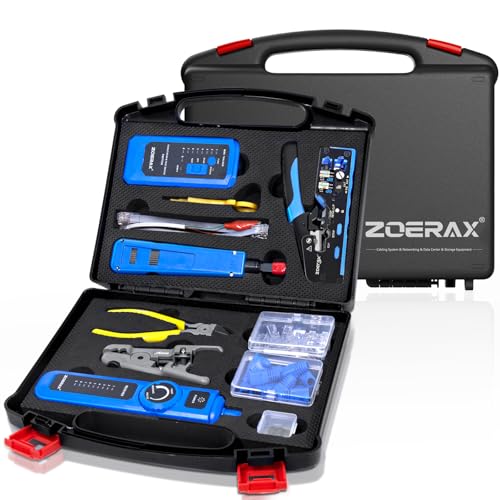
Professional Network Tool Kit, ZOERAX 14 in 1 – RJ45 Crimp Tool, Cat6 Pass Through Connectors and Boots, Cable Tester, Wire Stripper, Ethernet Punch Down Tool
- All-in-One Professional Kit: Sturdy case for easy transport and storage
- Complete Tool Set: Includes crimper, punch down, stripper, and connectors
- Versatile Ethernet Crimper: Adjustable, tool-free multi-function crimping tool
As an affiliate, we earn on qualifying purchases.
As an affiliate, we earn on qualifying purchases.
Frequently Asked Questions
How Do I Prioritize Bandwidth Across Different Network Segments?
To prioritize bandwidth across your network segments, you should configure bandwidth allocation settings on your router. Use traffic shaping to assign higher priority to essential devices or activities, like work or streaming, while limiting less critical traffic. By adjusting Quality of Service (QoS) rules, you guarantee important data gets through faster, optimizing your network performance and maintaining smooth operation for your most crucial devices.
What Security Measures Are Most Effective for Each Segment?
You should implement strong access control by setting strict permissions for each segment, ensuring only authorized devices access sensitive areas. Enforce device encryption to protect data on all devices within each segment. Regularly update firmware and security patches, and use firewalls to monitor traffic. Combining device encryption with precise access control creates a layered security approach, effectively safeguarding each segment from unauthorized access and potential threats.
Can I Add New Devices Without Disrupting the Network?
Adding devices to your segmented network is a breeze—think of it as “plug and play.” You can seamlessly expand without disrupting existing segments or security. Just make certain you assign new devices to the correct segment, update your network settings if needed, and verify connections. With proper planning, you won’t miss a beat, and your network stays secure and efficient while you grow your smart home.
How Do I Monitor Traffic and Activity in Each Segment?
You can monitor traffic and activity in each segment by setting up intrusion detection systems (IDS) and performing traffic analysis. Use network monitoring tools like Wireshark or PRTG to analyze data flows, identify unusual activity, and track bandwidth usage. Regularly review logs and alerts from your IDS to catch potential security threats early. This proactive approach helps you maintain visibility and control over each network segment, ensuring your devices stay secure.
What Are the Common Pitfalls in Segmenting a Home Network?
Think of segmenting your home network as creating safe islands in a vast digital ocean. Common pitfalls include neglecting a separate guest network, which can let visitors access your main devices, or forgetting to isolate IoT devices that often lack robust security. You might also overlook proper routing or firewall rules, allowing unwanted cross-traffic. Avoid these traps to keep your network secure, organized, and truly segmented.

TP-Link AC1900 Smart WiFi Router (Archer A8) -High Speed MU-MIMO Wireless Router, Dual Band Router for Wireless Internet, Gigabit, Supports Guest WiFi
- Wireless Speed: Up to 600 Mbps on 2.4GHz, 1300 Mbps on 5GHz
- Dual Band WiFi: Supports 2.4GHz and 5GHz bands
- OneMesh Compatibility: Seamless WiFi with TP-Link Extenders
As an affiliate, we earn on qualifying purchases.
As an affiliate, we earn on qualifying purchases.
Conclusion
By building a segmented home network, you’re stepping into the role of a digital guardian, much like a castle’s moat protecting its treasures. Just as ancient defenses kept invaders at bay, your network segmentation shields your devices from threats. Take control now, and transform your home into a fortress of security. Remember, in the digital age, a well-guarded network is your strongest line of defense—be the hero of your own cybersecurity story.

The Small Business Network Shield: How to Secure Your Office Wi-Fi, Smart Devices, and Employee Phones Without an IT Degree
As an affiliate, we earn on qualifying purchases.
As an affiliate, we earn on qualifying purchases.

TRENDnet 28-Port Layer 2 Managed SFP Switch with 10G SFP+ Ports, TL2-F70284, 24 x Gigabit, 4 x 10G Ports, Web Based Management, 128Gbps Switching Capacity, Lifetime Protection, Black
- Device Interface: 24 Gigabit SFP and 4 10G SFP+ ports
- Console Port: RJ-45 out-of-band management port
- LED Indicators: Status indicators for ports and system
As an affiliate, we earn on qualifying purchases.
As an affiliate, we earn on qualifying purchases.