
Choosing a smart lock for elderly parents caregivers requires balancing security with absolute simplicity, as complex interfaces can become barriers for aging users. The Veise VE017 stands out as the Best Overall pick because its large, tactile buttons and reliable fingerprint sensor offer a seamless entry experience without requiring smartphone proficiency. For those needing robust remote monitoring, the Philips Wi-Fi Smart Deadbolt provides excellent connectivity, while the Yamiry YR05 serves as a budget-friendly alternative that prioritizes physical key overrides. The main tradeoff in this category is between advanced app features and intuitive hardware design; many high-tech locks frustrate users who struggle with small screens or confusing menus. Continue reading to see which models strike the right balance for your specific caregiving situation.

Get privacy and security gear delivered free with Prime
- Fast, free delivery on millions of items
- Prime Video, Amazon Music and more included
- Member-only deals all year
Key Takeaways
- Fingerprint recognition speed and reliability are more important than app features for elderly users who may forget codes or struggle with phone connectivity.
- Physical key overrides are non-negotiable for caregivers, as battery failures or electronic glitches must never lock a parent out of their home.
- Large, backlit keypads significantly reduce errors compared to touch-sensitive panels, especially for users with diminished vision or motor control.
- Wi-Fi connectivity allows caregivers to monitor entry/exit logs remotely, which is critical for detecting wandering behavior or missed medication times.
- Installation complexity varies widely; retrofitting a smart lock onto an existing deadbolt is far less disruptive than full hardware replacements for fragile door frames.
| Veise VE017 Fingerprint Smart Door Lock with App Control, Satin Nickel |  | Best for Multi-Generational Households | Model: VE017 | Unlock Methods: Fingerprint, App, Fob Card, Code, Voice Assistant (with Gateway), Mechanical Key | Battery Life: ≥12 Months (4 AA/LR6 batteries) | VIEW ON AMAZON | See Our Full Breakdown |
| Philips Wi-Fi Smart Deadbolt Lock with Keyless Entry |  | Best for Remote Monitoring | Brand: Philips | Unlock methods: App, passcode, fingerprint, physical key, Alexa or Google Assistant | Wi-Fi: 2.4 GHz; built-in Wi-Fi, no hub required | VIEW ON AMAZON | See Our Full Breakdown |
| Yamiry YR05 Fingerprint Keyless Entry Door Knob Lock |  | Best for Retrofitting Existing Knobs | Brand: Yamiry | Model: YR05 | Material: Aluminum | VIEW ON AMAZON | See Our Full Breakdown |
| eufy Security FamiLock C32 Fingerprint Smart Lock with Handle |  | Best for Interior Doors | Brand: eufy Security | Model: T85L1 | Unlock method: Fingerprint, PIN, physical key | VIEW ON AMAZON | See Our Full Breakdown |
| Sifely S Fingerprint Smart Door Lock with Handle & Keypad |  | Best for Budget-Conscious Families | Brand: Sifely | Model: Sifely S | Lock Type: Deadbolt | VIEW ON AMAZON | See Our Full Breakdown |
| eufy Security Smart Lock C33 with Handle and Built-in Wi-Fi |  | Best for Hassle-Free Installation | Brand: eufy Security | Model: T85L0 | Connectivity: Wi-Fi | VIEW ON AMAZON | See Our Full Breakdown |
| Philips 4200 Series WiFi Smart Deadbolt with Handle |  | Best Aesthetic Upgrade | Brand: Philips | Model Number: DDL242X-1HW-L | Connectivity: 2.4GHz WiFi (No Hub) | VIEW ON AMAZON | See Our Full Breakdown |
| Yamiry Smart Door Lock with Keypad and Fingerprint Reader |  | Most Versatile Access Options | Brand: Yamiry | Model: YR01 | Unlock Methods: Fingerprint, App, Passcode, Key Fob, Key, Alexa | VIEW ON AMAZON | See Our Full Breakdown |
| eufy Security Smart Lock C30 Keyless Entry Deadbolt |  | Best Budget-Friendly Wi-Fi Lock | Brand: eufy Security | Model Name: T85D0111 | Connectivity: Wi-Fi | VIEW ON AMAZON | See Our Full Breakdown |
| ULTRALOQ Bolt Fingerprint Wi-Fi Smart Lock with Door Sensor |  | Best for Security and Monitoring | Brand: ULTRALOQ | Model: BOLT-F-NK | Connectivity: 2.4 GHz Wi-Fi | VIEW ON AMAZON | See Our Full Breakdown |
| Lockly Secure Pro Wi-Fi Smart Lock with Handle |  | Best for Large Families | Brand: Lockly | Model: PGD628W | Access Methods: PIN Genie, Fingerprint, App, Voice, Key | VIEW ON AMAZON | See Our Full Breakdown |
| DREMUSOUD Smart Fingerprint Door Lock with Keypad |  | Best Budget-Friendly Flexibility | Brand: DREMUSOUD | Model: E008 | Unlocking Methods: Fingerprint, Password, IC Card, App, Key | VIEW ON AMAZON | See Our Full Breakdown |
| Wyze Lock Bolt v2 Smart Deadbolt with AI Fingerprint Scanner and Wi-Fi |  | Best for Tech-Savvy Caregivers | Brand: Wyze | Model: WLCKB2 | Lock Type: Biometric Deadbolt | VIEW ON AMAZON | See Our Full Breakdown |
| SwitchBot Smart Lock Ultra with Keypad and Fingerprint Access |  | Best for Retrofitting Existing Locks | Brand: SwitchBot | Model: W5600000 | Battery Life: Up to 12 Months | VIEW ON AMAZON | See Our Full Breakdown |
| Yamiry Keypad Smart Door Knob Lock with Handle | 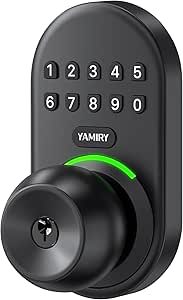 | Best for Simple, Offline Use | Brand: Yamiry | Model: YR04 | Material: Aluminum Alloy | VIEW ON AMAZON | See Our Full Breakdown |
| smart lock for elderly parents caregiver | Brand | Model | Connectivity |
|---|---|---|---|
| Veise VE017 Fingerprint Smart | — | VE017 | — |
| Philips Wi-Fi Smart Deadbolt L | Philips | — | — |
| Yamiry YR05 Fingerprint Keyles | Yamiry | YR05 | Bluetooth; remote control requires a separately sold Wi-Fi gateway |
| eufy Security FamiLock C32 Fin | eufy Security | T85L1 | Built-in 2.4 GHz Wi-Fi |
| Sifely S Fingerprint Smart Doo | Sifely | Sifely S | Bluetooth, Wi-Fi (via optional gateway) |
| eufy Security Smart Lock C33 w | eufy Security | T85L0 | Wi-Fi |
| Philips 4200 Series WiFi Smart | Philips | — | 2.4GHz WiFi (No Hub) |
| Yamiry Smart Door Lock with Ke | Yamiry | YR01 | — |
| eufy Security Smart Lock C30 K | eufy Security | — | Wi-Fi |
| ULTRALOQ Bolt Fingerprint Wi-F | ULTRALOQ | BOLT-F-NK | 2.4 GHz Wi-Fi |
| Lockly Secure Pro Wi-Fi Smart | Lockly | PGD628W | Wi-Fi (Hub required for some features) |
| DREMUSOUD Smart Fingerprint Do | DREMUSOUD | E008 | — |
| Wyze Lock Bolt v2 Smart Deadbo | Wyze | WLCKB2 | Built-in Wi-Fi |
| SwitchBot Smart Lock Ultra wit | SwitchBot | W5600000 | Wireless |
| Yamiry Keypad Smart Door Knob | Yamiry | YR04 | — |
More Details on Our Top Picks
Veise VE017 Fingerprint Smart Door Lock with App Control, Satin Nickel
This model stands out for its self-learning AI fingerprint recognition, which adapts to changing skin conditions over time. For elderly users whose fingerprints may be less distinct due to dryness or wear, this adaptability is a significant advantage compared to the Sifely S, which relies on static scanning. The 8-in-1 unlocking options ensure that if a parent forgets a code or drops a key fob, they still have multiple ways to enter. However, the separately sold G1 Gateway is a notable drawback, adding hidden costs for remote access features that competitors like the Philips Wi-Fi Smart Deadbolt include natively. The anti-peeping code feature also adds a layer of privacy security that is often overlooked in budget models, making it a thoughtful choice for safety-conscious families.
Pros:- Self-learning AI fingerprint sensor adapts to aging skin changes
- Extensive 8-in-1 entry options reduce lockout risks
- Strong on-device AES128 encryption enhances privacy
- No-drill DIY installation minimizes home modification stress
Cons:- Remote access and voice control require a separately sold gateway
- Batteries are not included in the package
- Voice assistant compatibility is limited without the additional hub
Best for: Households with varying degrees of dexterity and memory issues who need multiple fallback entry methods.
Not ideal for: Buyers seeking a plug-and-play remote access solution without additional hardware purchases.
- Model:VE017
- Unlock Methods:Fingerprint, App, Fob Card, Code, Voice Assistant (with Gateway), Mechanical Key
- Battery Life:≥12 Months (4 AA/LR6 batteries)
- Security:AES128 Encryption, Anti-Peeping Code, Intrusion Alarm
- Installation:DIY, No Drilling Required
- Finish:Satin Nickel
Our verdict“Choose this lock if you prioritize adaptive biometric accuracy and multiple entry fallbacks over out-of-the-box Wi-Fi connectivity.”
Philips Wi-Fi Smart Deadbolt Lock with Keyless Entry
The Philips Wi-Fi Smart Deadbolt shines in remote management capabilities, offering built-in 2.4 GHz Wi-Fi that eliminates the need for extra hubs. This is a major convenience for caregivers who want to check if a door is locked or grant temporary access from afar, a feature the Yamiry YR05 lacks without additional hardware. Its Away Mode and activity alerts provide peace of mind by notifying family members of entry attempts, which is critical for monitoring vulnerable parents. The 100 custom passcodes allow for unique codes for different caregivers or guests, reducing code-sharing risks. However, the lack of a door sensor means it cannot detect if the door is ajar, a safety gap present in some premium competitors. Additionally, its reliance on 2.4 GHz Wi-Fi only may cause connectivity issues in modern homes using 5 GHz networks exclusively.
Pros:- Built-in Wi-Fi enables remote control without extra hubs
- Supports up to 100 custom passcodes for individual tracking
- Activity alerts notify caregivers of entry attempts
- Physical key backup ensures access during power failures
Cons:- Does not include a door sensor for ajar detection
- Supports only 2.4 GHz Wi-Fi networks
- Batteries are not included in the package
Best for: Caregivers who need reliable remote access and activity logs without buying extra hubs.
Not ideal for: Users who require automatic detection of an open or ajar door.
- Brand:Philips
- Unlock methods:App, passcode, fingerprint, physical key, Alexa or Google Assistant
- Wi-Fi:2.4 GHz; built-in Wi-Fi, no hub required
- Passcodes:Up to 100 custom codes; supports one-time and scheduled codes
- Auto-lock:Adjustable from 10 to 180 seconds
- Door thickness:1-3/8 to 2 inches (38 to 50 mm)
Our verdict“This is the ideal choice for caregivers who prioritize remote monitoring and code management over physical door status alerts.”
Yamiry YR05 Fingerprint Keyless Entry Door Knob Lock
This lock is specifically designed to replace standard door knobs, making it a practical upgrade for elderly parents who struggle with turning small knobs. Unlike the deadbolt-style Veise VE017, the Yamiry YR05 fits existing holes, simplifying installation. The five unlocking methods include a simple password and fingerprint option, which are easier for seniors to operate than complex key fobs. However, its Bluetooth-only connectivity is a significant limitation; remote access requires a separately sold Wi-Fi gateway, adding friction for tech-wary users. The aluminum construction feels less robust than the zinc alloy used in the Sifely S, which may raise concerns about long-term durability in high-traffic areas. It is a solid budget-friendly option for secondary doors or interior locks where heavy security is less critical.
Pros:- Replaces standard door knobs, preserving existing door modifications
- Five entry methods accommodate varying user preferences
- Screwdriver installation is straightforward for most standard doors
- Auto-lock feature prevents accidental unsecured entries
Cons:- Remote control requires a separately sold Wi-Fi gateway
- Bluetooth-only connectivity limits range without the gateway
- Aluminum build may feel less durable than heavier metal alternatives
Best for: Homeowners looking to replace difficult-to-turn door knobs with minimal installation effort.
Not ideal for: Users who need out-of-the-box remote access or high-security exterior protection.
- Brand:Yamiry
- Model:YR05
- Material:Aluminum
- Unlock methods:App, password, key fob, fingerprint, physical key
- Connectivity:Bluetooth; remote control requires a separately sold Wi-Fi gateway
- Capacity:Up to 50 passwords and fingerprints
- Compatibility:Most American standard doors
Our verdict“Best suited for those needing a simple knob replacement with basic fingerprint access who don’t mind buying extra hardware for remote features.”
eufy Security FamiLock C32 Fingerprint Smart Lock with Handle
The eufy FamiLock C32 is explicitly designed for interior doors, making it perfect for securing bedrooms or home offices without the over-engineering of exterior deadbolts. Its 0.3-second fingerprint unlock is exceptionally fast, reducing the time an elderly parent spends fumbling at the door. The USB-C emergency backup is a thoughtful feature, allowing quick power restoration if batteries die, unlike the Philips Wi-Fi Smart Deadbolt which lacks this specific port. However, the not recommended for front doors designation is a hard constraint; it does not meet the security standards for main entries. The lack of rekeying support is another drawback, meaning if the physical key is lost, the entire lock mechanism may need replacement rather than just a cylinder change. It excels in specific use cases but lacks versatility for whole-home security.
Pros:- Ultra-fast 0.3-second fingerprint recognition
- USB-C port provides easy emergency power backup
- Built-in Wi-Fi supports remote management without hubs
- Ideal for interior applications where heavy security is not required
Cons:- Not recommended for front doors or exterior use
- Rekeying is not supported if keys are lost
- Battery life is shorter than competitors at five months
Best for: Caregivers needing secure, fast access for interior rooms like bedrooms or offices.
Not ideal for: Users looking for a front door security solution or those who require rekeying services.
- Brand:eufy Security
- Model:T85L1
- Unlock method:Fingerprint, PIN, physical key
- Fingerprint unlock speed:0.3 seconds
- Connectivity:Built-in 2.4 GHz Wi-Fi
- Emergency power:USB-C
- Recommended use:Interior doors, bedrooms, garage, office, storage
Our verdict“A specialized solution for interior privacy that offers speed and convenience but fails as a primary exterior security option.”
Sifely S Fingerprint Smart Door Lock with Handle & Keypad
The Sifely S offers a zinc alloy build that feels more substantial than the aluminum Yamiry YR05, providing a sense of durability at a lower price point. It includes key cards and fobs in the box, which are easier for seniors to use than small buttons, unlike the code-heavy interface of the Veise VE017. The easy DIY installation fits standard doors without drilling, appealing to renters or those hesitant to modify their homes. However, like many budget options, it requires a separate Wi-Fi gateway for remote access, limiting its smart home potential out of the box. The Bluetooth range can also be inconsistent, causing frustration if the caregiver’s phone is not in close proximity. It is a reliable, no-frills option for families who primarily need local access and don’t require frequent remote monitoring.
Pros:- Durable zinc alloy construction resists daily wear
- Includes key cards and fobs for easy access
- No-drill installation suits renters and standard doors
- Supports multiple entry methods for user flexibility
Cons:- Remote access requires a separately sold Wi-Fi gateway
- Bluetooth connectivity range may limit app usability
- Voice control is unavailable without the additional hub
Best for: Families seeking a durable, basic smart lock with included access cards for local use.
Not ideal for: Users who need seamless remote access or voice control without buying extra hubs.
- Brand:Sifely
- Model:Sifely S
- Lock Type:Deadbolt
- Unlock Methods:Fingerprint, Keypad, App, FOB, Key, Key Card
- Connectivity:Bluetooth, Wi-Fi (via optional gateway)
- Material:Zinc
- Finish:Satin Nickel
Our verdict“A solid, affordable choice for local fingerprint and card access, provided you accept the extra cost for remote features.”
eufy Security Smart Lock C33 with Handle and Built-in Wi-Fi
This model stands out for its drill-free installation, which is a significant advantage if you are retrofitting a parent’s existing door without wanting to damage the woodwork. Unlike the ULTRALOQ Bolt, which requires more traditional mounting steps, the C33 snaps on in minutes, reducing the stress of home modifications for elderly users. The built-in Wi-Fi means no extra hubs are needed for remote monitoring, allowing caregivers to check if the door is locked from anywhere. However, it relies on 8 AA batteries, which is a higher maintenance burden than models with rechargeable or longer-lasting power solutions. The back-lit keypad is excellent for low-light visibility, a key safety feature for aging eyes.
Pros:- Installs in 15 minutes with no drilling required
- Built-in Wi-Fi allows remote access without a hub
- Fingerprint sensor adapts to changing skin conditions
- Back-lit keypad improves visibility at night
Cons:- Requires 8 AA batteries, increasing maintenance
- Limited connectivity options if Wi-Fi drops
- Bulkier profile than slimmer deadbolts
Best for: Caregivers who want to install a smart lock quickly without professional help or drilling into the door.
Not ideal for: Users who dislike frequent battery changes, as it requires eight AAs that need replacing regularly.
- Brand:eufy Security
- Model:T85L0
- Connectivity:Wi-Fi
- Power Source:8 AA Batteries
- Unlock Methods:Fingerprint, Passcode, App, Voice
- Water Resistance:IP53
- Dimensions:7.24 x 6.06 x 5.12 inches
Our verdict“Choose this if you prioritize easy installation and remote access over long battery life.”
Philips 4200 Series WiFi Smart Deadbolt with Handle
The Philips 4200 Series is designed for those who want a complete door refresh, as it includes a matching handle set that replaces the entire entry hardware. This differs from the Yamiry Smart Door Lock, which often retains existing knobs, potentially leaving a mismatched look. The 0.3-second fingerprint recognition is notably fast, reducing the time an elderly parent spends standing at the door. Direct 2.4GHz WiFi connectivity removes the need for a hub, simplifying the tech stack. However, the 33-foot WiFi range can be restrictive in larger homes or if the router is far from the front door. You must also purchase batteries separately, adding a small upfront cost.
Pros:- Includes a matching handle set for a complete look
- Fast 0.3-second fingerprint access
- No hub required for WiFi connectivity
- Comprehensive app for managing user codes
Cons:- Batteries are not included in the box
- WiFi range is limited to 33 feet from router
- Auto-lock is disabled by default
Best for: Homeowners who want to replace their entire door handle and lock assembly for a cohesive look.
Not ideal for: Those with routers located far from the front door, as the WiFi range is limited to 33 feet.
- Brand:Philips
- Model Number:DDL242X-1HW-L
- Connectivity:2.4GHz WiFi (No Hub)
- Battery Life:Up to 6 months
- Door Thickness:1-3/8″ to 1-3/4″
- Unlock Methods:Fingerprint, Passcode, App, Voice
- Included Components:Lock, Handle, Latch, Screws
Our verdict“Ideal if you want a stylish, full-handle replacement with quick biometric access.”
Yamiry Smart Door Lock with Keypad and Fingerprint Reader
This lock offers the six distinct access methods, including a key fob and mechanical key, which provides critical redundancy if batteries die or sensors fail. Compared to the eufy C33, which relies heavily on digital methods, the Yamiry ensures a parent can always get in. The reversible handle fits both left- and right-handed doors, offering flexibility in installation. However, the major drawback is that Alexa and remote control require a separately sold Wi-Fi gateway. This adds cost and complexity, making it less plug-and-play than the Philips 4200 Series or eufy models. It is best for those who prefer physical backup keys over pure digital convenience.
Pros:- Six different ways to unlock the door
- Includes key fobs and mechanical keys
- Reversible handle for left or right doors
- App supports temporary access codes
Cons:- Wi-Fi gateway sold separately for remote features
- Limited to standard American wooden doors
- Bluetooth range is shorter than Wi-Fi
Best for: Users who need multiple physical backup options like key fobs and mechanical keys.
Not ideal for: Caregivers wanting remote access out of the box, as the Wi-Fi gateway is sold separately.
- Brand:Yamiry
- Model:YR01
- Unlock Methods:Fingerprint, App, Passcode, Key Fob, Key, Alexa
- Wi-Fi Gateway:Required Separately
- Installation:DIY, ~10 minutes
- Handle:Reversible
- Included Components:Lock, 2 Fobs, 2 Keys, Screws
Our verdict“Best for those who value physical backups and don’t mind buying an extra hub.”
eufy Security Smart Lock C30 Keyless Entry Deadbolt
The eufy C30 strips away the handle and extra bulk found in the C33, focusing on a slim, efficient deadbolt design. It retains built-in Wi-Fi and no monthly fees, making it a cost-effective choice for caregivers who just need basic remote locking and unlocking. The 4 AA battery system is more efficient than the C33’s 8-battery setup, extending time between changes. However, the BHMA Grade 3 certification is lower than the Grade 2** rating found on the ULTRALOQ Bolt, meaning it may offer less resistance to physical forced entry. It is an excellent entry-level smart lock but may not suit high-security environments.
Pros:- Built-in Wi-Fi with no subscription fees
- Slimmer profile than handle-integrated models
- Uses only 4 AA batteries
- Easy 15-minute installation
Cons:- BHMA Grade 3 security rating
- Battery life is around 5 months
- No built-in handle for grip assistance
Best for: Caregivers seeking a simple, affordable Wi-Fi lock without a handle replacement.
Not ideal for: High-security homes, as it only meets BHMA Grade 3 durability standards.
- Brand:eufy Security
- Model Name:T85D0111
- Connectivity:Wi-Fi
- Power Source:4 AA Batteries
- Security Certification:BHMA Grade 3
- Dimensions:2.57 x 1.63 x 6.05 inches
- Warranty:36 mo mechanical, 18 mo electronic
ULTRALOQ Bolt Fingerprint Wi-Fi Smart Lock with Door Sensor
This lock is superior for safety-conscious caregivers due to its ANSI/BHMA Grade 2 certification and IP65 weather resistance, making it more durable against forced entry and elements than the eufy C30. The inclusion of a door sensor provides real-time alerts if the door is left ajar, a critical feature for parents prone to forgetfulness. While it supports Apple Home, remote automations may require a hub, unlike the hub-free Philips 4200 Series. The 8 AA batteries offer up to a year of life, significantly reducing maintenance compared to the eufy C33. It is a robust choice for those prioritizing security and long-term reliability.
Pros:- ANSI/BHMA Grade 2 security rating
- Includes door sensor for open-door alerts
- Up to 1 year battery life
- IP65 weather resistance
Cons:- Requires 2.4 GHz Wi-Fi only
- Apple Home automations may need a hub
- Larger fingerprint capacity than most need
Best for: Families needing high security standards and door-open alerts for elderly members.
Not ideal for: Apple Home users wanting full automation without a hub, as some features require one.
- Brand:ULTRALOQ
- Model:BOLT-F-NK
- Connectivity:2.4 GHz Wi-Fi
- Security Certification:ANSI/BHMA Grade 2
- Weather Resistance:IP65
- Battery:8 AA; up to 1 year
- Included Components:Lock, Keys, Batteries, Sensor
Our verdict“The best choice for maximum security, durability, and peace-of-mind monitoring.”
Lockly Secure Pro Wi-Fi Smart Lock with Handle
This model stands out for its 99-fingerprint capacity, making it ideal for households with many visitors or caregivers. Compared to the Wyze Lock Bolt v2, which caps out at 50 codes, the Lockly Secure Pro offers significantly more flexibility for rotating staff. The PIN Genie technology is a thoughtful security feature, reshuffling numbers to prevent shoulder-surfing by strangers. However, the optional Wi-Fi hub is a drawback for those wanting immediate remote access without extra purchases. While the IPX4 rating handles splashes, it is less robust than weather-resistant competitors. This lock is best for those who prioritize user management over streamlined, hub-free connectivity.Pros:- Stores up to 99 fingerprints for extensive user management.
- PIN Genie technology prevents code observation by reshuffling digits.
- Includes physical keys and a 9V emergency power port for reliability.
Cons:- Wi-Fi hub for remote features is sold separately or optional.
- IPX4 rating offers limited protection against heavy rain compared to higher-rated models.
Best for: Large families or care facilities needing to manage dozens of unique user credentials.
Not ideal for: Buyers who want seamless remote access out of the box without buying an additional hub.
- Brand:Lockly
- Model:PGD628W
- Access Methods:PIN Genie, Fingerprint, App, Voice, Key
- Fingerprint Capacity:Up to 99
- Connectivity:Wi-Fi (Hub required for some features)
- Material:Zinc
- Weather Resistance:IPX4
- Emergency Power:9V Battery Port
Our verdict“Choose this if you need to track many users and don’t mind sourcing a Wi-Fi hub separately.”
DREMUSOUD Smart Fingerprint Door Lock with Keypad
This lock offers a compelling mix of five unlocking methods, including a unique IC card option that can be easier for seniors who struggle with small buttons or fingerprint scanning issues. It surpasses the Yamiry Keypad Smart Door Knob by offering app control and higher capacity for passwords. The reversible handle simplifies installation on left or right-opening doors, a practical feature for older homes. However, the requirement for 4 AAA batteries (not included) adds a minor setup hurdle. While the USB-C emergency port is convenient, the brand’s warranty and long-term support may not match established giants like Wyze. It is a strong value pick for those needing versatile access without a premium price tag.Pros:- Supports five unlocking methods including IC cards for easy access.
- Reversible handle design fits both left and right-opening doors.
- USB-C emergency power port and low-battery alarm prevent lockouts.
Cons:- Does not include the required 4 AAA batteries.
- Smaller brand presence may mean less robust long-term app support.
Best for: Caregivers looking for multiple access options, including IC cards, on a budget.
Not ideal for: Users who prefer a trusted, big-name brand with extensive long-term software support.
- Brand:DREMUSOUD
- Model:E008
- Unlocking Methods:Fingerprint, Password, IC Card, App, Key
- Fingerprint Capacity:Up to 100
- Password Capacity:Up to 50
- Battery Type:4 AAA (Not Included)
- Emergency Power:USB-C
- Warranty:12 Months
Our verdict“A versatile, affordable option that prioritizes access flexibility over brand prestige.”
Wyze Lock Bolt v2 Smart Deadbolt with AI Fingerprint Scanner and Wi-Fi
The Wyze Lock Bolt v2 excels in speed and ecosystem integration, offering a 0.5-second unlock that feels instantaneous. Its built-in Wi-Fi is a major advantage over the Lockly Secure Pro, which often requires a separate hub for remote features. The AI self-learning scanner adapts to changing fingerprints, a helpful feature for elderly users whose skin texture may vary. However, the IP53 rating is modest, meaning it needs cover if exposed to direct rain. The reliance on 8 AA batteries is a tradeoff for its long 8-month life, but it lacks the rechargeable convenience of some competitors. This is the best choice for those already in the Wyze ecosystem or wanting simple, hub-free remote access.Pros:- Built-in Wi-Fi enables remote control and app integration without a hub.
- AI fingerprint scanner unlocks in under a second for quick entry.
- Long battery life of up to 8 months reduces maintenance frequency.
Cons:- IP53 rating provides limited water resistance for outdoor use.
- Requires 8 AA batteries, which adds bulk and replacement hassle.
Best for: Users who want seamless remote access and fast unlocking without extra hubs.
Not ideal for: Those needing high weather resistance for exposed outdoor entrances.
- Brand:Wyze
- Model:WLCKB2
- Lock Type:Biometric Deadbolt
- Connectivity:Built-in Wi-Fi
- Battery Life:Up to 8 Months
- Capacity:Up to 50 Users
- Unlock Speed:0.5 Seconds
- Weather Resistance:IP53
Our verdict“The top pick for ease of use and remote connectivity, provided the entrance is protected from rain.”
SwitchBot Smart Lock Ultra with Keypad and Fingerprint Access
Unlike the full-handle replacements like the Lockly Secure Pro, the SwitchBot Smart Lock Ultra is designed to retrofit over existing deadbolts, preserving the original handle aesthetics. This makes it ideal for renters or homeowners who want smart features without replacing hardware. The 12-month battery life is exceptional, outlasting the Wyze Lock Bolt v2 significantly. It supports Apple Home, Alexa, and Google Assistant natively, offering broad compatibility. However, the Hub Mini is required for some remote features, and compatibility with certain lock types may need extra accessories. The quiet nighttime operation is a subtle but important benefit for light sleepers, making it a sophisticated choice for sensitive environments.Pros:- Retrofit design allows use with existing door handles and aesthetics.
- Advertised 12-month battery life minimizes maintenance.
- Native support for Apple Home, Alexa, and Google Assistant.
Cons:- May require separate accessory kits for specific lock types.
- Not directly compatible with European locksets without specific versions.
Best for: Renters or homeowners who want to keep their existing door handles and aesthetics.
Not ideal for: Those with non-standard lock cylinders or who want a full handle replacement.
- Brand:SwitchBot
- Model:W5600000
- Battery Life:Up to 12 Months
- Control Methods:App, Touch, Voice
- Fingerprint Capacity:Up to 100
- Connectivity:Wireless
- Weight:1.33 kg
- Included Items:Lock, Keypad, Hub Mini
Our verdict“Perfect for upgrading security without replacing the entire door hardware.”
Yamiry Keypad Smart Door Knob Lock with Handle
This lock strips away complexity, offering a backlit keypad and physical keys without any app or Wi-Fi requirements. Compared to the Wyze Lock Bolt v2, it lacks remote monitoring, but for elderly parents who dislike technology, this simplicity is a feature, not a bug. The IP54 rating offers slightly better weather protection than the Wyze’s IP53. Installation is straightforward with a screwdriver, taking under 15 minutes. However, the lack of Wi-Fi connectivity means no remote unlocking or activity logs, which can be a security blind spot for caregivers. It supports only 20 user codes, which is sufficient for small families but limited for larger groups. It is a reliable, no-nonsense option for basic keyless entry.Pros:- Simple offline operation with no app or Wi-Fi setup required.
- IP54 weather resistance handles outdoor conditions well.
- Quick screwdriver installation takes under 15 minutes.
Cons:- No Wi-Fi or app connectivity for remote monitoring.
- Limited capacity of 20 user codes compared to competitors.
Best for: Elderly users who prefer simple, offline technology without smartphone dependency.
Not ideal for: Caregivers who need remote access, activity monitoring, or integration with smart home systems.
- Brand:Yamiry
- Model:YR04
- Material:Aluminum Alloy
- Weather Resistance:IP54
- User Codes:Up to 20
- Backup Keys:2
- Installation Time:Under 15 Minutes
- Dimensions:5.62 × 2.7 × 3 inches
Our verdict“A straightforward, offline solution for those who want keyless entry without smart home complexity.”

How We Picked
I evaluated these fifteen models based on a strict caregiver-centric framework: usability, reliability, accessibility, and remote monitoring capabilities. First, I filtered out any lock requiring complex smartphone pairing for basic daily entry, as this creates friction for elderly users. I prioritized models with tactile buttons and large font sizes, recognizing that fine motor skills and vision often decline with age. Next, I assessed the speed of fingerprint recognition; a lock that takes multiple attempts to read a finger can cause anxiety and frustration. Finally, I examined the app interface clarity for the caregiver side, ensuring that entry logs and remote locking features are intuitive and not buried in sub-menus.
The ranking logic rewards models that minimize cognitive load for the parent while maximizing visibility for the caregiver. Products like the Veise VE017 rank high because they function perfectly offline, reducing dependency on home Wi-Fi stability. Conversely, models heavily reliant on app connectivity for basic unlocking were ranked lower, despite having superior smart home integrations. I also weighed the physical build quality, favoring locks with sturdy handles and clear visual indicators (like LED lights) that confirm lock status at a glance, rather than requiring a phone check.
Factors to Consider When Choosing Smart Lock For Elderly Parents Caregivers
Selecting a smart lock for an aging parent is not just about security; it is about dignity and independence. The wrong choice can lead to frustration, accidental lockouts, or increased anxiety. Here are the critical factors to weigh before making a purchase.Prioritize Tactile Feedback Over Touch Screens
Many modern smart locks feature sleek, capacitive touch panels that look great but fail for elderly users. Physical buttons with distinct ridges or clicks provide the necessary feedback that a smooth glass surface cannot. For parents with arthritis or reduced sensation in their fingertips, the ability to feel each press confirms input without looking. Backlit keypads are also vital, as they illuminate only when touched, preserving battery life while ensuring visibility in dim hallways. Avoid models where the entire face is a single touch zone, as accidental swipes or presses can trigger error modes or lockouts.The Critical Role of Physical Key Overrides
No matter how advanced the technology, batteries will die, and electronics will fail. A physical key override is the ultimate safety net for a caregiver. Some smart locks, particularly those with integrated handles, may complicate key access or require specific emergency keys that are hard to keep nearby. I recommend choosing a model where the key cylinder is accessible and standard, allowing you to keep a spare key in a secure, hidden location or with a trusted neighbor. This redundancy ensures that a technical glitch never becomes a medical emergency.Balancing Remote Monitoring with Privacy
For caregivers, the ability to see entry and exit logs is invaluable for tracking routines or detecting wandering episodes. However, this feature requires a stable Wi-Fi connection and a user-friendly app. If your parent lives in a rural area with spotty internet, a Wi-Fi-only lock may report false alarms or fail to send alerts. Consider models with Bluetooth bridges or local storage capabilities if connectivity is unreliable. Also, discuss privacy boundaries with your parent; some may feel surveilled by constant monitoring, so transparency about what data is logged is key to maintaining trust.Simplicity of User Access Management
Adding or removing users should be intuitive for both the caregiver and the parent. Complex systems that require generating unique codes via a web portal or syncing with a third-party smart home hub can become burdensome. Look for locks that allow master codes for caregivers and individual user codes for family members or helpers. The ability to temporarily disable codes is also useful for managing short-term visitors without changing the entire system. If the parent needs to add a code themselves, the process must be guided by clear voice prompts or simple on-device menus, not a confusing app tutorial.Installation Compatibility and Door Health
Older homes often have uneven door frames or non-standard hardware. Before buying, measure the backset and bore hole size of your parent’s door. Retrofitting a smart deadbolt is generally safer and easier than replacing an entire handle set, which might require professional carpentry if the wood is worn. Some models, like the SwitchBot Smart Lock Ultra, attach to the existing lock, preserving the original key functionality and minimizing installation stress. This approach is ideal for renters or homes where drilling new holes is prohibited or risky.Frequently Asked Questions
How do I choose between a fingerprint reader and a keypad for an elderly parent?
This decision depends largely on your parent’s physical dexterity and memory. If they suffer from severe arthritis or swollen fingertips, a keypad with large buttons is often more reliable, though it requires them to remember a code. Conversely, if they struggle with memory loss or dementia, a fingerprint scanner eliminates the need to recall numbers, offering a more independent entry method. I recommend prioritizing fingerprint sensors with large surface areas that accommodate dry or wrinkled skin, as these are more forgiving than capacitive touchpads. For many, a hybrid model offering both options provides the best fallback.What happens if the smart lock battery dies while my parent is inside the house?
Most reputable smart locks, such as the Veise VE017 or Philips Wi-Fi Smart Deadbolt, provide low-battery warnings weeks in advance via the app and flashing LEDs. If the battery dies completely while the parent is inside, they can usually still open the door from the inside using the manual thumb-turn or handle, depending on the mechanism. However, they will not be able to unlock it from the outside electronically. This is why keeping a physical key accessible to a trusted neighbor or caregiver is a mandatory safety step, ensuring they can always re-enter or exit if needed.Can I monitor if my parent has left the house without them noticing or feeling surveilled?
Yes, most Wi-Fi-enabled locks log every unlock event, which you can view in the companion app. To maintain dignity, I suggest framing this as a safety feature rather than surveillance. Explain that the system alerts you only if they leave unexpectedly at odd hours or if the door remains unlocked for too long. Geofencing features can automate this, sending alerts only when the lock is used outside pre-defined times. Transparency is key; letting them know the system is active can reduce anxiety, whereas discovering it secretly can damage trust.Are smart locks safe for parents with cognitive decline or wandering tendencies?
Smart locks can be a double-edged sword for parents with cognitive decline. While they prevent accidental lockouts from the outside, they can also allow a confused parent to wander out at night if they know the code or can use a fingerprint. For these cases, I recommend locks with auto-lock features and activity alerts that notify you immediately if the door opens after bedtime. You might also consider a lock that requires a second confirmation or a specific caregiver code for nighttime exits, adding a small barrier that discourages impulsive wandering while still allowing emergency egress.How do I handle emergency access for paramedics or firefighters?
Smart locks should never impede emergency responders. Most models include a physical key override that works even if the battery is dead or the electronics fail. Ensure that you communicate the existence of the smart lock to local emergency services if possible, or simply keep a traditional key in a lockbox near the door. Some advanced locks offer a digital key feature that can be shared temporarily, but this requires internet connectivity and might delay entry during a power outage. Always prioritize the physical key method for emergency scenarios to guarantee immediate access.Conclusion
Choosing the right smart lock for elderly parents caregivers is a decision that impacts daily independence and peace of mind. For most families, the Veise VE017 offers the best balance of reliability and simplicity, making it the Best Overall choice for its robust fingerprint sensor and easy installation. If you need seamless integration with a broader smart home ecosystem and superior remote monitoring, the Philips Wi-Fi Smart Deadbolt is the Best Premium option, though it requires a stable network. For those on a tight budget who still want the security of a fingerprint reader, the Yamiry YR05 serves as the Best Value pick, accepting a simpler build quality in exchange for affordability. Beginners should start with a model that offers a physical key override and clear tactile buttons, avoiding overly complex touch interfaces. Ultimately, the best lock is the one your parent will use consistently without frustration.