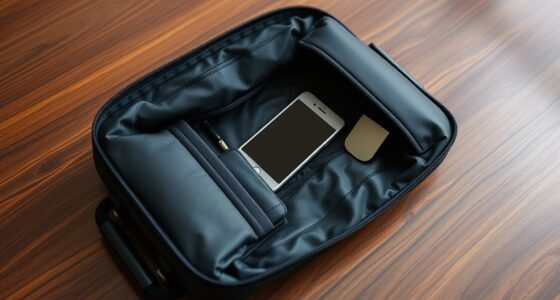
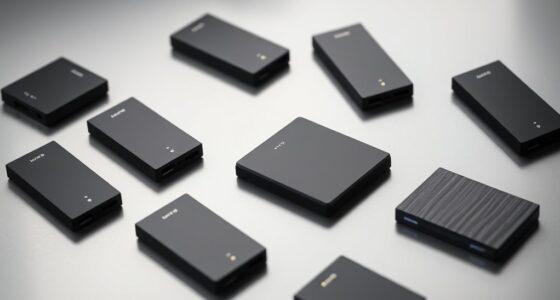
This checklist is for people who want to think through secure device and document storage for home, travel, or work. It covers several kinds of protection, from keeping paper records in a safe to limiting access to portable devices and storage media.

Get privacy and security gear delivered free with Prime
- Fast, free delivery on millions of items
- Prime Video, Amazon Music and more included
- Member-only deals all year
The sections follow the requested storage slots: fireproof document safe, locking USB flash drive, laptop locking cable, RFID blocking card sleeve, Faraday phone pouch, and secure hard drive case. Where a product is named, it is the pick for that slot; the cable and hard drive case sections offer selection advice instead.
Use each section to check the fit for your own documents, devices, and routines. Compare the item’s capacity and physical fit with what you plan to store, and review the compatibility details before choosing. Treat each item as one part of a broader storage plan.
Fireproof Document Safe
A document safe can give important papers a designated storage place at home. The listed pick is the Surtisita 9.0 Cu. Ft. Fireproof Biometric Safe with Keypad. Before choosing a safe, make a list of the documents and other items you want to keep together, then check whether the stated capacity suits that collection. Consider where the safe will sit and whether its exterior dimensions work for that location.
A common buying mistake is choosing by a feature name alone. Think through how you expect to access the safe: the pick names both biometric access and a keypad, so review the product details and decide which access methods suit your routine. Check the available space around the intended location, too, so the door and keypad area are practical to reach. Confirm that the safe’s interior dimensions accommodate the largest items you plan to store, including folders or envelopes, rather than relying only on its overall capacity. Keep the intended contents and access routine at the center of the decision.
What to look for:
- Check interior dimensions against your largest documents.
- Confirm the safe fits the intended location.
- Review how the biometric and keypad access work.
- List the papers and other items you intend to store.
- Check the product’s stated capacity against your collection.
Surtisita 9.0 Cu. Ft. Fireproof Biometric Safe with Keypad
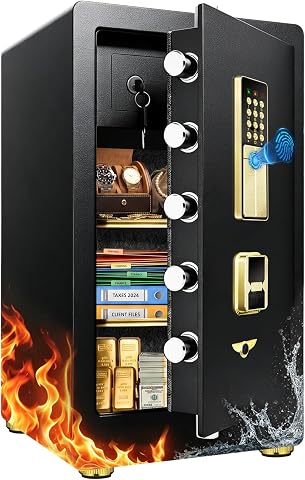
This 80-pound safe has a 9.0 cu. ft.
Pros:
- Offers fingerprint, keypad, and emergency key access.
- Includes two lockboxes and two adjustable shelves.
- Has keypad, fingerprint, and vibration alarms.
- Multi-layer insulated steel construction is rated for heat exposure up to 1700°F for 35 minutes.
Cons:
- At 80 pounds, it may be difficult to move.
- Fingerprint enrollment requires scanning each finger four times.
Best for: People who want one designated place for documents and other valuables.
Not ideal for: Anyone who cannot accommodate the safe’s footprint or capacity.
Bottom line: Check the interior dimensions and access details against your storage plan before choosing this safe.
Locking USB Flash Drive
A locking USB drive is a portable option for files you want to keep on removable storage. The listed pick is the Apricorn Aegis Secure Key 3 NX 32GB Encrypted USB 3.0 Flash Drive. Its name identifies encryption, a 32GB capacity, and USB 3.0, so start by checking whether those stated attributes fit your files and devices. Estimate the space your intended files need and leave room for additions if you expect the collection to grow.
A frequent mistake is assuming that a drive will work smoothly with every device or file workflow. Check the connector and operating-system compatibility in the product details, and consider how you will enter and manage access credentials. Confirm the usable capacity suits your expected files, especially if you plan to carry large media or backups. Also decide whether a single portable drive fits your routine, or whether you need another storage approach for copies of important data. The right choice depends on capacity, device compatibility, and access habits; the product name alone cannot answer those questions for your setup.
What to look for:
- Match the 32GB capacity to the files you plan to carry.
- Check compatibility with your computer and operating system.
- Confirm the USB 3.0 connection suits your device.
- Review how credentials are set and entered.
- Consider whether one drive fits your storage routine.
Apricorn Aegis Secure Key 3 NX 32GB Encrypted USB 3.0 Flash Drive
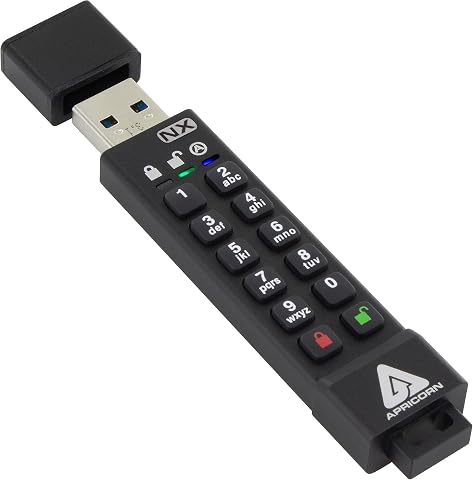
This 32GB USB Type-A flash drive uses 256-bit AES XTS encryption and has FIPS 140-2 Level 3 validation listed as pending in the source. It supports separate administrator and user modes, read-only modes, and data recovery PINs, and is compatible with Windows, iOS, Linux, Android, and Chrome.
Pros:
- 256-bit AES XTS encryption
- Separate administrator and user modes
- Includes two read-only modes and data recovery PINs
- Compatible with several operating systems
Cons:
- FIPS 140-2 Level 3 validation is described as pending
- Write speed unit is not specified in the product information
Best for: People whose files fit the stated capacity and compatible devices.
Not ideal for: Anyone needing more space or a different connection.
Bottom line: Verify device compatibility and file capacity before relying on this drive for portable storage.
Laptop Locking Cable
A laptop locking cable can help keep a computer attached to a fixed point when it is left in a shared or public setting. Since there is no specific pick for this slot, choose by checking your laptop’s security slot or other supported attachment point first. Not every cable fits every device, so confirm the connection type in the laptop documentation and the cable listing before buying.
A common mistake is focusing on cable length or appearance before confirming compatibility. Check that the cable can reach a suitable fixed anchor without putting strain on the laptop or connector. Consider how often you will attach and remove it, and whether the lock mechanism suits your routine. A cable is most useful when the laptop has a compatible attachment point and the place you use it offers a practical anchor; make sure both conditions apply to your setup.
What to look for:
- Identify the laptop’s supported locking or attachment point.
- Match the cable connector to that point.
- Check cable length against the intended anchor location.
- Choose a lock mechanism that fits your daily routine.
- Confirm the anchor point is fixed and reachable.
RFID Blocking Card Sleeve
Card sleeves can keep individual cards together with a layer intended to block RFID signals. The named pick is the 10x RFID Blocking Credit Card Sleeves – DuPont Tyvek, Waterproof & Tea. Check the listing carefully for the full product description and intended use, and confirm that the sleeve dimensions fit the cards you carry. The product name specifies a set of 10, so consider how many cards you want covered and whether that quantity suits your wallet or travel kit.
A common buying mistake is assuming every card or wallet arrangement fits a sleeve the same way. Compare the listed dimensions with your cards, and consider whether you want sleeves for payment cards, identification, or both. Think about how often you take cards out and put them back; a sleeve should be practical to use in your everyday routine. Check the product details for material and care guidance, especially if you expect frequent handling. Focus on card fit and daily access as well as the stated RFID-blocking purpose.
What to look for:
- Check sleeve dimensions against the cards you carry.
- Confirm the set quantity matches your needs.
- Review the material and care details.
- Consider how sleeves fit inside your wallet or travel kit.
- Check the listing’s intended card types and use.
10x RFID Blocking Credit Card Sleeves – DuPont Tyvek, Waterproof & Tearproof

These RFID blocking sleeves protect contactless credit cards, IDs, and badges from digital skimming. Made from durable DuPont Tyvek with an ArmorShield alloy interior, they are slim, waterproof, and long-lasting, fitting standard cards comfortably.
Pros:
- Effective RFID protection against digital skimming
- Slim, lightweight, and fits easily into wallets
- Durable and waterproof material
Cons:
- Only protects RFID-enabled cards, not physical theft
- Limited to standard card sizes, may not fit larger cards
- No additional features like RFID readers or indicators
Best for: People who want sleeves for several cards in a wallet or travel kit.
Not ideal for: Anyone whose cards or wallet cannot accommodate separate sleeves.
Bottom line: Check card dimensions and everyday wallet fit before choosing this sleeve set.
Faraday Phone Pouch
A Faraday pouch is intended to block signals to a device placed inside it. The listed pick is the SLNT Faraday Phone Sleeve – Signal Blocking Pouch (Black, Medium). Before choosing it, check the product’s fit guidance against your phone’s dimensions, including any case you normally keep on it. A pouch that is too tight can be awkward to use, while excess space may make the phone less secure in transit.
A common mistake is treating a size label such as medium as a guarantee of fit. Compare the pouch’s stated dimensions with your exact phone-and-case combination, and check how the opening closes. Consider when you intend to use the pouch and how quickly you need to access the phone afterward. The product name describes signal blocking, but check the listing for operating instructions and any care guidance before use. Device fit and closure are practical essentials for a pouch you expect to carry.
What to look for:
- Compare pouch dimensions with your phone and case.
- Check the closure and opening style.
- Review instructions for placing and removing the phone.
- Confirm the pouch suits how you plan to carry it.
- Check care guidance in the product listing.
SLNT Faraday Phone Sleeve – Signal Blocking Pouch (Black, Medium)
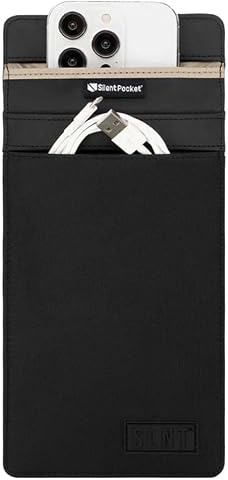
The SLNT Faraday Phone Sleeve features advanced signal-blocking technology to protect devices from cellular, WiFi, Bluetooth, GPS, RFID, NFC, EMF, and satellite signals. Made from durable weatherproof nylon or sleek leather, it offers versatile, discreet protection with dual pockets for organization, suitable for various device sizes.
Pros:
- Effectively blocks multiple signals to protect privacy
- Available in durable weatherproof nylon or sleek leather
- Multiple sizes accommodate various devices
- Compact and lightweight for everyday carry
Cons:
- May be more expensive than basic sleeves
- Requires proper closure to ensure signal blocking
- Limited color options
Best for: People seeking a pouch sized to their phone and carrying routine.
Not ideal for: Anyone whose phone and case exceed the stated fit.
Bottom line: Measure your phone with its case and review the use instructions before choosing this pouch.
Secure Hard Drive Case
A hard drive case helps organize and protect a drive during storage or travel. No specific pick is listed for this slot, so start with the exact drive model and its dimensions. Cases are not universal: check the interior measurements and confirm the intended drive type is supported. If you carry cables or small accessories with the drive, see whether the case has room for them without pressing against the device.
A common mistake is selecting a case by exterior appearance while overlooking the fit inside. Check the closure, interior padding, and how securely the drive sits when the case is shut. Consider whether you want a slim case for a single drive or space for accessories, then compare those needs with the listed dimensions. Also review material and care details for the conditions in which you expect to use it. A snug, compatible fit is the key starting point for choosing a case that is convenient to carry.
What to look for:
- Match interior dimensions to the exact drive model.
- Check whether the case supports your drive type.
- Review closure and interior padding details.
- Confirm there is space for any cables you carry.
- Consider the case’s dimensions for storage and travel.
Start with the storage need that matters most in your routine: identify documents to keep together, files to carry, or devices you want to secure. Then prioritize the fit and compatibility checks for those items before adding secondary accessories. This order keeps your checklist focused on what you will actually store and use.
Work through the sections at your own pace, checking dimensions, access methods, and device compatibility against your setup. A few careful measurements and a clear list of intended contents can make the choices easier. Use this checklist as a practical starting point for building a storage plan that fits your needs.