

If you host on Airbnb, a smart lock isn’t a luxury—it’s the difference between coordinating physical key handoffs and letting guests check in at 2 a.m. without a single message. After comparing 15 models built for short-term rentals, the ULTRALOQ Bolt Fingerprint WiFi Smart Lock stands out as the best overall for its combination of fast fingerprint entry, reliable remote access, and granular guest code scheduling. The Schlage Encode Smart WiFi Deadbolt earns the premium slot for its rock-solid build and easy-to-use app, while the Wyze Lock Bolt v2 impresses as a budget-friendly pick that doesn’t skimp on essential host features. The main tradeoffs you’ll face are connectivity reliability versus battery life, fingerprint accuracy versus simplicity, and whether you need a handle-integrated design or a standalone deadbolt. Keep reading for the full breakdown and the specific reasons each lock made or missed the list.

Get privacy and security gear delivered free with Prime
- Fast, free delivery on millions of items
- Prime Video, Amazon Music and more included
- Member-only deals all year
Key Takeaways
- Fingerprint readers are now common, but accuracy varies dramatically—the ULTRALOQ Bolt and Lockly Secure Pro handle dirty or dry fingers far better than budget sensors.
- Wi-Fi built-in is non-negotiable for hosts; Bluetooth-only locks force you to rely on guest app installs, which creates friction. Matter support is emerging but still inconsistent across brands.
- Temporary code scheduling and auto-lock are the two features that separate host-friendly locks from consumer ones—most locks under $150 lack either or both.
- Battery life and backup options differ more than you’d expect: the Philips models offer a physical key override, while some like the Wyze Bolt v2 have none, which is a dealbreaker for many hosts.
- Handle-integrated locks (eufy C220, Sifely S) simplify installation but often use weaker latches than traditional deadbolts—a tradeoff that matters for security-conscious hosts.
| ULTRALOQ Bolt Fingerprint WiFi Smart Lock with Sensor, Black |  | Best Overall | Brand: ULTRALOQ | Model: BOLT-F-NK | Unlock Methods: Fingerprint, passcode, app, auto-unlock, voice, keys | VIEW ON AMAZON | See Our Full Breakdown |
| Lockly Secure Pro Wi-Fi Smart Lock with Handle |  | Best for High-Turnover Rentals | Brand: Lockly | Model: PGD628W | Unlock Methods: Keypad, fingerprint, app, voice, key | VIEW ON AMAZON | See Our Full Breakdown |
| Tapo DL100 Smart Wi-Fi Deadbolt Door Lock with Keyless Tactile Buttons |  | Best Value | Model: DL100 | Unlock Methods: Keypad, Bluetooth, Wi-Fi, voice, keys | Access Codes: Up to 200 | VIEW ON AMAZON | See Our Full Breakdown |
| Philips Wi-Fi Smart Door Lock with Fingerprint Recognition |  | Best for Quick Access | Brand: Philips | Model: DDL240X-1HW | Unlock Methods: App, fingerprint, PIN, voice, key | VIEW ON AMAZON | See Our Full Breakdown |
| Kwikset Halo Select Smart Lock Keyless Entry Deadbolt |  | Best for Smart Home Ecosystems | Brand: Kwikset | Model: 998000-004 | Connectivity: Wi-Fi, Matter | VIEW ON AMAZON | See Our Full Breakdown |
| ULTRALOQ Bolt SE Wi-Fi Smart Lock with Matter over Thread Support | 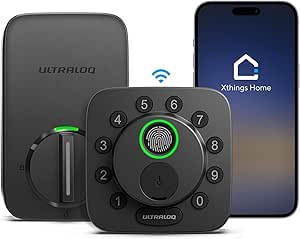 | Best Overall for Hosts Who Want Long Battery and Future-Proof Connectivity | Connectivity: Built-in Wi-Fi (2.4 GHz), Matter over Thread | Access Methods: Fingerprint, Passcode, App, Web Portal, EKey, Voice, Mechanical Key | Capacity: 50 Fingerprints, 50 Passcodes | VIEW ON AMAZON | See Our Full Breakdown |
| Philips Wi-Fi Smart Deadbolt Lock |  | Best for High Guest Turnover with Up to 100 Passcodes | Model: DDL242X-1HW | Connectivity: Wi-Fi (2.4GHz) | Unlock Methods: App, Passcode, Fingerprint, Key, Voice | VIEW ON AMAZON | See Our Full Breakdown |
| eufy Security Smart Lock C220 Fingerprint Keyless Entry Deadbolt |  | Best for Beginners Who Want Simple Setup and Multiple Entry Options | Model: T8506 | Lock Type: Deadbolt | Unlock Methods: Fingerprint, app, keypad, physical key, Apple Watch, Alexa/Google voice assistant | VIEW ON AMAZON | See Our Full Breakdown |
| Schlage Arrive Smart WiFi Deadbolt with Camelot Trim, Matte Black |  | Best for Large Portfolios with Up to 250 Access Codes | Model: BE459WBCAM622 | Finish: Matte Black | Trim: Camelot | VIEW ON AMAZON | See Our Full Breakdown |
| Wyze Lock Bolt v2 Fingerprint Smart Deadbolt with Wi-Fi |  | Best Budget Pick for Essential Features Without Extra Cost | Model: WLCKB2 | Lock Type: Biometric deadbolt with keypad | Connectivity: Wi-Fi | VIEW ON AMAZON | See Our Full Breakdown |
| Philips 4200 Series Wi-Fi Keypad Deadbolt with Handle |  | Best All-in-One Package | Brand: Philips | Model: DDL242X-1HW-L | Connectivity: 2.4 GHz Wi-Fi; no hub required | VIEW ON AMAZON | See Our Full Breakdown |
| Schlage Encode Smart WiFi Deadbolt with Century Trim, Matte Black |  | Best Overall for Reliability | Brand: Schlage | Model: BE489WBCEN622 | Finish: Matte Black | VIEW ON AMAZON | See Our Full Breakdown |
| Sifely S Fingerprint Smart Door Lock with Handle and Keypad |  | Best Value for Flexible Access | Brand: Sifely | Model: Sifely S | Lock type: Deadbolt | VIEW ON AMAZON | See Our Full Breakdown |
| eufy Security Smart Lock C30 Keypad Deadbolt with Built-in Wi-Fi, Black |  | Best No-Drill Install | Brand: eufy Security | Model: C30 (T85D0111) | Lock type: Deadbolt with keypad | VIEW ON AMAZON | See Our Full Breakdown |
| Aqara U400 UWB Smart Lock with Apple Home Key and Fingerprint Deadbolt, Silver |  | Best for Apple Home Hosts | Brand: Aqara | Model: DL-D16E | Color: Silver | VIEW ON AMAZON | See Our Full Breakdown |
| smart lock for airbnb host | Model | Connectivity | Brand | Unlock Methods |
|---|---|---|---|---|
| ULTRALOQ Bolt Fingerprint WiFi | BOLT-F-NK | Wi-Fi | ULTRALOQ | Fingerprint, passcode, app, auto-unlock, voice, keys |
| Lockly Secure Pro Wi-Fi Smart | PGD628W | Bluetooth, Wi-Fi (hub optional) | Lockly | Keypad, fingerprint, app, voice, key |
| Tapo DL100 Smart Wi-Fi Deadbol | DL100 | — | — | Keypad, Bluetooth, Wi-Fi, voice, keys |
| Philips Wi-Fi Smart Door Lock | DDL240X-1HW | Wi-Fi | Philips | App, fingerprint, PIN, voice, key |
| Kwikset Halo Select Smart Lock | 998000-004 | Wi-Fi, Matter | Kwikset | — |
| ULTRALOQ Bolt SE Wi-Fi Smart L | — | Built-in Wi-Fi (2.4 GHz), Matter over Thread | — | — |
| Philips Wi-Fi Smart Deadbolt L | DDL242X-1HW | Wi-Fi (2.4GHz) | — | App, Passcode, Fingerprint, Key, Voice |
| eufy Security Smart Lock C220 | T8506 | Built-in Wi-Fi | — | Fingerprint, app, keypad, physical key, Apple Watch, Alexa/Google voice assistant |
| Schlage Arrive Smart WiFi Dead | BE459WBCAM622 | Built-in WiFi and Bluetooth | — | — |
| Wyze Lock Bolt v2 Fingerprint | WLCKB2 | Wi-Fi | — | — |
| Philips 4200 Series Wi-Fi Keyp | DDL242X-1HW-L | 2.4 GHz Wi-Fi; no hub required | Philips | — |
| Schlage Encode Smart WiFi Dead | BE489WBCEN622 | Built-in WiFi | Schlage | — |
| Sifely S Fingerprint Smart Doo | Sifely S | Bluetooth; Wi-Fi with optional gateway | Sifely | Fingerprint, keypad, app, fob, key |
| eufy Security Smart Lock C30 K | C30 (T85D0111) | Built-in Wi-Fi | eufy Security | — |
| Aqara U400 UWB Smart Lock with | DL-D16E | Matter over Thread | Aqara | UWB, Apple Home Key, fingerprint, passcode, app, NFC card, physical key |
More Details on Our Top Picks
ULTRALOQ Bolt Fingerprint WiFi Smart Lock with Sensor, Black
This lock stands out for its seven unlocking methods, including fingerprint, app, and voice control, which gives Airbnb hosts flexibility for every guest type. Compared with the Lockly Secure Pro, the ULTRALOQ includes a door sensor that confirms when the door is actually closed—a small feature that prevents lockouts and gives you real-time status from anywhere. Its IP65 rating and zinc alloy build handle outdoor exposure better than the Tapo DL100’s IP54, and the eight AA batteries last up to a year, so you won’t be changing batteries between bookings. The tradeoff: it only supports 2.4 GHz Wi-Fi and needs to stay within roughly 70 feet of your router, so it’s not ideal for large properties with weak signals. Setup also demands a stable network, but once running, it’s a reliable workhorse.Pros:- Seven unlocking methods including fingerprint and voice control
- Built-in door sensor for real-time open/close alerts
- IP65 weather resistance and zinc alloy build
- Up to 1-year battery life on 8 AA batteries
Cons:- Only 2.4 GHz Wi-Fi with ~70 ft range limit
- Setup requires stable network and some technical comfort
Best for: Hosts who manage multiple short-term rentals and want a durable, feature-rich lock with door status monitoring and long battery life.
Not ideal for: Hosts with large properties where the lock sits far from the router, or those who prefer a hub-free Matter setup like the Kwikset Halo Select.
- Brand:ULTRALOQ
- Model:BOLT-F-NK
- Unlock Methods:Fingerprint, passcode, app, auto-unlock, voice, keys
- Connectivity:Wi-Fi
- Battery:8 AA (up to 1 year)
- Weather Resistance:IP65
- Certification:ANSI/BHMA Grade 2
- Included:Door sensor, 2 keys, 8 batteries
Our verdict“The ULTRALOQ Bolt is the best all-around choice for Airbnb hosts who need a dependable, feature-packed lock with door monitoring.”
Lockly Secure Pro Wi-Fi Smart Lock with Handle
If your calendar fills with back-to-back guests, the Lockly Secure Pro is built to keep up. Its handle design makes entry feel natural for guests who aren’t used to smart locks, and the fingerprint reader stores up to 99 prints—enough for a whole cleaning crew and frequent visitors. The PIN Genie keypad scrambles code positions to prevent shoulder-surfing, a thoughtful touch for shared spaces. Compared with the ULTRALOQ Bolt, the Lockly lacks a door sensor, but its 9V emergency battery port ensures you’re never locked out when batteries die. The optional Secure Link hub adds extended Wi-Fi features, but the lock works via Bluetooth out of the box, which might limit remote control unless you add that hub. For hosts who prioritize guest ease over remote monitoring, this is a strong pick.Pros:- Handle design for intuitive entry
- 99 fingerprint capacity
- PIN Genie anti-peep keypad
- 9V backup battery port
Cons:- Wi-Fi hub required for full remote features
- No door sensor included
Best for: Hosts running high-turnover properties with many different guests and staff needing access.
Not ideal for: Hosts who need built-in Wi-Fi remote access without extra hardware, or those who want door status alerts.
- Brand:Lockly
- Model:PGD628W
- Unlock Methods:Keypad, fingerprint, app, voice, key
- Fingerprint Capacity:Up to 99
- Connectivity:Bluetooth, Wi-Fi (hub optional)
- Material:Zinc
- Weather Resistance:IPX4
- Emergency Backup:9V port and key
Our verdict“The Lockly Secure Pro is ideal for busy Airbnb hosts who value guest convenience and high-volume access management.”
Tapo DL100 Smart Wi-Fi Deadbolt Door Lock with Keyless Tactile Buttons
The Tapo DL100 delivers the essentials for Airbnb hosts on a budget without cutting corners on access control. With up to 200 customizable codes, you can assign unique PINs to every guest, cleaning staff, or maintenance person and revoke them instantly—something the Philips lock also does but at a higher cost. Auto-lock and failed-PIN protection add security, while the USB-C emergency port is a modern backup that the Lockly’s 9V port lacks. However, its BHMA Grade 3 rating is the lowest here, so it’s less suited for heavy commercial use, and battery life drops to 200 days in Wi-Fi mode, meaning more frequent swaps than the ULTRALOQ’s year-long runtime. For a spare property or a first smart lock, this is a sensible entry point.Pros:- Up to 200 access codes
- USB-C emergency power
- Auto-lock and failed-PIN protection
- Works with Alexa, Google, SmartThings
Cons:- BHMA Grade 3 (lower durability)
- Shorter battery life in Wi-Fi mode
Best for: New Airbnb hosts or those managing one or two properties who want solid features at a lower cost.
Not ideal for: Hosts with high-traffic doors that need a tougher grade, or those who want longer battery life without compromise.
- Model:DL100
- Unlock Methods:Keypad, Bluetooth, Wi-Fi, voice, keys
- Access Codes:Up to 200
- Battery:4 AA (200 days Wi-Fi, 300 days BT)
- Emergency Power:USB-C
- Security:BHMA Grade 3
- Smart Home:Alexa, Google, SmartThings
- Dimensions:5.88 x 2.65 x 2.2 in
Our verdict“The Tapo DL100 is the best value pick for budget-conscious hosts who still need flexible code management.”
Philips Wi-Fi Smart Door Lock with Fingerprint Recognition
Speed matters when a guest is standing in the rain fumbling with a keypad. The Philips lock recognizes fingerprints in 0.3 seconds, which is noticeably faster than the ULTRALOQ Bolt’s standard sensor and gives you a frictionless check-in experience. Its built-in Wi-Fi means you don’t need a separate hub for remote control, unlike the Lockly Secure Pro which relies on an optional add-on. You can set auto-lock timers from 30 to 180 seconds, and the 24-month warranty is the longest here, offering peace of mind for frequent use. The catch: auto-lock only engages when the door is fully closed and batteries have enough charge, so a slightly ajar door could leave your property unlocked. Also, it stores 100 PIN codes—plenty for most hosts, but less than the Kwikset’s 250.Pros:- 0.3-second fingerprint recognition
- Built-in Wi-Fi (no hub)
- Adjustable auto-lock timer
- 24-month warranty
Cons:- Auto-lock depends on door fully closed and battery level
- Only 100 PIN codes
Best for: Hosts who prioritize fast, frictionless guest entry and want a hub-free Wi-Fi lock with a solid warranty.
Not ideal for: Hosts who need very high code capacity or who want a door sensor to verify closure.
- Brand:Philips
- Model:DDL240X-1HW
- Unlock Methods:App, fingerprint, PIN, voice, key
- Fingerprint Speed:0.3s
- PIN Capacity:100 codes
- Auto-lock:30-180s
- Connectivity:Wi-Fi
- Voice:Alexa, Google Assistant
- Warranty:24 months
Our verdict“The Philips lock is the best choice for hosts who want the quickest fingerprint unlock and hassle-free remote access.”
Kwikset Halo Select Smart Lock Keyless Entry Deadbolt
For hosts who want their lock to play nicely with every assistant, the Kwikset Halo Select is the most future-proof option here. Matter support means it works with Alexa, Apple Home, and Google Home without a hub, and geofencing can auto-unlock when you approach—a feature the Tapo DL100 lacks. With up to 250 access codes, it outpaces the Philips lock’s 100, making it easier to manage multiple properties or long-term tenants. The Grade AAA certification is the highest among these five, so it’s built for repeated use. The tradeoff: it relies solely on battery power (no backup keyhole), which could be a dealbreaker if you prefer a physical key as a fallback. Also, installation is straightforward with just a screwdriver, but the lack of a fingerprint sensor means guests must remember codes or use the app.Pros:- Matter support with all major platforms
- Up to 250 access codes
- Grade AAA certification
- Geofencing auto-unlock
Cons:- No fingerprint sensor
- No physical key backup (battery-only)
Best for: Tech-savvy hosts who use multiple smart home platforms and want maximum code capacity and security certification.
Not ideal for: Hosts who want fingerprint entry or a physical key backup for emergencies.
- Brand:Kwikset
- Model:998000-004
- Connectivity:Wi-Fi, Matter
- Smart Home:Alexa, Apple Home, Google Home
- Access Codes:Up to 250
- Security:Grade AAA
- Finish:Matte Black
- Warranty:Lifetime finish
Our verdict“The Kwikset Halo Select is the best pick for hosts who want seamless smart home integration and high security without a hub.”
ULTRALOQ Bolt SE Wi-Fi Smart Lock with Matter over Thread Support
The ULTRALOQ Bolt SE earns the top spot because it balances every priority a host juggles: remote access, guest codes, durability, and battery life. Its built-in Wi-Fi lets you manage the lock from anywhere without a hub, while Matter over Thread support positions it for broader smart home integration down the road. Compared with the Philips Wi-Fi Smart Deadbolt, which relies solely on 2.4 GHz Wi-Fi, the Bolt SE’s dual connectivity gives you more flexibility, though you’ll need a Thread border router to use the Matter remote features. The 18-month battery life stands out against the eufy C220’s eight-month estimate, meaning fewer mid-stay battery swaps. The tradeoff: it doesn’t include a door sensor, so you won’t get open/close alerts unless you buy one separately. For hosts who want a dependable lock that won’t need constant attention, this is the pick.
Pros:- Built-in Wi-Fi enables remote access without an extra hub
- Matter over Thread support offers broad ecosystem compatibility
- Up to 18 months of battery life reduces maintenance frequency
- IP65 waterproof rating handles harsh exterior conditions
Cons:- Matter over Thread remote features require a separate compatible Thread Border Router
- Wi-Fi connectivity is limited to 2.4 GHz networks only
- Door sensor is not included in the package
Best for: Airbnb hosts managing multiple properties who need a reliable lock with long battery life and flexible smart home compatibility
Not ideal for: Hosts who want door open/close monitoring out of the box — you’ll need to purchase a separate sensor
- Connectivity:Built-in Wi-Fi (2.4 GHz), Matter over Thread
- Access Methods:Fingerprint, Passcode, App, Web Portal, EKey, Voice, Mechanical Key
- Capacity:50 Fingerprints, 50 Passcodes
- Battery Life:Up to 18 months
- Material:Zinc Alloy
- Weather Resistance:IP65 Waterproof
- Certification:ANSI BHMA Certified
- Included Components:2 Emergency Keys, Installation Kit, User Guide
- Warranty:Lifetime mechanical, 18-month electronic
Our verdict“If you want a durable, low-maintenance smart lock that works with your existing smart home setup and won’t die mid-guest-stay, the ULTRALOQ Bolt SE is the strongest all-around choice.”
Philips Wi-Fi Smart Deadbolt Lock
For hosts who cycle through guests weekly, the Philips Wi-Fi Smart Deadbolt is built to handle volume. Its 100-passcode capacity doubles the ULTRALOQ Bolt SE’s 50, letting you assign unique codes to each reservation without constantly deleting old ones. The auto-lock timer (10–180 seconds) and away mode give you peace of mind when a guest forgets to lock up, and the fingerprint reader works quickly for repeat visitors. Compared with the Schlage Arrive, which lacks a fingerprint sensor, the Philips offers more entry options, but it’s not without tradeoffs: batteries aren’t included, so you’ll need to stock AAs, and it only supports 2.4 GHz Wi-Fi. The absence of a door sensor also means you won’t know if the door is physically ajar. If your priority is managing many short stays with minimal fuss, this lock’s generous code allowance and automation features make it a strong fit.
Pros:- Up to 100 passcodes for high-volume guest management
- Auto-lock timer adjustable from 10 to 180 seconds
- Away mode adds an extra security layer
- Multiple unlock methods including fingerprint, app, key, and voice
Cons:- Batteries not included — you’ll need to supply 4 AA alkaline batteries
- Only supports 2.4 GHz Wi-Fi networks
- No door sensor for open/close status
Best for: Hosts with frequent turnovers who need to issue many unique guest codes and rely on auto-lock to prevent lockouts
Not ideal for: Hosts who want a door open/close sensor or prefer a lock with batteries included in the box
- Model:DDL242X-1HW
- Connectivity:Wi-Fi (2.4GHz)
- Unlock Methods:App, Passcode, Fingerprint, Key, Voice
- Battery:4 AA alkaline (not included)
- Door Thickness:1-3/8″ to 2″ (38-50mm)
- Auto-Lock Timer:10-180 seconds
- Passcodes:Up to 100
- Voice Control:Alexa, Google Assistant
Our verdict“The Philips Wi-Fi Smart Deadbolt is the right choice for busy hosts who need to manage a high number of guest codes and want automated locking to cover forgetful guests.”
eufy Security Smart Lock C220 Fingerprint Keyless Entry Deadbolt
If you’re new to smart locks, the eufy Security C220 removes most of the friction. It ships with 8 AA batteries included, so you can install and start using it immediately — a contrast to the Philips Wi-Fi Smart Deadbolt, which requires you to buy batteries separately. The six unlock methods (fingerprint, app, keypad, physical key, Apple Watch, and voice) cover every guest preference, and installation takes about 15 minutes on standard deadbolts. Compared with the Wyze Lock Bolt v2, the eufy offers a slightly broader set of entry options and a higher BHMA Grade 3 certification, though the Wyze counters with USB-C emergency power. The tradeoff is battery life: at up to eight months, it’s shorter than the ULTRALOQ Bolt SE’s 18 months, so you’ll need to schedule replacements more often. For hosts who want a dependable, no-surprises lock without a steep learning curve, this is a solid starting point.
Pros:- Six unlock methods including fingerprint and Apple Watch
- Includes 8 AA batteries — ready to use out of the box
- BHMA Grade 3 certified and IP53 waterproof
- Simple installation compatible with most standard deadbolts
Cons:- Battery life up to 8 months is shorter than some competitors
- Compatibility depends on existing deadbolt and door measurements
- No built-in door sensor for open/close alerts
Best for: First-time smart lock users who want a straightforward installation, included batteries, and a variety of guest-friendly unlock methods
Not ideal for: Hosts who want the longest possible battery life or a lock with Matter support for future smart home expansion
- Model:T8506
- Lock Type:Deadbolt
- Unlock Methods:Fingerprint, app, keypad, physical key, Apple Watch, Alexa/Google voice assistant
- Connectivity:Built-in Wi-Fi
- Battery:8 AA batteries; up to 8 months
- Certification:BHMA Grade 3
- Operating Temperature:-22°F to 158°F (-30°C to 70°C)
- Included Components:2 keys, 8 AA batteries, exterior and interior assemblies, installation sets, mounting plate
Our verdict“The eufy C220 is the best gateway lock for hosts who want an easy, reliable smart lock with plenty of entry options and minimal setup hassle.”
Schlage Arrive Smart WiFi Deadbolt with Camelot Trim, Matte Black
When you’re managing a dozen or more listings, the Schlage Arrive’s 250-access-code capacity is a game-changer. That’s more than double the ULTRALOQ Bolt SE’s 50 codes, and it means you can assign unique codes to every guest, cleaner, and maintenance person without ever hitting a limit. The backlit, all-weather keypad is easy for guests to use in the dark, and installation requires only a screwdriver — no hardwiring. Compared with the eufy C220, which offers fingerprint entry, the Arrive skips biometrics, but it compensates with a limited lifetime mechanical warranty and the reliability of the Schlage brand. The tradeoff is that remote features depend on Wi-Fi, and you’ll need to replace batteries periodically, but with a lock this scalable, the maintenance is a minor inconvenience. For hosts with a growing property count, this lock’s code management and durability make it a top contender.
Pros:- Up to 250 access codes for large-scale guest management
- Backlit, all-weather keypad for easy use in any condition
- Simple screwdriver installation without hardwiring
- Limited lifetime mechanical and finish warranty
Cons:- Remote app features require a WiFi connection
- Battery-powered — batteries need periodic replacement
- No fingerprint sensor, unlike some competitors
Best for: Hosts managing multiple properties who need to issue hundreds of unique access codes and want a trusted brand with a long warranty
Not ideal for: Hosts who want fingerprint entry for fast guest access or a lock with built-in door sensor capabilities
- Model:BE459WBCAM622
- Finish:Matte Black
- Trim:Camelot
- Connectivity:Built-in WiFi and Bluetooth
- Access Codes:Up to 250
- Smart Home Compatibility:Alexa and Google Home
- Door Thickness:1-3/8 in to 1-3/4 in
- Backset:2-3/8 in or 2-3/4 in
- Warranty:Limited lifetime mechanical and finish; limited three-year electronics
Our verdict“The Schlage Arrive is the go-to lock for hosts with many properties who need extensive code capacity and a dependable, long-lasting mechanical build.”
Wyze Lock Bolt v2 Fingerprint Smart Deadbolt with Wi-Fi
The Wyze Lock Bolt v2 proves you don’t need to spend heavily to get a functional smart lock for your rental. It offers fingerprint, keypad, app, and physical key access — a solid set for guests — and adds auto-lock and tamper alarms for security. What sets it apart from the eufy C220 is the USB-C emergency power, which lets you jump-start the lock with a power bank if the batteries die, a lifesaver during a guest turnover. The tradeoff is a smaller 50-code/fingerprint capacity compared with the Philips’s 100, and battery life tops out at eight months, similar to the eufy. For hosts on a tight budget who still want remote management and biometric entry, this lock covers the basics without the premium price tag. Just be aware that Wi-Fi dependence means a dead network could lock you out of remote controls.
Pros:- Fingerprint, keypad, app, and physical key access
- USB-C emergency power for backup when batteries die
- Auto-lock and tamper alarms for added security
- Stores up to 50 codes or fingerprints
Cons:- Requires 8 AA batteries, which need periodic replacement
- Remote control depends on Wi-Fi connectivity
- 50-code capacity is lower than some competitors
Best for: Cost-conscious hosts who want a reliable smart lock with fingerprint entry and essential automation features without paying for extras like Matter support
Not ideal for: Hosts managing high guest volumes who need more than 50 unique codes or those who prefer a lock with a longer battery life
- Model:WLCKB2
- Lock Type:Biometric deadbolt with keypad
- Connectivity:Wi-Fi
- Control Method:App, keypad, fingerprint, physical key
- Stored Codes or Fingerprints:Up to 50
- Battery Life:Up to 8 months
- Emergency Power:USB-C
- Weather Resistance:IP53
- Additional Features:Auto-lock, tamper alarms
Our verdict“The Wyze Lock Bolt v2 is the smart choice for budget-focused hosts who need a dependable, feature-packed lock without the premium price.”
Philips 4200 Series Wi-Fi Keypad Deadbolt with Handle
If you want to hand guests a single clean entry point without buying a separate handle, this Philips model bundles the deadbolt and matching lever set right in the box. That alone sets it apart from the Schlage Encode, which only covers the lock itself and leaves you to source a handle separately. The fingerprint reader is genuinely fast at 0.3 seconds, and the direct 2.4 GHz Wi-Fi means no extra hub cluttering your wiring closet. Compared with the eufy C30, this one gives you more access methods (fingerprint, PIN, app, voice) and a longer six-month battery estimate, though the eufy wins on installation simplicity because it needs no drilling. The tradeoff: batteries aren’t included, and auto-lock is off by default, so you’ll have to enable it in the app if you want the door to secure itself after each checkout.
Pros:- Includes matching handle and all installation hardware
- Fingerprint unlock in 0.3 seconds speeds up guest entry
- Remote app control with access history and status checks
- Works with Alexa and Google Assistant for voice commands
Cons:- Batteries not included, so you’ll need to buy six AA cells upfront
- Auto-lock is disabled by default and must be manually configured
- Wi-Fi range is limited to 33 feet, which may be tight in larger homes
Best for: Hosts who want a complete entry set (deadbolt plus handle) in one purchase and value fingerprint speed for frequent guest turnover.
Not ideal for: Hosts who prefer a hub-free setup with zero extra steps — this still requires a reliable 2.4 GHz Wi-Fi signal within 33 feet of the router.
- Brand:Philips
- Model:DDL242X-1HW-L
- Connectivity:2.4 GHz Wi-Fi; no hub required
- Access methods:App, keypad PIN, fingerprint, voice assistant
- Fingerprint unlock time:0.3 seconds
- Auto-lock timer:0–180 seconds; off by default
- Battery life:Up to 6 months
- Compatible door thickness:1⅜–1¾ inches (38–50 mm)
- Included components:Two door levers, latch assembly, mounting screws, smart lock, manual
Our verdict“This is the pick for hosts who want a complete, fingerprint-first entry package and don’t mind configuring auto-lock during setup.”
Schlage Encode Smart WiFi Deadbolt with Century Trim, Matte Black
When you’re managing multiple guests and need a lock you can trust without babysitting, the Schlage Encode stands out for its proven track record and generous 100-code capacity. That’s far more than the Philips 4200 Series offers, and it’s a real advantage if you rotate codes for each booking or want to give cleaning staff their own entry. The built-in Wi-Fi works directly with the Schlage Home app, so remote locking, unlock history, and custom notifications are all on tap without a hub. Compared with the eufy C30, the Encode feels more substantial and includes a backup key, but the eufy is easier to install because it requires no drilling. The main tradeoff is battery life — up to six months with typical use is fine, but you’ll need to keep spares handy, and the lock depends on a stable home Wi-Fi network for remote access.
Pros:- Supports up to 100 access codes, ideal for frequent guest turnover
- Built-in Wi-Fi enables remote control without a separate hub
- Includes a physical backup key for lockout situations
- Limited lifetime mechanical and finish warranty
Cons:- Battery life is only up to six months, so replacements are a recurring task
- Requires a secure home Wi-Fi network for all remote features
- No fingerprint reader, unlike the Philips 4200 Series
Best for: Hosts who prioritize brand reliability, need to manage up to 100 unique access codes, and want a backup key for emergency access.
Not ideal for: DIY-focused hosts who want a no-drill install — this requires standard deadbolt preparation and is heavier than the eufy C30.
- Brand:Schlage
- Model:BE489WBCEN622
- Finish:Matte Black
- Trim:Century
- Connectivity:Built-in WiFi
- Access codes:Up to 100
- Voice control:Alexa and Google Home
- Power:Four AA batteries
- Backup key:Included
Our verdict“This is the most dependable choice for hosts who want a high-capacity, no-compromise smart deadbolt from a trusted brand.”
Sifely S Fingerprint Smart Door Lock with Handle and Keypad
For hosts who want a broad range of entry methods without paying a premium, the Sifely S packs fingerprint, keypad, app, fob, and key access into a single unit — and it includes a handle, much like the Philips 4200 Series but at a more approachable price point. The Bluetooth app handles user management and access logs, which is enough for many short-term rental setups. Where it differs from the eufy C30 is that remote access and voice assistant integration aren’t built in; you’ll need to buy the optional Wi-Fi Gateway separately. That’s a meaningful tradeoff if you rely on checking the lock status from your phone while away. The reversible handle and DIY-friendly design make it a solid pick for hosts who want to install it themselves, and the included physical keys and key cards give you backup options that the Schlage Encode doesn’t offer in the same way.
Pros:- Five unlock methods: fingerprint, keypad, app, fob, and key
- Bluetooth app provides user management and access logs
- Reversible handle for left- or right-hand doors
- Includes physical keys and key cards for backup
Cons:- Remote access and Alexa/Google Assistant require an optional Wi-Fi Gateway
- No built-in Wi-Fi, so the lock isn’t remotely accessible by default
- Zinc construction feels less premium than the Schlage Encode’s build
Best for: Budget-conscious hosts who want maximum entry flexibility (fingerprint, keypad, fob, key) and are comfortable managing remote access via a separate gateway.
Not ideal for: Hosts who need out-of-the-box remote control and voice assistant support without buying extra hardware — the eufy C30 or Schlage Encode are better fits.
- Brand:Sifely
- Model:Sifely S
- Lock type:Deadbolt
- Unlock methods:Fingerprint, keypad, app, fob, key
- Connectivity:Bluetooth; Wi-Fi with optional gateway
- Material:Zinc
- Finish:Satin nickel
- Dimensions:7 x 3 x 1.12 inches
- Warranty:One year
Our verdict“This is the smart value pick for hosts who want a versatile, handle-included lock and don’t mind adding a gateway for remote features.”
eufy Security Smart Lock C30 Keypad Deadbolt with Built-in Wi-Fi, Black
If your rental door is already prepped for a standard deadbolt, the eufy C30 is the fastest way to go smart — it installs without drilling, which is a huge time saver compared with the Philips 4200 Series that requires more involved mounting. Built-in Wi-Fi means no hub, and you get remote control, keypad, voice assistant, and app access right out of the box. The IP53 weather resistance and BHMA Grade 3 certification give it a durability edge over the Sifely S, which lacks an official weather rating. The tradeoff is battery life: at up to five months, it’s shorter than the Schlage Encode’s six-month estimate, so you’ll be changing four AA batteries more often. The compact size (just over six inches tall) also means it won’t dominate the door, but it might feel less substantial to hosts who prefer a beefier lock.
Pros:- No-drill installation fits most standard deadbolts
- Built-in Wi-Fi provides hub-free remote control
- Weather-resistant design (IP53) with BHMA Grade 3 certification
- Customizable auto-lock with no monthly fees
Cons:- Battery life is only up to five months, requiring more frequent changes
- Installation compatibility limited to most standard deadbolts, not all
- No fingerprint reader, unlike the Philips 4200 Series
Best for: Hosts who want a quick, no-drill upgrade on a standard deadbolt and value built-in Wi-Fi for remote management without extra hardware.
Not ideal for: Hosts who need a longer battery interval or want a more prominent, heavy-duty lock — the Schlage Encode lasts longer and feels more substantial.
- Brand:eufy Security
- Model:C30 (T85D0111)
- Lock type:Deadbolt with keypad
- Connectivity:Built-in Wi-Fi
- Access methods:Keypad, app, Alexa, Google Assistant, physical key
- Power:4 AA batteries
- Battery life:Up to 5 months
- Weather resistance:IP53
- Certification:BHMA Grade 3
Our verdict“This is the go-to lock for hosts who want a fast, hub-free install with reliable remote control and don’t mind a shorter battery cycle.”
Aqara U400 UWB Smart Lock with Apple Home Key and Fingerprint Deadbolt, Silver
For hosts who live in the Apple ecosystem, the Aqara U400 is the clear standout because it supports Apple Home Key and hands-free UWB unlocking — something no other lock in this roundup, including the Schlage Encode, can match. Guests with compatible iPhones can simply tap or approach the lock, which feels genuinely futuristic for check-in. The Matter over Thread connectivity means it plays nicely with multiple platforms, not just Apple, but you’ll need a Thread-enabled hub to unlock the full potential. Compared with the eufy C30, the U400 offers a rechargeable battery (USB-C) that lasts up to six months per charge, saving you from buying AA batteries repeatedly. The tradeoffs are real: UWB and Home Key require recent Apple devices, the NFC card is sold separately, and the installation is more involved than the eufy’s no-drill design. If your guests are mostly Android users, the fingerprint and passcode still work, but you’re paying for features they won’t use.
Pros:- Hands-free UWB unlocking and Apple Home Key support
- Matter over Thread works across multiple smart home platforms
- Rechargeable battery with USB-C charging, up to six months per charge
- IP65-rated exterior and BHMA certification
Cons:- UWB and Home Key features require compatible Apple devices and a Thread hub
- NFC card is sold separately, adding cost if you want that backup
- Installation is more complex than the eufy C30’s no-drill setup
Best for: Hosts who use Apple devices themselves and want to offer guests the convenience of Apple Home Key and hands-free UWB unlocking.
Not ideal for: Hosts with a mixed guest base (Android and iPhone) or those who want a simpler, no-hub install — the eufy C30 or Schlage Encode are more universally accessible.
- Brand:Aqara
- Model:DL-D16E
- Color:Silver
- Connectivity:Matter over Thread
- Unlock methods:UWB, Apple Home Key, fingerprint, passcode, app, NFC card, physical key
- Battery:Rechargeable, removable lithium; up to 6 months per charge
- Charging port:USB-C
- Weather resistance:IP65
- Certification:BHMA-certified
Our verdict“This is the premium choice for Apple-centric hosts who want cutting-edge entry methods and don’t mind the ecosystem requirements.”

How We Picked
I evaluated these 15 smart locks specifically through the lens of an Airbnb host, not a typical homeowner. That means the ranking prioritizes guest access management—the ability to create temporary codes, set expiration times, and revoke access instantly—above all else. Next came connectivity reliability: does the lock maintain a stable Wi-Fi connection so you can monitor entry logs and unlock remotely without a hub? I also weighed installation complexity, because hosts often swap locks between properties and need something that fits standard doors without a locksmith. Security hardware (deadbolt grade, tamper resistance) and battery life with clear low-battery alerts rounded out the criteria.
The ranking logic is transparent: locks that require a separate hub (like some older Schlage models) dropped because they add cost and failure points. Models with no mechanical key backup were penalized, since a dead battery during a guest stay is a nightmare. I also considered app quality—clunky apps with confusing code menus lost points even if the hardware was solid. The final order reflects a balance of host-specific features, build quality, and real-world usability, not just spec sheets.
Factors to Consider When Choosing Smart Lock For Airbnb Hosts
Beyond the individual reviews, there are several cross-cutting factors that determine whether a smart lock will actually make your hosting life easier. Here’s what I learned from comparing these 15 models side by side.
Guest Access Management: Temporary Codes and Scheduling
The single most important feature for Airbnb hosts is the ability to generate unique, temporary access codes for each guest and set them to expire automatically. The ULTRALOQ Bolt and Schlage Encode both excel here, allowing you to schedule codes by date and time directly from the app. Budget locks like the Tapo DL100 often limit you to a handful of saved codes, which becomes a problem if you have back-to-back bookings. Look for a lock that supports at least 20 stored codes and lets you delete them remotely. Also check whether the lock’s app shows entry logs—this is how you’ll know if a guest actually arrived and left on time.
Connectivity: Built-in Wi-Fi vs. Hub vs. Bluetooth
Every host needs remote access, but how that works varies. Built-in Wi-Fi (found on the ULTRALOQ Bolt, Schlage Encode, and eufy C220) means you can manage the lock from anywhere without extra hardware. Bluetooth-only locks like the older Sifely models require you to be physically nearby unless you buy a separate bridge, which defeats the purpose. Some locks, like the Philips Wi-Fi Smart Deadbolt, use a plug-in adapter that connects to your home network—this works but adds a device that can fail. The emerging standard is Matter over Thread (seen on the ULTRALOQ Bolt SE), which promises better reliability and integration, but it’s still not as mature as direct Wi-Fi. For most hosts, I’d choose a lock with native Wi-Fi over any hub-based system.
Security Hardware: Deadbolt Grade and Tamper Resistance
Not all smart locks are equally secure. Traditional deadbolts from Schlage are ANSI Grade 1 or 2, meaning they resist forced entry better than the lighter latches on handle-integrated models like the eufy C220 or Sifely S. If your rental is in a high-traffic area or you’re worried about break-ins, prioritize a lock with a solid metal deadbolt. Also consider whether the lock has a mechanical key override—the Aqara U400 and Philips 4200 Series include one, which is a lifesaver when the battery dies. Some budget locks omit this entirely, forcing you to jump the lock with a 9V battery, which guests won’t understand. For a rental, a physical key backup is a must-have, even if you never plan to use it.
Battery Life and Power Failure Scenarios
Smart locks run on AA or lithium batteries, and the difference between 3 months and 12 months of life is huge when you’re managing multiple properties. The Wyze Lock Bolt v2 and eufy C30 are efficient but lack low-battery warnings that are actually loud enough to notice. The ULTRALOQ and Schlage models give you multiple alerts—app notification, email, and a visual indicator on the lock itself. Also check how the lock behaves when the battery dies: does it lock or unlock? Some models, like the Philips Wi-Fi Smart Deadbolt, will auto-unlock when power drops below a threshold, which is a security risk. You want a lock that stays locked and can be manually overridden with a key or a 9V backup terminal.
Integration with Smart Home Platforms and Airbnb
If you use a smart home hub, check compatibility with Amazon Alexa, Google Home, or Apple HomeKit. The Lockly Secure Pro and Aqara U400 support HomeKit, which lets guests with iPhones use Home Key to unlock—a nice touch but not essential. More important is whether the lock can integrate with Airbnb’s direct messaging or your channel manager. Currently, very few locks have native Airbnb integration; most hosts manually generate codes per booking. The Schlage Encode and ULTRALOQ Bolt both work with IFTTT, so you can automate code creation if you’re tech-savvy. Don’t buy a lock expecting it to sync with Airbnb automatically—that feature is still rare and often requires paid third-party services.
Frequently Asked Questions
Can I give each Airbnb guest a unique code and expire it automatically?
Yes, but only if the lock supports scheduled codes. The ULTRALOQ Bolt, Schlage Encode, and Lockly Secure Pro all let you set a specific start and end time for each code, so a guest’s code stops working at checkout. Budget models like the Tapo DL100 and Wyze Lock Bolt v2 allow you to create codes but not schedule them—you’d have to remember to delete them manually, which is risky if you have back-to-back bookings. For a true set-and-forget experience, look for locks that advertise ‘temporary codes’ or ‘scheduled access’ in their app features. I’d avoid any lock that doesn’t support at least 10 active codes with expiration settings.
What happens if the smart lock loses Wi-Fi connection?
Most smart locks will still function as a keypad or fingerprint reader when Wi-Fi drops, because the locking mechanism is local. However, you’ll lose remote access—you won’t be able to unlock for a guest or check entry logs until the connection returns. The ULTRALOQ Bolt and Schlage Encode have stronger Wi-Fi antennas and reconnect automatically, while some budget locks require a manual reset. If your rental has poor internet, choose a lock with Bluetooth fallback (like the eufy C220) so you can still manage it from within a short range. Also, consider a lock with a cellular backup option, though that’s rare and adds cost. For most hosts, a reliable home Wi-Fi network is sufficient, but test the lock’s range before installing it at a far door.
Do I need a smart home hub to use these locks?
No, not for the locks in this roundup. All 15 models have built-in Wi-Fi or Bluetooth that connects directly to your phone via their respective apps. You don’t need a separate hub like a Samsung SmartThings or Amazon Echo Plus. However, if you want to control the lock with voice assistants or integrate it into routines, you’ll need a compatible hub or speaker. The Schlage Encode works with Alexa and Google Home without a hub, while the ULTRALOQ Bolt requires a free app but no additional hardware. The Aqara U400 supports Apple HomeKit, which requires an Apple TV or HomePod as a home hub. For basic hosting duties—sending codes and unlocking remotely—the apps alone are sufficient.
How do I handle a guest lockout if the lock’s battery dies?
This is why I strongly recommend a lock with a mechanical key override. The Philips Wi-Fi Smart Deadbolt and Schlage Encode both include a physical key cylinder, so you (or a nearby neighbor) can unlock with a traditional key. If the lock lacks a keyhole, most have a 9V battery terminal on the outside—touch it with a 9V battery to power the lock temporarily. The Wyze Lock Bolt v2 and eufy C30 have this feature, but it requires the guest to understand how to use it, which isn’t realistic. The best solution is to set up a backup access method: either a spare key hidden in a secure lockbox or a secondary smart lock on another door. Also, enable low-battery notifications so you can replace batteries before they die.
Are fingerprint locks reliable for many different guests?
Fingerprint sensors have improved, but they still fail with wet, dirty, or calloused fingers—common among travelers. The ULTRALOQ Bolt and Lockly Secure Pro have the most accurate sensors in this roundup, with fast recognition and a low false-rejection rate. Budget sensors like those on the Sifely S and Wyze Lock Bolt v2 work well for clean fingers but can be frustrating for guests who just came from the beach. A good compromise is a lock that combines fingerprint with a keypad, so guests can fall back to a code if the sensor fails. For high turnover, I’d rely on codes as the primary method and use fingerprint as a convenience for repeat guests or yourself. Also, check how many fingerprints the lock stores—some allow only 50, which is fine for a few regulars.
Conclusion
Choosing the right smart lock for your Airbnb comes down to how you host. For most hosts, the ULTRALOQ Bolt Fingerprint WiFi Smart Lock is the best overall because it nails the essentials: fast fingerprint entry, reliable Wi-Fi, scheduled codes, and a solid deadbolt. If you want the most polished app and a brand you can trust for durability, the Schlage Encode Smart WiFi Deadbolt is the premium pick—it’s a bit pricier but feels built to last a decade. For budget-conscious hosts who still need remote management, the Wyze Lock Bolt v2 offers the core features at a fraction of the cost, though you’ll give up a mechanical key backup. Beginners should start with the Kwikset Halo Select because its app is the most intuitive and installation is straightforward. Finally, if you have a smart home ecosystem or want Apple Home Key support, the Aqara U400 is the specialist choice. Whatever you pick, make sure it supports temporary codes and gives you a way to recover from a dead battery—those two features will save you more headaches than any other spec.


