A smart lock with keypad and fingerprint access lets you choose between a code and a biometric entry, with app features available on some models. I rank the Wyze Auto-Lock Bolt v2 as the best overall for its combination of fingerprint entry, Wi-Fi, auto-lock, backup keys, and weather resistance. The eufy Security Smart Lock C220 stands out as a fingerprint-focused alternative, while the TEEHO TE002 is a simpler pick for shoppers who want a keypad deadbolt. The main tradeoffs are connectivity and remote control versus simpler operation, plus choosing a deadbolt or handle-style lock that fits your door and routine. Read on for the full comparison, buying advice, and recommendations by buyer type.

Get privacy and security gear delivered free with Prime
- Fast, free delivery on millions of items
- Prime Video, Amazon Music and more included
- Member-only deals all year
Key Takeaways
- Wyze Auto-Lock Bolt v2 leads the roundup by pairing fingerprint and keypad entry with Wi-Fi, auto-lock, backup keys, and an IP53 weather-resistance rating.
- Connectivity varies across this lineup. Some picks list built-in Wi-Fi or app control, while simpler keypad-and-fingerprint options may suit buyers who do not need remote access.
- Deadbolts and handle locks solve different problems. Check your door hardware and the way you use the entrance before choosing by features alone.
- Philips offers two different configurations: a Wi-Fi keypad lock with a handle and fingerprint entry, and a keypad deadbolt with a handle; confirm the exact model’s listed access methods.
- Veise VE017 appears in both matte black and satin nickel. The finish changes the visual fit, not the core reason to compare it with other fingerprint-and-app options.
| Wyze Auto-Lock Bolt v2 Fingerprint Smart Lock with Wi-Fi, Keyless Entry, Auto-Lock, Backup Keys, IP53 Weather-Resistance |  | Best Overall for Built-In Remote Access | Model: WLCKB2 | Connectivity: Wi-Fi | Access capacity: Up to 50 keypad codes or fingerprints | VIEW ON AMAZON | See Our Full Breakdown |
| Veise VE017 Fingerprint Smart Door Lock with App Control, Matte Black |  | Best for Flexible Access Management | Finish: Matte black | Material: Scratch-resistant all-zinc alloy | Access methods: Fingerprint, keypad, key fob, mechanical key, app | VIEW ON AMAZON | See Our Full Breakdown |
| TEEHO TE002 Fingerprint Deadbolt with Keypad for Front Door, Matte Black |  | Best for Straightforward Keyless Entry | Unlock methods: Fingerprint, passcode, physical key, one-time PIN | Fingerprint capacity: 20 fingerprints | Passcode capacity: 20 passcodes | VIEW ON AMAZON | See Our Full Breakdown |
| Philips WiFi Keypad Door Lock with Handle, Built-in WiFi, APP Remote Control, Voice & Fingerprint Unlock, Satin Nickel |  | Best for a Complete Handle-and-Lock Set | Connectivity: Built-in 2.4 GHz Wi-Fi | Fingerprint unlock speed: 0.3 seconds | Passcode types: Permanent, one-time, periodic, recurring | VIEW ON AMAZON | See Our Full Breakdown |
| Keypad Smart Door Knob Lock, Yamiry Fingerprint Keyless Entry Handle Lock |  | Best for Replacing a Door Knob | Lock type: Electronic door knob | Material: Aluminum | Listed access methods: App, password, key fob, fingerprint, physical key | VIEW ON AMAZON | See Our Full Breakdown |
| Veise KS02A Fingerprint Door Lock, Keypad Deadbolt, Matte Black |  | Best for Simple, Key-First Access | Brand: Veise | Model: KS02A | Material: All-zinc alloy | VIEW ON AMAZON | See Our Full Breakdown |
| Sifely Fingerprint Smart Door Lock with Handle & Keypad |  | Best for Rental Access Flexibility | Brand: Sifely | Model: Sifely S | Finish: Satin nickel | VIEW ON AMAZON | See Our Full Breakdown |
| Yamiry Smart Door Handle Lock with Keypad and Fingerprint |  | Best for App-Based Guest Codes | Brand: Yamiry | Lock style: Door handle lock | Material: Stainless steel and zinc | VIEW ON AMAZON | See Our Full Breakdown |
| Veise VE017 Fingerprint Smart Door Lock with App Control, Satin Nickel |  | Best for App-Managed Entry | Brand: Veise | Model: VE017 | Material: Scratch-resistant all-zinc alloy | VIEW ON AMAZON | See Our Full Breakdown |
| Evanshow Fingerprint Door Lock Biometric Door Knob with Keypad |  | Best for High Fingerprint Capacity | Brand: Evanshow | Lock style: Biometric door knob | Finish: Matte black | VIEW ON AMAZON | See Our Full Breakdown |
| Philips WiFi Keypad Deadbolt with Handle, Built-in WiFi, APP Remote Control |  | Best Complete Handle Set | Unlock methods: Fingerprint, keypad, app, voice | Wi-Fi: Built-in 2.4GHz Wi-Fi; no hub required | Wi-Fi distance guidance: Keep within 33 ft (10 m) of the router | VIEW ON AMAZON | See Our Full Breakdown |
| eufy Security Smart Lock C220, Fingerprint Keyless Entry Door Lock |  | Best for Low-Maintenance Access | Unlock methods: Fingerprint, keypad, app, voice, physical key | Battery life: 8 months | Batteries: 8 AA batteries | VIEW ON AMAZON | See Our Full Breakdown |
| Ulecoce U68 Fingerprint Keypad Deadbolt with Knob Set, Matte Black | 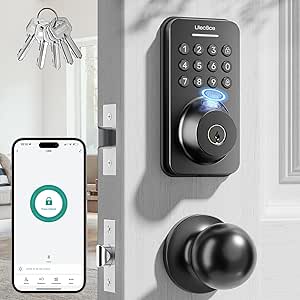 | Best for Large Fingerprint Groups | Fingerprint storage: 512 sets | Unlock methods: Fingerprint, keypad, app, physical key | Connectivity: Wi-Fi with separate gateway | VIEW ON AMAZON | See Our Full Breakdown |
| smart lock with keypad and fingerprint | Connectivity |
|---|---|
| Wyze Auto-Lock Bolt v2 Fingerp | Wi-Fi |
| Veise VE017 Fingerprint Smart | — |
| TEEHO TE002 Fingerprint Deadbo | — |
| Philips WiFi Keypad Door Lock | Built-in 2.4 GHz Wi-Fi |
| Keypad Smart Door Knob Lock | Bluetooth |
| Veise KS02A Fingerprint Door L | — |
| Sifely Fingerprint Smart Door | Bluetooth and Wi-Fi |
| Yamiry Smart Door Handle Lock | Bluetooth; Wi-Fi gateway required for remote control |
| Veise VE017 Fingerprint Smart | Wi-Fi via separately sold G1 Gateway |
| Evanshow Fingerprint Door Lock | — |
| Philips WiFi Keypad Deadbolt w | — |
| eufy Security Smart Lock C220 | — |
| Ulecoce U68 Fingerprint Keypad | Wi-Fi with separate gateway |
More Details on Our Top Picks
Wyze Auto-Lock Bolt v2 Fingerprint Smart Lock with Wi-Fi, Keyless Entry, Auto-Lock, Backup Keys, IP53 Weather-Resistance
The Wyze Bolt v2 is a strong pick for buyers who want fingerprint and keypad entry plus remote app control without a separate gateway. Its stated fingerprint unlock time of under half a second makes quick arrivals easier, while Wi-Fi lets you manage access remotely. Compared with the TEEHO TE002, Wyze offers Wi-Fi connectivity and capacity for up to 50 codes or fingerprints, but TEEHO supplies one-time PINs and a higher IP54 weather rating. Wyze’s IP53 protection and backup keys add useful safeguards, though its eight AA batteries mean ongoing power management and battery life can vary. I’d rank it ahead of gateway-dependent choices for simpler remote access, but buyers who want a simpler offline-focused lock may prefer TEEHO.
Pros:- Fingerprint unlocking is specified at under half a second.
- Built-in Wi-Fi supports remote app management without a separately listed gateway.
- Stores up to 50 keypad codes or fingerprints.
- Backup physical keys and an emergency USB-C port provide alternative access.
Cons:- Remote features depend on a Wi-Fi connection.
- Eight AA batteries are required, and battery life varies with use.
- IP53 weather resistance is below the TEEHO TE002’s IP54 rating.
Best for: Households that want fingerprint and keypad entry with remote access managed over built-in Wi-Fi, plus backup keys.
Not ideal for: Buyers who want one-time PINs, a higher stated weather-resistance rating, or a lock that avoids Wi-Fi for remote features.
- Model:WLCKB2
- Connectivity:Wi-Fi
- Access capacity:Up to 50 keypad codes or fingerprints
- Weather resistance:IP53
- Durability:BHMA Grade 2
- Power:8 AA batteries; USB-C emergency port
- Unlock methods:Fingerprint, keypad, app, physical key
Our verdict“Choose the Wyze Bolt v2 if built-in Wi-Fi, fast fingerprint access, and multiple backup entry methods matter more than one-time PINs or a higher weather rating.”
Veise VE017 Fingerprint Smart Door Lock with App Control, Matte Black
The Veise VE017 suits homes or small rental properties where different people need different ways in. Fingerprint, keypad, key fob, and mechanical-key access give it more entry choices than the TEEHO TE002, which lists fingerprints, passcodes, physical keys, and one-time PINs but not a key fob. Veise also pairs encrypted local storage with activity logs and customizable permissions, helping owners keep track of access. The limitation is remote control: Wi-Fi requires the separately sold G1 Gateway, unlike the Wyze Bolt v2 with Wi-Fi listed as built in. Installation is presented as a no-drill DIY job, and the stated battery life is at least 12 months, but buyers must supply four AA batteries. I’d favor this model for access flexibility, not for gateway-free remote management.
Pros:- Fingerprint, keypad, key-fob, and mechanical-key access options.
- Encrypted local storage and activity logs support controlled access management.
- Four AA batteries are specified to last at least 12 months.
- DIY installation is described as requiring no drilling.
Cons:- Remote Wi-Fi access requires the separately sold G1 Gateway.
- Four AA batteries are not included.
- App-based permissions and smart-home features may take setup and familiarity.
Best for: Landlords and multi-tenant households that want several entry methods, permission controls, and access activity records.
Not ideal for: Buyers who need remote access without extra hardware, want batteries included, or prefer a lock with built-in Wi-Fi.
- Finish:Matte black
- Material:Scratch-resistant all-zinc alloy
- Access methods:Fingerprint, keypad, key fob, mechanical key, app
- Battery life:At least 12 months
- Batteries:4 AA/LR6 alkaline batteries, not included
- Remote connectivity:Wi-Fi via separately sold Veise G1 Gateway
- Security features:AES-128 encryption, anti-peeping password, intrusion alarm
- Smart-home compatibility:Alexa and Google Assistant
Our verdict“Pick the VE017 if varied access methods and permission tracking matter more than having remote Wi-Fi built into the lock.”
TEEHO TE002 Fingerprint Deadbolt with Keypad for Front Door, Matte Black
The TEEHO TE002 focuses on practical entry rather than remote app management. It combines a fingerprint reader, keypad, physical keys, and one-time PINs, making it a good fit for homes that need occasional guest access without building around Wi-Fi. Compared with the Wyze Bolt v2, TEEHO offers one-time PINs and an IP54 rating, while Wyze adds built-in Wi-Fi and supports up to 50 codes or fingerprints. The TE002 stores 20 fingerprints and 20 passcodes, so it is less suited to a busy household with many users. Its auto-lock timer and stated battery life of up to 365 days support low-fuss daily use, but the four AA batteries are not included. Check the specified door-hole size before buying; fit restrictions matter more here than app features.
Pros:- Includes one-time PINs alongside fingerprint, keypad, and physical-key entry.
- IP54 weather resistance is specified.
- Auto-lock timer can be set from 10 to 99 seconds.
- Battery life is listed as up to 365 days, with low-battery alerts.
Cons:- Capacity is limited to 20 fingerprints and 20 passcodes.
- Four AA batteries are not included.
- Compatibility is specified for standard U.S. doors with a 2-1/8-inch door hole.
Best for: Homeowners who want fingerprint and keypad access, temporary guest PINs, and auto-locking without prioritizing remote app control.
Not ideal for: Households with more than 20 fingerprint users or 20 passcodes, or buyers who need built-in Wi-Fi and remote access.
- Unlock methods:Fingerprint, passcode, physical key, one-time PIN
- Fingerprint capacity:20 fingerprints
- Passcode capacity:20 passcodes
- Battery:4 AA batteries, not included
- Listed battery life:Up to 365 days
- Auto-lock timer:10–99 seconds
- Weather resistance:IP54
- Door compatibility:Standard U.S. doors with a 2-1/8-inch (54 mm) door hole
Our verdict“Choose the TEEHO TE002 for a capable keypad-and-fingerprint deadbolt with one-time PINs, provided its user capacity and door fit suit your home.”
Philips WiFi Keypad Door Lock with Handle, Built-in WiFi, APP Remote Control, Voice & Fingerprint Unlock, Satin Nickel
This Philips package stands apart because it includes a handle set as well as a keypad deadbolt, making it a more complete hardware choice than the deadbolt-only Wyze Bolt v2. Built-in 2.4 GHz Wi-Fi supports remote app access, and the lock also works with Alexa and Google Assistant. Its stated 0.3-second fingerprint unlock is among the quick access options in this group, while permanent, one-time, periodic, and recurring passcodes can suit different household schedules. The tradeoff is that it uses eight AA batteries, which are not included, and the listed door-thickness range is 1-3/8 to 1-3/4 inches. Compared with TEEHO’s simpler approach, Philips offers more app and voice control, but buyers should check fit and be ready to configure the app.
Pros:- Includes a matching handle set with the keypad lock.
- Built-in 2.4 GHz Wi-Fi enables remote app management.
- Works with Alexa and Google Assistant.
- Supports permanent, one-time, periodic, and recurring passcodes.
Cons:- Eight AA alkaline batteries are not included.
- Compatibility is limited to doors 1-3/8 to 1-3/4 inches thick.
- App setup may be less appealing to buyers seeking a simple keypad-and-fingerprint-only lock.
Best for: Homeowners replacing both a deadbolt and handle who want built-in Wi-Fi, voice control, and several passcode schedules.
Not ideal for: Buyers who only need a deadbolt, have a door outside the stated thickness range, or want batteries included.
- Connectivity:Built-in 2.4 GHz Wi-Fi
- Fingerprint unlock speed:0.3 seconds
- Passcode types:Permanent, one-time, periodic, recurring
- Control:App, fingerprint, voice
- Voice compatibility:Alexa and Google Assistant
- Auto-lock:Yes; adjustable from 0 to 180 seconds
- Door thickness:1-3/8 to 1-3/4 inches (38–50 mm)
- Batteries:8 AA alkaline batteries, not included
Our verdict“Choose this Philips model if you are replacing the handle too and want built-in Wi-Fi and voice controls, after checking door thickness.”
Keypad Smart Door Knob Lock, Yamiry Fingerprint Keyless Entry Handle Lock
The Yamiry is the outlier in this group: it is a fingerprint-and-keypad door knob, rather than a standalone deadbolt like the TEEHO TE002 or Wyze Bolt v2. That makes it a better match for buyers who want to replace a knob or add electronic entry while keeping an existing deadbolt, which the listing says it works with. It offers five access methods—app, password, key fob, fingerprint, and key—and stores up to 50 passwords and fingerprints. Bluetooth is the listed connection; remote control requires a separately sold Wi-Fi gateway, so it does not match the Philips lock’s built-in Wi-Fi convenience. The supplied details do not state battery type, battery life, or weather rating, leaving useful planning questions unanswered. I’d choose it for knob-format flexibility, not for clearly specified outdoor durability or gateway-free remote access.
Pros:- Offers five access methods: app, password, key fob, fingerprint, and physical key.
- Stores up to 50 passwords and fingerprints.
- Bluetooth app control is available, with remote control possible through a separate Wi-Fi gateway.
- Listing describes screwdriver installation on most American-standard doors.
Cons:- Remote control requires a separately sold Wi-Fi gateway.
- The supplied product details do not specify battery type or battery life.
- No weather-resistance rating is provided in the supplied specifications.
Best for: Buyers replacing a standard door knob or adding fingerprint and keypad entry while retaining an existing deadbolt.
Not ideal for: Shoppers who need a deadbolt replacement, built-in Wi-Fi remote control, or published battery and weather-resistance details.
- Lock type:Electronic door knob
- Material:Aluminum
- Listed access methods:App, password, key fob, fingerprint, physical key
- Password and fingerprint capacity:Up to 50 of each
- Connectivity:Bluetooth
- Remote access:Requires separately sold Wi-Fi gateway
- Locking methods:Auto-lock, app lock, long-press button
- Item dimensions:5.62 × 2.69 × 3 inches
Our verdict“Pick the Yamiry if you specifically want a fingerprint-and-keypad knob that can work alongside an existing deadbolt, not a deadbolt replacement with built-in Wi-Fi.”
Veise KS02A Fingerprint Door Lock, Keypad Deadbolt, Matte Black
The KS02A is a straightforward choice for buyers who want fingerprint and keypad entry without relying on an app. It stores up to 20 fingerprints and also accepts passwords, one-time codes, and mechanical keys, giving household members and occasional visitors more than one way inside. Its all-metal zinc-alloy construction and stated operating range suit a variety of entry doors, while auto-lock and low-battery alerts address everyday convenience.
Compared with the Veise VE017, this model has less emphasis on app-based access management, but it avoids making a separately sold Wi-Fi gateway central to its appeal. The tradeoff is limited storage: 20 fingerprints and passwords may not suit a busy rental or large household. Installation also calls for careful alignment, and batteries are not included. I’d choose it for uncomplicated access, not for remote monitoring.
Pros:- Supports fingerprints, passwords, one-time codes, and mechanical keys
- Stores up to 20 fingerprints
- All-zinc-alloy construction is described as scratch- and wear-resistant
- Includes auto-lock and low-battery alerts
Cons:- Batteries are not included
- Installation requires careful lock alignment
- Fingerprint and password capacity may be restrictive for larger groups
Best for: Homeowners who want fingerprint, keypad, one-time-code, and key access on a front or side door, without making remote app controls a priority.
Not ideal for: Landlords or large households that need a higher number of stored users or frequent remote access management.
- Brand:Veise
- Model:KS02A
- Material:All-zinc alloy
- Fingerprint capacity:Up to 20 fingerprints
- Access methods:Fingerprint, password, one-time code, mechanical key
- Door thickness:1-3/8 to 2 inches (35 to 50 mm)
- Door bore diameter:2-1/8 inches (54 mm)
- Operating temperature:-31°F to 158°F
- Warranty:1-year limited warranty, with 1-year extension upon registration
Our verdict“Choose the KS02A if you want a metal keypad deadbolt with several local entry methods and can work within its 20-fingerprint capacity.”
Sifely Fingerprint Smart Door Lock with Handle & Keypad
The Sifely stands out for households and hosts who need several ways to grant entry: fingerprint, keypad, app, fob, or mechanical key. Bluetooth and Wi-Fi connectivity are listed, and Alexa and Google Assistant compatibility adds voice-control options. That flexibility makes it a stronger fit for guest turnover than the more locally focused Veise KS02A, whose listed access methods do not include app, fob, or voice control.
Remote unlocking from anywhere depends on a separately purchased Wi-Fi Gateway, so the listed connectivity does not mean full remote access is ready out of the box. Setup may also take more attention than a simpler keypad deadbolt, and the product information gives limited detail on fingerprint capacity and battery life. I’d shortlist it for families or rental managers who value multiple credential types, but skip it if you want a simple, fully specified lock with remote access built in.
Pros:- Offers fingerprint, keypad, app, fob, and mechanical-key access
- Supports Alexa and Google Assistant voice control
- DIY installation is intended for standard doors
- Suits family and short-term-rental access needs
Cons:- Remote unlocking from anywhere requires a separately sold Wi-Fi Gateway
- Setup may be more involved than a basic keypad lock
- Product details do not specify fingerprint capacity or battery life
Best for: Airbnb hosts and families who want to offer guests or relatives a choice of fingerprint, code, fob, app, or key entry.
Not ideal for: Buyers who need remote unlocking without extra hardware, want a simple setup, or need clearly stated user and fingerprint capacity before choosing.
- Brand:Sifely
- Model:Sifely S
- Finish:Satin nickel
- Material:Zinc
- Dimensions:7 x 3 x 1.12 inches
- Connectivity:Bluetooth and Wi-Fi
- Control methods:App, remote, touch, and voice
- Access methods:Fingerprint, keypad, app, fob, and key
- Warranty:One-year product warranty
Our verdict“Pick the Sifely for varied guest and family entry methods, provided you are prepared to add its Wi-Fi Gateway for remote access.”
Yamiry Smart Door Handle Lock with Keypad and Fingerprint
Yamiry’s handle lock combines fingerprint and keypad access with app control, key fobs, and a mechanical key. Its app can create permanent or temporary access and show unlock records, which gives hosts a practical way to handle visitors without handing over a permanent code. The reversible handle and stated fit for standard American wooden doors also make it more adaptable during installation than the Veise KS02A deadbolt, which is aimed at a specific bore and door-thickness range.
The tradeoff is that the broader feature set depends on a phone app, and remote control and Alexa voice unlocking require a separately sold Wi-Fi gateway. The listing also does not provide fingerprint capacity, battery life, or a warranty specification here, so buyers have less information to compare than with the KS02A. I’d favor this model for managing changing guest access, not for shoppers seeking a simple lock with fully documented limits.
Pros:- Combines fingerprint, passcode, fob, mechanical-key, and app access
- App supports temporary and permanent access and unlock records
- Reversible handle suits left- and right-handed doors
- Passage mode and auto-lock are listed features
Cons:- Remote control and Alexa voice unlocking require a separate Wi-Fi gateway
- Product information does not state fingerprint capacity or battery life
- App and gateway features add setup dependencies compared with the KS02A
Best for: Short-term-rental hosts and property managers who want app-based temporary passcodes and unlock records alongside fingerprint entry.
Not ideal for: Buyers who prefer a keypad-only routine, do not want app-dependent access management, or need battery and capacity details before purchase.
- Brand:Yamiry
- Lock style:Door handle lock
- Material:Stainless steel and zinc
- Finish:Matte
- Dimensions:5.5 x 2.95 x 0.79 inches
- Connectivity:Bluetooth; Wi-Fi gateway required for remote control
- Access methods:Fingerprint, passcode, app, key fob, mechanical key, Alexa voice unlock
- Additional functions:Passage mode and auto-lock
- Installation:DIY installation for most standard American wooden doors; reversible handle
Our verdict“Choose Yamiry if temporary app-managed guest codes matter more than a simpler, locally operated fingerprint deadbolt.”
Veise VE017 Fingerprint Smart Door Lock with App Control, Satin Nickel
The VE017 is the app-focused pick in this group: it pairs fingerprint recognition and keypad entry with app control, fob access, and a mechanical key. Local encryption is a useful distinction for buyers who want access data handled on the lock rather than relying only on cloud-based storage. It is also listed as BHMA/ANSI certified, giving this model a stated security credential that the product details for the KS02A do not provide.
Compared with the Sifely S, the VE017’s listed feature set emphasizes encrypted data and certification, while both require extra hardware for remote access: the VE017 needs a separately sold G1 Gateway. That added purchase and app setup make it less appealing if you only need fingerprint and keypad entry. Its four AA batteries are not included, and the listed 12-month battery life is a specification rather than a guarantee for every use pattern. I’d choose it for managed access, not app-free simplicity.
Pros:- Combines fingerprint, keypad, app, fob, and mechanical-key access
- Local encryption is specified for stored data
- BHMA/ANSI certification is listed
- DIY installation is described as taking about 15 minutes
Cons:- Remote access requires a separately sold G1 Gateway
- Four AA batteries are not included
- App-based features may take extra setup for less tech-oriented users
Best for: Homeowners or multi-tenant property managers who want fingerprint and code entry plus app-based access management and a stated certification.
Not ideal for: Buyers who want remote unlocking without buying a gateway, avoid app setup, or prefer a lock that includes batteries.
- Brand:Veise
- Model:VE017
- Material:Scratch-resistant all-zinc alloy
- Battery:Four AA batteries, not included
- Stated battery life:12 months
- Connectivity:Wi-Fi via separately sold G1 Gateway
- Access methods:Fingerprint, keypad, app, fob, and mechanical key
- Security standard:BHMA/ANSI certified
- Data protection:Local encryption
Our verdict“The VE017 suits buyers who want app-managed credentials and listed certification, as long as gateway-dependent remote access fits their plans.”
Evanshow Fingerprint Door Lock Biometric Door Knob with Keypad
For households that need to register many people, this Evanshow knob offers a clear advantage: capacity for up to 100 fingerprints and 50 passwords. It also includes four IC cards and two mechanical keys, giving residents and guests alternatives when a fingerprint or code is inconvenient. That is a much larger stated user capacity than the Veise KS02A’s 20 fingerprints, making this model a better match for shared homes, small offices, or rooms with frequent staff access.
The tradeoff is a more basic feature profile: the supplied details do not list app control, remote access, or smart-home integrations, so it is less suitable for managing visitors from away. Setup has a security-sensitive step: an administrator fingerprint must be registered first, or any fingerprint can unlock the door until that is done. The USB port provides emergency power only; it does not charge the internal batteries. I’d consider it for local, high-capacity entry rather than connected access.
Pros:- Stores up to 100 fingerprints and 50 passwords
- Includes four IC cards and two mechanical keys as alternate entry methods
- Fits wooden doors from 1.18 to 1.97 inches thick, with either swing direction
- USB port allows emergency power from an external power bank
Cons:- Administrator fingerprint must be registered before regular use
- USB emergency power cannot recharge the lock’s internal batteries
- No app control or remote access is specified in the supplied details
Best for: Shared households, small offices, or families that need many fingerprints and passwords but do not require app-based remote control.
Not ideal for: Buyers who want remote access, app-managed guest credentials, or a lock with connected-home features listed in the product details.
- Brand:Evanshow
- Lock style:Biometric door knob
- Finish:Matte black
- Fingerprint capacity:Up to 100 fingerprints
- Password capacity:Up to 50 passwords
- Other access methods:Password, four IC cards, two mechanical keys
- Door thickness:1.18 to 1.97 inches
- Door orientation:Left- or right-swing wooden doors
- Emergency power:USB port for external power bank; does not charge internal batteries
Our verdict“Choose Evanshow when high local fingerprint and password capacity matters more than app control or remote entry.”
Philips WiFi Keypad Deadbolt with Handle, Built-in WiFi, APP Remote Control
The included matching handle gives this Philips model an advantage over retrofit-style choices such as the eufy Security Smart Lock C220: it is designed as a coordinated deadbolt-and-handle set rather than a deadbolt replacement alone. Its fingerprint reader and backlit keypad cover quick entry at the door, while built-in 2.4GHz Wi-Fi lets you manage codes, fingerprints, lock status, and access history in the app without a separate hub. Flexible one-time, recurring, and periodic codes suit households that share access with visitors or service providers.
The tradeoff is a 33-foot router-distance guideline, which may limit remote reliability if the door is far from the Wi-Fi access point. Battery life is listed as up to six months, below the C220’s stated eight months, and batteries are not included. Installation also calls for checking door fit and resetting the lock for left-opening doors. I’d choose this for a coordinated hardware refresh, not if you only want to replace an existing deadbolt.
Pros:- Includes a matching handle set, making it a fuller hardware replacement than the eufy C220 deadbolt.
- Built-in Wi-Fi supports remote app access without a separate hub.
- Fingerprint entry and permanent, one-time, periodic, and recurring PIN codes suit different household members and visitors.
- App-configurable auto-lock and access history help manage routine use and shared entry.
Cons:- The stated Wi-Fi guidance calls for the lock to be within 33 feet of the router, which can constrain placement.
- Up to six months of battery life is shorter than the eufy C220’s stated eight months, and batteries are not included.
- Compatibility depends on door thickness, and left-opening doors require a direction reset during setup.
Best for: Homeowners replacing both a deadbolt and handle who want fingerprint entry, flexible guest codes, and remote app access without buying a hub.
Not ideal for: People keeping their existing handle, households with a distant or obstructed Wi-Fi router, or buyers who want batteries included and longer stated battery life.
- Unlock methods:Fingerprint, keypad, app, voice
- Wi-Fi:Built-in 2.4GHz Wi-Fi; no hub required
- Wi-Fi distance guidance:Keep within 33 ft (10 m) of the router
- PIN code types:Permanent, one-time, periodic, recurring
- Auto-lock timer:0–180 seconds; off by default
- Stated battery life:Up to 6 months; batteries not included
- Battery type:Standard 1.5V alkaline batteries
- Door thickness compatibility:1-3/8 to 1-3/4 inches (38–50 mm)
- Included hardware:Matching handle set
Our verdict“Choose this Philips set if you want a fingerprint-enabled smart deadbolt and matching handle in one package, and your door is within reliable Wi-Fi range.”
eufy Security Smart Lock C220, Fingerprint Keyless Entry Door Lock
The eufy Security Smart Lock C220 is the most convincing choice here for buyers who want a fingerprint deadbolt with several fallback entry methods. It adds a physical key, keypad, app, and voice control to self-learning fingerprint recognition, which is intended to improve recognition over repeated use. Compared with the Philips WiFi Keypad Deadbolt with Handle, the C220 is a deadbolt-focused replacement rather than a complete handle set, but its stated eight-month battery life is longer than Philips’s six-month figure.
Built-in Wi-Fi avoids an extra bridge, and the unusual-attempt alert adds a useful notification feature. Its limits are practical: it uses eight AA batteries, fits standard deadbolts with a bore under 54 mm, and the app setup may take more effort than a simpler keypad-only lock. I’d favor it when battery interval and multiple backup methods matter more than getting a matching handle in the box; buyers upgrading all their door hardware should look at the Philips set instead.
Pros:- Fingerprint, keypad, app, voice, and physical-key entry provide several ways to get inside.
- Eight-month stated battery life is longer than the Philips model’s stated six months.
- Self-learning fingerprint recognition is designed to improve recognition with use.
- Built-in Wi-Fi, unusual-attempt alerts, and stated 15-minute installation add remote oversight and convenience.
Cons:- Requires eight AA batteries, which need periodic replacement.
- Compatibility is limited to most standard deadbolts with a bore under 54 mm.
- App setup may feel complex, and the lock does not include a matching handle set.
Best for: Households with a compatible standard deadbolt that want fingerprint entry, physical-key backup, and several months between expected battery changes.
Not ideal for: Buyers replacing both the deadbolt and handle, doors outside the stated bore compatibility, or anyone seeking a setup with minimal app configuration.
- Unlock methods:Fingerprint, keypad, app, voice, physical key
- Battery life:8 months
- Batteries:8 AA batteries
- Fingerprint recognition:Self-learning AI recognition
- Wi-Fi:Built-in; no bridge required
- Compatibility:Most standard deadbolts; bore under 54 mm
- Installation time:15 minutes
- Certification:BHMA Grade 3
- Alert feature:Unusual-attempt alert
Our verdict“Pick the C220 for a compatible deadbolt when you value multiple backup entry methods and longer stated battery life over an included handle.”
Ulecoce U68 Fingerprint Keypad Deadbolt with Knob Set, Matte Black
The Ulecoce U68’s standout differentiator is capacity: its stated storage for 512 fingerprint sets makes it a better fit for a property managing many individual users than the Philips WiFi Keypad Deadbolt with Handle, whose fingerprint capacity is not specified here. It also comes with two knobs and backup keys, so it suits buyers replacing more than a deadbolt. App control, keypad entry, physical keys, and voice-assistant compatibility cover a range of access preferences.
That capacity comes with a connectivity caveat: Wi-Fi requires a separate gateway, and voice control depends on that setup. The auto-lock timer runs from five to 60 seconds, a shorter range than the Philips model’s 0–180 seconds. Battery life is not provided, leaving buyers with less information for planning maintenance. I’d consider it for a rental or shared property with many fingerprint users, but choose a built-in-Wi-Fi option such as the Philips or eufy if avoiding extra networking hardware is the priority.
Pros:- Stated capacity of 512 fingerprint sets suits properties with many individual users.
- Includes two knobs, backup keys, mounting hardware, and a manual.
- Offers fingerprint, keypad, app, and physical-key access, plus Alexa and Google Assistant compatibility with the required setup.
- Three-year warranty is stated in the product data.
Cons:- Wi-Fi and voice features require a separate gateway, unlike the built-in Wi-Fi Philips and eufy models.
- Battery life is not specified, making replacement planning harder.
- The five-to-60-second auto-lock range offers less timing flexibility than the Philips model.
Best for: Owners of shared homes or rental properties who need fingerprint storage for many users and want knobs and backup keys included.
Not ideal for: Buyers who want Wi-Fi or voice features without purchasing a separate gateway, or who need clear battery-life information before choosing.
- Fingerprint storage:512 sets
- Unlock methods:Fingerprint, keypad, app, physical key
- Connectivity:Wi-Fi with separate gateway
- Voice assistants:Alexa and Google Assistant compatible
- Auto-lock timer:5–60 seconds
- Included components:Two knobs, backup keys, mounting hardware, manual
- Finish:Matte black
- Warranty:3 years
Our verdict“Choose the U68 when high fingerprint capacity and included knob hardware matter more than avoiding a separate gateway or uncertainty about battery life.”

How We Picked
I compared the 13 listed products against the needs implied by this category: fingerprint and keypad access, clear entry options, and a hardware style that fits the door. I also looked at listed connectivity, app and remote-control features, auto-lock, backup-key availability, weather resistance, and whether the product is a deadbolt, knob, or handle set. These details affect daily use more than a long feature list does: remote access matters to some households, while straightforward local entry may be enough for others.
The ranking favors options with a clearly described mix of access methods and practical features, while accounting for tradeoffs such as reliance on an app, fewer listed safeguards, or a less specific product description. The Wyze leads because its stated features combine several useful entry and backup options. The eufy, Philips, Veise, and simpler keypad models serve different priorities rather than being treated as interchangeable. Where the supplied product names do not establish a feature, I avoid assuming it is included; buyers should confirm the exact variant and door fit before ordering.
Factors to Consider When Choosing Smart Lock With Keypad And Fingerprint
Choosing a fingerprint keypad lock is less about collecting the most features and more about matching the lock to your door, household, and preferred way of managing access. These checks can prevent a common mismatch: buying a connected deadbolt when you need a handle set, or expecting remote control from a lock whose listing only describes local entry.
Choose the Right Hardware Style for Your Door
Start by identifying whether you need a deadbolt, knob, or handle set; these products are not direct substitutes. A deadbolt generally replaces the bolt assembly, while a handle-style product may combine the grip and locking hardware. Check your existing bore holes, door thickness, backset, handing, and whether the door has a separate deadbolt before you shop. A lock can have the right access features and still be incompatible with your door preparation. If you are replacing a whole entry set, compare what hardware is included rather than assuming a lock labeled with a handle covers every part you need. When uncertain, measure first and use the manufacturer’s fit guide.
Separate Local Entry From Remote Control
A keypad and fingerprint reader can work as entry methods without giving you remote access or app control. Remote features may help when you need to manage access away from home, but they can add setup steps and dependence on connectivity. Check whether Wi-Fi is built in, whether an app is required for initial setup, and which functions remain available if the network is down. Do not assume voice-assistant compatibility or remote unlocking from a general smart-home claim; verify the exact model and supported functions. If you only need household members to enter at the door, a simpler lock may be easier to manage. If you routinely grant access to visitors, an app-based model may better match the job.
Think Through Who Will Use Each Entry Method
Fingerprint entry is convenient when users have enrolled prints and the reader recognizes them reliably, while a keypad provides a useful alternative for guests or anyone who prefers not to use biometrics. Consider who needs access, how many codes or fingerprints the lock supports, and how you will remove access when someone no longer needs it. The product title alone may not give those limits, so check the manual or manufacturer specifications before buying for a rental or a larger household. A backup key can matter if electronic entry is unavailable, but not every model in this roundup lists one. Choose a mix of methods that gives your household a realistic fallback rather than relying on a single way in.
Match Weather Exposure and Lock Placement
Locks on exposed doors face different conditions from units protected by a porch or interior entryway. Look for a stated weather-resistance rating when the exterior side will see rain or dust, and check the manufacturer’s installation guidance for the allowed placement. One product in this roundup lists IP53 weather resistance; that detail should not be generalized to the other models. Even a rated lock can be affected by poor installation, standing water, or exposure beyond its stated limits. For a sheltered door, weather protection may matter less than hardware fit and the entry methods your household will use. Compare the rating to the actual exposure rather than treating “outdoor” wording as a guarantee.
Budget for Power, Maintenance, and Fallback Access
Electronic locks need a plan for battery changes and low-power situations, even when they also offer mechanical keys. Before buying, find the battery type, expected battery life, low-battery warnings, and any emergency power procedure in the model documentation. Those details are not established consistently by the product names in this lineup, so verify them rather than assuming a shared standard. A backup key is useful only if it is accessible when needed and stored securely. Fingerprint readers and keypads also need occasional cleaning, especially on a frequently used entry. A little attention to maintenance can matter more over time than adding another app feature.
Pay More Only for Features You Will Use
Connected features make the most sense when you have a concrete need for remote management, app control, or smart-home integration. They may not improve daily life for a household that mainly wants code and fingerprint entry at the door. Conversely, a rental host or family managing access for people who are away may value those controls enough to accept added setup and connectivity requirements. Compare the exact model name and finish carefully: similar product titles can describe different hardware or access methods, as the two Philips listings illustrate. Also check whether a feature is built in or depends on an additional device or service. Choose based on a feature you will use, not a longer specification list.
Frequently Asked Questions
Can I still get into my home if the fingerprint reader or keypad stops working?
That depends on the specific lock, so check its listed fallback methods before buying. The Wyze Auto-Lock Bolt v2 explicitly lists backup keys, while the supplied names do not confirm a physical key for every other model. Ask whether the lock supports a mechanical key, emergency power, or another entry method, and read the instructions for how to use it. Keep any backup method accessible without leaving it in an obvious or insecure place. A lock with two electronic entry methods is not necessarily protected against every power or hardware failure.
Do I need Wi-Fi to use fingerprint and keypad entry?
Do not assume Wi-Fi is required for local fingerprint or keypad entry; connectivity and the lock’s on-door access methods are separate questions. The Wyze and Philips listings specifically mention Wi-Fi, while other product titles emphasize keypad and fingerprint access without establishing built-in Wi-Fi. Check the exact model documentation to learn which functions work without an internet connection. Remote control and notifications may depend on connectivity even if local entry remains available. If you want a lock mainly for entry at the door, prioritize offline behavior and fallback access over app features.
Should I choose a deadbolt or a keypad handle lock?
Choose based on the hardware your door needs, not on which label sounds more feature-rich. A deadbolt is a different component from a knob or handle set, and some listings combine a lock with a handle while others describe a deadbolt alone. Measure your current setup and check the manufacturer’s compatibility details before ordering. If your door needs a separate handle, confirm whether it is included or must remain in place. This check can prevent buying an electronic lock that offers the right entry methods but does not replace the hardware you intended to change.
Which type of lock makes more sense for a rental or guest entry?
For a rental or guest entrance, prioritize simple access management: check how many codes or fingerprints can be stored, how easily access can be removed, and whether the app supports the management you need. The roundup includes models whose titles mention app control or remote access, but their exact user limits and sharing tools should be verified in the product documentation. A keypad can be more practical than collecting fingerprints from temporary visitors, while fingerprint entry may suit regular household members. Also make a plan for guests who cannot use the app or whose code is forgotten. Choose the model around your turnover routine, not just the number of advertised entry methods.
How can I tell whether a lock will fit my door before buying?
Use the product’s installation guide to compare your door’s thickness, backset, bore holes, handing, and existing lock layout with the supported dimensions. The distinction between a deadbolt, knob, and handle set matters because a matching access feature does not guarantee matching hardware. Check whether the listing describes a single lock component or a set that includes a handle. If your door has unusual dimensions or a multipoint mechanism, contact the manufacturer before ordering. Confirming these details first is more reliable than judging fit from a product photo or finish name.
Conclusion
My best overall pick is the Wyze Auto-Lock Bolt v2 for buyers who want a broad mix of keypad and fingerprint entry, Wi-Fi, auto-lock, backup keys, and stated weather resistance. For best value, I would start with the TEEHO TE002 if a straightforward fingerprint deadbolt and keypad fit your needs; verify its exact specifications and door compatibility before choosing. The best premium direction is a connected Philips or eufy model for buyers who value app features or a more connected setup, with the precise access methods checked on the selected variant. For beginners, the simpler keypad-and-fingerprint options are a sensible starting point if remote control is not a priority. If your main need is a handle-style replacement, compare the Philips and Yamiry handle listings against your door hardware; for exposed placement, the Wyze is the clearest fit in this lineup because it explicitly lists weather resistance.