
For a smart lock compatible with Google Home, my best overall pick is the Schlage Encode Smart WiFi Deadbolt, which pairs built-in Wi-Fi with a keyed backup. The Yale Keyed Deadbolt with Google Matter stands out for a Matter-based setup, while the eufy Security Smart Lock C220 adds fingerprint entry for households that want quick access without a code. The main tradeoffs are whether you want Wi-Fi or Matter over Thread, which entry methods suit your household, and how much setup your Google Home system requires. Some models also differ in whether they keep a traditional keyway or depend on keypad, app, or fingerprint access. Read on for the full breakdown and guidance on matching a lock to your door and smart home.

Get privacy and security gear delivered free with Prime
- Fast, free delivery on millions of items
- Prime Video, Amazon Music and more included
- Member-only deals all year
Key Takeaways
- Schlage Encode is my best overall fit for shoppers who want built-in Wi-Fi and a keyed backup alongside Google Home compatibility.
- Google integration is not one-size-fits-all: the Matter and Thread options may need compatible home hardware, while Wi-Fi models have their own app and network requirements.
- Fingerprint access is the clearest point of difference in picks such as the eufy C220, Veise VE012W, and Philips fingerprint models; it matters most when users want to avoid remembering or sharing codes.
- The Philips choices overlap heavily across keypad, handle, fingerprint, and Wi-Fi variations, so buyers should compare the exact model and included hardware rather than rely on the brand name alone.
- Backup access separates practical picks from niche ones: keyed models offer a familiar fallback, while keyless designs ask households to plan for batteries, connectivity, and alternate entry.
| eufy Security Smart Lock C220, Fingerprint Keyless Entry Door Lock |  | Best Overall | Unlock methods: Fingerprint, app, keypad, voice and physical key | Voice assistants: Alexa and Google | Connectivity: Built-in Wi-Fi; no bridge required | VIEW ON AMAZON | See Our Full Breakdown |
| ULTRALOQ Bolt SE Wi-Fi Smart Lock with Matter over Thread | 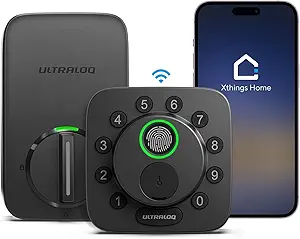 | Best for Matter-Ready Google Homes | Connectivity: 2.4 GHz Wi-Fi and Matter over Thread | Fingerprint storage: Up to 50 fingerprints | Passcode storage: Up to 50 passcodes | VIEW ON AMAZON | See Our Full Breakdown |
| Philips Wi-Fi Smart Deadbolt Lock, Keyless Entry Door Lock |  | Best for Google Assistant Access and Alerts | Connectivity: 2.4 GHz Wi-Fi | Voice assistants: Alexa and Google Assistant | Unlock methods: App, passcode, fingerprint, physical key and voice commands | VIEW ON AMAZON | See Our Full Breakdown |
| Philips WiFi Keypad Door Lock with Handle, App Control Smart Deadbolt Lock |  | Best for Shared Access | Connectivity: Built-in Wi-Fi | Voice assistants: Alexa and Google Assistant | Unlock methods: Key, passcode, mobile app and voice | VIEW ON AMAZON | See Our Full Breakdown |
| Google Nest x Yale Lock – Tamper-Proof Smart Lock for Keyless Entry – Satin Nickel |  | Best for Existing Google Nest Homes | Type: Smart keyless deadbolt | Finish: Satin nickel | Entry methods: Keypad and smartphone | VIEW ON AMAZON | See Our Full Breakdown |
| Philips Wi-Fi Smart Lock for Front Door, Fingerprint Keyless Entry Door Lock, Electronic Keypad Deadbolt |  | Best for Fingerprint Sharing | Google Home compatibility: Google Assistant voice control | Wi-Fi: 2.4GHz; no hub or bridge required | Unlock methods: Fingerprint, PIN code, app, voice, physical key | VIEW ON AMAZON | See Our Full Breakdown |
| Philips WiFi Keypad Deadbolt with Handle, Built-in WiFi, App Remote Control |  | Best Handle-Set Upgrade | Google Home compatibility: Google Assistant | Wi-Fi: 2.4GHz; no hub needed | Access methods: Keypad, fingerprint, app, voice | VIEW ON AMAZON | See Our Full Breakdown |
| Philips WiFi Smart Keypad Deadbolt Lock, App Remote Control, No Hub Needed |  | Best for Tactile Keypad Access | Google Home compatibility: Google Assistant voice control | Wi-Fi: Built-in; no hub needed | Unlock methods: Passcode, physical key, app, voice | VIEW ON AMAZON | See Our Full Breakdown |
| Tapo Smart Wi-Fi Deadbolt Door Lock, Keyless Tactile Buttons, DL100 |  | Best for Long Battery Runtime | Google Home compatibility: Yes; voice unlocking uses PIN verification | Other smart-home compatibility: Alexa and Samsung SmartThings | Access methods: Keypad, Bluetooth, Wi-Fi app, voice, two backup keys | VIEW ON AMAZON | See Our Full Breakdown |
| Veise VE012W WiFi Fingerprint Smart Lock for Front Door, Satin Nickel |  | Best for Fast Fingerprint Entry | Google Home compatibility: Google Assistant voice control | Wi-Fi: Built-in 2.4GHz; no hub required | Access methods: App, fingerprint, codes, two physical keys, voice | VIEW ON AMAZON | See Our Full Breakdown |
| Veise VE027-K WiFi Smart Deadbolt Locks with 2 Knobs Set, Matte Black |  | Best for Fingerprint and Access Flexibility | Connectivity: Built-in 2.4GHz Wi-Fi | Google Home compatibility: Google Assistant voice control | Entry methods: App, fingerprint, IC card, PIN code, key, voice, authorization, and code sharing | VIEW ON AMAZON | See Our Full Breakdown |
| Philips Wi-Fi Smart Deadbolt Lock, Keyless Entry Door Locks for Front Door |  | Best for Remote Guest Access | Connectivity: Built-in Wi-Fi | Google Home compatibility: Google Assistant voice control | Entry methods: Fingerprint, passcode, key, voice, and remote app | VIEW ON AMAZON | See Our Full Breakdown |
| Philips Wi-Fi Smart Door Lock, Fingerprint Door Lock |  | Best for Straightforward Daily Entry | Connectivity: Built-in Wi-Fi | Google Home compatibility: Google Assistant voice control | Entry methods: App, fingerprint, PIN code, voice, and physical key | VIEW ON AMAZON | See Our Full Breakdown |
| Yale Keyed Deadbolt Smart Lock with Google Matter, Matte Black |  | Best for Google Home Integration | Smart-home protocol: Matter over Thread | Google Home compatibility: Google Home app and compatible Google hubs | Remote access requirement: Matter-enabled hub | VIEW ON AMAZON | See Our Full Breakdown |
| Schlage Encode Smart WiFi Deadbolt Lock with Century Trim, Matte Black |  | Best for Security-First Buyers | Connectivity: Built-in Wi-Fi | Google Home compatibility: Google Home voice control | Entry methods: Touchscreen code, app, voice, and physical key | VIEW ON AMAZON | See Our Full Breakdown |
| smart lock compatible with google home | Google Home compatibility | Connectivity |
|---|---|---|
| eufy Security Smart Lock C220 | — | Built-in Wi-Fi; no bridge required |
| ULTRALOQ Bolt SE Wi-Fi Smart L | — | 2.4 GHz Wi-Fi and Matter over Thread |
| Philips Wi-Fi Smart Deadbolt L | — | 2.4 GHz Wi-Fi |
| Philips WiFi Keypad Door Lock | — | Built-in Wi-Fi |
| Google Nest x Yale Lock | — | — |
| Philips Wi-Fi Smart Lock for F | Google Assistant voice control | — |
| Philips WiFi Keypad Deadbolt w | Google Assistant | — |
| Philips WiFi Smart Keypad Dead | Google Assistant voice control | — |
| Tapo Smart Wi-Fi Deadbolt Door | Yes; voice unlocking uses PIN verification | — |
| Veise VE012W WiFi Fingerprint | Google Assistant voice control | — |
| Veise VE027-K WiFi Smart Deadb | Google Assistant voice control | Built-in 2.4GHz Wi-Fi |
| Philips Wi-Fi Smart Deadbolt L | Google Assistant voice control | Built-in Wi-Fi |
| Philips Wi-Fi Smart Door Lock | Google Assistant voice control | Built-in Wi-Fi |
| Yale Keyed Deadbolt Smart Lock | Google Home app and compatible Google hubs | — |
| Schlage Encode Smart WiFi Dead | Google Home voice control | Built-in Wi-Fi |
More Details on Our Top Picks
eufy Security Smart Lock C220, Fingerprint Keyless Entry Door Lock
I rank the eufy Security Smart Lock C220 first for Google Home households that want several ways to get inside without adding a separate bridge. Built-in Wi-Fi supports remote control, while fingerprint, keypad, app, voice and physical-key entry give household members practical alternatives. Compared with the ULTRALOQ Bolt SE, it skips Matter over Thread and its hub requirement for remote access; compared with the Philips Wi-Fi Smart Deadbolt, it adds a stated battery-life estimate and a self-learning fingerprint feature. The tradeoffs are worth noting: fingerprint recognition may take time to adapt, and eight AA batteries need replacing about every eight months. I’d also check the deadbolt dimensions before ordering, since compatibility is limited to standard setups.
Pros:- Supports voice control through Google Assistant alongside app, keypad, fingerprint and physical-key entry
- Built-in Wi-Fi allows remote control without a separate bridge
- Fingerprint access gives residents a quick alternative to remembering a code
- Weather-resistant design and stated durability over 100,000 lock cycles
Cons:- Eight AA batteries are expected to last about eight months before replacement
- Self-learning fingerprint recognition may need time to improve
- Requires a compatible standard deadbolt installation
Best for: Households seeking Google Assistant voice control, built-in Wi-Fi and multiple convenient entry methods without a separate bridge
Not ideal for: Buyers whose doors do not fit standard deadbolt dimensions or who want a lock with a longer stated battery interval
- Unlock methods:Fingerprint, app, keypad, voice and physical key
- Voice assistants:Alexa and Google
- Connectivity:Built-in Wi-Fi; no bridge required
- Battery setup:Eight AA batteries
- Battery life:About 8 months
- Fingerprint feature:Self-learning recognition
- Door compatibility:Most standard deadbolts; bore under 54 mm
- Durability:BHMA Grade 3; over 100,000 lock cycles
Our verdict“I’d choose the C220 for Google Home users who want versatile entry and direct Wi-Fi control, provided their door fits its standard-deadbolt requirements.”
ULTRALOQ Bolt SE Wi-Fi Smart Lock with Matter over Thread
I’d pick the ULTRALOQ Bolt SE for a Google Home setup built around Matter and Thread, especially if fewer battery changes matter more than the simplest setup. Its support for Matter over Thread gives it a broader smart-home role than the eufy C220, which relies on built-in Wi-Fi and its own ecosystem. The Bolt SE also stores up to 50 fingerprints and 50 passcodes, making it a stronger fit for a busy household or managed access. Its stated battery life of up to 18 months is the standout practical advantage. The catch is that remote access requires a compatible Matter over Thread hub, so it is not as self-contained as the C220. It also uses 2.4 GHz Wi-Fi and does not include a door sensor.
Pros:- Matter over Thread support fits a compatible Google Home smart-home setup
- Stores up to 50 fingerprints and 50 passcodes
- Stated battery life of up to 18 months reduces battery-change frequency
- IP65 weather resistance and customizable auto-lock timer
Cons:- Remote access requires a compatible Matter over Thread hub
- Wi-Fi is limited to the 2.4 GHz band
- Door sensor is not included
Best for: Google Home users already equipped with a compatible Matter over Thread hub who need many stored fingerprints or passcodes
Not ideal for: Shoppers wanting out-of-the-box remote access without checking hub compatibility, or those who need a door-open sensor
- Connectivity:2.4 GHz Wi-Fi and Matter over Thread
- Fingerprint storage:Up to 50 fingerprints
- Passcode storage:Up to 50 passcodes
- Battery life:Up to 18 months
- Material:Zinc alloy
- Weather resistance:IP65 waterproof
- Auto-lock:Yes; customizable timer
- Included components:Two emergency keys, installation kit and user guide
Our verdict“I’d choose the Bolt SE for a Matter-equipped Google Home and a large household, but not if you want remote access without checking for a compatible hub.”
Philips Wi-Fi Smart Deadbolt Lock, Keyless Entry Door Lock
I’d shortlist this Philips Wi-Fi Smart Deadbolt for buyers who want Google Assistant compatibility paired with app-based access codes and real-time notifications. Its fingerprint reader adds a convenient entry route that the Philips WiFi Keypad Door Lock with Handle does not list, while the standard deadbolt form keeps the installation focused on replacing the lock rather than changing the whole handle set. Remote access runs over 2.4 GHz Wi-Fi, with a stated range of 65 feet. That figure and the Wi-Fi band are worth checking against your home setup. Unlike the eufy C220, the supplied details do not give a battery-life estimate, and this lock has no door sensor, so notifications do not tell you whether the door itself is open or closed.
Pros:- Supports Google Assistant alongside Alexa
- Offers fingerprint, passcode, app and physical-key entry
- App remote control and real-time notifications help track lock activity
- Fits supported door thicknesses from 1-3/8 to 2 inches
Cons:- AA alkaline batteries are not included
- No door sensor for open-or-closed status
- Supports only 2.4 GHz Wi-Fi
Best for: Google Assistant users who want fingerprint entry, custom codes and app notifications in a standard-deadbolt replacement
Not ideal for: People who need a door-open sensor, use a Wi-Fi network without 2.4 GHz, or prefer a lock with a published battery-life estimate
- Connectivity:2.4 GHz Wi-Fi
- Voice assistants:Alexa and Google Assistant
- Unlock methods:App, passcode, fingerprint, physical key and voice commands
- Battery type:AA alkaline (LR6)
- Supported door thickness:1-3/8 to 2 inches (38 to 50 mm)
- Remote control range:65 ft
- App features:Customizable access codes and real-time notifications
Our verdict“I’d choose this Philips deadbolt for Google Assistant access plus fingerprint and notification features, but look elsewhere if door-status sensing is a priority.”
Philips WiFi Keypad Door Lock with Handle, App Control Smart Deadbolt Lock
I see the Philips WiFi Keypad Door Lock with Handle as the better pick for households that regularly issue codes to guests, cleaners or tenants. It stores up to 100 user PIN codes and supports permanent, one-time and timed passwords, giving it more explicit access-management detail than the standard Philips Wi-Fi Smart Deadbolt. Built-in Wi-Fi enables remote app control, and Google Assistant voice commands are supported when paired with the assistant. Physical buttons may also suit people who prefer them to a touchscreen. Its handle-and-deadbolt format is a different installation choice from the eufy C220, so confirm the door layout before buying. Battery expectations are less clear: the listing says up to six months with frequent daily use, while also referring to nine months.
Pros:- Supports Google Assistant and remote app control over built-in Wi-Fi
- Stores up to 100 PIN codes with permanent, one-time and timed options
- Physical keypad buttons offer an alternative to touchscreen controls
- Customizable auto-lock timer can be set from 10 to 180 seconds
Cons:- Eight AA batteries are not included, and the listing gives differing battery-life figures
- Handle-and-deadbolt format may not suit doors set up for a deadbolt-only replacement
- No door sensor is listed for reporting whether the door is physically open
Best for: Families, hosts and property managers who need many timed or one-time codes and want a handle with the deadbolt
Not ideal for: Buyers replacing only a deadbolt, households that need a clearly stated battery interval, or doors outside the listed dimensions
- Connectivity:Built-in Wi-Fi
- Voice assistants:Alexa and Google Assistant
- Unlock methods:Key, passcode, mobile app and voice
- PIN code capacity:Up to 100 user PIN codes
- Password modes:Permanent, one-time and timed
- Auto-lock timer:10 to 180 seconds
- Battery setup:Eight AA batteries; listing cites up to 6 months with 20–30 uses daily and also mentions 9 months
- Door fit:Door thickness 1-3/8 to 2 inches; cross bore 1-1/2 or 2-1/8 inches
Our verdict“I’d choose this Philips set for shared households that need flexible guest codes and a handle, after confirming door fit and battery expectations.”
Google Nest x Yale Lock – Tamper-Proof Smart Lock for Keyless Entry – Satin Nickel
I’d place the Google Nest x Yale Lock on the list for buyers who already organize their smart home around Google Nest and want a keypad-first deadbolt. Its satin-nickel finish, customizable passcodes, remote access and auto-lock cover the core daily needs without relying on a traditional key for routine entry. The Google Nest name gives it a natural ecosystem fit, but the supplied product details are less specific about direct Google Home controls than the Philips models, which explicitly list Google Assistant, or the eufy C220. I would check the current Nest and Google Home integration details before buying if voice commands are a deciding factor. The available information also leaves battery duration, door measurements and installation demands fairly open, so this is less straightforward to evaluate than the other picks.
Pros:- Keypad and smartphone entry support keyless daily access
- Remote access and customizable passcodes support managing entry
- Auto-lock can reduce the chance of leaving the deadbolt unlocked
- Privacy mode and tamper alerts add listed security controls
Cons:- Provided product details do not specify direct Google Home voice-control functions
- Door measurements need checking, and installation may require professional help
- Battery duration and replacement interval are not specified
Best for: Google Nest households that want keypad entry, remote access and customizable codes in a keyless deadbolt
Not ideal for: Buyers who require clearly documented Google Assistant voice control, detailed fit specifications or a stated battery-life estimate
- Type:Smart keyless deadbolt
- Finish:Satin nickel
- Entry methods:Keypad and smartphone
- Remote access:Yes
- Passcodes:Customizable
- Auto-lock:Yes
- Additional features:Privacy mode and tamper alerts
Our verdict“I’d choose the Nest x Yale for an existing Google Nest home that values keypad entry, but verify Google Home controls and door fit before committing.”
Philips Wi-Fi Smart Lock for Front Door, Fingerprint Keyless Entry Door Lock, Electronic Keypad Deadbolt
The Philips Wi-Fi Smart Lock pairs Google Assistant voice control with five entry methods, making it a flexible fit for a household where not everyone wants to use the same one. Its reader sits high on the panel for a natural reach, and it stores up to 50 fingerprints; the app also supports 100 passcodes, including temporary and recurring options. Direct 2.4GHz Wi-Fi means remote access without a separate hub, unlike locks that need an extra bridge. Compared with the Philips DL100, this model adds fingerprint entry but lacks the stated BHMA Grade 3 certification and included batteries. It suits busy family access, though the eight AA batteries are sold separately, and the many access settings may be more than a simple keypad user needs.
Pros:- Works with Google Assistant and connects to 2.4GHz Wi-Fi without a hub.
- Stores up to 50 fingerprints and supports five entry methods.
- Offers up to 100 passcodes, including temporary, recurring, and date-range codes.
- Fits doors from 1-3/8 to 2 inches thick and supports left- or right-handed doors.
Cons:- Requires eight AA alkaline batteries, sold separately.
- The product details do not state a battery-life estimate or a security grade.
Best for: Families who want individual fingerprint access for household members plus temporary passcodes for visitors, with remote control and Google Assistant compatibility.
Not ideal for: Buyers who want batteries included or prefer a simpler keypad-only setup; this lock requires eight separately purchased AA alkaline batteries and offers several access methods to manage.
- Google Home compatibility:Google Assistant voice control
- Wi-Fi:2.4GHz; no hub or bridge required
- Unlock methods:Fingerprint, PIN code, app, voice, physical key
- Fingerprint capacity:Up to 50 fingerprints
- Passcode capacity:Up to 100 passcodes
- Auto-lock:Adjustable from 10 to 180 seconds
- Door thickness:1-3/8 to 2 inches
- Power:Eight 1.5V AA alkaline batteries; not included
Our verdict“Choose this Philips if fingerprint access for a large household matters more than included batteries or a simpler feature set.”
Philips WiFi Keypad Deadbolt with Handle, Built-in WiFi, App Remote Control
The Philips WiFi Keypad Deadbolt with Handle is the lineup’s practical pick for replacing both the deadbolt and handle in one installation. It connects to Wi-Fi directly, supports Google Assistant, and combines keypad, fingerprint, and app access, so the household can use the method that suits each person. The included handle set is its clearest advantage over the Philips Wi-Fi Smart Lock, which is presented as a deadbolt replacement without a handle set. The tradeoff is fit: this model is specified for doors 1-3/8 to 1-3/4 inches thick and is designed primarily for right-opening doors, a narrower fit than the other Philips model’s stated range and handing. Its auto-lock also needs to be activated in the app, and batteries are not included.
Pros:- Includes a handle set, useful when replacing more than the deadbolt.
- Built-in Wi-Fi enables remote app access without a separate hub.
- Supports keypad, fingerprint, app, and voice access.
- Lists a 0.3-second fingerprint recognition speed and up to six months of battery life.
Cons:- Designed primarily for right-opening doors, limiting fit for some entrances.
- Batteries are not included.
- Auto-lock requires manual activation in the app.
Best for: Homeowners replacing a compatible deadbolt and handle together who want Google Assistant access, fingerprint entry, and app-based remote management.
Not ideal for: Owners of left-opening doors or doors thicker than 1-3/4 inches, and buyers who want auto-lock enabled without app setup.
- Google Home compatibility:Google Assistant
- Wi-Fi:2.4GHz; no hub needed
- Access methods:Keypad, fingerprint, app, voice
- Handle set:Included
- Auto-lock:Customizable from 0 to 180 seconds
- Battery life:Up to 6 months
- Battery type:1.5V alkaline batteries; not included
- Door thickness:1-3/8 to 1-3/4 inches
- Fingerprint speed:0.3 seconds
Our verdict“Pick this Philips when you need a matching handle set and your door’s handing and thickness fit its more limited specifications.”
Philips WiFi Smart Keypad Deadbolt Lock, App Remote Control, No Hub Needed
This Philips WiFi Smart Keypad Deadbolt favors a straightforward button keypad over fingerprint hardware or a touchscreen. That can be a better match for homes where several people share entry, especially with up to 100 custom passwords and options for permanent, one-time, and timed access. Google Assistant compatibility and built-in Wi-Fi add voice and remote app control without a hub. Against the fingerprint-equipped Philips Wi-Fi Smart Lock, this one gives up biometric entry but keeps access centered on passcodes, keys, and the app. The product listing also cites an IP54 rating and operation across a wide temperature range, giving it useful weather resistance. The tradeoffs are eight AA batteries that are not included and no stated fingerprint option or BHMA grade.
Pros:- Physical keypad buttons provide tactile entry without a touchscreen.
- Supports Google Assistant and direct Wi-Fi app control with no hub.
- Allows up to 100 passwords with permanent, one-time, and timed modes.
- Lists IP54 protection and operation from -31°F to 150°F.
Cons:- Requires eight AA batteries, sold separately.
- Does not list fingerprint entry.
- The provided product data does not state a BHMA grade or door-thickness range.
Best for: Households, landlords, and hosts who prefer physical keypad buttons and need distinct timed or one-time codes for visitors.
Not ideal for: Buyers who want fingerprint entry, included batteries, or a stated BHMA security grade.
- Google Home compatibility:Google Assistant voice control
- Wi-Fi:Built-in; no hub needed
- Unlock methods:Passcode, physical key, app, voice
- Password capacity:Up to 100 custom passwords
- Password types:Permanent, one-time, and timed
- Auto-lock:Adjustable from 10 to 180 seconds
- Operating temperature:-31°F to 150°F
- Power:Eight AA batteries; not included
Our verdict“Choose this model if you want Google-connected remote control and flexible guest codes on a tactile keypad, not biometric access.”
Tapo Smart Wi-Fi Deadbolt Door Lock, Keyless Tactile Buttons, DL100
The Tapo DL100 stands apart from the Philips keypad options with a clear battery advantage: its four included AA batteries are rated for up to 200 days in Wi-Fi mode or 300 days in Bluetooth mode. It also works with Google Home, Alexa, and SmartThings, making it a flexible choice for a mixed smart-home setup. The tactile keypad supports up to 200 codes, while app alerts and timestamped activity logs help track access. For added safeguards, it has PIN-attempt limits, auto-lock, and two backup keys. Compared with the Philips keypad deadbolt, Tapo adds a stated BHMA Grade 3 rating and included batteries, but its listed code capacity is not as high as the Philips models’ 100-code maximum. Voice unlocking uses PIN verification, so it is not a hands-free bypass.
Pros:- Compatible with Google Home, Alexa, and Samsung SmartThings.
- Includes four AA batteries, with stated runtime up to 200 days on Wi-Fi.
- Supports up to 200 codes, plus access groups and timestamped activity logs.
- Lists BHMA Grade 3 certification, IP54 weather resistance, and two backup keys.
Cons:- Voice unlocking requires PIN verification, adding a step to voice access.
- Does not list fingerprint entry or an included handle set.
- Battery life is shorter in Wi-Fi mode than the listed Bluetooth runtime.
Best for: Google Home users who want included batteries, a large code capacity, activity records, and a lock that also fits Alexa or SmartThings households.
Not ideal for: Buyers who expect voice commands to unlock without PIN verification, or who need a handle set or fingerprint reader.
- Google Home compatibility:Yes; voice unlocking uses PIN verification
- Other smart-home compatibility:Alexa and Samsung SmartThings
- Access methods:Keypad, Bluetooth, Wi-Fi app, voice, two backup keys
- Code capacity:Up to 200 customizable codes
- Battery life:Up to 200 days in Wi-Fi mode; up to 300 days in Bluetooth mode
- Batteries:Four AA batteries included
- Security and weather:BHMA Grade 3; IP54
- Door hole sizes:2-1/8 inches and 1-1/2 inches
- Dimensions:Exterior: 5.88 x 2.65 x 2.2 inches; interior: 10.51 x 2.84 x 1.81 inches
Our verdict“The Tapo DL100 is a strong fit for Google Home households that value battery life, broad ecosystem support, and detailed access management over fingerprint entry.”
Veise VE012W WiFi Fingerprint Smart Lock for Front Door, Satin Nickel
The Veise VE012W is the speed-focused fingerprint pick here: its listing gives a 0.2-second recognition time and says the sensor’s AI chip learns over time. It connects directly to 2.4GHz Wi-Fi and supports Google Assistant, while the app handles remote locking, status checks, alerts, and access codes. That makes it more access-flexible than the tactile-only Tapo DL100, but Tapo has the advantage of included batteries and a stated 200-day Wi-Fi runtime. Veise lists a BHMA/ANSI Grade 3 test, IP55 water resistance, and AES-128 local data encryption. The tradeoff is power: eight AA batteries are not included, and the claimed longer battery life lacks a specific runtime figure in the supplied details.
Pros:- Lists fingerprint recognition in 0.2 seconds and storage for 20 fingerprints.
- Works with Google Assistant and built-in 2.4GHz Wi-Fi without a hub.
- Supports permanent, recurring, time-limited, and one-time codes.
- Lists BHMA/ANSI Grade 3 testing, IP55 water resistance, and AES-128 local encryption.
Cons:- Eight AA alkaline batteries are not included.
- The battery-life claim does not provide a specific number of days or months.
- Its 20-fingerprint capacity is lower than the Philips Wi-Fi Smart Lock’s 50.
Best for: Households that want quick fingerprint entry alongside Google Assistant, remote app management, and several types of guest codes.
Not ideal for: Buyers who want batteries in the box or a clearly stated battery-runtime estimate; the lock needs eight AA batteries and its description gives no specific duration.
- Google Home compatibility:Google Assistant voice control
- Wi-Fi:Built-in 2.4GHz; no hub required
- Access methods:App, fingerprint, codes, two physical keys, voice
- Fingerprint capacity:20 fingerprints
- Fingerprint recognition:0.2 seconds
- Code options:Up to 100 custom PINs, plus one-time, recurring, and time-limited codes
- Security and weather:BHMA/ANSI Grade 3 test; IP55
- Power:Eight AA/LR6 alkaline batteries; not included
- Door thickness:1-3/8 to 2 inches
Our verdict“Choose the Veise VE012W for fast fingerprint access and robust app-based monitoring, provided you are comfortable supplying batteries yourself.”
Veise VE027-K WiFi Smart Deadbolt Locks with 2 Knobs Set, Matte Black
I’d pick the Veise VE027-K for a busy household that wants Google Assistant control alongside several fast ways to enter. Its built-in 2.4GHz Wi-Fi supports remote app access without a hub, while the 0.2-second fingerprint reader, cards, keys, and passcodes give family members options that don’t depend on voice commands. Compared with the Philips Wi-Fi Smart Deadbolt, Veise lists fingerprint storage for up to 20 people and more detailed temporary-code controls, including expiring and one-time access. The tradeoff is a more feature-dense setup, plus eight AA batteries are not included. Its Grade 3 rating is also below the Schlage Encode’s stated top residential BHMA security certification. I’d choose Veise for flexible entry, not for the strongest published security credential.
Pros:- Built-in 2.4GHz Wi-Fi enables remote app access without a separate hub
- Fingerprint, IC card, PIN, key, app, and voice entry give households multiple options
- Supports up to 20 fingerprints and 100 custom passcodes
- IP65 weather resistance and an ANSI/BHMA Grade 3 rating are specified
Cons:- Requires eight AA batteries, which are not included
- Its Grade 3 certification is below the Schlage Encode’s stated top residential BHMA security certification
- Its extensive access features may be more setup than buyers wanting a simple keypad lock need
Best for: Households that want fingerprint entry, temporary guest codes, and Google Assistant voice control without adding a Wi-Fi hub
Not ideal for: Buyers prioritizing the highest stated residential security certification or a lock with batteries included
- Connectivity:Built-in 2.4GHz Wi-Fi
- Google Home compatibility:Google Assistant voice control
- Entry methods:App, fingerprint, IC card, PIN code, key, voice, authorization, and code sharing
- Fingerprint capacity:Up to 20 fingerprints
- Passcode capacity:Up to 100 custom passcodes
- Auto-lock:Adjustable from 10 to 180 seconds
- Power:Eight AA batteries, not included
- Weather resistance and grade:IP65; ANSI/BHMA Grade 3
Our verdict“I’d choose the Veise for a high-traffic home that values fingerprint access and flexible Google Assistant-compatible entry methods over a higher stated security grade.”
Philips Wi-Fi Smart Deadbolt Lock, Keyless Entry Door Locks for Front Door
The Philips Wi-Fi Smart Deadbolt suits people who regularly need to grant and revoke access from away from home. I like its combination of built-in Wi-Fi and remote user management: you can check lock status, review access history, and share scheduled or one-time codes without a separate hub. Google Assistant voice control and fingerprint entry round out daily use, while the 100-code capacity gives it an advantage for a household with several relatives or recurring visitors. The Philips Wi-Fi Smart Door Lock offers a simpler five-method access lineup, whereas this model emphasizes guest-code management. The tradeoff is that the listing gives no fingerprint capacity, battery-life figure, or stated security grade, making it harder to compare long-term upkeep and physical security with the Schlage Encode.
Pros:- Built-in Wi-Fi supports remote control and monitoring without a separate hub
- Creates up to 100 passcodes and supports scheduled and one-time codes
- Offers fingerprint, passcode, key, app, and voice entry
- Access alerts and history help track arrivals while away
Cons:- The product information does not state fingerprint capacity or battery-life duration
- No security-grade certification is specified in the supplied product details
Best for: Hosts, landlords, and families who need to issue temporary or scheduled codes remotely and use Google Assistant
Not ideal for: Buyers who need a published fingerprint capacity, battery-life estimate, or security-grade certification before choosing
- Connectivity:Built-in Wi-Fi
- Google Home compatibility:Google Assistant voice control
- Entry methods:Fingerprint, passcode, key, voice, and remote app
- Passcode capacity:Up to 100 custom passcodes
- Guest codes:Unlimited one-time or scheduled codes
- Fingerprint recognition:0.3 seconds
- Security alerts:Anti-tamper alarm and low-battery alert
- Backup entry:Physical emergency key
Our verdict“I’d choose this Philips for remote management of household and guest access, but I’d favor a lock with published durability details if those are a priority.”
Philips Wi-Fi Smart Door Lock, Fingerprint Door Lock
I’d put this Philips on the shortlist for someone who wants the common entry options without the more extensive feature list of the Veise VE027-K. It offers five access methods—app, fingerprint, PIN, voice, and physical key—with built-in Wi-Fi for remote control and Google Assistant compatibility. The PIN setup covers permanent, one-time, scheduled, and recurring access, so a household can handle guests without relying on the lock’s fingerprint reader. Its 30-to-180-second auto-lock range is more clearly specified than the auto-lock details provided for many locks, though the Veise allows a shorter minimum delay. Compared with the Philips Wi-Fi Smart Deadbolt, this model has a longer stated warranty and includes eight batteries. The tradeoff: it lists no fingerprint-user capacity, and voice control depends on compatible smart-home setup.
Pros:- Built-in Wi-Fi supports remote app access without an additional hub
- Includes eight batteries and a stated 24-month warranty
- PIN codes can be permanent, one-time, scheduled, or recurring
- Auto-lock can be set from 30 to 180 seconds
Cons:- No fingerprint storage capacity is specified in the product information
- The minimum auto-lock delay is longer than the Veise VE027-K’s 10-second setting
Best for: Households seeking app, PIN, fingerprint, key, and Google Assistant entry with scheduled codes and included batteries
Not ideal for: Buyers who want a stated fingerprint capacity, or who need an auto-lock delay shorter than 30 seconds
- Connectivity:Built-in Wi-Fi
- Google Home compatibility:Google Assistant voice control
- Entry methods:App, fingerprint, PIN code, voice, and physical key
- Fingerprint recognition:0.3 seconds
- PIN code types:Permanent, one-time, scheduled, and recurring
- Auto-lock:Adjustable from 30 to 180 seconds
- Included batteries:Eight
- Warranty:24 months
Our verdict“I’d choose this Philips for households wanting a clearly defined set of everyday entry methods, scheduled PINs, and batteries included.”
Yale Keyed Deadbolt Smart Lock with Google Matter, Matte Black
For a buyer building around Google Home, I’d give this Yale the clearest ecosystem-focused role. Matter over Thread connects it to compatible Google Home hubs, and access management through the Google Home app keeps codes and activity in the same place as other connected devices. The important limitation is easy to miss: remote access requires a Matter-enabled hub, so this is not the same plug-and-play remote Wi-Fi approach as the Schlage Encode or the Philips built-in-Wi-Fi locks. Yale’s keypad and physical key provide dependable alternatives to voice control, and its ANSI/BHMA Grade 2 rating offers a stated security benchmark. I’d choose it for an existing Matter setup, but skip it if you don’t want to add or rely on a compatible hub.
Pros:- Designed for Google Home control through Matter
- Matter over Thread is specified as an energy-efficient connection
- Supports custom entry codes, app control, and a physical key
- ANSI/BHMA Grade 2 certification is stated
Cons:- Remote access requires a Matter-enabled hub
- No fingerprint entry or built-in Wi-Fi is listed
- Compatibility is limited to 2.4GHz networks and the U.S. and Canada
Best for: Google Home households with a compatible Matter-enabled hub that want app-managed entry codes and Thread connectivity
Not ideal for: Shoppers who want remote control without a compatible hub, or who need a fingerprint reader or built-in Wi-Fi
- Smart-home protocol:Matter over Thread
- Google Home compatibility:Google Home app and compatible Google hubs
- Remote access requirement:Matter-enabled hub
- Entry methods:App, custom entry code, and physical key
- Security grade:ANSI/BHMA Grade 2
- Network band:2.4GHz
- Supported regions:United States and Canada
- Door fit:Fits most U.S. and Canadian entry doors; adapter included for 1½-inch bore holes
Our verdict“I’d choose the Yale when Google Home and Matter are the priority and a compatible hub is already part of the home setup.”
Schlage Encode Smart WiFi Deadbolt Lock with Century Trim, Matte Black
I’d steer security-minded buyers toward the Schlage Encode when they want Google Home compatibility alongside a strong set of stated physical-security credentials. It connects directly to home Wi-Fi for remote app control, so, unlike the Yale Matter lock, it does not require a separate smart-home hub for that access. The built-in alarm can alert you to door movement or forced-entry attempts, and the lock supports up to 100 codes with activity history and customizable notifications. Schlage also cites its highest residential BHMA security, durability, and finish rating, a distinction the Veise VE027-K does not match with its Grade 3 rating. The tradeoff is no fingerprint reader, and typical battery life is listed as up to six months. I’d choose this for security features over biometric convenience.
Pros:- Built-in Wi-Fi supports remote access without an additional hub
- Works with Google Home and supports up to 100 access codes
- Built-in customizable alarm can detect door movement and forced-entry attempts
- Cites the highest residential BHMA security, durability, and finish rating
Cons:- Does not offer fingerprint entry
- Typical battery life is listed as up to six months
- Fits doors 1⅜ to 1¾ inches thick, a narrower stated range than the Veise VE027-K
Best for: Homeowners who want remote Google Home-compatible control, a built-in alarm, and a stated high residential BHMA certification
Not ideal for: Buyers who prefer fingerprint entry, longer stated battery life, or a lock that avoids periodic battery changes
- Connectivity:Built-in Wi-Fi
- Google Home compatibility:Google Home voice control
- Entry methods:Touchscreen code, app, voice, and physical key
- Access-code capacity:Up to 100 codes
- Security certification:Highest residential BHMA security, durability, and finish rating stated
- Alarm:Customizable door-movement and forced-entry alarm
- Power:Four AA batteries included; up to six months of typical use
- Door fit:Door thickness 1⅜ to 1¾ inches; 2⅜- or 2¾-inch backset
Our verdict“I’d choose the Schlage Encode for a security-focused home that values remote Google Home control and an alarm more than fingerprint entry.”

How We Picked
I compared each lock on the factors that shape daily use: its stated Google Home connection path, entry methods, built-in Wi-Fi or Matter support, backup access, and the amount of extra smart-home hardware it may need. I also weighed door-hardware fit, installation complexity, and whether the product description makes the exact model and included components clear. These checks matter because a lock can support Google Home yet still differ in which commands or remote features work.
My ranking favors useful Google Home integration and dependable everyday access over a long feature list. Schlage Encode and Google-focused Yale options stand out for buyers who prioritize a familiar brand and clear ecosystem fit; the Tapo DL100 and simpler Philips keypad models suit shoppers who want a more straightforward feature mix. Fingerprint models earn a place for households that value quick entry, while Matter over Thread models make more sense for buyers who already have compatible infrastructure or want to build around Matter. I give less weight to overlapping variants when their names alone do not make differences or included hardware clear.
| smart lock compatible with google home | Google Home compatibility |
|---|---|
| eufy Security Smart Lock C220 | — |
| ULTRALOQ Bolt SE Wi-Fi Smart L | — |
| Philips Wi-Fi Smart Deadbolt L | — |
| Philips WiFi Keypad Door Lock | — |
| Google Nest x Yale Lock | — |
| Philips Wi-Fi Smart Lock for F | Google Assistant voice control |
| Philips WiFi Keypad Deadbolt w | Google Assistant |
| Philips WiFi Smart Keypad Dead | Google Assistant voice control |
| Tapo Smart Wi-Fi Deadbolt Door | Yes; voice unlocking uses PIN verification |
| Veise VE012W WiFi Fingerprint | Google Assistant voice control |
| Veise VE027-K WiFi Smart Deadb | Google Assistant voice control |
| Philips Wi-Fi Smart Deadbolt L | Google Assistant voice control |
| Philips Wi-Fi Smart Door Lock | Google Assistant voice control |
| Yale Keyed Deadbolt Smart Lock | Google Home app and compatible Google hubs |
| Schlage Encode Smart WiFi Dead | Google Home voice control |
Factors to Consider When Choosing Smart Lock Compatible With Google Home
Before choosing a lock, match its connection method and physical design to the Google Home setup and door you already have. Compatibility labels do not tell the whole story: account linking, hubs, network coverage, and supported controls can vary by model.
Check What Google Home Can Actually Control
Look beyond a general “works with Google” claim and check the exact controls offered for the model you plan to buy. Some integrations may show lock status or let you lock remotely, while unlocking by voice can be restricted or require an extra security step. Confirm whether setup runs through Google Home directly or through the lock maker’s app and account. If several household members need access, check how permissions and shared users are handled before installation. This avoids buying for a voice routine that the particular lock does not support.
Choose Wi-Fi or Matter With Your Existing Setup in Mind
Built-in Wi-Fi can make remote access simpler, but it relies on a stable signal near the door and may add another device to your wireless network. Matter over Thread can fit neatly into a Matter-based home, but it may depend on a compatible controller and Thread border router. Do not assume that owning a Google speaker means you have every required Matter component; check the device’s exact capabilities. If you want the least extra hardware, compare the full connection requirements rather than the protocol name. A lock that fits your current setup is often easier to maintain than one bought for a future system you have not built yet.
Match Entry Methods to the People Using the Door
Keypads work well when family members, guests, or service providers need separate codes, while fingerprint readers can speed up routine entry for people who do not want to enter a PIN. App access is useful for remote management but is a poor sole fallback if a phone is lost or unavailable. Think through who needs access, how often codes will change, and whether everyone can comfortably use the chosen method. A feature-rich lock can become a poor household fit if its main entry method does not suit its least tech-comfortable user. Choose a backup method that remains usable during a dead phone, network outage, or depleted lock battery.
Measure the Door and Check the Included Hardware
Smart locks are not universal replacements, even when the product name says deadbolt. Check door thickness, backset, bore-hole dimensions, handing requirements, and whether the existing deadbolt or handle needs to be replaced. Sets that include a handle can save a separate hardware search, but they may not match an existing finish or door preparation. For Philips and Veise models with similar names, confirm the exact model number and included pieces before ordering. A careful fit check can prevent installation delays and avoid paying for hardware you do not need.
Plan for Power, Connectivity, and a Backup
Every connected lock needs a plan for battery replacement and access when the network or smart-home service is unavailable. Check the manufacturer’s low-battery warnings and the lock’s stated emergency access options before relying on it as your only way inside. A physical key offers a familiar backup, while a keyless model may call for a spare code, another authorized user, or a documented recovery method. Wi-Fi signal at the front door also deserves a check; a strong connection elsewhere in the house does not prove coverage at the lock. Paying more for extra entry methods or clearer backup options can be worthwhile for a busy household, but only if those features solve a real access problem.
Frequently Asked Questions
Does a Google Home-compatible lock always support voice unlocking?
No. Compatibility can mean different levels of control, and some locks allow status checks or locking but restrict voice unlocking for security. Check the specific model’s Google Home feature list and whether an added PIN or confirmation is required. If voice access is a deciding factor, verify that exact command before buying rather than relying on a general compatibility badge. Keep a keypad, fingerprint, app, or physical-key route available as a separate way to enter.
Do I need a hub for a smart lock to work with Google Home?
It depends on the lock’s connection method. A Wi-Fi model may connect through your home network and the maker’s app, while a Matter over Thread lock can require a compatible Matter controller and Thread border router. Check the manufacturer’s current requirements for the exact model, since similarly named versions can use different radios. If you want to avoid extra hardware, favor a lock whose required components you already own or whose Wi-Fi setup is self-contained.
Should I choose a keyed lock or a keyless model?
A keyed model gives you a familiar mechanical fallback if batteries, phones, or connectivity become a problem. A keyless lock can reduce the need to carry a key and may offer keypad or fingerprint access, but you should plan alternate entry before removing the old hardware. Think about who uses the door and whether someone in the household may prefer a physical key. The lineup includes options such as Schlage Encode and Yale keyed models for shoppers who want that backup, alongside fingerprint and keypad choices for key-free routines.
Is a fingerprint lock a better choice than a keypad for a family?
It depends on the household’s habits, not just convenience claims. Fingerprint entry can be quick for regular users, but a keypad can be easier for visitors or people who do not want to enroll a print. A lock with both methods offers flexibility, though it may add setup and maintenance tasks. Compare how many people need access and how often temporary access is needed; for a household with guests or service providers, code management may matter more than fast personal entry.
Why are there so many similar Philips Wi-Fi smart locks in this roundup?
The Philips options cover overlapping combinations of Wi-Fi, keypad entry, fingerprints, and handle sets, so the brand name alone does not identify the right version. Compare the exact model listing, included hardware, entry methods, and Google Home connection details before choosing. A handle bundle may suit a door where both pieces need replacement, while a deadbolt-only model may be a closer match for a simple retrofit. If two listings appear nearly identical, confirm dimensions and installation requirements instead of assuming their features or contents are interchangeable.
Conclusion
For most shoppers who want a familiar keyed backup and built-in Wi-Fi, I’d start with Schlage Encode as my best overall pick. The Tapo DL100 is my best value choice for buyers who want a focused Wi-Fi keypad option, while the Yale Keyed Deadbolt with Google Matter is my premium pick for a home already set up around Matter. Newcomers who want a Google-centered experience can look first at the Google Nest x Yale Lock, checking its current setup requirements before purchase. For fingerprint-first entry, compare the eufy C220 with the Veise and Philips fingerprint models; for shoppers who prefer traditional keys, give keyed Yale and Schlage options priority. Choose by connection needs and fallback access first, then narrow the list by finish and entry style.