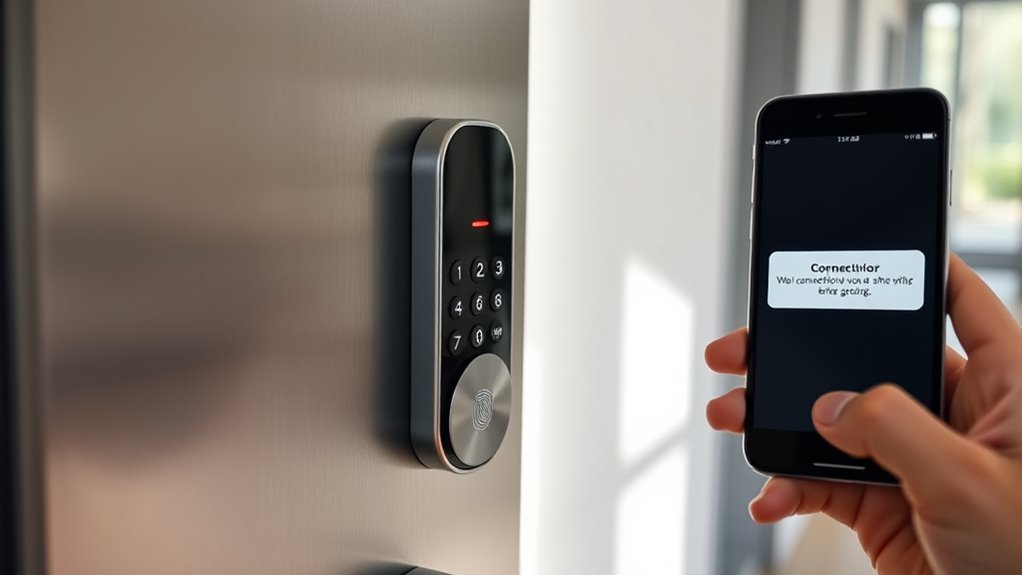

To handle smart lock connectivity issues, start by checking that your phone’s Bluetooth and Wi-Fi are working and within range. Restart your device and lock, unpair and re-pair the lock if needed, and make sure both firmware and app are up to date. Make certain your Wi-Fi signal is strong near the lock, and restart your router if connections drop. Regular maintenance and support resources can also help fix persistent problems—more tips await if you keep exploring.
Key Takeaways
- Check and maintain a strong Bluetooth and Wi-Fi connection, ensuring devices are within range and signals are stable.
- Regularly update lock firmware and app to fix bugs and improve compatibility.
- Restart devices or routers to resolve temporary connectivity glitches.
- Confirm power sources and conduct hardware maintenance to prevent malfunctions.
- Follow manufacturer troubleshooting guides or contact support for persistent issues.

Smart locks offer convenience, but connectivity problems can disrupt their functionality. When you rely on Bluetooth pairing to unlock your door, any interruption in the connection can leave you stranded outside or cause delays. To guarantee smooth operation, start by checking the Bluetooth connection between your phone and the lock. Sometimes, a simple restart of your device or the lock itself can resolve pairing issues. Make sure your phone’s Bluetooth is turned on and that it’s within the appropriate range, typically within 30 feet. If the lock isn’t responding, unpair the device and then go through the Bluetooth pairing process again, ensuring you follow the lock manufacturer’s instructions carefully. Also, keep your device’s software up to date, as updates often include bug fixes that improve Bluetooth functionality. Regular maintenance and updates can prevent many connectivity issues before they arise.
Check Bluetooth connection and keep devices within 30 feet for reliable smart lock access.
Wi Fi stability plays a critical role in how your smart lock communicates with your app or cloud services. If your lock is Wi Fi-enabled, a weak or unstable connection can prevent remote access or cause the lock to malfunction. Check your Wi Fi signal strength near the lock; if it’s weak, consider moving your router closer or using a Wi Fi extender to boost coverage. Confirm that your Wi Fi network is functioning properly by testing other connected devices—if they’re also experiencing issues, the problem likely lies with your network. Restart your router to clear any temporary glitches and guarantee you’re running the latest firmware. Many smart locks have a dedicated app that relies on a stable internet connection to send commands or update firmware. If you notice frequent disconnections or delays, disable other bandwidth-heavy devices on your network temporarily and see if that enhances stability. Additionally, keep in mind that appliances like smart locks may be affected by power consumption issues, so ensuring your device has a reliable power source is essential for consistent operation.
In addition to checking hardware connections, verify that the lock’s firmware and your app are both current. Manufacturers often release updates that fix bugs, improve connectivity, and enhance security. Regularly updating your lock’s firmware can prevent many common issues. If problems persist, consider resetting the lock to factory settings and reconfiguring it from scratch. This can clear corrupted settings that interfere with Bluetooth pairing or Wi Fi communication.
Finally, guarantee your device’s operating system and app are compatible with the lock. Compatibility issues can sometimes cause connectivity troubles, especially after major OS updates. If all else fails, consult the manufacturer’s troubleshooting guides or customer support for specific advice. Staying proactive about updates, maintaining your Wi Fi network, and ensuring proper Bluetooth pairing will greatly reduce the chances of connectivity issues disrupting your smart lock’s operation.

Hidalife Bluetooth Gateway for Smart Door Lock, WiFi Gateway for Smart Life, Tuya/SmartLife App to Remotely Control, Voice Control Compatible with Alexa & Google Assistant,Only Support 2.4G WiFi
- Reliable Connectivity: Stable Bluetooth and Mesh signals with long range
- Remote Control: Control door lock remotely via SmartLife App
- Access Sharing: Share access codes for various durations
As an affiliate, we earn on qualifying purchases.
As an affiliate, we earn on qualifying purchases.
Frequently Asked Questions
Can Smart Lock Connectivity Issues Affect Home Security?
Yes, smart lock connectivity issues can affect your home security. When your lock doesn’t connect properly, it might prevent you from locking or unlocking your door remotely, risking unauthorized access. This can compromise your digital security and user privacy. To stay protected, guarantee your smart lock maintains a strong connection and update its firmware regularly. Staying proactive helps safeguard your home and personal information from potential breaches.
How Often Should I Update My Smart Lock Firmware?
You should update your smart lock firmware as often as you breathe—at least once a month. Firmware updates are vital because they fix bugs, improve features, and most importantly, address security implications. Ignoring updates leaves your lock vulnerable to hacking and unauthorized access. Stay vigilant, keep your firmware current, and protect your home from digital threats. Regular updates ensure your smart lock remains a fortress of security and convenience.
Do Smart Lock Connectivity Problems Drain Battery Life?
Yes, connectivity problems can drain your smart lock’s battery. When the signal strength is weak or unstable, your lock repeatedly tries to reconnect, using more power and accelerating battery drain. To prevent this, make certain your lock is within a good range of your Wi-Fi or Bluetooth device, and check for any interference. Maintaining a strong, stable connection helps conserve battery life and keeps your smart lock functioning smoothly.
Is It Safe to Use a Backup Key During Connection Failures?
Yes, it’s safe to use a backup key during connection failures. Backup keys provide reliable emergency access options, ensuring you can release your smart lock if connectivity issues arise. Keep your backup key in a secure, known location to prevent unauthorized access. Regularly test it to confirm it works properly. Using your backup key responsibly guarantees safety and peace of mind when your smart lock faces connectivity problems.
Can Wi-Fi Interference Cause Smart Lock Connectivity Issues?
Ever wondered if Wi-Fi interference affects your smart lock? It definitely can, especially if it’s close to other wireless devices. Wi-Fi interference and signal interference can disrupt Bluetooth pairing, causing connectivity issues. Keep your smart lock away from microwaves, cordless phones, or other electronics that emit signals. Ensuring a clear, strong Wi-Fi signal and minimizing interference helps maintain a reliable connection, so you can access securely every time.

TP-Link AC1200 WiFi Extender – 1.2Gbps Home Signal Booster, Dual Band 5GHz/2.4GHz, Up to 1600 Sq.ft and 32 Devices, EasyMesh Compatible, One Ethernet Port (RE315)
- Enhanced Wi-Fi Coverage: Eliminates dead zones with strong signal
- Dual-Band Speed: Supports 867 Mbps on 5GHz and 300 Mbps on 2.4GHz
- Wide Coverage Area: Covers up to 1500 sq.ft with 2 antennas
As an affiliate, we earn on qualifying purchases.
As an affiliate, we earn on qualifying purchases.
Conclusion
Think of your smart lock as the lighthouse guiding your way home. When connectivity falters, it’s like the light flickering—a moment to check your signals and restore the flow. With patience and a few simple steps, you’ll reignite that beacon, ensuring your home remains secure and welcoming. Remember, every connection restored is a steady beam guiding you safely through the night, turning tech troubles into a bright symbol of your resilience and control.

Philips WiFi Keypad Door Lock with Handle, Built-in WiFi, APP Remote Control, Voice & Fingerprint Unlock, Smart Locks for Front Door with Auto Lock, Digital Front Door Lock Set, Keyless Entry Deadbolt
- WiFi Connectivity: Connects directly to 2.4GHz WiFi without hub
- Remote App Control: Manage lock remotely via Philips Home Access App
- Real-Time Access Monitoring: Check lock status and access history anytime
As an affiliate, we earn on qualifying purchases.
As an affiliate, we earn on qualifying purchases.

Fingerprint Door Lock, 4-in-1 GHome Smart Lock for Bedroom, Home, Apartment & Office, Smart Keyless Entry Door Lock with Code, App Control & Keys, Easy to Install Black Interior Door Knob with Lock
- 4-in-1 Unlock Methods: Fingerprint, keypad, app, keys
- Long-Lasting Rechargeable Battery: 700mAh, charges in 2 hours, lasts 180 days
- Fast & Accurate Recognition: 0.2s scan, 99.98% accuracy
As an affiliate, we earn on qualifying purchases.
As an affiliate, we earn on qualifying purchases.