
To improve your daily security habits, familiarize yourself with your alarm modes and customize them for different times and activities. Use silent or loud alerts strategically, especially during vulnerable periods like late nights or absences. Regularly review and test your alarm settings to guarantee they work correctly. Incorporate alarms into your routine by setting reminders for password updates or camera checks. Keep these practices consistent, and you’ll stay more alert and prepared for any threat—more tips await you.
Key Takeaways
- Regularly review and customize alarm settings to match your daily routines and security needs.
- Use silent or discreet alarm modes during sensitive times to avoid alerting intruders.
- Enable alerts for unusual activity on digital accounts and security systems for proactive monitoring.
- Incorporate alarm checks into daily routines, like password updates and camera reviews, for ongoing vigilance.
- Test emergency alarms regularly and practice response drills to ensure quick, effective reactions during crises.

Many people overlook the power of alarm modes in strengthening their daily security routines, but harnessing these features can substantially improve your overall safety. Alarm modes aren’t just about setting a simple alert; they can be tailored to enhance your cybersecurity awareness and emergency preparedness. By understanding how to leverage these modes effectively, you can respond swiftly to potential threats and protect your digital and physical spaces more efficiently.
Start by recognizing the different alarm modes available on your devices and security systems. For example, many smartphones and home security setups offer various alarm settings—silent, loud, or customized alerts. Using the right mode at the right time is vital. During periods when you’re most vulnerable, such as late at night or when you’re away from home, setting your alarm system to a more sensitive mode can alert you immediately to any suspicious activity. This not only deters intruders but also guarantees you’re quickly aware of potential dangers, allowing you to act promptly.
Adjust alarm modes based on your vulnerability times to stay alert and respond swiftly to threats.
For cybersecurity awareness, activating alarms tied to your online accounts can be a game-changer. Many platforms allow you to set up notifications for unusual login attempts or suspicious activity. When these alarms go off, you’re prompted to verify your identity or change your passwords, reducing the risk of cyberattacks. Make it a habit to review and customize these alarm settings regularly. This proactive approach keeps you vigilant and informed about your digital security, preventing small issues from escalating into major breaches. Incorporating cybersecurity alerts into your routine is a simple yet effective way to stay protected. Recognizing the importance of alarm configurations can help you optimize your security measures effectively. Additionally, understanding how alarm systems are designed can help you better interpret alerts and respond appropriately.
Emergency preparedness benefits immensely from well-configured alarm modes. In case of a fire, gas leak, or medical emergency, your alarm system should be set to immediate alert modes, which notify emergency services or designated contacts without delay. You should also test these alarms periodically to verify they function correctly. Practice drills can help you familiarize yourself with how your system responds and how quickly you’ll be able to act. The key is to have alarm modes that activate quickly and clearly communicate the situation, reducing confusion and response time. Additionally, integrating emergency protocols with your alarm system ensures coordinated responses during critical moments.
Incorporating alarm modes into your daily routines isn’t just about reacting to emergencies; it’s about cultivating a mindset of constant vigilance. Use alarms to remind yourself to update passwords, check security cameras, or review access permissions. The more you integrate these features into your daily habits, the more natural security becomes. Whether it’s digital alerts or physical alarms, the goal is to stay one step ahead of potential threats and guarantee you’re prepared to handle them efficiently. Properly utilizing alarm modes transforms passive security into active protection, giving you peace of mind every day. Recognizing the importance of biodiversity in maintaining resilient ecosystems can also inspire you to adopt sustainable living practices that support overall community safety and well-being.
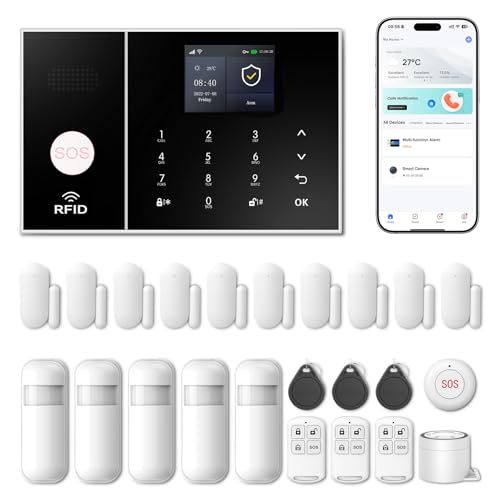
Wireless Alarm System for Home Security,24 Pcs Home Alarm System Wireless DIY Kit,WiFi+GSM/4G with Instant App Alerts NO MonthlyFees,SOS Button,App & Remote Control,Work with Alexa,for Apartment
APP Control & Highly DIY: Home Security Systems can be remotely controlled via Smart Life or Tuya APP….
As an affiliate, we earn on qualifying purchases.
As an affiliate, we earn on qualifying purchases.
Frequently Asked Questions
Can Alarm Modes Be Customized for Different Days of the Week?
Yes, alarm modes can be customized for different days of the week. With weekly scheduling, you can set specific alarm modes for each day, ensuring your security habits fit your routine. Most devices offer customization options that allow you to activate or deactivate alarms, adjust sensitivity, or choose different alert sounds based on the day. This flexibility helps you maintain consistent security practices tailored to your weekly schedule.
How Do Alarm Modes Integrate With Smart Home Security Systems?
Did you know 85% of smart home owners use remote access regularly? Alarm modes seamlessly integrate with your system through this feature, allowing you to control security settings remotely. You can customize modes for different scenarios and guarantee your system works together smoothly. System integration enables you to automate alarms, cameras, and sensors, providing thorough security management from anywhere, making your daily routine safer and more convenient.
Are There Safety Tips for Setting Alarms While Traveling?
When setting alarms while traveling, prioritize travel safety by adjusting your alarm setup to mimic your usual routine, making it less obvious you’re away. Use smart home security features like remote arm/disarm and alerts for unusual activity. Always double-check that your alarms are active before leaving, and inform trusted neighbors or friends. These steps help safeguard your home, giving you peace of mind during your trip.
What Should I Do if My Alarm Mode Fails to Activate?
If your alarm mode fails to activate, first check for alarm troubleshooting issues like incorrect settings or low battery. Make sure your device’s software is up to date. If problems persist, set a security backup alarm on another device or app. This way, you won’t rely solely on one alarm and can maintain your safety routines. Regularly testing your alarms helps prevent future failures and keeps your security habits reliable.
Can Alarm Modes Be Linked to Emergency Contacts or Services?
You can indeed link alarm modes to emergency contact integration and service alert notifications, augmenting your safety net. When an alarm mode activates, it can automatically alert your chosen contacts and emergency services, providing peace of mind amid uncertainty. This seamless connection ensures that help is just a moment away, offering reassurance that support is ready to respond swiftly, even if you’re unable to reach out yourself.

WiFi Door Alarm System, Wireless DIY Smart Home Security System, with Phone APP Alert, 8 Pieces-Kit (Alarm Siren, Door Window Sensor, Remote), Work with Alexa, for House, Apartment, by tolviviov
WIFI Network: WIFI connection, Only works on 2.4GHz WiFi network, does NOT support 5GHz WiFi networks.
As an affiliate, we earn on qualifying purchases.
As an affiliate, we earn on qualifying purchases.
Conclusion
Now that you understand how to leverage alarm modes, imagine the peace of mind you’ll gain—yet, the true test lies ahead. Will you remember to activate the right mode at the right time? A moment’s hesitation could mean missing vital protection. Stay vigilant, stay prepared, and let these habits become second nature. The next time you set your alarm, a safer, more secure life might just be within your grasp—if you choose to act now.

WiggleWorm Alert™ Mini Motion Vibration Sensor Alarm (1-Pack) – Stick Anywhere Smart Home Detector for Jewelry Box, Kids Door, Safe & Mailbox | Phone App Instant Alerts, Audible & Silent Modes
STICK ANYWHERE IN SECONDS: Attach to doors, windows, mailboxes, jewelry boxes, and more using the included fastener. No…
As an affiliate, we earn on qualifying purchases.
As an affiliate, we earn on qualifying purchases.

Simplex 0742317 4090-9810 Trim Plate Bracket
As an affiliate, we earn on qualifying purchases.
As an affiliate, we earn on qualifying purchases.