
To protect your smart-home apps from supply chain attacks, always download updates from official sources and verify their authenticity through digital signatures. Keep your device firmware and apps updated regularly, and limit app permissions to only what’s necessary. Be cautious of third-party components and vet your vendors carefully to guarantee security standards are met. Staying vigilant and following these best practices helps safeguard your devices—continue exploring for more tips on securing your smart home.
Key Takeaways
- Vet third-party vendors and supply chain components through thorough security assessments before integration.
- Source apps exclusively from official app stores and trusted manufacturer websites.
- Regularly update device firmware and apps to patch known vulnerabilities and ensure supply chain integrity.
- Verify digital signatures and certificates of app updates to prevent tampering or malicious modifications.
- Limit app permissions to essential functions and monitor for suspicious activity to reduce attack surface.
Have you ever wondered how secure your smart-home apps really are? In today’s interconnected world, these apps are the gateways to your home’s security, lighting, thermostats, and even your door locks. But their convenience comes with risks, especially when it comes to supply chain attacks. Hackers target the software and hardware suppliers that provide the components and updates for your smart-home devices. That’s why protecting these apps from malicious interference is more critical than ever.
One of the most effective ways to safeguard your smart-home apps is by ensuring they receive secure app updates. Developers often release patches and improvements to fix vulnerabilities, but if these updates aren’t securely delivered, attackers can intercept or tamper with them. Make sure your devices and apps are set to automatically download updates from trusted sources. Always verify that updates come from official channels and check the digital signatures or certificates provided. This minimizes the risk of installing malicious code disguised as legitimate updates.
Ensure smart-home app updates are secure by verifying sources and digital signatures to prevent malicious tampering.
Another key aspect of protection lies in third-party vetting. Many smart-home apps rely on third-party libraries, components, or even external servers. These third parties can inadvertently introduce vulnerabilities if they’re not properly vetted. When choosing apps or devices, look for vendors that prioritize third-party vetting—meaning they carefully assess their suppliers and partners for security standards. Reputable companies conduct thorough security audits, review their supply chains, and implement strict controls to prevent compromised components from entering their products. This diligence helps reduce the chances of a supply chain attack reaching your home.
Beyond updates and vetting, you should also be cautious about the sources from which you download or install these apps. Stick to official app stores and the manufacturer’s website. Avoid third-party app stores or unofficial sources, which are more likely to host tampered or malicious versions of legitimate apps. Additionally, keeping your device’s firmware and operating system up to date adds an extra layer of security, making it harder for attackers to exploit known vulnerabilities.
Be mindful of the permissions you grant your smart-home apps. Limit access to only what’s necessary for the app to function properly. Excessive permissions can give attackers more opportunities if the app or its supply chain is compromised. Regularly review app permissions and remove any that seem unnecessary. Ensuring the integrity of the supply chain and verifying the authenticity of components is also essential in maintaining a secure environment.
smart home app digital signature verification tools
As an affiliate, we earn on qualifying purchases.
As an affiliate, we earn on qualifying purchases.
Frequently Asked Questions
How Can Users Identify Compromised Smart-Home App Updates?
You can spot compromised smart-home app updates by watching for signs of firmware tampering, like unexpected behavior or sudden device issues. Keep an eye on update sources to avoid insider threats, and always verify the digital signatures or checksums provided by trusted developers. Regularly review app permissions and update logs to detect suspicious changes, ensuring your smart home remains secure against malicious updates.
What Legal Measures Exist Against Supply Chain Attackers?
Legal frameworks and liability legislation act as shields and swords in the fight against supply chain attackers. They set clear boundaries and consequences for cyber threats, holding perpetrators accountable. Laws like the Computer Fraud and Abuse Act and GDPR serve as steel walls, deterring attackers and punishing breaches. While enforcement varies, these measures aim to turn the tables, making cybercriminals face the weight of legal action for their malicious acts.
How Do Supply Chain Attacks Differ From Direct App Hacks?
Supply chain attacks differ from direct app hacks because they target the vendor’s infrastructure, compromising code integrity before reaching you. You face risks to vendor reputation and may unknowingly install malicious updates. Unlike direct hacks, which target your device directly, supply chain attacks manipulate the entire software supply process, making it harder to detect and prevent. To stay protected, guarantee your vendor maintains strong security practices and verifies code integrity regularly.
What Are the Signs of a Smart-Home App Breach?
You’ll notice unusual activity, like unexpected device behavior or unauthorized access, indicating a smart-home app breach. Firmware vulnerabilities can open backdoors, while insider threats might lead to data leaks or unauthorized control. Keep an eye on suspicious login attempts, strange device responses, or app crashes. Regularly update firmware and monitor for signs of tampering, as these steps help you defend against breaches caused by vulnerabilities or malicious insiders.
How Often Should Developers Audit Their App Supply Chains?
You should audit your app supply chain regularly, at least quarterly, to stay ahead of risks. During these audits, prioritize vendor compliance checks and thorough code reviews to identify vulnerabilities early. By consistently monitoring your vendors’ adherence to security standards and scrutinizing code changes, you’ll strengthen your defenses, reduce the risk of supply chain attacks, and confirm your smart-home app remains secure for users and compliant with industry best practices.
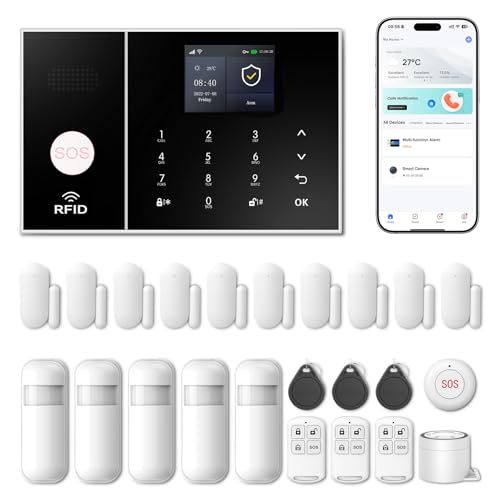
Wireless Alarm System for Home Security,24 Pcs Home Alarm System Wireless DIY Kit,WiFi+GSM/4G with Instant App Alerts NO MonthlyFees,SOS Button,App & Remote Control,Work with Alexa,for Apartment
- App Control & Customizable Sensors: Remotely control and expand system with sensors
- Voice Control & Color Screen: Supports voice commands and displays system info
- Tamper Protection & Multi-Alarm: Physical tamper-proof design with alerts and security code
As an affiliate, we earn on qualifying purchases.
As an affiliate, we earn on qualifying purchases.
Conclusion
To safeguard your smart-home apps, think of yourself as a vigilant gardener tending delicate plants. By patching vulnerabilities and verifying sources, you create a fortress that keeps malicious pests at bay. Remember, in the digital garden, neglect allows weeds to choke the healthy growth. Stay proactive, nurture your defenses, and your smart home can flourish peacefully, shining like a well-tended oasis amid the chaos of unseen threats.

Philips Wi-Fi Smart Deadbolt with 2 Handles, Front Lock Set with Gateway
- Keypad Door Lock with Handles: Stylish and functional smart lock set
- Remote Control via App: Manage lock remotely with smartphone
- Real-Time Notifications: Get updates on door status
As an affiliate, we earn on qualifying purchases.
As an affiliate, we earn on qualifying purchases.

Philips WiFi Keypad Door Lock with Handle, Built-in WiFi, APP Remote Control, Voice & Fingerprint Unlock, Smart Locks for Front Door with Auto Lock, Digital Front Door Lock Set, Keyless Entry Deadbolt
- WiFi Connectivity: Connects directly to 2.4GHz WiFi without hub
- Remote App Control: Manage lock remotely via Philips Home Access App
- Real-Time Access Monitoring: Check lock status and access history anytime
As an affiliate, we earn on qualifying purchases.
As an affiliate, we earn on qualifying purchases.