
For most Apple Home users, I’d start with the Aqara Camera Hub G5 Pro: its outdoor-ready design and built-in hub make it the strongest all-round fit in this Aqara-focused lineup. The Aqara G350 stands out for shoppers who want a higher-resolution indoor camera, while the G100 two-pack gives you a practical way to cover more than one location. Choosing among these HomeKit security cameras means weighing indoor versus outdoor placement, camera resolution, hub features, and the convenience of buying one unit or two. I ranked the options by how well their features serve those different needs, not by treating similar color and bundle listings as distinct camera designs. Read on for the full comparison, setup considerations, and guidance on which camera suits your home.

Get privacy and security gear delivered free with Prime
- Fast, free delivery on millions of items
- Prime Video, Amazon Music and more included
- Member-only deals all year
Key Takeaways
- The G5 Pro is the most versatile choice in this lineup because it pairs an outdoor-ready camera design with hub functionality; choose it over the indoor-only options when one camera may need to cover an exposed location.
- The G350 is the indoor resolution pick, with a 4K dual-lens design that distinguishes it from the 2K E1 and G100 models; its strengths matter most when detailed indoor viewing is a priority.
- The G100 two-pack is a coverage decision, not a different camera tier. It offers two matching 2K indoor/outdoor cameras, while the white and black single-camera entries are color variants rather than separate feature sets.
- The E1 and G100 serve different placement needs: the E1 is intended for indoor use, while the G100’s indoor/outdoor positioning gives it more flexibility around sheltered exterior locations.
- HomeKit compatibility alone does not settle the choice. Buyers should check their preferred recording setup, network coverage, power access, and the exact feature support they need before choosing a camera.
| Aqara Indoor Security Camera G350, 4K UHD Dual-Lens Matter Camera Hub |  | Best Premium Indoor Camera Hub | Video resolution: 4K UHD wide-angle + 2.5K HD telephoto | Field of view: 133° wide-angle | Zoom: 9x hybrid | VIEW ON AMAZON | See Our Full Breakdown |
| Aqara Camera E1 2K Indoor Security Camera |  | Best Value HomeKit Pan-and-Tilt Camera | Resolution: 2304 × 1296 pixels | Viewing coverage: 360° pan-and-tilt | Night vision range: 10 meters | VIEW ON AMAZON | See Our Full Breakdown |
| Aqara G100 2K Indoor/Outdoor Security Camera, White |  | Best Single-Camera Indoor/Outdoor Pick | Resolution: 2304 × 1296 (3 MP); HomeKit Secure Video limited to 1080p | Field of view: 140° | Lens: f/1.8 | VIEW ON AMAZON | See Our Full Breakdown |
| Aqara G100 2K Indoor/Outdoor Security Camera, 2-Pack |  | Best Multi-Zone Coverage Bundle | Pack size: 2 cameras | Resolution: 2304 × 1296 (3 MP); HomeKit Secure Video limited to 1080p | Field of view: 140° per camera | VIEW ON AMAZON | See Our Full Breakdown |
| Aqara Camera Hub G5 Pro 4MP Wi-Fi Security Camera | 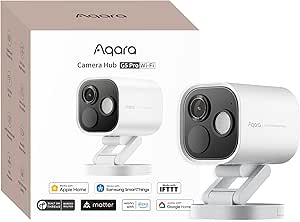 | Best for Color Night Vision Outdoors | Resolution: 4 MP | Field of view: 133° | Night vision: True color; no infrared light | VIEW ON AMAZON | See Our Full Breakdown |
| Aqara G100 2K Indoor/Outdoor Security Camera, Black |  | Best Flexible Placement | Resolution: 2304 × 1296 (3 MP); HomeKit limits resolution to 1080p | Field of view: 140° | Night vision: Spotlight color and 940 nm infrared | VIEW ON AMAZON | See Our Full Breakdown |
| Aqara Camera Hub G5 Pro 4MP Wi-Fi Security Camera | 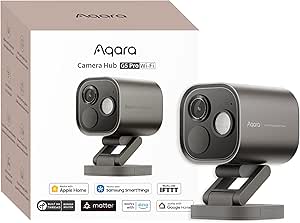 | Best HomeKit Hub Upgrade | Resolution: 4 MP | Field of view: 133° | Night vision: True-color; no infrared light | VIEW ON AMAZON | See Our Full Breakdown |
| home security cameras for homekit | Storage | Field of view | Night vision | Connectivity |
|---|---|---|---|---|
| Aqara Indoor Security Camera G | MicroSD up to 512 GB, NAS, or cloud | 133° wide-angle | 940 nm invisible infrared LEDs | 2.4/5 GHz Wi-Fi, Bluetooth, Zigbee, and Thread |
| Aqara Camera E1 2K Indoor Secu | MicroSD up to 512 GB, SMB3-compatible NAS, or cloud | — | — | Wi-Fi 6, 2.4 GHz only; WPA3 |
| Aqara G100 2K Indoor/Outdoor S | MicroSD up to 512 GB or NAS; cloud storage available | 140° | Spotlight color and 940 nm infrared; enabled manually | Wi-Fi 6, 2.4 GHz only; WPA3; RTSP |
| Aqara G100 2K Indoor/Outdoor S | MicroSD up to 512 GB or NAS; cards not included | 140° per camera | Spotlight color and 940 nm infrared | 2.4 GHz Wi-Fi 6, Bluetooth, and RTSP |
| Aqara Camera Hub G5 Pro 4MP Wi | 8 GB encrypted eMMC, Aqara Cloud, and RTSP | 133° | True color; no infrared light | Dual-band 2.4/5 GHz Wi-Fi, Zigbee, and Thread |
| Aqara G100 2K Indoor/Outdoor S | microSD up to 512 GB or NAS | 140° | Spotlight color and 940 nm infrared | Wi-Fi, Bluetooth, RTSP |
| Aqara Camera Hub G5 Pro 4MP Wi | Encrypted 8GB eMMC; Aqara Cloud and RTSP also supported | 133° | True-color; no infrared light | — |
More Details on Our Top Picks
Aqara Indoor Security Camera G350, 4K UHD Dual-Lens Matter Camera Hub
The Aqara Indoor Security Camera G350 is the most capable indoor option here for buyers who want detailed HomeKit monitoring and a wider smart-home role. Its 4K wide-angle and 2.5K telephoto lenses, paired with 9x hybrid zoom and tracking, can bring distant activity closer without making this a camera aimed only at a fixed view. Local AI detection and a lens that physically retracts add useful privacy control, while microSD, NAS, and encrypted cloud options provide more recording choices than the Camera E1.
Its tradeoffs are meaningful: the G350 records at 20 fps, the microSD card is not included, and third-party Zigbee devices are not supported. Matter camera support also varies by platform, so buyers should check their intended setup. Compared with the outdoor-ready Aqara G5 Pro, the G350 is the stronger indoor zoom-and-hub choice, not a weatherproof one.
Pros:- Dual-lens 4K and 2.5K video with 9x hybrid zoom
- Local face, pet, gesture, and sound recognition
- Physical lens retraction supports a clear privacy mode
- Combines Matter, Thread, and Zigbee hub functions
Cons:- 20 fps video is less fluid than higher-frame-rate options
- Does not support third-party Zigbee devices, and Matter camera support varies by platform
- MicroSD card is not included
Best for: HomeKit households seeking an indoor camera with zoom, local AI, privacy controls, and a built-in Matter, Thread, and Zigbee hub.
Not ideal for: Buyers who need an outdoor camera, broad third-party Zigbee compatibility, or a straightforward camera without smart-home hub features.
- Video resolution:4K UHD wide-angle + 2.5K HD telephoto
- Field of view:133° wide-angle
- Zoom:9x hybrid
- Frame rate:20 fps
- Night vision:940 nm invisible infrared LEDs
- Local AI:Face, pet, gesture, and sound recognition
- Hub capabilities:Matter bridge, Zigbee hub, and Thread support
- Storage:MicroSD up to 512 GB, NAS, or cloud
- Connectivity:2.4/5 GHz Wi-Fi, Bluetooth, Zigbee, and Thread
Our verdict“Choose the G350 if you want a feature-rich indoor HomeKit camera that can also anchor a smart-home setup, and skip it if you need weather resistance or broad Zigbee device support.”
Aqara Camera E1 2K Indoor Security Camera
The Aqara Camera E1 is a sensible pick for rooms where a fixed camera would leave blind spots. Its 360° pan-and-tilt view and person detection let one indoor camera cover more of a space than the fixed-view G100 models, and HomeKit Secure Video gives Apple households a familiar way to manage compatible recordings. Local microSD and NAS recording are alternatives to cloud storage, while its privacy mode turns the lens away and disables the camera.
Compared with the more advanced Aqara G350, the E1 gives up 4K detail, long-range zoom, and a smart-home hub role in favor of a simpler pan-and-tilt setup. Its 2.4 GHz-only Wi-Fi may also limit placement in homes that rely on 5 GHz coverage. The power supply is not included, and some cloud and AI functions require a subscription, so factor those needs into the setup.
Pros:- 360° pan-and-tilt coverage helps reduce fixed-camera blind spots
- Supports HomeKit Secure Video and local microSD recording
- Privacy mode turns the lens away and disables the camera
- Includes person detection, night vision, and two-way audio
Cons:- Supports 2.4 GHz Wi-Fi only, not 5 GHz
- Power supply is not included
- Some cloud and AI features require a subscription
Best for: Apple HomeKit users who want an indoor pan-and-tilt camera to cover a nursery, living room, or other space with changing activity.
Not ideal for: Buyers who need 5 GHz Wi-Fi, weather resistance, high-resolution zoom, or a camera that includes its power supply.
- Resolution:2304 × 1296 pixels
- Viewing coverage:360° pan-and-tilt
- Night vision range:10 meters
- Connectivity:Wi-Fi 6, 2.4 GHz only; WPA3
- Storage:MicroSD up to 512 GB, SMB3-compatible NAS, or cloud
- Compatibility:Apple HomeKit, Alexa, and IFTTT
- Power:Corded, 5 V / 5 W; USB-C port
- Dimensions:2.71 × 2.71 × 4.09 inches
- Water resistance:Not water resistant; IP20
Our verdict“Pick the E1 for flexible indoor HomeKit coverage across a whole room, but choose a fixed camera like the G100 if you need an outdoor-ready housing.”
Aqara G100 2K Indoor/Outdoor Security Camera, White
The Aqara G100 suits buyers who want one HomeKit-compatible camera that can move between indoor and outdoor duty. Its IP65-rated housing, 140° field of view, and choice of spotlight color night vision or infrared make it more adaptable to entryways and covered exterior areas than the indoor-only Camera E1. Local motion and person detection, plus microSD or NAS recording, also give buyers options beyond subscription cloud storage.
The HomeKit tradeoff is that video is limited to 1080p in HomeKit Secure Video, even though the camera records at 2304 × 1296. Unlike the pan-and-tilt E1, the G100 has a fixed view, so placement matters more. Its 2.4 GHz-only Wi-Fi and separately purchased power adapter and microSD card add setup constraints; cloud recognition for pets, vehicles, packages, and faces requires a subscription.
Pros:- IP65 housing supports indoor or outdoor installation
- 140° field of view covers a broad fixed area
- Offers spotlight color and 940 nm infrared night vision
- Supports HomeKit Secure Video, microSD, NAS, and RTSP
Cons:- HomeKit Secure Video limits recordings to 1080p
- Requires 2.4 GHz Wi-Fi and does not support 5 GHz
- Power adapter and microSD card are not included
Best for: HomeKit users who need a single fixed-view camera for an indoor room or outdoor entry point and want local recording options.
Not ideal for: Buyers who need pan-and-tilt coverage, 5 GHz Wi-Fi, included power and storage accessories, or 2K video within HomeKit Secure Video.
- Resolution:2304 × 1296 (3 MP); HomeKit Secure Video limited to 1080p
- Field of view:140°
- Lens:f/1.8
- Weather resistance:IP65
- Night vision:Spotlight color and 940 nm infrared; enabled manually
- Detection:Local motion and person detection
- Storage:MicroSD up to 512 GB or NAS; cloud storage available
- Connectivity:Wi-Fi 6, 2.4 GHz only; WPA3; RTSP
- Power:DC 5 V / 1 A adapter required; not included
Our verdict“Choose this single G100 for flexible indoor or outdoor placement, but consider the Camera E1 instead if you need a camera that can pan across a room.”
Aqara G100 2K Indoor/Outdoor Security Camera, 2-Pack
This two-pack of Aqara G100 cameras is the practical choice for monitoring two separate areas, such as a front entry and a garage, without relying on one camera to cover both. Each unit has a 140° field of view, IP65 weather resistance, local motion and person detection, and HomeKit Secure Video support. Compared with buying a single G100, the bundle gives a matched pair for broader property coverage; unlike the pan-and-tilt Camera E1, each camera keeps a fixed view, so the two placements can watch separate zones at once.
HomeKit Secure Video limits resolution to 1080p, despite the 2K-class recording spec, and the cameras require 2.4 GHz Wi-Fi. Neither power adapters nor microSD cards are included, so plan for those separately. The Aqara Home app is needed for some functions, and some features depend on subscriptions or an Apple Home hub. This is a better fit for multi-point coverage than for buyers who only need one room monitored.
Pros:- Two cameras can monitor separate zones simultaneously
- IP65-rated cameras suit indoor or outdoor mounting
- Local motion and person detection with HomeKit Secure Video support
- Each camera supports microSD, NAS, and RTSP options
Cons:- HomeKit Secure Video limits video to 1080p
- Both cameras rely on 2.4 GHz Wi-Fi, with no 5 GHz support
- Power adapters and microSD cards are not included
Best for: Homeowners who want fixed HomeKit-compatible coverage at two distinct indoor or outdoor locations, such as a doorway and side yard.
Not ideal for: Buyers monitoring only one area, those needing pan-and-tilt tracking, or households that need 5 GHz Wi-Fi or included power accessories.
- Pack size:2 cameras
- Resolution:2304 × 1296 (3 MP); HomeKit Secure Video limited to 1080p
- Field of view:140° per camera
- Aperture:f/1.8
- Weather resistance:IP65
- Night vision:Spotlight color and 940 nm infrared
- Storage:MicroSD up to 512 GB or NAS; cards not included
- Connectivity:2.4 GHz Wi-Fi 6, Bluetooth, and RTSP
- Power:DC 5 V / 1 A adapter per camera; not included
Our verdict“Choose the two-pack when you need fixed coverage at two locations; for a single room with changing sightlines, the pan-and-tilt Camera E1 is a better match.”
Aqara Camera Hub G5 Pro 4MP Wi-Fi Security Camera
The Aqara Camera Hub G5 Pro is the strongest fit here for a HomeKit user who wants outdoor-ready monitoring with color night vision. Its 4MP video, 133° view, and dimmable spotlight can preserve color detail after dark, while IP65 protection makes it suited to exposed locations. Built-in encrypted storage means recording can start without adding a microSD card, and local visual and abnormal-sound detection keep key alerts from relying entirely on cloud processing.
Compared with the G100, the G5 Pro adds dual-band Wi-Fi, built-in 8GB storage, and Zigbee/Thread hub functions, but it is a wired camera and has no infrared night vision. The G350 is a better indoor choice for zoom and physical lens retraction; the G5 Pro instead prioritizes outdoor durability and color night views. Some features require subscriptions or compatible hubs and devices, so its broader feature set may take more setup.
Pros:- 4MP video with true-color night vision and a dimmable spotlight
- IP65-rated housing supports outdoor installation
- Built-in 8GB encrypted storage avoids a separate memory card
- Combines Zigbee and Thread hub functions with a Matter bridge
Cons:- Requires wired power
- No infrared night vision
- Some functions depend on subscriptions or compatible hubs and devices
Best for: HomeKit households seeking a wired, weather-resistant camera with color night vision, encrypted onboard storage, and Aqara hub capabilities.
Not ideal for: Buyers who need battery operation, infrared night vision, or a compact indoor camera with pan-and-tilt or physical privacy mode.
- Resolution:4 MP
- Field of view:133°
- Night vision:True color; no infrared light
- Spotlight:3000 K dimmable LED
- Local detection:Visual and abnormal-sound detection
- Connectivity:Dual-band 2.4/5 GHz Wi-Fi, Zigbee, and Thread
- Storage:8 GB encrypted eMMC, Aqara Cloud, and RTSP
- Weather resistance:IP65
- Power:Corded, 5 V / 2 A USB-C
Our verdict“Choose the G5 Pro for wired outdoor HomeKit coverage and color night views, but pick the G350 for a more flexible indoor camera with zoom and a physical privacy feature.”
Aqara G100 2K Indoor/Outdoor Security Camera, Black
The Aqara G100 is the more adaptable pick for buyers who want one HomeKit-compatible camera that can move between indoor and outdoor duties. Its IP65-rated housing, broad 140° view, and choice of color spotlight or 940 nm infrared night vision suit areas where lighting conditions vary. It also offers local motion and person detection, plus microSD or NAS recording beyond HomeKit Secure Video. Compared with the Aqara Camera Hub G5 Pro, the G100 gives up 4MP detail, a built-in Zigbee and Thread hub, and richer local detection, but its 140° field of view is wider and its infrared mode avoids relying on visible light at night. The main compromises are practical: HomeKit caps video at 1080p, and you must supply the power adapter and microSD card. Some features also depend on Aqara’s app or subscription.
Pros:- IP65 housing supports indoor and outdoor placement
- Offers both spotlight color and 940 nm infrared night vision
- 140° field of view covers a broad area
- Supports local motion and person detection, microSD, and NAS storage
Cons:- HomeKit Secure Video limits resolution to 1080p
- 5V/1A power adapter and microSD card are sold separately
- Cloud recognition and some features depend on a subscription or Aqara Home app
Best for: HomeKit households seeking a flexible indoor/outdoor camera with infrared night vision and local storage options.
Not ideal for: Buyers who want higher-resolution footage in HomeKit, included power and storage accessories, or a camera with a built-in Zigbee and Thread hub.
- Resolution:2304 × 1296 (3 MP); HomeKit limits resolution to 1080p
- Field of view:140°
- Night vision:Spotlight color and 940 nm infrared
- Connectivity:Wi-Fi, Bluetooth, RTSP
- Storage:microSD up to 512 GB or NAS
- Frame rate:20 fps
- Audio:Two-way audio
- Mounting:Freestanding, wall, or ceiling
- Power:DC 5V/1A adapter required; not included
Our verdict“Choose the G100 if you want a versatile indoor/outdoor HomeKit camera with infrared night vision and flexible local storage, and can accept 1080p HomeKit video.”
Aqara Camera Hub G5 Pro 4MP Wi-Fi Security Camera
The Aqara Camera Hub G5 Pro suits buyers who want a camera to do more than watch a doorway: it combines 4MP video, local visual and sound detection, and Zigbee and Thread hub functions. Its 1/1.8-inch sensor, f/1.0 aperture, and dimmable spotlight support true-color night footage without infrared illumination. Compared with the Aqara G100, the G5 Pro adds sharper source video and hub capabilities, but has a narrower 133° view and no infrared mode. Local detection can keep working during internet outages, while the encrypted 8GB eMMC provides built-in storage; RTSP is the route for continuous recording, rather than HomeKit Secure Video. That distinction matters for buyers planning around Apple’s recording ecosystem. It also needs USB-C power, and HomeKit Secure Video requires an active iCloud subscription and an Apple Home hub.
Pros:- 4MP video with a 133° field of view
- True-color night vision with a dimmable 3000K spotlight
- Local visual and abnormal sound detection can work during internet outages
- Combines Zigbee and Thread hub functions with encrypted built-in storage and RTSP
Cons:- No infrared night vision
- Requires USB-C power and has no battery option
- Continuous recording is supported only through RTSP to local storage; HomeKit Secure Video requires an active iCloud subscription and Apple Home hub
Best for: Aqara and Apple Home households that want a wired outdoor-capable camera plus Zigbee and Thread hub functions and local detection.
Not ideal for: Buyers who need battery operation, infrared night vision, a wider viewing angle, or continuous recording through HomeKit Secure Video.
- Resolution:4 MP
- Field of view:133°
- Night vision:True-color; no infrared light
- Sensor and aperture:1/1.8-inch sensor; f/1.0
- Spotlight:3000K, dimmable
- AI detection:7 visual detection types and 4 abnormal sound detection types
- Hub protocols:Aqara Zigbee and Thread
- Storage:Encrypted 8GB eMMC; Aqara Cloud and RTSP also supported
- Power and weather resistance:5V/2A USB-C; IP65
Our verdict“Pick the G5 Pro if you want a higher-resolution, feature-rich Aqara hub camera with local detection, and do not need infrared night vision or battery power.”

How We Picked
I ranked these Aqara cameras around the decisions that shape a HomeKit setup: placement flexibility, image capability, hub functionality, and practical coverage. I gave extra weight to features that can change where a camera can be installed or how it fits into a wider smart-home setup. I also treated the two G100 colors as one camera design and the G100 two-pack as a bundle variation, so duplicate listings do not gain a ranking advantage just by appearing more than once.
The G5 Pro leads for versatility because its camera-and-hub combination and outdoor-ready role suit more placement scenarios than an indoor-only model. The G350 follows for buyers who put indoor resolution first, while the G100 options make sense for flexible placement or multi-location coverage. The E1 remains a straightforward indoor alternative. I judged each by fit for a specific buyer, rather than assuming that the highest resolution or largest bundle is best for every HomeKit household.
| home security cameras for homekit | Power |
|---|---|
| Aqara Indoor Security Camera G | — |
| Aqara Camera E1 2K Indoor Secu | Corded, 5 V / 5 W; USB-C port |
| Aqara G100 2K Indoor/Outdoor S | DC 5 V / 1 A adapter required; not included |
| Aqara G100 2K Indoor/Outdoor S | DC 5 V / 1 A adapter per camera; not included |
| Aqara Camera Hub G5 Pro 4MP Wi | Corded, 5 V / 2 A USB-C |
| Aqara G100 2K Indoor/Outdoor S | DC 5V/1A adapter required; not included |
| Aqara Camera Hub G5 Pro 4MP Wi | — |
Factors to Consider When Choosing Home Security Cameras For Homekit
Before choosing a camera, I’d start with the job it needs to do: watch a room, cover an entry, or extend a smart-home setup. HomeKit support is only one part of the decision; placement, network conditions, recording preferences, and installation details can matter just as much.
Match the camera to its location
Start by deciding whether the camera will live indoors, outdoors, or move between locations. A model described as indoor/outdoor offers more placement flexibility, but that label does not mean every mounting spot is suitable. Check the product’s installation and environmental requirements, especially if the camera will face rain, direct sun, or wide temperature swings. For exterior coverage, consider whether a sheltered position gives a better view and protects the installation. A frequent mistake is choosing a camera for its image specs before confirming that its power source and mounting position work at the intended spot. If the location is uncertain, placement flexibility can be more useful than extra resolution.
Check what HomeKit support means for your setup
Camera listings can mention HomeKit, Matter, and hub functions, but those terms do not always describe the same capabilities. Before buying, confirm which features are supported through Apple Home and which may depend on Aqara’s app, a compatible hub, or other equipment. If you plan to use Apple Home for notifications, automations, or recorded clips, verify that your chosen configuration supports the particular functions you expect. Do not assume that every specification shown in a manufacturer’s app will appear in Apple Home in the same way. A camera hub can add value to a broader smart-home system, but it may be unnecessary if you only need a standalone view of one room. The right choice depends on how much of your system you want to manage from Apple Home.
Choose resolution for the view you need
Higher resolution can help when you need a more detailed view, but it cannot fix poor camera placement, glare, or a weak network connection. Think about the distance between the camera and the area you want to monitor, along with how wide a scene it needs to cover. A detailed indoor view may favor the G350’s 4K design, while 2K may be sufficient for general room or entry monitoring. The common mistake is treating a resolution number as a guarantee that a camera will identify every detail in every lighting condition. Check the camera’s lens arrangement and field of view as well as its resolution. Choose the image capability that fits the actual scene rather than paying attention to the largest number alone.
Plan network access and power before installation
A camera can only provide dependable coverage where it can stay powered and connect to your network. Check Wi-Fi strength at the intended mounting point, not just beside your router; exterior walls and long distances can make a noticeable difference. If the signal is weak, changing the camera model may not solve the underlying network problem. Confirm the required power arrangement and cable route before settling on a mount, especially for a location that is hard to reach. For multiple cameras, think about whether your network can support the added devices and video activity. A basic placement and connectivity check can save a second installation attempt.
Decide whether you need one camera or a bundle
Buying multiple cameras together makes sense when you already know which locations need coverage and the same camera design suits each one. The G100 two-pack is a straightforward route to covering two spots, but a bundle is not automatically a better fit if one location needs different capabilities. A single camera lets you test placement and network performance before adding more devices. Avoid buying a multi-camera set just to fill every room; each camera should have a clear purpose and useful view. Also check whether the bundle’s color and installation options fit both locations. If the spaces differ, mixing a dedicated indoor model with an indoor/outdoor option may suit the home better.
Set expectations for recording and privacy
Before installation, decide when you want the camera to record or send alerts and who should be able to view its feed. HomeKit households may prefer to manage camera access and notifications through Apple Home, but the available recording features can depend on compatible equipment and service settings. Check the current requirements for the recording method you plan to use rather than assuming that camera ownership alone provides every feature. Indoor cameras also raise a practical privacy question: choose a location and schedule that make sense when people are at home. Review notification settings so routine movement does not create more alerts than you can use. These choices can shape everyday satisfaction more than a small difference in image resolution.
Frequently Asked Questions
Which of these Aqara cameras should I choose for a HomeKit setup with both indoor and outdoor coverage?
I’d look first at the G5 Pro if the same camera may need to cover an exterior location and you also want hub functionality. The G100 is another option when you want an indoor/outdoor-positioned 2K camera, including as a two-pack for matching locations. The G350 and E1 are indoor-focused picks, so they make more sense for rooms than exposed mounting spots. Before buying, check the model’s placement requirements and the HomeKit features available in your planned setup. A camera’s compatibility label does not replace checking its installation needs.
Is the G100 two-pack a better buy than two separate G100 cameras?
The two-pack is most useful when you already know that two locations need the same G100 design and color. It does not change the camera’s core role or capabilities; it mainly packages two units together. Separate cameras can be a better choice if you want different colors, need to test Wi-Fi at each location first, or may prefer another model for one of the views. Compare the contents of the bundle with the exact setup you need, rather than treating a larger pack as a feature upgrade. For mixed indoor and outdoor needs, a combination of models may be more suitable.
Do I need an Aqara hub to use these cameras with Apple Home?
That depends on the specific camera and the HomeKit features you want to use. The G350 is described as a Matter camera hub, and the G5 Pro includes hub functionality, while the G100 and E1 have different roles in the lineup. Check Aqara’s current compatibility details for the exact model and confirm whether your planned Apple Home setup needs additional equipment. Also distinguish between viewing a camera in Apple Home and using broader smart-home or recording features, which may have separate requirements. If you already own compatible Aqara equipment, verify its support before adding another hub-capable device.
Should I choose the G350’s 4K design or a 2K model for indoor monitoring?
Choose based on the scene, not just the resolution number. The G350’s 4K dual-lens design is the more distinctive option for buyers who prioritize detailed indoor coverage, while the E1 and G100 provide 2K options for more general monitoring or flexible placement. A higher-resolution camera cannot compensate for a view that is too wide, poorly lit, or aimed at the wrong area. Consider how far away the monitored space is and whether the lens arrangement suits it. If the scene is simple and close, a 2K camera may be a more sensible fit.
What should I check before mounting a HomeKit camera outside?
Confirm that the camera is suitable for the planned outdoor position and that its power source, mounting method, and cable route are practical there. Test Wi-Fi at the exact spot, since an exterior wall or distance from the router can weaken the connection. Check the view at different times of day for glare, backlighting, and blind spots. Review the camera’s current instructions for environmental and installation limits before fixing it in place. Finally, confirm that the HomeKit functions you want are supported for that model and setup; outdoor suitability and Apple Home compatibility are separate questions.
Conclusion
My best overall pick is the Aqara Camera Hub G5 Pro for buyers who want outdoor-ready flexibility along with hub functions. For a more detail-focused indoor setup, I’d choose the Aqara G350; it is the best premium-style option here by capability, not by price. The G100 two-pack is my best value-for-coverage choice when two locations need the same camera, while the single G100 is the more flexible starting point if you only need one. For beginners setting up a straightforward indoor view, the Aqara Camera E1 is the simplest role-specific pick in this lineup. If color matters, choose the G100 finish that fits your space; the black and white listings do not represent different camera capabilities. Match the camera to the location and the HomeKit features you plan to use, and the choice becomes much clearer.