For large properties, my best overall pick is the NETGEAR Orbi 870 Series, which balances Wi-Fi 7 capability with a less extreme hardware tier than Orbi 970. The Amazon eero Max 7 stands out for its stated 7,500-square-foot coverage and support for internet plans up to 10 Gbps, while the Orbi 970 Series is the premium choice for buyers seeking a higher-end quad-band setup. The main tradeoff is between peak capacity and cost, simpler setup and deeper network controls, and wireless convenience versus wired backhaul. A mesh kit’s coverage estimate is only a starting point: walls, outbuildings, and node placement can change results substantially. Read on for how these eight systems differ and which one best fits your property.

Get privacy and security gear delivered free with Prime
- Fast, free delivery on millions of items
- Prime Video, Amazon Music and more included
- Member-only deals all year
Key Takeaways
- Orbi 870 is the balanced lead pick: it offers a Wi-Fi 7 option without putting the more specialized Orbi 970 systems at the center of every recommendation.
- Orbi 970 is a premium choice, not a default: its quad-band configuration suits buyers prioritizing high-end capacity, but many properties may benefit more from careful node placement or wired links.
- eero Max 7 has the clearest stated scale figures: its listed coverage and device capacity make it easy to compare on paper, though real coverage still depends on the building and layout.
- Wi-Fi 7 appears across several tiers: Orbi 360, 370, 770, 870, and 970 show that choosing the newest Wi-Fi generation alone does not identify the right system; features, network layout, and budget still separate them.
- The eero Pro 6E remains a different kind of pick: it trades Wi-Fi 7 for Wi-Fi 6E, which can suit buyers who value a capable mesh system without needing the newest wireless generation.
| NETGEAR Orbi 970 Series (2026 Release) WiFi 7 Mesh System, 3 Pack | 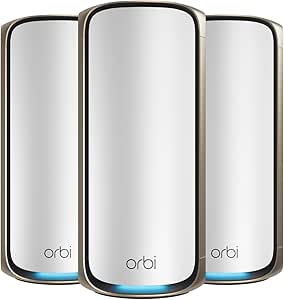 | Best Overall for Maximum Coverage | WiFi generation: WiFi 7 (802.11be) | Coverage: Up to 10,000 sq. ft. | Maximum WiFi speed: Up to 27 Gbps | VIEW ON AMAZON | See Our Full Breakdown |
| NETGEAR Orbi 360 Series WiFi 7 Mesh System, 3 Pack |  | Best for Moderate-Sized Properties | WiFi generation: WiFi 7 | Coverage: Up to 6,000 sq. ft. | Maximum WiFi speed: Up to 5 Gbps | VIEW ON AMAZON | See Our Full Breakdown |
| Amazon eero Max 7 mesh wifi system (newest model) – Supports internet plans up to 10 Gbps, Coverage up to 7,500 sq. ft., Connect 750+ devices, 3-pack |  | Best for Smart-Home Device Density | WiFi generation: WiFi 7 (IEEE 802.11a/b/g/n/ac/ax/be) | Coverage: Up to 7,500 sq. ft. | Maximum wireless speed: Up to 4.3 Gbps | VIEW ON AMAZON | See Our Full Breakdown |
| eero Pro 6E Mesh Wi-Fi System (3-Pack) |  | Best Compact WiFi 6E Option | WiFi technology: WiFi 6E, AX5400 | Coverage: Up to 6,000 sq. ft. | Supported speeds: Up to 2.3 Gbps | VIEW ON AMAZON | See Our Full Breakdown |
| NETGEAR Orbi 870 Series WiFi 7 Mesh System, 3 Pack |  | Best Value for Large Homes | WiFi generation: WiFi 7 | Coverage: Up to 9,000 sq. ft. | Maximum WiFi speed: Up to 21 Gbps | VIEW ON AMAZON | See Our Full Breakdown |
| NETGEAR Orbi 370 Series WiFi 7 Mesh System, Up to 6,000 sq ft., 3 Pack | | Best Lower-Coverage WiFi 7 Pick | WiFi generation: WiFi 7 | Maximum speed: Up to 5 Gbps | Coverage: Up to 6,000 sq. ft. | VIEW ON AMAZON | See Our Full Breakdown |
| NETGEAR Orbi 770 Series WiFi 7 Mesh System, Up to 8,000 sq ft., 3 Pack |  | Best Balance for Large Properties | WiFi generation: WiFi 7 | Maximum speed: Up to 11 Gbps | Coverage: Up to 8,000 sq. ft. | VIEW ON AMAZON | See Our Full Breakdown |
| NETGEAR Orbi 970 Series Quad-Band WiFi 7 Mesh Network System (RBE973S), Router + 2 Satellite Extenders | | Best Premium for Extensive Properties | WiFi generation: WiFi 7 | Band design: Quad-band | Maximum speed: Up to 27 Gbps | VIEW ON AMAZON | See Our Full Breakdown |
| enterprise grade mesh wifi system for large propertie | Coverage | WiFi generation | Included units | Supported devices |
|---|---|---|---|---|
| NETGEAR Orbi 970 Series | Up to 10,000 sq. ft. | WiFi 7 (802.11be) | Router and 2 satellites | Up to 200 |
| NETGEAR Orbi 360 Series WiFi 7 | Up to 6,000 sq. ft. | WiFi 7 | 3-pack | Up to 70 |
| Amazon eero Max 7 mesh wifi sy | Up to 7,500 sq. ft. | WiFi 7 (IEEE 802.11a/b/g/n/ac/ax/be) | 3-pack | 750+ |
| eero Pro 6E Mesh Wi-Fi System | Up to 6,000 sq. ft. | — | — | 100+ |
| NETGEAR Orbi 870 Series WiFi 7 | Up to 9,000 sq. ft. | WiFi 7 | 3-pack | Up to 150 |
| NETGEAR Orbi 370 Series WiFi 7 | Up to 6,000 sq. ft. | WiFi 7 | Router and two satellites | — |
| NETGEAR Orbi 770 Series WiFi 7 | Up to 8,000 sq. ft. | WiFi 7 | Router and two satellites | — |
| NETGEAR Orbi 970 Series Quad-B | Up to 10,000 sq. ft. | WiFi 7 | Router and two satellite extenders | — |
More Details on Our Top Picks
NETGEAR Orbi 970 Series (2026 Release) WiFi 7 Mesh System, 3 Pack
For a large property where coverage, device capacity, and wired connections all matter, the Orbi 970 Series is the most capable all-round choice in this group. Its router and two satellites are rated for up to 10,000 sq. ft. and 200 devices, while quad-band WiFi 7 uses a dedicated backhaul lane to help satellite traffic avoid competing with client devices. That design is a stronger fit for busy, multi-storey homes than the dual-band Orbi 360, though actual coverage still depends on walls and placement. The 10-gigabit internet port and 10-gigabit and 2.5-gigabit LAN connections also give home offices and NAS equipment room for fast wired links. The tradeoff is that its headline speed and coverage exceed what many internet plans or ordinary devices can use, and NETGEAR Armor requires a subscription after its trial. It is a premium, US-only system, not a substitute for business access-point management.
Pros:- Rated to cover up to 10,000 sq. ft. with the router and two satellites
- Quad-band dedicated backhaul helps reserve wireless capacity for satellite links
- Supports up to 200 devices and WiFi 7 speeds up to 27 Gbps
- 10-gigabit internet port plus 10-gigabit and 2.5-gigabit LAN ports
Cons:- Maximum coverage and speed depend on building materials, layout, placement, and client devices
- NETGEAR Armor moves to a separate subscription after the included 30-day trial
- Designed for US use only and does not include a modem
Best for: Owners of large, multi-storey homes with multi-gig internet, many simultaneous devices, and wired workstations or NAS equipment.
Not ideal for: Buyers with modest broadband, a smaller property, or a need for centrally managed commercial networking; much of this system’s capacity may go unused.
- WiFi generation:WiFi 7 (802.11be)
- Coverage:Up to 10,000 sq. ft.
- Maximum WiFi speed:Up to 27 Gbps
- Frequency bands:Quad-band
- Supported devices:Up to 200
- Included units:Router and 2 satellites
- Ports:10 Gbps internet; 10 Gbps and 2.5 Gbps LAN ports
- Expansion:Additional Orbi 970 satellite rated for up to 3,300 sq. ft.
Our verdict“Choose the Orbi 970 if your large property needs the roundup’s broadest stated coverage, dedicated quad-band backhaul, and multi-gig wired connections.”
NETGEAR Orbi 360 Series WiFi 7 Mesh System, 3 Pack
The Orbi 360 is the restrained choice for a property that needs mesh coverage but not the scale or backhaul capacity of the larger Orbi systems. Its three-unit setup is rated for up to 6,000 sq. ft., with WiFi 7 speeds up to 5 Gbps and support for as many as 70 devices. That makes it a practical step up from older WiFi generations for households with streaming, gaming, and smart-home traffic. Compared with the Orbi 870, though, it covers less area, supports fewer devices, and offers lower stated throughput; its dual-band design also lacks the dedicated backhaul band advertised for the Orbi 970. The listed single port and 2.5 Gbps maximum LAN speed make wired expansion less flexible than the Orbi 870’s 12 ports. I’d shortlist it for a large but not estate-scale home, rather than a property that needs extensive wired networking.
Pros:- Three-unit system rated for coverage up to 6,000 sq. ft.
- WiFi 7 support with stated speeds up to 5 Gbps
- Expandable with additional satellites rated for up to 2,000 sq. ft. each
- App-based setup and WPA2/WPA3 security support
Cons:- Dual-band design does not provide the Orbi 970’s advertised dedicated backhaul band
- Supports up to 70 devices, fewer than the Orbi 870 or Orbi 970
- Product data lists one port, limiting wired connection options
Best for: Households in homes up to roughly 6,000 sq. ft. that want WiFi 7 mesh and app-based setup without targeting the largest properties.
Not ideal for: Owners of very large estates or homes with extensive wired equipment, since its stated coverage and listed port count are modest beside the Orbi 870 and Orbi 970.
- WiFi generation:WiFi 7
- Coverage:Up to 6,000 sq. ft.
- Maximum WiFi speed:Up to 5 Gbps
- Frequency bands:Dual-band
- Supported devices:Up to 70
- Included units:3-pack
- Listed port count:1
- Maximum LAN speed:2,500 Mbps
- Satellite expansion:Up to 2,000 sq. ft. per satellite
Our verdict“Pick the Orbi 360 for WiFi 7 coverage in a moderate-sized home, but choose an Orbi 870 or 970 when property size, device load, or wired connections grow.”
Amazon eero Max 7 mesh wifi system (newest model) – Supports internet plans up to 10 Gbps, Coverage up to 7,500 sq. ft., Connect 750+ devices, 3-pack
The eero Max 7 earns its place for properties with unusually dense device populations, not simply for its coverage figure. The three-pack is rated for up to 7,500 sq. ft. and more than 750 devices, a striking contrast with the Orbi 870’s stated limit of 150. Four auto-sensing Ethernet ports per unit, including two 10 GbE ports, also give wired equipment more options than the Orbi 360’s listed single port. Its WiFi 7 system is tri-band, with eero’s TrueMesh, TrueRoam, and TrueChannel features intended to help devices find reliable connections. The Orbi 970 remains the stronger match when maximum stated coverage and quad-band dedicated backhaul are the priority; eero instead adds Thread, Matter, and Zigbee controller support for smart homes. The tradeoffs are a lower stated wireless speed of up to 4.3 Gbps, app-based management, and optional eero Plus for advanced security.
Pros:- Rated for up to 7,500 sq. ft. and more than 750 connected devices
- Four Ethernet ports per unit, including two auto-sensing 10 GbE ports
- Tri-band WiFi 7 with TrueMesh, TrueRoam, and TrueChannel features
- Includes a smart-home hub with Thread and Zigbee support and Matter controller functionality
Cons:- Stated wireless speed is up to 4.3 Gbps, below the Orbi 870 and Orbi 970 figures
- Does not advertise the Orbi 970’s quad-band dedicated backhaul
- Advanced digital security uses an optional eero Plus subscription
Best for: Owners of large smart homes with hundreds of connected devices, multi-gig wired equipment, and Thread, Matter, or Zigbee devices.
Not ideal for: Buyers who prioritize the highest stated wireless speed or quad-band dedicated backhaul, or who want network setup and management outside a mobile app.
- WiFi generation:WiFi 7 (IEEE 802.11a/b/g/n/ac/ax/be)
- Coverage:Up to 7,500 sq. ft.
- Maximum wireless speed:Up to 4.3 Gbps
- Supported devices:750+
- Radios:3; tri-band
- Ethernet per unit:Two auto-sensing 10 GbE ports and two auto-sensing 2.5 GbE ports
- Included units:3-pack
- Smart-home support:Thread; Zigbee controller; Matter controller
- Warranty:3-year limited warranty
Our verdict“Choose eero Max 7 when device density, multi-gig Ethernet, and smart-home protocol support matter more than the roundup’s highest stated WiFi speed.”
eero Pro 6E Mesh Wi-Fi System (3-Pack)
The eero Pro 6E suits buyers who want broad mesh coverage in a compact, straightforward system and do not need WiFi 7. Its three units are rated for up to 6,000 sq. ft. and more than 100 devices, while WiFi 6E adds access to the 6 GHz band for compatible clients. That can help reduce congestion for newer phones and laptops, but it will not deliver the WiFi 7 features or higher stated capacity of the eero Max 7. It also falls well short of the Orbi 970’s 10,000 sq. ft. coverage target, making it a less compelling fit for a sprawling estate. Each unit has a 2.5 Gb and 1 Gb Ethernet port, useful for a wired connection, though the listed wired speed tops out at 1 Gbps. This is a simpler fit for moderate large homes, with a one-year warranty and some subscription-dependent features.
Pros:- Three units rated to cover up to 6,000 sq. ft.
- WiFi 6E adds a 6 GHz band for compatible devices
- Supports more than 100 connected devices
- Each unit has a 2.5 Gb Ethernet port and a 1 Gb Ethernet port
Cons:- WiFi 6E generation lacks WiFi 7 features found in the Orbi 870 and eero Max 7
- Coverage rating is lower than the Orbi 870, Orbi 970, and eero Max 7
- Listed wired speed is up to 1 Gbps and warranty is one year
Best for: Owners of homes up to 6,000 sq. ft. with compatible WiFi 6E devices who want compact mesh units and simple app management.
Not ideal for: Buyers with estate-scale coverage needs, WiFi 7 clients, or multi-gig wired requirements; the Orbi 970 and eero Max 7 offer more headroom.
- WiFi technology:WiFi 6E, AX5400
- Coverage:Up to 6,000 sq. ft.
- Supported speeds:Up to 2.3 Gbps
- Wired speed:Up to 1 Gbps
- Supported devices:100+
- Ethernet per device:1 x 2.5 Gb and 1 x 1 Gb
- Dimensions:5.6 x 5.4 x 2.0 in.
- Warranty:1 year
Our verdict“Choose the eero Pro 6E if a compact, app-managed WiFi 6E system meets your property’s needs; skip it if you need WiFi 7 or broader estate coverage.”
NETGEAR Orbi 870 Series WiFi 7 Mesh System, 3 Pack
The Orbi 870 is the middle ground for large properties: it is rated for up to 9,000 sq. ft., just below the Orbi 970’s 10,000 sq. ft., while supporting up to 150 devices and WiFi 7 speeds up to 21 Gbps. That makes it a stronger fit than the dual-band Orbi 360 for a busy, expansive home, without relying on the 970’s quad-band design and 27 Gbps headline speed. Its listed 12 ports, including a 10 Gbps internet port and 2.5 Gbps LAN ports, are useful where offices, media equipment, or storage need wired connections. The tradeoff is that it is tri-band rather than quad-band, and maximum wireless performance depends on compatible devices and an internet plan that can use it. NETGEAR Armor also requires a subscription after its trial. I’d choose it when coverage and connectivity matter more than the 970’s extra headroom.
Pros:- Rated to cover up to 9,000 sq. ft. with the three-unit system
- WiFi 7 speeds up to 21 Gbps and support for up to 150 devices
- 12 listed ports, including a 10 Gbps internet port and 2.5 Gbps LAN ports
- Orbi app setup and optional satellite expansion
Cons:- Tri-band design lacks the Orbi 970’s quad-band dedicated backhaul
- Actual coverage and performance vary with property layout, building materials, and client devices
- NETGEAR Armor requires a subscription after its trial
Best for: Owners of large homes who need WiFi 7, multi-gig internet support, and multiple wired connections, but do not need the Orbi 970’s maximum capacity.
Not ideal for: Buyers covering properties beyond its 9,000 sq. ft. rating or those who specifically need a quad-band dedicated backhaul system.
- WiFi generation:WiFi 7
- Coverage:Up to 9,000 sq. ft.
- Maximum WiFi speed:Up to 21 Gbps
- Frequency bands:Tri-band
- Supported devices:Up to 150
- Included units:3-pack
- Port count:12
- Internet and LAN ports:10 Gbps internet; 2.5 Gbps LAN
- Security:WPA3; Advanced Router Protection; NETGEAR Armor trial
Our verdict“Pick the Orbi 870 for a large property that needs broad WiFi 7 coverage and plenty of wired connections without the Orbi 970’s highest-capacity feature set.”
NETGEAR Orbi 370 Series WiFi 7 Mesh System, Up to 6,000 sq ft., 3 Pack
I’d choose the Orbi 370 for a large but not sprawling property where WiFi 7 and mesh coverage matter more than maximum capacity. Its router-and-two-satellite setup is rated for up to 6,000 sq. ft. and 70 devices, giving it a smaller footprint than the Orbi 770’s 8,000 sq. ft. and 100-device rating. The 370 is also dual-band, while the 770’s tri-band design gives the satellite links a dedicated band to help preserve performance across busy, spread-out homes. With speeds up to 5 Gbps and support for internet plans up to 2.5 Gbps, the 370 suits households with moderate device loads rather than dense, high-traffic estates. App-guided setup and automatic security updates simplify ownership, but the lower capacity and dual-band design leave less headroom for heavy simultaneous use. Add-on satellites can extend coverage, though the listed coverage still depends on placement and building materials.
Pros:- Three-piece mesh kit is rated for coverage up to 6,000 sq. ft.
- WiFi 7 speeds up to 5 Gbps and backward compatibility with WiFi 6 and WiFi 5 devices
- Enhanced Backhaul is designed to help maintain mesh performance across the property
- App-guided setup and automatic firmware updates simplify network management
Cons:- Dual-band design has less backhaul capacity than the tri-band Orbi 770
- Rated for up to 70 devices, below the Orbi 770’s 100-device capacity
- Coverage and performance can fall short in large or obstructed properties
Best for: Owners of medium-to-large homes who want a three-unit WiFi 7 mesh with straightforward app setup and a moderate number of connected devices.
Not ideal for: Large estates with dense device use, demanding wireless backhaul needs, or coverage requirements beyond 6,000 sq. ft.; the Orbi 770 offers more rated coverage, capacity, and a tri-band design.
- WiFi generation:WiFi 7
- Maximum speed:Up to 5 Gbps
- Coverage:Up to 6,000 sq. ft.
- Included units:Router and two satellites
- Band design:Dual-band with Enhanced Backhaul
- Device capacity:Up to 70 devices
- Internet plan compatibility:Up to 2.5 Gbps
- Setup and management:Orbi app
Our verdict“Choose the Orbi 370 for WiFi 7 across a moderately large property, but step up to the Orbi 770 if coverage area or simultaneous device demand is a priority.”
NETGEAR Orbi 770 Series WiFi 7 Mesh System, Up to 8,000 sq ft., 3 Pack
The Orbi 770 earns this spot by pairing a substantial coverage rating with a tri-band mesh design, without going to the Orbi 970’s four-band, 10,000-sq.-ft. scale. Its router and two satellites are rated for up to 8,000 sq. ft. and 100 devices, making it a stronger fit than the dual-band Orbi 370 for larger homes with more simultaneous streaming, calls, and smart-home traffic. The dedicated backhaul band is meant to help satellite connections avoid competing as directly with client devices, a useful distinction when nodes are spread across floors or wings. WiFi 7 reaches up to 11 Gbps, though that headline speed depends on compatible devices and network conditions. The system supports plans up to 2.5 Gbps, so it is not a match for buyers seeking multi-gig internet above that port limit. App setup and security features are approachable, but this remains a home mesh system rather than a configurable enterprise access-point platform.
Pros:- Tri-band WiFi 7 with Enhanced Backhaul supports a dedicated mesh connection
- Rated to cover up to 8,000 sq. ft. and support up to 100 devices
- Up to 11 Gbps headline WiFi speed and compatibility with older WiFi devices
- Additional satellites can extend coverage by up to 2,750 sq. ft. each
Cons:- Internet plan compatibility is listed up to 2.5 Gbps
- Costs more in hardware and complexity than the lower-capacity Orbi 370 for properties that do not need its extra reach
- Coverage claims vary with building materials, layout, and satellite placement
Best for: Owners of large homes or multi-storey properties who need tri-band WiFi 7 mesh, coverage rated up to 8,000 sq. ft., and support for up to 100 devices.
Not ideal for: Organizations needing enterprise network controls or properties exceeding its coverage rating; buyers with internet plans above 2.5 Gbps should also look at systems with faster WAN connectivity.
- WiFi generation:WiFi 7
- Maximum speed:Up to 11 Gbps
- Coverage:Up to 8,000 sq. ft.
- Included units:Router and two satellites
- Band design:Tri-band with Enhanced Backhaul
- Device capacity:Up to 100 devices
- Internet plan compatibility:Up to 2.5 Gbps
- Security:WPA3 and NETGEAR Armor 30-day trial; separate subscription required
- Ports:7
Our verdict“Pick the Orbi 770 when a large property needs more coverage and tri-band backhaul than the Orbi 370 provides, without requiring the Orbi 970’s higher capacity.”
NETGEAR Orbi 970 Series Quad-Band WiFi 7 Mesh Network System (RBE973S), Router + 2 Satellite Extenders
For properties where coverage, device count, and wired uplink capacity all matter, the Orbi 970 is the most ambitious system in this group. Its quad-band WiFi 7 design is rated for up to 10,000 sq. ft. and 200 devices, compared with the Orbi 770’s 8,000 sq. ft. and 100-device limits. The listed 27 Gbps maximum speed is a combined system figure, not a promise that one device will reach that rate; compatible clients and suitable service are still needed. A 10 Gbps internet port gives this model a clearer advantage for multi-gig connections than the Orbi 770’s 2.5 Gbps plan compatibility. The tradeoff is that many homes will not use its full capacity, and WiFi 7 clients are needed to realize the newest wireless gains. NETGEAR Armor includes a one-year subscription, but the product data limits this system to U.S. use.
Pros:- Quad-band WiFi 7 mesh rated for coverage up to 10,000 sq. ft.
- Supports up to 200 devices, double the Orbi 770’s listed capacity
- 10 Gbps internet port accommodates faster service than the Orbi 770’s 2.5 Gbps compatibility
- Includes a one-year NETGEAR Armor subscription
Cons:- Its maximum capacity may be unnecessary for homes that need less than the Orbi 770 provides
- Compatible WiFi 7 devices are needed to make full use of the latest wireless capabilities
- Product data states U.S.-only use
Best for: Owners of very large properties with many connected devices, multi-gig internet service, and a need for a high-capacity three-unit mesh.
Not ideal for: Smaller properties or buyers with modest internet service who will not benefit from its extra coverage, device capacity, and 10 Gbps port; skip it if you need use outside the U.S.
- WiFi generation:WiFi 7
- Band design:Quad-band
- Maximum speed:Up to 27 Gbps
- Coverage:Up to 10,000 sq. ft.
- Included units:Router and two satellite extenders
- Device capacity:Up to 200 devices
- Internet port speed:10 Gbps
- Security:WPA3; NETGEAR Armor subscription included for 1 year
- Ports:6
Our verdict“Choose the Orbi 970 for a very large, device-dense property or multi-gig connection; the Orbi 770 is a more fitting scale for less demanding sites.”

How We Picked
I compared these systems for the demands of large homes, estates, and multi-building properties, not just for headline speed. I gave weight to the wireless generation and band design, stated coverage and device capacity where supplied, the potential for wired backhaul, and how well a system’s positioning matched a buyer who needs broad, dependable service. I also considered setup and ongoing management, since a network that is hard to maintain can be a poor fit even when its hardware is powerful.
The ranking favors a useful balance of scale, capability, and buyer fit over specifications that only matter in the most demanding installations. Orbi 870 leads as the balanced Wi-Fi 7 option; eero Max 7 and Orbi 970 serve distinct needs for stated scale and premium capacity. The other Orbi models give buyers alternatives across feature tiers, while eero Pro 6E offers a Wi-Fi 6E path. These are product comparisons, not guarantees of whole-property coverage: building materials, layout, interference, and backhaul can change results, and enterprise-grade needs such as VLANs or centralized administration should be confirmed against each system’s current specifications before purchase.
| enterprise grade mesh wifi system for large propertie | WiFi generation | Coverage |
|---|---|---|
| NETGEAR Orbi 970 Series | WiFi 7 (802.11be) | Up to 10,000 sq. ft. |
| NETGEAR Orbi 360 Series WiFi 7 | WiFi 7 | Up to 6,000 sq. ft. |
| Amazon eero Max 7 mesh wifi sy | WiFi 7 (IEEE 802.11a/b/g/n/ac/ax/be) | Up to 7,500 sq. ft. |
| eero Pro 6E Mesh Wi-Fi System | — | Up to 6,000 sq. ft. |
| NETGEAR Orbi 870 Series WiFi 7 | WiFi 7 | Up to 9,000 sq. ft. |
| NETGEAR Orbi 370 Series WiFi 7 | WiFi 7 | Up to 6,000 sq. ft. |
| NETGEAR Orbi 770 Series WiFi 7 | WiFi 7 | Up to 8,000 sq. ft. |
| NETGEAR Orbi 970 Series Quad-B | WiFi 7 | Up to 10,000 sq. ft. |
Factors to Consider When Choosing Enterprise Grade Mesh Wifi System For Large Properties
Choosing mesh for a large property starts with the site, not the box. I would map the areas that need service, identify where the network can use Ethernet, and decide whether the goal is strong household Wi-Fi or managed infrastructure for staff, guests, and separate buildings.
Map the property before counting nodes
Coverage figures describe favorable conditions, not a promise that every room or outbuilding will receive a strong signal. Thick masonry, foil-backed insulation, metal roofing, and long distances between buildings can weaken a mesh link sharply. Make a simple floor plan and mark the modem, likely node locations, and dead zones instead of assuming three units will cover every level. A separate garage or guesthouse may need a point-to-point link or wired access point rather than another wireless mesh hop. Buying a larger kit before checking the layout can leave you with both poor coverage and extra equipment. Use a return window or a site survey when the property is unusually large or complex.
Plan backhaul for distance and congestion
Backhaul is the connection between the main router and satellite nodes, and it can become the limiting factor even when client devices support fast Wi-Fi. Wireless backhaul is convenient, but each node still needs a strong path to the rest of the system; placing satellites at the edge of an existing dead zone often makes matters worse. Ethernet backhaul can keep more wireless capacity available for phones, laptops, and cameras. If Ethernet is not practical, check whether the system’s band design and placement options suit your layout before choosing on Wi-Fi generation alone. For detached buildings, compare trenching or exterior-rated cable with a dedicated bridge link. The right backhaul plan can outperform simply adding more nodes.
Match Wi-Fi generation to your devices and internet plan
Wi-Fi 7 can bring useful capacity and newer wireless features, but the benefit depends on compatible client devices and the network traffic you actually run. A home with a few older laptops may gain less than a property with newer devices, heavy local transfers, and a fast internet connection. Wi-Fi 6E, as found in the eero Pro 6E, can still be a sensible fit when your clients and needs do not call for Wi-Fi 7. Check the router’s WAN and LAN port capabilities against your internet service and any local server or storage links. A high-speed plan does not guarantee equally fast service at distant wireless nodes. Spend on capabilities you can use, rather than treating the newest generation as a stand-in for good coverage.
Separate consumer mesh from managed network needs
“Enterprise-grade” can mean high capacity and broad coverage to one buyer, but centralized administration and policy controls to another. If you need VLANs, multiple SSIDs with distinct access rules, monitoring, remote administration, or formal support commitments, verify those functions in the current product documentation. Consumer mesh systems may be straightforward to install but may not provide the controls or operational visibility expected in a business network. This distinction matters on properties with staff, tenants, security devices, or frequent guests. Do not assume a large coverage claim means enterprise management features are included. A managed access-point system may be a better match if network policies and support are as important as wireless reach.
Count devices by activity, not just by headcount
A device-capacity figure can be useful for comparing systems, but it does not tell you how well every device will perform at once. A camera uploading video, a television streaming, and a laptop transferring large files consume different amounts of network capacity. List fixed devices as well as phones and computers: cameras, smart-home hubs, printers, access-control equipment, and guest devices can add up across a large property. Give priority to systems whose stated capacity and design suit the busiest periods, not just average use. If many devices belong to separate groups, also check whether the system supports the isolation and access rules you need. This avoids choosing by a headline device count that does not reflect real traffic.
Budget for upkeep and future changes
A mesh network is not a one-time hardware decision: firmware updates, app access, replacement units, and support policies affect its useful life. Check how the system handles security updates and whether key management features require a subscription or a particular account arrangement. Consider whether you can add compatible nodes later, but do not assume a future satellite will solve a weak backhaul or a poor site layout. Large properties often change as offices, guest spaces, or outdoor areas are added, so leave room for a wired access point or another network segment if needed. Paying more makes sense when it addresses a real capacity or management requirement. Otherwise, better placement and cabling may be the more effective use of the budget.
Frequently Asked Questions
Will a three-pack cover my entire large property?
Not necessarily. A three-pack’s published coverage is a planning reference, not a guarantee for every layout or building material. Interior walls, multiple floors, stone construction, and detached structures can all reduce usable signal. Mark the areas where service matters and consider whether satellites can connect back to the main router reliably. For long distances or separate buildings, Ethernet or a dedicated wireless bridge may work better than adding another mesh node.
Is Wi-Fi 7 worth choosing if most of my devices are older?
Older devices will not gain Wi-Fi 7 features simply because the router supports them, though they can still connect to a newer mesh system. The upgrade may make sense if you plan to keep the network for years, expect to add newer clients, or need the capacity of a higher-tier system. If your current devices and internet plan are modest, a Wi-Fi 6E option such as eero Pro 6E may meet your needs without making the latest generation the deciding factor. Check the whole system, including backhaul and ports, rather than selecting on the Wi-Fi label alone.
Can these systems replace a business network with VLANs and central management?
Do not assume so based on a product’s coverage or device-capacity claims. Mesh systems aimed at home users may simplify setup but may not offer the VLAN, access-control, monitoring, or support functions required for a business deployment. Confirm those functions in current documentation before installing a system for staff, guests, tenants, or security equipment. If you need centrally managed access points and defined network segments, a business-oriented platform may be a better fit. A consumer mesh can still work for a large home where broad Wi-Fi coverage is the main goal.
Should I choose the Orbi 970 or the eero Max 7 for a large property?
These are different premium directions rather than interchangeable answers. Orbi 970 is the roundup’s quad-band premium choice for buyers focused on a high-end Orbi mesh configuration. Eero Max 7 is easier to compare using its stated coverage and device-capacity figures, and may appeal to buyers who value that scale information alongside support for fast internet plans. Neither spec sheet can account for your building materials, satellite placement, or backhaul. Choose after confirming the management features you need and how nodes will connect across the property.
When should I spend on Ethernet backhaul instead of buying more mesh nodes?
Ethernet backhaul is worth prioritizing when satellites are far apart, wireless links pass through difficult construction, or several areas need consistent performance at the same time. It gives nodes a direct wired path and can reduce the amount of wireless capacity spent carrying traffic between them. Extra nodes help only when they can connect to the mesh effectively; placing one in a weak-signal area can extend unreliable service rather than fix it. For a new build or major renovation, plan cable routes before walls close. If cabling is impossible, test likely node positions and look at a dedicated link for detached buildings.
Conclusion
For most buyers seeking a capable system for a large property, I would start with the NETGEAR Orbi 870 Series as the best overall balance in this lineup. The NETGEAR Orbi 360 Series is my best-value direction for buyers who want Wi-Fi 7 without starting at the top Orbi tier, while the NETGEAR Orbi 970 Series is the best premium choice for those prioritizing its quad-band configuration. For beginners who want straightforward mesh setup and clearly stated scale figures, I would look first at the eero Max 7; buyers whose needs fit Wi-Fi 6E can choose the eero Pro 6E instead. The Orbi 370 and 770 give shoppers additional Wi-Fi 7 options across different coverage claims, while the second Orbi 970 configuration suits those who prefer its router-and-satellite package. For multi-building sites or business networks requiring managed controls, I would confirm backhaul and administration needs before buying any consumer mesh kit.