For an indoor camera that can physically block its lens, the SimpliSafe SimpliCam is my best overall pick because its privacy shutter makes the camera’s off state easy to understand. The Arlo Essential Indoor Baby Camera 2K stands out for buyers who want a two-camera set, while the Anona 4K UHD 4-Pack suits homes that need coverage in several rooms. The main tradeoffs are how clearly a camera signals privacy, how much area it can cover, and whether you prefer a single device or a multi-camera setup. A shutter can help limit visual monitoring, but it does not by itself answer questions about microphones, cloud storage, or account security. Read on for the full comparison and guidance on choosing the right fit.

Get privacy and security gear delivered free — and shop member deals
- Fast, free delivery on millions of items
- Access to Prime Big Deal Days deals on October 6–7
- Prime Video, Amazon Music and more included
Key Takeaways
- SimpliSafe SimpliCam leads for straightforward shutter-based privacy, while buyers should weigh its wired setup against the flexibility of wireless alternatives.
- The Arlo Baby Camera 2K two-camera set is the clear multi-room choice among the named Arlo options; its baby-camera positioning may be more than a general monitoring setup needs.
- Anona’s 4K four-pack prioritizes broad room coverage and high-resolution capture, but a bundle only helps if you can manage and place several cameras effectively.
- Xiaomi Smart Camera C301 combines a privacy shutter with pan-and-tilt coverage, a useful distinction when one fixed angle would leave blind spots.
- The LUMAISLE PTZ and Arlo Essential 2nd Gen bring movement or a newer 2K option into the comparison, but confirm each model’s exact shutter behavior before choosing it for physical lens privacy.
| SimpliSafe SimpliCam 1080p Wired Indoor Security Camera with Privacy Shutter | 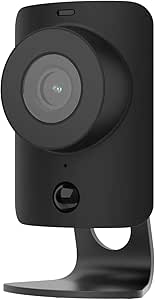 | Best for SimpliSafe Households | Resolution: 1080p HD | Field of view: 120 degrees | Power: AC power | VIEW LATEST PRICE | See Our Full Breakdown |
| Arlo Essential Indoor Baby Camera 2K (3rd Gen), 2-Camera Set |  | Best for Nursery Coverage | Camera count: 2 | Video resolution: 2K | Field of view: 130 degrees | VIEW LATEST PRICE | See Our Full Breakdown |
| Anona 4K UHD Indoor Security Camera, 4-Pack |  | Best for Multi-Room Detail | Pack size: 4 cameras | Resolution: 4K, 8 MP | Pan and tilt: 360-degree pan; 110-degree tilt | VIEW LATEST PRICE | See Our Full Breakdown |
| Xiaomi Smart Camera C301 2K Indoor Wi-Fi Camera with Privacy Shutter |  | Best for Physical Lens Privacy | Resolution: 3MP (2304 × 1296) | Pan range: 360 degrees | Tilt range: 107 degrees | VIEW LATEST PRICE | See Our Full Breakdown |
| LUMAISLE Indoor PTZ Security Camera, 2K 3MP, Blue |  | Best for Local Recording | Resolution: 2K, 3MP | Pan range: 355 degrees horizontal | Tilt range: 90 degrees vertical | VIEW LATEST PRICE | See Our Full Breakdown |
| Arlo Essential Indoor Security Camera, 2K, 2nd Gen |  | Best for a Wide, Fixed View | Resolution: 2K | Power: Wired, plug-in | Field of view: 130 degrees | VIEW LATEST PRICE | See Our Full Breakdown |
| indoor security cameras with privacy shutter | Resolution | Power | Connectivity | Field of view |
|---|---|---|---|---|
| SimpliSafe SimpliCam 1080p Wir | 1080p HD | AC power | Wi-Fi | 120 degrees |
| Arlo Essential Indoor Baby Cam | — | Wired; 6.5 ft power cable | Dual-band Wi-Fi | 130 degrees |
| Anona 4K UHD Indoor Security C | 4K, 8 MP | Corded electric, 5 V | — | — |
| Xiaomi Smart Camera C301 2K In | 3MP (2304 × 1296) | — | — | — |
| LUMAISLE Indoor PTZ Security C | 2K, 3MP | Continuous power required | Dual-band Wi-Fi, 2.4GHz and 5GHz | — |
| Arlo Essential Indoor Security | 2K | Wired, plug-in | 2.4 GHz Wi-Fi | 130 degrees |
More Details on Our Top Picks
SimpliSafe SimpliCam 1080p Wired Indoor Security Camera with Privacy Shutter
The SimpliCam’s manually controlled stainless steel shutter makes its privacy choice easy to understand: close it when you want the lens covered, then open it when monitoring is needed. Its 1080p video and 120-degree view are more modest than the 2K Arlo Essential Indoor Baby Camera, but may be enough for checking a room without investing in a multi-camera set. Two-way audio, night vision, and motion alerts add useful everyday coverage. The main reason I’d choose it over the Xiaomi C301 is its fit with the SimpliSafe Gen 3 system; buyers outside that setup get less from its ecosystem tie-in. It needs Wi-Fi and AC power, and video verification or faster dispatch requires a monitoring plan.
Pros:- Manually controlled stainless steel shutter covers the lens for privacy
- 120-degree field of view covers a broad fixed view of a room
- Night vision, motion alerts, and two-way audio support everyday monitoring
Cons:- 1080p resolution is lower than the 2K Arlo and Xiaomi options
- Requires AC power and Wi-Fi
- Video verification and faster dispatch require a monitoring plan
Best for: SimpliSafe Gen 3 owners who want a single indoor camera with a clearly visible, manually controlled lens shutter
Not ideal for: Buyers who want 2K or 4K detail, pan-and-tilt coverage, or a camera that works without a nearby outlet and Wi-Fi
- Resolution:1080p HD
- Field of view:120 degrees
- Power:AC power
- Connectivity:Wi-Fi
- Audio:Two-way audio
- Privacy feature:Stainless steel privacy shutter
- Compatibility:SimpliSafe Gen 3 security system
- Use:Indoor
Our verdict“Choose the SimpliCam if you already use SimpliSafe Gen 3 and prefer a manual shutter over higher resolution or pan-and-tilt coverage.”
Arlo Essential Indoor Baby Camera 2K (3rd Gen), 2-Camera Set
For a nursery or two separate rooms, the two-camera set and app-controlled automatic privacy shields make this Arlo a more flexible choice than the single SimpliSafe SimpliCam. Each camera offers 2K video, a 130-degree view, and 12x zoom, giving caregivers more detail when checking a crib or another part of the room. Sound and motion alerts, night vision, and two-way audio round out its monitoring tools. The tradeoff is ongoing service dependence: premium features such as 60-day video history require a paid Arlo Secure plan after the included trial. I’d also check its regional limits and smart home fit before choosing it over the Xiaomi C301; this model is intended for the United States and does not work with Arlo SmartHub or Base Stations.
Pros:- Two cameras cover separate rooms from one set
- 2K video, 130-degree view, and 12x zoom provide flexible viewing
- App-controlled automatic privacy shields, night vision, and two-way audio
- Works with Alexa, Google Home, Samsung SmartThings, and IFTTT
Cons:- Premium features, including 60-day video history, require a paid plan after the trial
- Wired cameras need a nearby power outlet
- Not compatible with Arlo SmartHub or Base Stations, and functionality may be limited outside the United States
Best for: Caregivers who want to monitor a nursery and a second indoor area with app-controlled privacy shields and smart home integrations
Not ideal for: Buyers who want local Arlo hub compatibility, use the cameras outside the United States, or avoid paid plans for premium features
- Camera count:2
- Video resolution:2K
- Field of view:130 degrees
- Zoom:12x
- Connectivity:Dual-band Wi-Fi
- Power:Wired; 6.5 ft power cable
- Privacy feature:App-controlled automatic privacy shield
- Smart home compatibility:Amazon Alexa, Samsung SmartThings, IFTTT, Google Home
- Subscription:1-month Arlo Secure trial; paid plan required for premium features after trial
Our verdict“Pick this Arlo set for two-room nursery monitoring if its subscription terms and regional compatibility suit your household.”
Anona 4K UHD Indoor Security Camera, 4-Pack
The Anona set is the lineup’s coverage-first pick: four cameras can monitor multiple rooms, while 4K video and 8x digital zoom offer more image detail than the 2K Arlo set. Its 360-degree pan, 110-degree tilt, and automatic motion tracking can follow activity across a room instead of leaving a fixed view. But the title’s privacy-shutter promise is a weak fit here: the supplied details do not list a physical or app-controlled shutter. That omission matters for anyone who wants a clear way to block the lens when a room is occupied. I’d choose the Xiaomi C301 instead for its physical shutter and local AI detection, while the Anona makes more sense for buyers prioritizing four-camera coverage and flexible storage. The 15 fps rate is a tradeoff for moving subjects.
Pros:- Four cameras cover multiple indoor rooms
- 4K video and 8x digital zoom provide detailed views
- 360-degree pan, 110-degree tilt, and automatic motion tracking follow activity
- Supports encrypted cloud storage or microSD cards up to 512 GB
Cons:- Product details do not specify a privacy shutter
- 15 fps may look less smooth when people or pets move quickly
- MicroSD cards are not included
Best for: Households that want four indoor cameras with pan-and-tilt tracking and flexible local or cloud recording
Not ideal for: Privacy-first buyers who require a documented lens shutter, or anyone who wants smoother video than 15 frames per second
- Pack size:4 cameras
- Resolution:4K, 8 MP
- Pan and tilt:360-degree pan; 110-degree tilt
- Zoom:8x digital zoom
- Wi-Fi:Dual-band 2.4 GHz and 5 GHz Wi-Fi 6
- Detection:Person, pet, and baby-cry detection
- Storage:Cloud or microSD card up to 512 GB; card not included
- Frame rate:15 frames per second
- Power:Corded electric, 5 V
Our verdict“Choose Anona for four-room coverage and tracking, but select the Xiaomi C301 if a physical privacy shutter is a requirement.”
Xiaomi Smart Camera C301 2K Indoor Wi-Fi Camera with Privacy Shutter
The C301 earns its place through a combination that is uncommon in this group: a physical lens shutter, local AI person detection, and pan-and-tilt coverage. It records at 2304 × 1296 and can rotate 360 degrees horizontally and 107 degrees vertically, so it covers more of a room than the fixed-view SimpliSafe SimpliCam. Compared with the 4K Anona four-pack, it offers lower resolution and fewer cameras, but its shutter gives privacy-conscious buyers a concrete way to block the lens. AES-128 encryption and microSD support add recording choices, while cloud storage is optional. The main constraints are 2.4GHz-only Wi-Fi and the use of the Mi Home app; I’d check that network and app fit before choosing it.
Pros:- Physical shutter blocks the camera lens
- 360-degree pan and 107-degree tilt cover a broad room area
- Local AI person detection and motion tracking
- Supports microSD cards up to 256 GB and optional cloud storage
Cons:- Wi-Fi is limited to 2.4GHz
- Resolution is below the 4K Anona system
- Uses the Mi Home app
Best for: Privacy-conscious households that want a physical lens shutter, person detection, and local microSD recording in one camera
Not ideal for: Buyers with 5GHz-only Wi-Fi, or those who need multiple cameras in the box or 4K resolution
- Resolution:3MP (2304 × 1296)
- Pan range:360 degrees
- Tilt range:107 degrees
- Detection:Local AI person detection and motion tracking
- Privacy:Physical lens shutter; AES-128 end-to-end encryption
- Storage:microSD up to 256 GB and cloud storage
- Wi-Fi:2.4GHz
- App:Mi Home
Our verdict“Choose the C301 if a physical shutter and local recording matter more than 4K resolution or multi-camera coverage.”
LUMAISLE Indoor PTZ Security Camera, 2K 3MP, Blue
The LUMAISLE stands out for buyers who want a 32GB TF card included and a camera that can track movement across most of a room. Its 355-degree pan and 90-degree tilt, person detection, and two-way audio give it more active coverage than the fixed SimpliSafe SimpliCam. It also supports dual-band Wi-Fi, while the Xiaomi C301 is limited to 2.4GHz. The privacy feature needs a closer look, though: app-controlled privacy mode is not described as a physical shutter, so it may not satisfy someone who wants a visible barrier over the lens. Color night vision and local recording are useful extras, but the camera needs continuous power and the advanced cloud features are offered as a 30-day free service.
Pros:- Includes a 32GB TF card for local recording
- 355-degree pan and 90-degree tilt with person tracking
- Dual-band 2.4GHz and 5GHz Wi-Fi
- Color night vision and two-way audio
Cons:- Privacy mode is app-controlled and not specified as a physical lens shutter
- Requires continuous power
- Advanced cloud features are offered as a 30-day free service
Best for: Buyers who want pan-and-tilt indoor monitoring with a local memory card included and dual-band Wi-Fi support
Not ideal for: Privacy-focused buyers who require a documented physical shutter, or households that need a camera to operate without continuous power
- Resolution:2K, 3MP
- Pan range:355 degrees horizontal
- Tilt range:90 degrees vertical
- Night vision:Color
- Connectivity:Dual-band Wi-Fi, 2.4GHz and 5GHz
- Storage:32GB TF card included; supports up to 128GB
- Privacy mode:App-controlled
- Power:Continuous power required
- Mount and color:Wall mount; blue
Our verdict“Choose LUMAISLE for included local storage and dual-band pan-and-tilt monitoring if app privacy mode meets your needs.”
Arlo Essential Indoor Security Camera, 2K, 2nd Gen
The Arlo Essential Indoor 2K pairs an automated privacy shield with a 130-degree view, making it a strong fit when you want one camera to cover a broad room and close off its lens when privacy matters. Its 2K video, night vision, and two-way audio also cover everyday monitoring without adding pan-and-tilt controls. Compared with the LUMAISLE Indoor PTZ Security Camera, Arlo trades the ability to rotate and follow activity for a simpler fixed view and a physical privacy shield. That makes placement more important: it cannot turn toward a doorway outside its field of view. The wired power connection keeps it ready for continuous use, but limits where it can sit. Some alerts and video storage also depend on a paid Arlo Secure plan, so buyers should check which features work for them before choosing it.
Pros:- Automated privacy shield closes off the camera lens when monitoring is not wanted
- 130-degree field of view covers a broad area from one fixed position
- 2K video, night vision, and two-way audio support day and night monitoring
- Compatible with Amazon Alexa and Google Home
Cons:- Wired plug-in power limits placement and requires a nearby outlet
- Some alert and video storage features require a paid Arlo Secure plan after the trial
- Setup supports 2.4 GHz Wi-Fi
Best for: Households that want a fixed, wide-angle view with an automated lens shield and already have a convenient outlet nearby
Not ideal for: Renters or anyone who needs flexible placement, pan-and-tilt coverage, or subscription-free access to all alert and storage features
- Resolution:2K
- Power:Wired, plug-in
- Field of view:130 degrees
- Privacy feature:Automated privacy shield
- Night vision:Yes
- Audio:Two-way audio with noise cancellation
- Connectivity:2.4 GHz Wi-Fi
- Smart home compatibility:Amazon Alexa, Google Home
Our verdict“Choose the Arlo Essential Indoor 2K if a wide fixed view and automated privacy shield matter more than cordless placement or pan-and-tilt coverage.”
How We Picked
I ranked these cameras around the specific promise of this roundup: useful indoor monitoring with a privacy shutter buyers can understand and operate. I gave the most weight to how clearly the product information identifies a physical shutter, then considered image resolution, viewing coverage, setup style, and whether the package suits one room or several. A moving camera can cover more of a room, but that does not replace a physical barrier when privacy is the priority.
The order also reflects the tradeoffs visible in the named models and bundles. SimpliSafe comes first for its clear shutter-focused fit; Arlo’s two-camera baby set and Anona’s four-pack follow for buyers who value multi-room coverage. Xiaomi earns a place for pairing a shutter with pan-and-tilt functionality. I include the LUMAISLE PTZ and Arlo Essential 2nd Gen as alternatives, while advising buyers to verify shutter presence and operation on the exact listing before treating either as a shutter-first choice.
| indoor security cameras with privacy shutter | Power | Privacy feature |
|---|---|---|
| SimpliSafe SimpliCam 1080p Wir | AC power | Stainless steel privacy shutter |
| Arlo Essential Indoor Baby Cam | Wired; 6.5 ft power cable | App-controlled automatic privacy shield |
| Anona 4K UHD Indoor Security C | Corded electric, 5 V | — |
| Xiaomi Smart Camera C301 2K In | — | — |
| LUMAISLE Indoor PTZ Security C | Continuous power required | — |
| Arlo Essential Indoor Security | Wired, plug-in | Automated privacy shield |
Factors to Consider When Choosing Indoor Security Cameras With Privacy Shutters
A privacy shutter is one part of a camera’s privacy story. I would match the camera’s physical controls, coverage style, and account features to the room and the people who use it.
Check What the Shutter Actually Blocks
Product names and listing photos do not always make clear whether a shutter physically covers the lens or simply changes the camera’s software state. Look for a direct explanation of how the shutter moves and how you activate it. If a camera has a microphone, ask whether audio capture can be disabled separately; a lens cover does not mute sound. Also check whether the app shows a clear privacy status when the camera is off. For shared spaces, choose controls that everyone in the household can understand. A physical cover is most useful when its state is visible and easy to confirm.
Choose Fixed View or Pan-and-Tilt
A fixed camera watches one carefully chosen area, which can make its view predictable and easier to limit. Pan-and-tilt models can follow a wider room, but movement may expose areas you did not intend to monitor. Before buying, decide which parts of the room should remain outside the frame and where the camera will sit. Avoid aiming a camera at neighboring homes, private work areas, or places where household members expect greater privacy. A wider view is not automatically better if it captures more than you need. For a single doorway or crib, a fixed position may be simpler; for a broad room, movement can reduce blind spots.
Treat Resolution as a Detail Tool
Higher resolution can make small details easier to distinguish, but it cannot correct poor placement, glare, or a blocked view. Consider what you need to recognize: general activity, a doorway, or finer details at a distance. A camera pointed across a large room may benefit more from careful positioning than from a resolution upgrade alone. Check whether the app and network can handle the video quality you select. If several cameras will run at once, bandwidth and storage needs can add up. Match the resolution to the room and viewing purpose rather than choosing the largest number by default.
Decide How Many Cameras You Can Manage
Multi-camera bundles can simplify coverage across several rooms, but each device adds setup, notifications, and maintenance. Count the areas that genuinely need monitoring before choosing a large pack. Think through whether you want separate settings for each camera and how quickly you can identify which device sent an alert. A two-camera set can be a sensible middle ground for a nursery and shared area, while a four-pack is useful only when those extra views have a clear purpose. Extra cameras can also increase the number of devices connected to your account. Start with the coverage plan, then choose a bundle that fits it.
Review Storage and Connectivity Before You Commit
A camera’s usefulness depends on how you can view and retrieve footage, not just how it records. Check whether live viewing, event clips, or longer recordings require an account plan or cloud connection. Confirm what happens during an internet outage and whether the model supports local storage if that matters to you. Review notification controls too: frequent alerts can make important events easier to miss. For a home with several users, consider who can access the account and how access can be removed later. These details shape privacy and day-to-day upkeep as much as the shutter does.
Frequently Asked Questions
Does a privacy shutter stop a camera from recording audio?
Usually, a shutter covers the camera lens, so it does not automatically disable a built-in microphone. Check the product details and app controls for a separate audio setting. If you want a camera that cannot capture sound while privacy mode is active, look for a clear statement from the manufacturer rather than assuming the shutter handles it. You can also check whether the app indicates when audio recording is enabled. The camera’s physical and audio privacy controls should be evaluated separately.
Should I choose one higher-resolution camera or a multi-camera bundle?
Choose based on the number and layout of the areas you need to monitor. One high-resolution camera may suit a single room where detail matters, while a bundle can cover separate rooms without relying on pan-and-tilt movement. More cameras also mean more setup, alerts, network use, and account devices to manage. If you are unsure, map the views you need before selecting a pack. Avoid buying extra cameras just because they are included together.
Is pan-and-tilt coverage worth it if I care about privacy?
It can be useful when one fixed angle leaves important parts of a room unseen, but movement makes the camera’s field of view less predictable. Decide whether the extra coverage is worth the need to manage movement settings and privacy zones. A physical shutter still matters because a camera facing away from a sensitive area may turn toward it later. Check how the model behaves when tracking is disabled and when privacy mode is active. If a consistent, limited view is your priority, a fixed camera may be easier to manage.
Can I rely on the word “privacy” in a product name to confirm there is a shutter?
No. Product names may refer to software privacy features, privacy settings, or a shutter, and those are not interchangeable. Look for an explicit description of a physical cover and how it is operated. Check images or setup documentation for the exact model and generation you plan to buy. If the listing is unclear, treat shutter presence as unconfirmed. That extra check is especially useful when comparing similarly named versions.
What should I check before placing an indoor camera in a nursery or shared room?
First decide which areas the camera should see and whether audio monitoring is appropriate for the household. Check shutter operation, account access controls, and how alerts or recordings are stored. Place the camera so it captures the intended area without pointing into neighboring spaces or other private parts of the home. If more than one person will use the app, agree on who can view footage and change settings. A clear household rule for when the camera is active can prevent confusion about its privacy state.
Conclusion
For the best overall fit, I would start with the SimpliSafe SimpliCam because its shutter is central to the choice. The best value in coverage depends on how many rooms you need: the Anona 4-pack suits multi-room plans, while the Arlo Baby Camera two-camera set is a more focused pick for buyers who want two views. For a premium-style feature set, consider the Xiaomi C301 if pan-and-tilt coverage and a shutter match your priorities. The best option for beginners is the camera whose shutter, app controls, and setup are clearest in the exact model documentation; SimpliSafe is the most direct place to start. For movement-focused coverage, compare the Xiaomi and LUMAISLE PTZ, and confirm shutter details on the latter; choose the Arlo Essential 2nd Gen when its 2K format and ecosystem fit your needs after verifying its privacy controls.
Fall Picks
fall essentials
As an affiliate, we earn on qualifying purchases.