Choosing the right home security cameras for elderly relatives requires balancing ease of use with robust monitoring features. My top recommendation is the eufy Security Indoor Cam S350 because its dual-lens design and local storage eliminate subscription worries while providing crisp 4K clarity for checking in on mobility. For those prioritizing direct communication, the CIAJIE Indoor Two-Way Video Camera with 4.3-Inch Screen stands out by allowing grandparents to see who is calling without needing a smartphone. The main tradeoff in this category often lies between complex smart home integration and simple, standalone operation. While some cameras offer advanced AI detection, others focus on intuitive interfaces that require minimal technical knowledge from the user. Continue reading to see how these and other models stack up against specific caregiving needs.

Get privacy and security gear delivered free with Prime
- Fast, free delivery on millions of items
- Prime Video, Amazon Music and more included
- Member-only deals all year
Key Takeaways
- Cameras with built-in screens, like the CIAJIE model, reduce the technological barrier for elderly users who may not use smartphones daily.
- Local storage options, such as those found in eufy devices, are superior for privacy-conscious families who want to avoid cloud subscription fees and potential data breaches.
- Two-way audio quality varies drastically; models with noise cancellation are essential for clear communication in environments with background noise like TV or hearing aids.
- Pan-Tilt-Zoom (PTZ) capabilities allow a single camera to cover larger living areas, reducing the number of devices needed for comprehensive monitoring of a single-story home.
- Privacy modes are a critical feature for dignity, allowing elderly individuals to physically cover the lens or disable the camera when they need private space.
| Ring Indoor Cam |  | Best for Simple, No-Subscription Live Monitoring | Video Resolution: 1080p HD | Night Vision: Color Night Vision | Connectivity: 2.4GHz Wi-Fi | VIEW ON AMAZON | See Our Full Breakdown |
| Anona 4K UHD Indoor Camera (2 Pack) |  | Best Value for High-Resolution Coverage | Video Resolution: 4K UHD (8MP) | Zoom: 8x Digital Zoom | Pan/Tilt: 360° Horizontal, 110° Vertical | VIEW ON AMAZON | See Our Full Breakdown |
| GALAYOU G2 Indoor Security Camera 4-Pack |  | Best for Multi-Room Coverage on a Budget | Video Resolution: 2K | Quantity: 4 Cameras | Viewing Angle: 95 degrees (Fixed) | VIEW ON AMAZON | See Our Full Breakdown |
| eufy Security E30 4K Indoor Camera |  | Best Premium Pick for No-Subscription Local Storage | Video Resolution: 4K UHD | Pan/Tilt: 360° Horizontal, 90° Vertical | Storage: Local MicroSD (Card sold separately) | VIEW ON AMAZON | See Our Full Breakdown |
| Kasa EC71 1080p Indoor Pan/Tilt Security Camera | 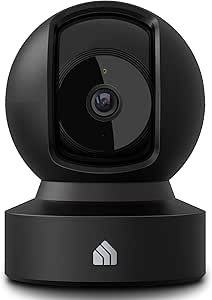 | Best for Smart Home Integration and Ease of Use | Video Resolution: 1080p Full HD | Pan/Tilt: 360° Horizontal, 113° Vertical | Connectivity: 2.4GHz Wi-Fi | VIEW ON AMAZON | See Our Full Breakdown |
| blurams 5G Cameras for Home Security, 360° PTZ Pet/Dog Indoor Camera, 2Pack |  | Best for Multi-Room Coverage | Resolution: 2K Ultra Clear | Field of View: 360° Pan-Tilt | Connectivity: Dual-Band Wi-Fi 6 (2.4GHz/5GHz) | VIEW ON AMAZON | See Our Full Breakdown |
| Cinnado D1 2K Indoor Security Camera 4-Pack |  | Best Value Multi-Camera Set | Resolution: 2K (1080p effective) | Connectivity: 2.4GHz Wi-Fi only | Storage: SD Card (up to 128GB) or Cloud | VIEW ON AMAZON | See Our Full Breakdown |
| 2K Indoor/Outdoor Security Camera with Color Night Vision and Two-Way Audio |  | Best for Entryways & Outdoor Access | Resolution: 2K | Weather Resistance: IP66 | Night Vision Range: 33 feet (Color) | VIEW ON AMAZON | See Our Full Breakdown |
| AOQEE 5G Indoor Security Camera 2-Pack with 360° Auto-Tracking and 2K HD Resolution |  | Best for Smart Human Detection | Resolution: 2K HD (3 MP) | Connectivity: Dual-Band Wi-Fi (2.4 GHz & 5 GHz) | Field of View: 360° Pan-Tilt | VIEW ON AMAZON | See Our Full Breakdown |
| K09 Indoor Security Camera with 2K Resolution, Dual-Band Wi-Fi, and AI Motion Detection |  | Best Simple Single-Camera Solution | Resolution: 2K (2304 x 1296) | Connectivity: Dual-Band Wi-Fi (2.4GHz & 5GHz) | Storage: Micro SD (up to 256GB) + Free 1-day Cloud | VIEW ON AMAZON | See Our Full Breakdown |
| CIAJIE Indoor Two-Way Video Camera with 4.3-Inch Screen |  | Best for Independent Seniors | Screen Size: 4.3 inches | Video Resolution: 1080p | Field of View: 360° | VIEW ON AMAZON | See Our Full Breakdown |
| GNCC 2K Indoor Security Cameras, 2-Pack |  | Best Value Multi-Room Kit | Resolution: 2K (1920p) | Pack Size: 2 cameras | Pan and Tilt: 340° horizontal, 80° vertical | VIEW ON AMAZON | See Our Full Breakdown |
| Home Security Camera with 4.3″ Screen, Two-Way Video Call for Elderly |  | Best for Simplicity | Screen Size: 4.3 inches | Resolution: 1080P HD | Field of View: 350 degrees | VIEW ON AMAZON | See Our Full Breakdown |
| eufy Security Indoor Cam S350 |  | Best Premium Clarity | Resolution: 4K UHD / 2K Telephoto | Zoom: 8x Hybrid Zoom | Field of View: 360° | VIEW ON AMAZON | See Our Full Breakdown |
| Tapo 1080P Indoor Security Camera, Baby Monitor, Dog Camera, Wired, C100 |  | Best Budget Starter | Resolution: 1080P HD | Night Vision Range: 30 feet | Audio: Two-way with Siren | VIEW ON AMAZON | See Our Full Breakdown |
| home security cameras for elderly | Storage | Connectivity | Resolution |
|---|---|---|---|
| Ring Indoor Cam | Cloud-based (Subscription required for history) | 2.4GHz Wi-Fi | — |
| Anona 4K UHD Indoor Camera | MicroSD (up to 512GB) or Cloud | Dual-Band Wi-Fi (2.4GHz/5GHz) | — |
| GALAYOU G2 Indoor Security Cam | MicroSD (up to 128GB) or Cloud | 2.4GHz Wi-Fi only | — |
| eufy Security E30 4K Indoor Ca | Local MicroSD (Card sold separately) | Dual-Band Wi-Fi | — |
| Kasa EC71 1080p Indoor Pan/Til | MicroSD (up to 256GB) or Cloud | 2.4GHz Wi-Fi | — |
| blurams 5G Cameras for Home Se | MicroSD (up to 256GB) or Cloud | Dual-Band Wi-Fi 6 (2.4GHz/5GHz) | 2K Ultra Clear |
| Cinnado D1 2K Indoor Security | SD Card (up to 128GB) or Cloud | 2.4GHz Wi-Fi only | 2K (1080p effective) |
| 2K Indoor/Outdoor Security Cam | Cloud or microSD card (up to 128 GB) | — | 2K |
| AOQEE 5G Indoor Security Camer | TF Card (8GB-128GB) or Cloud | Dual-Band Wi-Fi (2.4 GHz & 5 GHz) | 2K HD (3 MP) |
| K09 Indoor Security Camera wit | Micro SD (up to 256GB) + Free 1-day Cloud | Dual-Band Wi-Fi (2.4GHz & 5GHz) | 2K (2304 x 1296) |
| CIAJIE Indoor Two-Way Video Ca | — | Wi-Fi (2.4 GHz and 5 GHz) | — |
| GNCC 2K Indoor Security Camera | Cloud or microSD (card not included) | 2.4 GHz and 5 GHz Wi-Fi | 2K (1920p) |
| Home Security Camera with 4.3" | SD card (not included) | 2.4G WiFi only | 1080P HD |
| eufy Security Indoor Cam S350 | Local SD card (card not included) | — | 4K UHD / 2K Telephoto |
| Tapo 1080P Indoor Security Cam | microSD or Tapo Care Cloud | 2.4 GHz Wi-Fi | 1080P HD |
More Details on Our Top Picks
Ring Indoor Cam
This camera stands out for its plug-and-play simplicity, making it ideal for elderly users or caregivers who want to check in without complex setup. Unlike the eufy Security E30, which requires a separate SD card for local storage, the Ring Indoor Cam offers free live viewing and basic motion alerts without a mandatory subscription. The 1080p HD video is clear enough for identifying faces, though it lacks the 4K detail found in premium competitors. A key advantage is the manual privacy cover, a physical feature that reassures users about privacy when the camera is not in use. However, accessing recorded history and advanced AI alerts requires a paid Ring Protect plan, which may feel restrictive for budget-conscious buyers.Pros:- Free live view and basic motion alerts without a subscription
- Physical privacy cover provides tangible security reassurance
- Compact design fits easily on shelves or nightstands
Cons:- Recorded video history requires a paid Ring Protect subscription
- 1080p resolution is lower than 4K competitors
- Limited to 2.4GHz Wi-Fi networks
Best for: Caregivers who prioritize ease of use and want free live video access without managing storage cards
Not ideal for: Users who want to avoid monthly subscriptions for accessing recorded video history
- Video Resolution:1080p HD
- Night Vision:Color Night Vision
- Connectivity:2.4GHz Wi-Fi
- Storage:Cloud-based (Subscription required for history)
- Audio:Two-way audio with noise cancellation
- Power:Wired (Micro USB)
- Privacy Feature:Manual privacy cover
Our verdict“Choose this if you value simplicity and free live checks over high-resolution recording.”
Anona 4K UHD Indoor Camera (2 Pack)
Offering 4K UHD resolution in a two-pack, this system provides exceptional detail at a competitive price point. Compared to the Kasa EC71, which is limited to 1080p, the Anona’s 8x digital zoom allows caregivers to see fine details like medication bottles or facial expressions from a distance. The 360° pan and tilt combined with auto-tracking ensures no blind spots, a significant upgrade over fixed-angle cameras like the Ring Indoor Cam. While it supports both local microSD and cloud storage, the app interface can feel less polished than established brands. The AI detection for baby crying and pets is useful, but false positives can occur if not carefully calibrated.Pros:- 4K resolution offers superior image clarity for detail identification
- Two-camera pack provides broad coverage for larger spaces
- Supports both local microSD and cloud storage options
Cons:- App interface is less intuitive than major brand competitors
- AI detection may generate false alerts if not finely tuned
- Requires separate purchase of microSD cards for local recording
Best for: Budget-conscious families needing high-definition clarity and multiple camera coverage
Not ideal for: Users who prefer a single, highly refined app ecosystem over feature-heavy interfaces
- Video Resolution:4K UHD (8MP)
- Zoom:8x Digital Zoom
- Pan/Tilt:360° Horizontal, 110° Vertical
- Connectivity:Dual-Band Wi-Fi (2.4GHz/5GHz)
- Storage:MicroSD (up to 512GB) or Cloud
- AI Features:Person, Pet, and Crying Detection
- Quantity:2 Cameras
Our verdict“Pick this if you need sharp 4K video and two cameras without paying premium brand prices.”
GALAYOU G2 Indoor Security Camera 4-Pack
This four-camera kit is designed for monitoring multiple areas simultaneously, such as bedrooms, living rooms, and kitchens. While the 2K resolution is not as sharp as the Anona 4K model, it is sufficient for general oversight and identifying movement patterns. The ability to view all four feeds in one app window is a practical feature for caregivers managing a larger home. However, the fixed viewing angle means you cannot pan or tilt to follow activity, unlike the eufy Security E30. You must strategically place these cameras to avoid blind spots. The built-in siren is a deterrent feature, but the lack of 5GHz Wi-Fi support may cause connectivity issues in congested networks.Pros:- Four cameras provide comprehensive coverage for multi-room setups
- Built-in siren adds an active deterrent component
- View all four feeds simultaneously in the companion app
Cons:- Fixed position cameras cannot pan or tilt to track movement
- Limited to 2.4GHz Wi-Fi, which may suffer from interference
- 2K resolution is less detailed than 4K or high-end 2K options
Best for: Users needing to monitor several distinct rooms or entry points without panning capabilities
Not ideal for: Those who need to remotely adjust the camera angle to follow a person moving through a room
- Video Resolution:2K
- Quantity:4 Cameras
- Viewing Angle:95 degrees (Fixed)
- Night Vision:Up to 32 feet
- Connectivity:2.4GHz Wi-Fi only
- Storage:MicroSD (up to 128GB) or Cloud
- Audio:Two-way audio
Our verdict“Ideal for covering multiple fixed areas where panning is not necessary.”
eufy Security E30 4K Indoor Camera
This camera balances high-end features with privacy-focused storage. Unlike the Ring Indoor Cam, which locks video history behind a paywall, the eufy E30 stores recordings locally on a microSD card, giving you full control over your data. The 4K resolution rivals the Anona, but the build quality and app experience are more refined. Its AI tracking smoothly follows people, making it excellent for monitoring elderly relatives who move around the house. The main drawback is that HomeKit integration limits video to 1080p, and the SD card is not included. Compared to the Kasa EC71, it offers superior image quality and smart features, though at a higher entry cost.Pros:- No monthly subscription required for local video storage
- 4K resolution with smooth AI-powered person tracking
- Works with HomeKit, Alexa, and Google Assistant
Cons:- MicroSD card for recording is not included in the box
- HomeKit video streaming is capped at 1080p resolution
- Higher upfront cost compared to budget multi-packs
Best for: Privacy-conscious users who want 4K quality and refuse to pay monthly cloud fees
Not ideal for: Users who want to buy the camera and start recording immediately without extra accessories
- Video Resolution:4K UHD
- Pan/Tilt:360° Horizontal, 90° Vertical
- Storage:Local MicroSD (Card sold separately)
- Connectivity:Dual-Band Wi-Fi
- AI Features:Person and Pet Detection with Tracking
- Compatibility:HomeKit, Alexa, Google Assistant
- Night Vision:Color and Infrared
Our verdict“The best choice for those who demand premium features and data ownership without subscriptions.”
Kasa EC71 1080p Indoor Pan/Tilt Security Camera
The Kasa EC71 is a reliable workhorse that excels in smart home compatibility. It integrates seamlessly with Alexa and Google Home, allowing voice commands to check in on elderly family members—a feature the GALAYOU G2 lacks. While its 1080p resolution is lower than the eufy E30 or Anona, it is adequate for general monitoring and two-way communication. The 360° pan and tilt eliminates blind spots, and the app is known for its stability and user-friendly design. It supports both local microSD and cloud subscriptions, offering flexibility. However, the lack of 5GHz Wi-Fi support is a limitation in modern homes, and the video quality will not provide the fine detail needed for reading small text or identifying distant faces.Pros:- Excellent integration with Alexa and Google Home voice assistants
- Wide 360° pan/tilt coverage with auto-tracking
- User-friendly app with reliable connection stability
Cons:- Limited to 2.4GHz Wi-Fi networks only
- 1080p resolution lacks detail compared to 4K competitors
- Extended cloud history requires a paid Kasa Care subscription
Best for: Users deeply invested in the Alexa or Google Home ecosystem who prioritize app stability
Not ideal for: Those requiring 4K clarity for identifying fine details or reading small objects
- Video Resolution:1080p Full HD
- Pan/Tilt:360° Horizontal, 113° Vertical
- Connectivity:2.4GHz Wi-Fi
- Storage:MicroSD (up to 256GB) or Cloud
- AI Features:Baby Crying and Person Detection
- Compatibility:Alexa, Google Home
- Night Vision:Up to 30 feet
Our verdict“A solid, easy-to-use option for smart home users who don’t need 4K video.”
blurams 5G Cameras for Home Security, 360° PTZ Pet/Dog Indoor Camera, 2Pack
This two-pack is a strong contender for caregivers managing multiple rooms. Unlike the single-unit K09, the blurams system includes two cameras, allowing you to monitor a bedroom and a living area simultaneously without buying separate units. The 360° pan-tilt capability means you can remotely scan an entire room, which is helpful if an elderly person moves around unexpectedly. However, the cloud storage subscription is a significant ongoing cost compared to the free local options on some competitors. While the AI tracking is robust for pets, it can occasionally be overly sensitive to curtains moving. If you need broad coverage out of the box, this pair is efficient, but be prepared for the subscription model if you want full event history.
Pros:- Includes two cameras for multi-room monitoring
- 360° pan-tilt allows remote room scanning
- Dual-band Wi-Fi 6 support for stable connections
- Two-way audio works well for checking in
Cons:- Requires subscription for full cloud history
- MicroSD card is not included
- AI tracking can be sensitive to non-human motion
Best for: Caregivers needing to monitor two distinct areas (e.g., bedroom and kitchen) simultaneously with active tracking capabilities.
Not ideal for: Those who refuse to pay monthly subscription fees for cloud storage or need battery-powered flexibility.
- Resolution:2K Ultra Clear
- Field of View:360° Pan-Tilt
- Connectivity:Dual-Band Wi-Fi 6 (2.4GHz/5GHz)
- Storage:MicroSD (up to 256GB) or Cloud
- Audio:Two-Way Talk
- Night Vision:Color/IR Night Vision
- Smart Home Integration:Alexa and Google Assistant
Our verdict“Choose this if you need two cameras immediately and value active tracking over one-time purchase simplicity.”
Cinnado D1 2K Indoor Security Camera 4-Pack
For those securing a larger living space, the Cinnado 4-pack offers the best cost-per-camera ratio in this lineup. Compared to the blurams pair, you get double the coverage for a modest price increase, making it ideal for monitoring hallways, entrances, and common areas. The built-in siren is a unique deterrent feature that most basic monitors lack, though its utility for elderly care is debatable. The main drawback is its 2.4GHz Wi-Fi limitation; unlike the AOQEE or K09 models, it cannot connect to 5GHz networks, which may cause lag in congested homes. It is a practical choice for broad visual oversight, but it lacks the advanced AI human detection found in more expensive units.
Pros:- Four cameras included for wide coverage
- Built-in siren for active deterrence
- 2K resolution with 360° rotation
- Works with Alexa and Google Assistant
Cons:- Limited to 2.4GHz Wi-Fi only
- No advanced AI human/pet differentiation
- MicroSD cards not included
Best for: Users needing to cover four distinct indoor zones on a budget who have a 2.4GHz network available.
Not ideal for: Tech-savvy users with congested 2.4GHz bands who need low-latency 5GHz connectivity.
- Resolution:2K (1080p effective)
- Connectivity:2.4GHz Wi-Fi only
- Storage:SD Card (up to 128GB) or Cloud
- Night Vision:940nm IR Lights, 6-meter range
- Audio:Two-way with built-in mic/speaker
- Alerts:Motion detection with Siren
- Mounting:Wall or Ceiling
Our verdict“A high-value option for covering multiple rooms, provided your home network handles 2.4GHz traffic well.”
2K Indoor/Outdoor Security Camera with Color Night Vision and Two-Way Audio
This camera stands out because it is IP66 rated, meaning it can be placed just outside the front door or on a covered porch. For elderly care, monitoring the entryway is critical for safety, and this unit handles rain and dust better than the strictly indoor K09 or Cinnado models. The color night vision is a major advantage, providing clearer identification of visitors or family members after dark compared to standard IR-only cameras. However, its fixed field of view means it lacks the pan-tilt flexibility of the blurams or AOQEE units. You must choose its angle carefully during installation, as you cannot adjust it remotely. It is a robust choice for perimeter awareness but less flexible for indoor room scanning.
Pros:- IP66 weather resistance for outdoor use
- Color night vision for better clarity
- Two-way audio for remote communication
- Supports continuous 24/7 recording
Cons:- Fixed field of view (no pan/tilt)
- MicroSD card not included
- Bulky design may not suit minimalist interiors
Best for: Caregivers who need to monitor the front door, porch, or garage entrance for safety and visitor identification.
Not ideal for: Those looking for a pan-tilt camera to scan an entire room or those who need indoor-only discreet designs.
- Resolution:2K
- Weather Resistance:IP66
- Night Vision Range:33 feet (Color)
- Audio:Two-way audio
- Recording:24/7 recording supported
- Storage:Cloud or microSD card (up to 128 GB)
- Power Source:Corded electric (5V/5W)
- Dimensions:4.7 x 5.9 x 3.5 inches
Our verdict“The best choice for securing entry points, offering weather resistance and color night vision that indoor-only models lack.”
AOQEE 5G Indoor Security Camera 2-Pack with 360° Auto-Tracking and 2K HD Resolution
The AOQEE 2-pack distinguishes itself with AI that separates humans from pets. This is a significant upgrade over the Cinnado D1, which often triggers false alerts from family members or animals. For elderly care, this means fewer unnecessary phone notifications when a caregiver enters the room. The 360° auto-tracking is smooth and helpful for monitoring mobility issues, ensuring the camera follows movement rather than staying static. Like the blurams, it supports dual-band Wi-Fi, ensuring a stable connection. The downside is that cloud storage is not free, and the local TF card is sold separately. It is a smarter, more responsive system, but it requires a bit more setup to avoid subscription costs.
Pros:- AI distinguishes humans from pets
- 360° auto-tracking follows movement
- Dual-band Wi-Fi for stable connectivity
- Two cameras included for multi-room use
Cons:- Cloud storage requires subscription
- TF card not included
- Alexa integration limited to live stream
Best for: Households with pets or multiple residents who need reduced false alarms via AI human detection.
Not ideal for: Users who want a simple, plug-and-play experience without worrying about storage subscriptions or card purchases.
- Resolution:2K HD (3 MP)
- Connectivity:Dual-Band Wi-Fi (2.4 GHz & 5 GHz)
- Field of View:360° Pan-Tilt
- Storage:TF Card (8GB-128GB) or Cloud
- Dimensions:2.83 x 2.83 x 4.49 inches
- Weight:6.4 ounces
- Compatibility:Alexa, Android, iOS
- Count:2 Cameras
Our verdict“Ideal for tech-oriented caregivers who want intelligent alert filtering and reliable tracking across two rooms.”
K09 Indoor Security Camera with 2K Resolution, Dual-Band Wi-Fi, and AI Motion Detection
If you only need to monitor one specific area, such as a bedside table or a single chair, the K09 offers a straightforward, no-frills approach. Unlike the multi-camera packs from blurams or AOQEE, this is a single unit with a fixed lens, meaning you cannot pan or tilt it remotely. This limitation is offset by its free 1-day rolling cloud storage, a feature many competitors charge for. The AI motion detection helps reduce false alerts, and the dual-band Wi-Fi ensures the video feed remains stable. It is an excellent entry point for someone who wants a simple ‘check-in’ camera without the complexity of managing multiple devices or subscriptions. However, the lack of pan-tilt means you must place it with precision to cover the desired area.
Pros:- Free 1-day rolling cloud storage
- Dual-band Wi-Fi for stable connection
- AI motion detection reduces false alerts
- Simple, compact design
Cons:- No pan/tilt functionality
- TF card not included
- Only one camera in the package
Best for: Users who need to monitor a single, static location and prefer free cloud storage over local card management.
Not ideal for: Those who need to scan large rooms or track movement, as the fixed lens cannot rotate.
- Resolution:2K (2304 x 1296)
- Connectivity:Dual-Band Wi-Fi (2.4GHz & 5GHz)
- Storage:Micro SD (up to 256GB) + Free 1-day Cloud
- Night Vision:Infrared, 49 feet range
- Audio:Two-way audio
- Power Source:Wired (Plug-in)
- Pan/Tilt:No
- App:Yoosee
Our verdict“A reliable, low-maintenance option for monitoring a single room, offering free cloud backup and stable connectivity.”
CIAJIE Indoor Two-Way Video Camera with 4.3-Inch Screen
This camera stands out because it eliminates the smartphone barrier for elderly users. Unlike the Tapo C100, which requires a caregiver to use a phone app to see the feed, the CIAJIE features a built-in 4.3-inch screen. This allows seniors to initiate video calls with family members using a simple push button, fostering independence rather than dependence. The 360° wide-angle view ensures that even if the user moves around the room, they remain in frame. However, it is strictly an indoor device and relies on a stable Wi-Fi connection, which can be a hurdle in homes with spotty signals. It is less about surveillance and more about connection, making it a superior choice for reducing isolation compared to standard security cams like the eufy S350.
Pros:- Built-in screen allows seniors to initiate calls without a smartphone
- Push-button calling simplifies the connection process
- Supports shared access for up to 10 family members
Cons:- Indoor use only with no weather resistance
- Requires consistent Wi-Fi connectivity for all functions
- Lacks advanced AI security detection found in surveillance-focused models
Best for: Seniors who are comfortable with technology but prefer not to manage smartphone apps for daily communication with family.
Not ideal for: Caregivers who need robust security features or motion alerts, as this is primarily a communication device.
- Screen Size:4.3 inches
- Video Resolution:1080p
- Field of View:360°
- Connectivity:Wi-Fi (2.4 GHz and 5 GHz)
- Shared Access:Up to 10 family members
- Power Source:Corded electric
- Dimensions:5 x 5 x 7.5 inches
Our verdict“Choose this if your primary goal is enabling seniors to call family easily without needing to operate a smartphone.”
GNCC 2K Indoor Security Cameras, 2-Pack
For families needing coverage in multiple areas, this two-pack offers exceptional value. The 2K resolution provides sharper detail than the CIAJIE or Tapo C100, which is helpful for identifying if a fall has occurred or if medication has been taken. The AI motion tracking automatically follows movement, ensuring the camera stays on the subject, a feature the static GNCC rivals lack. However, the reliance on cloud subscriptions for full playback features adds ongoing costs, whereas competitors like the eufy S350 prioritize local storage. The pan-and-tilt function covers large living spaces effectively, but the lack of included storage media means you must purchase SD cards separately to avoid subscription fees.
Pros:- 2K resolution offers clearer video than standard 1080p competitors
- AI motion tracking keeps the subject centered in the frame
- Two cameras included allow for multi-room coverage out of the box
Cons:- Cloud playback requires a paid subscription
- MicroSD cards are not included for local storage
- Bluetooth and dual-band Wi-Fi setup can be complex for non-tech-savvy users
Best for: Caregivers who need to monitor multiple rooms (e.g., living room and bedroom) simultaneously without buying separate high-end units.
Not ideal for: Users who want a strictly no-subscription setup, as optimal playback features often require cloud plans.
- Resolution:2K (1920p)
- Pack Size:2 cameras
- Pan and Tilt:340° horizontal, 80° vertical
- Night Vision Range:10 meters
- Storage:Cloud or microSD (card not included)
- Connectivity:2.4 GHz and 5 GHz Wi-Fi
- Compatibility:Amazon Alexa
Our verdict“This kit is the smart choice for covering multiple rooms, provided you are willing to manage storage subscriptions or buy SD cards.”
Home Security Camera with 4.3″ Screen, Two-Way Video Call for Elderly
This model prioritizes one-button operation above all else, making it significantly easier for seniors with cognitive decline or limited dexterity to use than the app-heavy Tapo C100. Like the CIAJIE, it includes a screen for direct interaction, but its focus on local SD card storage means no monthly fees are required for basic recording. The 350-degree lens offers nearly full-room visibility, though it lacks the 5GHz Wi-Fi support found in the GNCC, potentially limiting performance in congested networks. It is a robust, no-nonsense tool for checking in on loved ones. The trade-off is a lower resolution (1080p) compared to the eufy S350, but for general monitoring, the clarity is sufficient and the ease of use is unmatched.
Pros:- One-button calling simplifies operation for users with limited tech skills
- Local SD card storage eliminates monthly subscription costs
- 350-degree wide-angle lens covers most room layouts
Cons:- Does not support 5GHz Wi-Fi networks
- SD card must be purchased separately
- Indoor use only with no weatherproofing
Best for: Elderly users who struggle with complex interfaces and need a fail-safe, simple device for family check-ins.
Not ideal for: Homes with only 5GHz Wi-Fi networks, as this device only supports 2.4GHz connections.
- Screen Size:4.3 inches
- Resolution:1080P HD
- Field of View:350 degrees
- Connectivity:2.4G WiFi only
- Storage:SD card (not included)
- Power Source:5V DC
- Dimensions:4.72 x 4.72 x 7.08 inches
Our verdict“This is the best option for seniors who need a dead-simple, subscription-free way to stay connected with family.”
eufy Security Indoor Cam S350
The eufy S350 is overkill for basic check-ins but essential if you need 4K clarity to identify small details, such as whether a pill bottle is empty or if a fall caused injury. Its dual-lens system with 8x hybrid zoom allows caregivers to get a close-up view without moving the camera, a capability far superior to the fixed zoom of the GNCC or CIAJIE. The local storage via SD card ensures privacy and no fees, addressing the subscription complaints associated with the GNCC. However, the lack of a built-in screen means seniors cannot initiate calls from the device itself, unlike the CIAJIE. This is a tool for the observer, not the user, making it best for proactive monitoring rather than social connection.
Pros:- 4K UHD wide-angle and 2K telephoto provide exceptional detail
- 8x hybrid zoom allows for close-ups without moving the unit
- Local SD card storage ensures privacy with no monthly fees
Cons:- No built-in screen for senior-initiated calls
- SD card is not included for local recording
- Does not support Apple HomeKit or older HomeBase versions
Best for: Families requiring high-definition evidence for medical or insurance purposes, or those monitoring pets and elderly together.
Not ideal for: Seniors who want to initiate calls themselves, as this camera is controlled entirely via the caregiver’s smartphone app.
- Resolution:4K UHD / 2K Telephoto
- Zoom:8x Hybrid Zoom
- Field of View:360°
- Night Vision Range:Up to 32 ft
- Storage:Local SD card (card not included)
- Detection:Human, Pet, Crying, Sound
- Compatibility:Alexa, HomeBase 3
Our verdict“Choose this for the highest video quality available, ideal for detailed monitoring but less suited for social interaction.”
Tapo 1080P Indoor Security Camera, Baby Monitor, Dog Camera, Wired, C100
The Tapo C100 is the most affordable entry point into home monitoring, stripping away complex features like the eufy S350‘s zoom or the CIAJIE‘s screen. It relies on the caregiver’s smartphone for all interaction, which is a drawback for seniors wanting independence but a benefit for families wanting a simple, low-cost surveillance tool. The 30-foot night vision is adequate for bedrooms, and the siren can deter intruders, a feature absent in the communication-focused CIAJIE. However, the 1080p resolution is the lowest in this lineup, making it difficult to identify small objects or facial expressions from a distance. It serves best as a secondary camera for low-risk areas where high detail is not critical.
Pros:- Very low cost with no mandatory subscription for basic features
- Compact size fits easily on shelves or nightstands
- Compatible with Alexa and Google Assistant for voice viewing
Cons:- 1080p resolution lacks detail for identifying small items
- No built-in screen for senior use
- Requires smartphone app for all configuration and viewing
Best for: Budget-conscious families who need basic motion detection and night vision without ongoing subscription costs.
Not ideal for: Situations requiring high-detail verification or senior-initiated communication, as it lacks a screen and high-res zoom.
- Resolution:1080P HD
- Night Vision Range:30 feet
- Audio:Two-way with Siren
- Storage:microSD or Tapo Care Cloud
- Connectivity:2.4 GHz Wi-Fi
- Dimensions:2.66 x 2.15 x 3.89 inches
- Power Source:Corded Electric
Our verdict“This is the right pick if you need a cheap, reliable security camera for a single room and don’t need high-definition clarity.”

How We Picked
I evaluated these cameras based on three pillars specific to elderly care: usability for the monitored individual, clarity for the caregiver, and reliability of connection. Usability was judged by the simplicity of the interface and the presence of physical privacy controls or direct viewing screens. Clarity was assessed through resolution specs and night vision capabilities, which are vital for detecting falls or unusual activity in low-light conditions. Reliability focused on dual-band Wi-Fi support and wired options to prevent disconnections that could leave a loved one unmonitored during a critical moment.
Ranking logic prioritized products that minimize the burden on the elderly user. A camera that requires complex app navigation to answer a call is less valuable than one with a simple button or screen. I also weighed the importance of local storage versus cloud subscriptions, favoring options that offer both to provide flexibility. Products were excluded if they lacked two-way audio or had poor night vision specs, as these are non-negotiable for effective safety monitoring.
Factors to Consider When Choosing Home Security Cameras For Elderly
Selecting a security camera for an elderly family member is different from buying one for a standard home. You are not just watching for intruders; you are monitoring well-being, mobility, and social connection. This guide breaks down the specific factors that matter most in this unique context.
Ease of Use and Interface Simplicity
The most sophisticated camera fails if the elderly user finds it confusing or intrusive. Look for intuitive interfaces that do not require frequent app updates or complex password entries. Some models, like those with integrated screens, allow the user to see who is calling them directly, which removes the confusion of a voice coming from a small speaker. If the elderly person is tech-savvy, a standard app-based system might work, but for many, physical buttons or automated responses are far better. Avoid systems that require pairing with multiple devices or complex network setups that could drop out and require technical troubleshooting from a distance.
Privacy Controls and Dignity
Surveillance can feel invasive if not managed with respect for the user’s autonomy. Physical privacy shutters or dedicated ‘privacy mode’ buttons are essential features that allow the elderly individual to disable the camera when they are changing clothes or seeking solitude. This control helps maintain their dignity and reduces anxiety about being watched. Cloud storage can also raise privacy concerns; therefore, local storage options or end-to-end encryption are preferable for families worried about data security. Always discuss the camera’s presence and usage rules openly with the person being monitored to ensure they feel comfortable and in control.
Audio Quality and Two-Way Communication
Clear communication is often the primary reason families install these cameras. Noise cancellation technology is critical here, as background noise from televisions, radios, or hearing aids can distort audio significantly. A camera with poor microphone quality will lead to frustrating misunderstandings and repeated calls. Look for models that emphasize high-fidelity two-way audio and consider placing the camera in a location that minimizes echo. If the elderly person has hearing difficulties, a camera with a built-in screen allows them to use visual cues and lip-reading to supplement audio, making interaction much more effective.
Connectivity and Power Reliability
Elderly homes may have older electrical outlets or inconsistent Wi-Fi signals. Wired power options are generally more reliable than battery-powered models, which require frequent charging that can be physically difficult for some seniors. However, wired cameras need safe cable management to prevent tripping hazards. Regarding connectivity, dual-band Wi-Fi support (2.4GHz and 5GHz) ensures a stable connection even in homes with many connected devices. If the home has poor Wi-Fi coverage, consider cameras with Ethernet ports or mesh-compatible features to prevent the camera from going offline during an emergency.
Night Vision and Fall Detection Capabilities
Falls often happen in low-light conditions, such as getting up to use the bathroom at night. Color night vision is significantly better than standard infrared black-and-white video for identifying skin tone changes, clothing colors, or specific hazards on the floor. While dedicated fall detection is rare in standard cameras, some AI-powered models offer activity zone alerts that can notify you if movement patterns change drastically. Ensure the camera has a wide field of view to capture the entire room, as a narrow lens might miss a fall occurring in the corner. Testing the night vision in the actual environment before finalizing the setup is a practical step to verify visibility.
Frequently Asked Questions
Do elderly people need to know how to use the camera app?
No, ideally the elderly person should not need to interact with the app at all. The caregiver typically manages the settings, notifications, and viewing from their own device. The camera should operate passively, recording or streaming automatically based on motion or schedule. If the system requires the elderly user to log in or navigate menus, it adds unnecessary friction and potential frustration. Choose models that offer automated monitoring or simple physical interfaces like a screen or button for the user, keeping the technical management on the caregiver’s end.
Is it better to use cloud storage or a local SD card for these cameras?
For elderly care, local storage is often preferred because it eliminates monthly subscription fees and reduces the risk of data breaches. However, cloud storage offers off-site backup, which is valuable if the camera itself is stolen or damaged. Many families choose a hybrid approach: using local storage for routine checks and enabling cloud recording only for specific alert events. This balances cost, privacy, and reliability. If privacy is a paramount concern, prioritize cameras that support local encryption and do not require a cloud account to function.
How do I handle privacy concerns with my elderly relative?
Open communication is the foundation of ethical monitoring. Explain exactly what the camera sees, who has access, and when it will be active. Implementing a ‘privacy mode’ is a powerful way to respect their autonomy; this allows them to disable the camera when they feel vulnerable or need private time. Avoid placing cameras in bathrooms or bedrooms unless there is a specific, agreed-upon medical need. Regularly checking in with them about their comfort level with the technology helps maintain trust and ensures the monitoring feels supportive rather than surveillant.
Can security cameras replace professional medical alert systems?
No, security cameras are a supplemental tool, not a replacement for dedicated medical alert systems. Cameras are passive observers; they rely on someone watching the feed or interpreting motion alerts, which can have delays. Medical alert pendants or smartwatches provide immediate, direct communication to emergency services or caregivers with a single button press. Use cameras to monitor environment and activity patterns, but keep a dedicated emergency alert system for immediate life-threatening situations. Combining both technologies provides a more robust safety net for elderly independence.
What is the best placement for a camera in an elderly person’s home?
The best placement balances coverage with respect for privacy. Common areas like living rooms, kitchens, and hallways are ideal for monitoring mobility and daily activity without infringing on personal space. Avoid direct views into bathrooms or bedrooms unless explicitly consented to for medical reasons. Place cameras high enough to capture a wide field of view but low enough to see faces clearly for interaction. Ensure the camera is out of reach of potential accidental knocking or cleaning disruptions, and check for glare from windows that might wash out the video during the day.
Conclusion
Choosing the right camera depends heavily on the specific needs of your elderly relative and your own technical comfort level. For the best overall balance of clarity, privacy, and ease of management, the eufy Security Indoor Cam S350 is my top choice due to its local storage and superior dual-lens detail. If your priority is ease of interaction for someone who struggles with smartphones, the CIAJIE Indoor Two-Way Video Camera with 4.3-Inch Screen offers a direct, dignified way to communicate. For those seeking a budget-friendly multi-camera setup to cover a larger home, the GALAYOU G2 4-Pack provides solid 2K performance without breaking the bank. Finally, if advanced features like 4K resolution and extensive zoom are non-negotiable, the eufy Security E30 remains a premium standout. Evaluate these options against your family’s specific communication habits and privacy preferences to make the final decision.