
For most buyers, I’d start with the SightPro Magnetic Laptop Privacy Screen, 14-Inch 16:10, a strong all-around choice for a common modern laptop size and a removable magnetic fit. The SightPro 14.1-Inch 16:10 Filter is a standout for shoppers who prefer a nonmagnetic filter, while the ZOEGAA 14-Inch 16:10 360° Screen suits buyers seeking broader-angle privacy coverage. The main tradeoffs are exact screen compatibility, magnetic versus adhesive-style attachment, and the effect of a privacy filter on brightness and viewing comfort. A screen that matches the laptop’s diagonal measurement but not its aspect ratio may fit poorly. Read on for the full breakdown of all 15 options and guidance on choosing the right fit.

Get privacy and security gear delivered free with Prime
- Fast, free delivery on millions of items
- Prime Video, Amazon Music and more included
- Member-only deals all year
Key Takeaways
- Exact aspect ratio matters as much as screen size: several picks target 14-inch displays, but the lineup separates 16:10 models from 16:9 models, which are not interchangeable.
- Magnetic attachment is the leading convenience pattern: multiple SightPro options and models from Verponity, Peslv, and ZOEGAA offer magnetic-style designs, while filter-style options suit buyers who prefer a different mounting approach.
- The SightPro 14-Inch 16:10 magnetic model earns the all-around nod: it pairs a widely used display format with a removable design, without narrowing compatibility to a single named laptop family.
- MacBook-specific models address a different fit problem: the SightPro MacBook Air 13.6-inch and Peslv 13-inch options name supported generations, so buyers should match the exact model rather than rely on diagonal size alone.
- Specialized formats bring useful tradeoffs: the reversible matte/glossy 14-inch filter adds surface-choice flexibility, the 15.6-inch filter serves larger 16:9 displays, and the ZOEGAA 360° option emphasizes privacy from more directions.
| Verponity 14-Inch Magnetic Laptop Privacy Screen, 16:10 |  | Best for Matte Glare Control | Screen size: 14 inches | Aspect ratio: 16:10 | Display dimensions: 12 1/16 × 7 7/16 inches (305 × 189 mm) | VIEW LATEST PRICE | See Our Full Breakdown |
| SightPro Magnetic Laptop Privacy Screen, 14-Inch 16:9 |  | Best for 14-Inch 16:9 Laptops | Screen size: 14 inches | Aspect ratio: 16:9 | Filter dimensions: 12 3/16 × 6 7/8 inches (310 × 175 mm) | VIEW LATEST PRICE | See Our Full Breakdown |
| SightPro Magnetic Laptop Privacy Screen, 16-Inch 16:10 |  | Best for Larger 16:10 Displays | Compatible display: 16-inch, 16:10 laptop | Filter dimensions: 13.56 × 8.49 inches (344.5 × 215.6 mm) | Diagonal: 16 inches (406 mm) | VIEW LATEST PRICE | See Our Full Breakdown |
| SightPro 14.1-Inch 16:10 Laptop Privacy Screen Filter |  | Best for Scratch Resistance and Mounting Choice | Screen size: 14 inches | Filter diagonal: 14.1 inches (358.14 mm) | Aspect ratio: 16:10 | VIEW LATEST PRICE | See Our Full Breakdown |
| SightPro Magnetic Privacy Screen for MacBook Air 13.6-Inch (2022–2026) |  | Best for Specified MacBook Air Models | Compatible devices: MacBook Air 13.6-inch models A2681, A3113, and A3240 | Compatible years and chips: 2022–2026; M2, M3, M4, and M5 | Screen size: 13.6 inches | VIEW LATEST PRICE | See Our Full Breakdown |
| Magnetic Laptop Privacy Screen for 14-Inch 16:10 Displays |  | Best for Quick Removal | Compatible display: 14 inches, 16:10 aspect ratio | Visible area: 11.87 × 7.42 inches (301.5 × 188.5 mm) | Viewing angle: ±30° | VIEW LATEST PRICE | See Our Full Breakdown |
| SightPro Magnetic Laptop Privacy Screen, 14-Inch 16:10 |  | Best Accessory Bundle | Screen size and aspect ratio: 14.1 inches; 16:10 | Filter dimensions: 11 15/16 × 7 1/2 inches (304 × 190 mm) | Attachment: Magnetic and removable | VIEW LATEST PRICE | See Our Full Breakdown |
| STARY 14-Inch Laptop Privacy Screen Filter, 16:10 (1920×1200) |  | Best for Four-Way Privacy | Compatible display: 14 inches, 16:10; 1920 × 1200 | Filter dimensions: 11.89 × 7.40 inches (302 × 188 mm) | Privacy coverage: Four-way; 30-degree viewing angle | VIEW LATEST PRICE | See Our Full Breakdown |
| Protescreen 14-Inch Laptop Privacy Screen Filter, 16:10 |  | Best for Glare Reduction | Screen size and aspect ratio: 14 inches; 16:10 | Filter dimensions: 11.89 × 7.40 inches (302 × 188 mm) | Viewing angle: ±30° | VIEW LATEST PRICE | See Our Full Breakdown |
| 14-Inch Laptop Privacy Screen Filter, 16:9, Reversible Matte/Glossy |  | Best for 16:9 Laptops | Screen size and aspect ratio: 14 inches; 16:9 | Filter dimensions: 12.2 × 6.9 inches (310 × 175 mm) | Viewing angle: ±30° | VIEW LATEST PRICE | See Our Full Breakdown |
| 14-Inch Laptop Privacy Screen Filter, 16:9 | 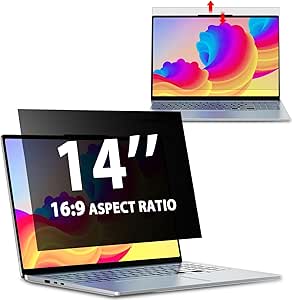 | Best for Flexible Installation | Compatible screen size: 14 inches | Aspect ratio: 16:9 | Filter dimensions: 12.2 × 6.9 inches (310 × 175 mm) | VIEW LATEST PRICE | See Our Full Breakdown |
| 15.6-Inch Privacy Screen Filter for 16:9 Laptops |  | Best for Full-Size 15.6-Inch 16:9 Laptops | Compatible display: 15.6-inch, 16:9 laptop screen | Required visible screen dimensions: 344 × 194 mm (13.54 × 7.64 inches) | Resolution: 1920 × 1080 | VIEW LATEST PRICE | See Our Full Breakdown |
| Peslv Magnetic Privacy Screen for MacBook Air 13-Inch (2018–2021, M1) and MacBook Pro 13-Inch (2016–2022, M1, M2) |  | Best for Removable MacBook Privacy | Compatible devices: MacBook Air 13-inch (2018–2021, M1); MacBook Pro 13-inch (2016–2022, M1, M2) | Mounting: Magnetic and removable | Viewing angle: About 30 degrees | VIEW LATEST PRICE | See Our Full Breakdown |
| Peslv 14-Inch 16:10 Laptop Privacy Screen Filter |  | Best for Reversible 14-Inch 16:10 Fit | Compatible screen size: 14 inches | Aspect ratio: 16:10 | Dimensions: 11.89 × 7.4 inches (302 × 188 mm) | VIEW LATEST PRICE | See Our Full Breakdown |
| ZOEGAA 14-Inch 16:10 360° Laptop Privacy Screen |  | Best for Four-Way Privacy | Screen size: 14 inches | Aspect ratio: 16:10 | Dimensions: 12 × 7.5 inches | VIEW LATEST PRICE | See Our Full Breakdown |
| privacy screen protectors for laptop | Hardness | Surface | Filter dimensions |
|---|---|---|---|
| Verponity 14-Inch Magnetic Lap | 3H | Matte | — |
| SightPro Magnetic Laptop Priva | 2H | Glossy and matte | 12 3/16 × 6 7/8 inches (310 × 175 mm) |
| SightPro Magnetic Laptop Priva | 2H | Glossy and matte | 13.56 × 8.49 inches (344.5 × 215.6 mm) |
| SightPro 14.1-Inch 16:10 Lapto | 8H | Glossy and matte | 11 15/16 × 7 1/2 inches (304 × 190 mm) |
| SightPro Magnetic Privacy Scre | 2H | — | — |
| Magnetic Laptop Privacy Screen | — | Glossy on one side; anti-glare on the other | — |
| SightPro Magnetic Laptop Priva | — | — | 11 15/16 × 7 1/2 inches (304 × 190 mm) |
| STARY 14-Inch Laptop Privacy S | — | — | 11.89 × 7.40 inches (302 × 188 mm) |
| Protescreen 14-Inch Laptop Pri | — | — | 11.89 × 7.40 inches (302 × 188 mm) |
| 14-Inch Laptop Privacy Screen | 9H | — | 12.2 × 6.9 inches (310 × 175 mm) |
| 14-Inch Laptop Privacy Screen | 9H | Reversible glossy and matte | 12.2 × 6.9 inches (310 × 175 mm) |
| 15.6-Inch Privacy Screen Filte | 3H | Glossy or matte | — |
| Peslv Magnetic Privacy Screen | 5H | — | — |
| Peslv 14-Inch 16:10 Laptop Pri | 5H | Matte and glossy | — |
| ZOEGAA 14-Inch 16:10 360° Lapt | 3H | — | — |
More Details on Our Top Picks
Verponity 14-Inch Magnetic Laptop Privacy Screen, 16:10
The Verponity pairs magnetic, removable mounting with a matte finish, making it a sensible fit for people who move between shared desks and want less reflection on screen. Its 16:10 sizing targets a different display shape from the 14-inch 16:9 SightPro Magnetic Laptop Privacy Screen, so matching the aspect ratio and listed dimensions matters more than the shared diagonal size. The stated ±26° privacy angle limits side views, while the washable, reusable filter can be removed without leaving adhesive residue. That convenience comes with firm compatibility limits: it does not work with MacBook or touchscreen laptops, and its privacy protection does not cover someone directly behind you. Compared with the SightPro 14.1-Inch 16:10 Laptop Privacy Screen Filter, Verponity is easier to remove, but offers less demanding scratch-hardness protection at 3H versus 8H.
Pros:- Magnetic attachment makes installation and removal straightforward.
- Matte surface reduces glare and reflections.
- Washable and reusable without adhesive residue.
- Includes a storage folder and cleaning cloth.
Cons:- Not compatible with MacBook or touchscreen laptops.
- Does not block direct rear viewing.
- 3H hardness is lower than the 8H rating listed for the SightPro 14.1-Inch 16:10 filter.
Best for: Owners of compatible 14-inch 16:10 Dell, HP, Lenovo, Acer, ASUS, or Samsung laptops who want a removable filter with a matte surface for reflective workspaces.
Not ideal for: MacBook and touchscreen owners, or users who need privacy from someone seated directly behind them.
- Screen size:14 inches
- Aspect ratio:16:10
- Display dimensions:12 1/16 × 7 7/16 inches (305 × 189 mm)
- Privacy angle:±26°
- Surface:Matte
- Hardness:3H
- Attachment:Magnetic
- Light protection:98% blue light and 99% UV rays blocked
- Compatibility:Compatible with many Dell, HP, Lenovo, Acer, ASUS, and Samsung laptops; not compatible with MacBook or touchscreen laptops
Our verdict“Choose Verponity if your compatible 14-inch 16:10 laptop needs a reusable magnetic filter that also cuts reflections.”
SightPro Magnetic Laptop Privacy Screen, 14-Inch 16:9
This SightPro is the lineup’s magnetic 14-inch 16:9 option, aimed at laptop owners whose screens do not match the 16:10 format of the Verponity 14-Inch Magnetic Laptop Privacy Screen. Its microlouver film limits side viewing while keeping the display clear from the front, and adhesive-free removal suits users who occasionally share their screen or pack the filter away. The package adds magnetic stickers, a webcam cover, a storage folder, and a cleaning cloth. Unlike the matte-only Verponity, this filter lists glossy and matte surfaces, though the product information does not specify how users switch between them. Fit requires checking the filter’s width and height against the actual display, not relying on “14-inch” alone. It is also not optimized for touchscreens, and the privacy effect does not extend to someone directly behind the user.
Pros:- Removable magnetic attachment avoids adhesive on the laptop.
- Microlouver film limits side viewing while preserving a clear front view.
- Includes magnetic stickers, a webcam cover, storage folder, and cleaning cloth.
- Lists both glossy and matte surfaces.
Cons:- Screen width and height must be checked to confirm fit.
- Not optimized for touchscreen use.
- Does not block views from directly behind the user.
Best for: People with compatible 14-inch 16:9 Lenovo, HP, Dell, Acer, ASUS, or Samsung laptops who want magnetic mounting and a bundled webcam cover.
Not ideal for: Owners of 16:10 laptops, touchscreen users, or buyers unwilling to verify screen dimensions before ordering.
- Screen size:14 inches
- Aspect ratio:16:9
- Filter dimensions:12 3/16 × 6 7/8 inches (310 × 175 mm)
- Material:Microlouver film
- Attachment:Magnetic and removable
- Surface:Glossy and matte
- Hardness:2H
- Touchscreen compatibility:Not optimized for touchscreens
- Package contents:Privacy filter, magnetic stickers, webcam privacy cover, storage folder, and cleaning cloth
Our verdict“Pick this SightPro when your laptop has a compatible 14-inch 16:9 display and you value removable mounting plus a webcam cover.”
SightPro Magnetic Laptop Privacy Screen, 16-Inch 16:10
For a larger laptop, this SightPro extends the lineup’s magnetic-filter format to a 16-inch 16:10 screen. The microlouver design blacks out side views while keeping the picture clear straight on, giving it a larger-display role distinct from both 14-inch options: the Verponity 14-Inch Magnetic Laptop Privacy Screen and SightPro’s 14-inch 16:9 model. Magnetic attachment makes removal practical, and the included webcam cover, storage folder, and cleaning cloth add useful carry-along accessories. Its listed 344.5 × 215.6 mm dimensions still need to match the laptop’s visible screen, so the diagonal alone is not enough to establish fit. The tradeoffs are a 2H hardness rating and limited touch support; it also cannot hide the screen from someone seated directly behind you.
Pros:- Magnetic attachment allows removal without adhesive.
- Sized for 16-inch 16:10 displays, unlike the listed 14-inch SightPro models.
- Limits side viewing while keeping a clear straight-on view.
- Includes a webcam cover, storage folder, and cleaning cloth.
Cons:- Requires checking screen width and height to confirm fit.
- Not optimized for touchscreen laptops.
- 2H hardness offers limited scratch resistance compared with the 8H SightPro 14.1-Inch 16:10 filter.
Best for: Owners of compatible 16-inch 16:10 laptops who want a removable side-view filter and bundled storage and webcam accessories.
Not ideal for: Touchscreen users, buyers who cannot confirm the display dimensions, or anyone needing protection from rear viewing angles.
- Compatible display:16-inch, 16:10 laptop
- Filter dimensions:13.56 × 8.49 inches (344.5 × 215.6 mm)
- Diagonal:16 inches (406 mm)
- Material:Microlouver film
- Attachment:Magnetic
- Hardness:2H
- Surface:Glossy and matte
- Water resistance:Water resistant
- Package contents:Privacy filter, magnetic stickers, webcam privacy cover, storage folder, and cleaning cloth
Our verdict“Choose this model if you have a verified 16-inch 16:10 laptop and prefer magnetic removal over fixed mounting.”
SightPro 14.1-Inch 16:10 Laptop Privacy Screen Filter
The SightPro 14.1-inch filter stands apart from the magnetic options through its 8H hardness rating and choice of adhesive strips or slide mount tabs. That makes it a better match for buyers who want a more secure, semi-permanent setup than the easily removable Verponity 14-Inch Magnetic Laptop Privacy Screen. Its 16:10 dimensions suit a different screen shape from SightPro’s 14-inch 16:9 filter, while the anti-glare feature helps in bright work areas. The product also lists reductions in UV and blue light, but installation is less flexible once mounted, and checking exact width and height remains necessary. It is not optimized for touchscreens, and, like the other filters here, its side-view privacy does not prevent someone behind you from seeing the display.
Pros:- 8H hardness rating is higher than the 2H ratings listed for the magnetic SightPro filters.
- Offers adhesive strips and slide mount tabs for installation.
- Reduces glare and helps reduce UV and blue light exposure.
- Includes a microfiber cleaning cloth.
Cons:- Mounting options are less convenient for frequent removal than magnetic filters.
- Not optimized for touchscreen laptops.
- Does not block visibility from directly behind the user.
Best for: Owners of compatible 14-inch 16:10 laptops who prioritize a firmer mount, anti-glare coverage, and the listed 8H hardness.
Not ideal for: Touchscreen owners and people who expect to remove and reattach their privacy filter often.
- Screen size:14 inches
- Filter diagonal:14.1 inches (358.14 mm)
- Aspect ratio:16:10
- Filter dimensions:11 15/16 × 7 1/2 inches (304 × 190 mm)
- Hardness:8H
- Surface:Glossy and matte
- Special feature:Anti-glare
- Installation:Adhesive strips and slide mount tabs
- Touchscreen compatibility:Not optimized for touchscreens
Our verdict“Choose this SightPro if your 14-inch 16:10 laptop needs a more scratch-resistant filter and you do not require frequent removal.”
SightPro Magnetic Privacy Screen for MacBook Air 13.6-Inch (2022–2026)
MacBook Air owners often face narrower fit choices than users of standard-sized Windows laptops, and this SightPro is made for a specific 13.6-inch model family: A2681, A3113, and A3240 from 2022–2026. That model-specific fit is its main advantage over the Verponity 14-Inch Magnetic Laptop Privacy Screen, which explicitly excludes MacBook laptops. The magnetic, removable design avoids tape and makes storage easier, while the microlouver film limits side viewing and helps reduce UV and blue light exposure. A glossy-and-matte finish and 2H hardness add flexibility and basic scratch protection, but the product is not a broad-fit MacBook accessory: buyers need to confirm their exact model. It also does not block a direct rear view, and the package includes fewer accessories than the 14-inch SightPro magnetic filter, which comes with a webcam cover.
Pros:- Designed for specified 13.6-inch MacBook Air models.
- Magnetic attachment allows removal without tape or adhesive.
- Limits side viewing while keeping the front view clear.
- Includes a storage folder and cleaning cloth.
Cons:- Compatibility is limited to the listed MacBook Air models.
- Does not block visibility from directly behind the user.
- 2H hardness is lower than the 8H rating listed for the SightPro 14.1-Inch 16:10 filter.
Best for: MacBook Air owners with one of the specified 13.6-inch models who want a removable magnetic privacy filter.
Not ideal for: Owners of other MacBook sizes or generations, and users seeking privacy from someone directly behind them.
- Compatible devices:MacBook Air 13.6-inch models A2681, A3113, and A3240
- Compatible years and chips:2022–2026; M2, M3, M4, and M5
- Screen size:13.6 inches
- Material:Microlouver film
- Attachment:Magnetic and removable
- Hardness:2H
- Finish:Glossy and matte
- Water resistance:Water resistant
- Package contents:Privacy screen filter, storage folder, and cleaning cloth
Our verdict“Pick this filter if you own a listed 13.6-inch MacBook Air and want magnetic privacy protection tailored to that model family.”
Magnetic Laptop Privacy Screen for 14-Inch 16:10 Displays
The magnetic attachment makes this a practical choice for people who want privacy on the move but sometimes share their screen: lift the filter off rather than leaving it in place. Its glossy and anti-glare sides let you choose between a more vivid-looking finish and less reflected light. Compared with the adhesive-and-tab options such as the Protescreen 14-Inch Laptop Privacy Screen Filter, this one is easier to remove, though its compatibility still depends on the measured display area—not just the laptop’s advertised diagonal size. The ±30° limit helps reduce side views, but it does not hide the screen from someone directly behind you. Expect some loss of sharpness and vibrancy, a common tradeoff for a privacy filter.
Pros:- Magnetic mount makes removal and reattachment convenient
- Glossy and anti-glare surfaces offer a choice of finish
- ±30° viewing limit helps restrict side-angle visibility
- Helps reduce blue light and guard against scratches and dust
Cons:- Can soften screen sharpness and vibrancy
- Does not block a view from directly behind the user
- Requires matching the visible display measurements for fit
Best for: 14-inch 16:10 laptop owners who regularly remove their privacy filter for collaboration or storage
Not ideal for: Buyers who need a filter for a 16:9 screen, want unchanged screen clarity, or need protection from someone seated directly behind them
- Compatible display:14 inches, 16:10 aspect ratio
- Visible area:11.87 × 7.42 inches (301.5 × 188.5 mm)
- Viewing angle:±30°
- Mounting:Magnetic; additional mounting accessories included
- Surface:Glossy on one side; anti-glare on the other
- Blue-light reduction:49%
- Dimensions and weight:11.87 × 7.42 × 0.5 inches; 5.6 ounces
Our verdict“Choose this magnetic filter if you have a measured 14-inch 16:10 display and want to remove the privacy screen often.”
SightPro Magnetic Laptop Privacy Screen, 14-Inch 16:10
This SightPro is the most ready-to-carry option here: alongside the removable magnetic filter, the package includes a storage folder, cleaning cloth, and webcam cover. The filter is designed to keep the image clear when viewed straight on while blacking out side views, and it also filters UV and blue light. Compared with the magnetic filter for 14-inch 16:10 displays in this lineup, its listed package adds more privacy and care accessories, but the tradeoff is limited touchscreen suitability. Fit also calls for checking the filter’s width and height against the actual screen, since “14.1 inches” alone does not confirm compatibility. It cannot prevent a view from directly behind you, so placement still matters in crowded workspaces.
Pros:- Magnetic attachment allows removal without leaving a permanent mount
- Designed to preserve a clear straight-on view while restricting side views
- Package includes a webcam cover, storage folder, and cleaning cloth
- Filters UV and blue light
Cons:- Not optimized for touchscreen use
- Fit depends on matching screen width and height
- Does not prevent someone directly behind the user from seeing the display
Best for: Frequent travelers and office workers with a compatible 14.1-inch 16:10 laptop who want a removable filter and storage accessories
Not ideal for: Touchscreen users or buyers who cannot confirm their screen dimensions and need a filter that blocks rear viewing
- Screen size and aspect ratio:14.1 inches; 16:10
- Filter dimensions:11 15/16 × 7 1/2 inches (304 × 190 mm)
- Attachment:Magnetic and removable
- Touchscreen compatibility:Not optimized for touchscreens
- Package contents:Privacy filter, magnetic stickers, webcam privacy cover, storage folder, cleaning cloth
- Filtering:UV and blue-light filtering
- Compliance:Section 889 and TAA compliant
Our verdict“Pick this SightPro if you have a compatible 14.1-inch 16:10 laptop and value a removable filter with useful storage and cleaning accessories.”
STARY 14-Inch Laptop Privacy Screen Filter, 16:10 (1920×1200)
The STARY’s standout is its stated four-way privacy: unlike the side-focused filters in this group, it is designed to limit views from above and below as well as from the left and right. That can suit shared spaces where people may stand or sit at different heights, though a darker or less direct view is a tradeoff of broader screening. You can choose a glossy or matte side, then install it with slide-in tabs or adhesive strips. Compared with the Protescreen 14-Inch Laptop Privacy Screen Filter, STARY offers the broader stated viewing-direction coverage and two mounting approaches, but it excludes MacBook and Surface models. Its 1920 × 1200 designation and 14-inch label still do not replace measuring the visible screen area.
Pros:- Designed to limit visibility from four directions
- Reversible glossy and matte finishes
- Slide-in tabs and adhesive strips provide two installation methods
- Includes stated scratch protection and blue-light and UV filtering
Cons:- Not compatible with MacBook or Surface
- Exact display measurements still need to match
- Four-way filtering may affect viewing from more angles than a side-only design
Best for: Owners of compatible non-Apple 14-inch 16:10 laptops who want privacy from above and below as well as from the sides
Not ideal for: MacBook and Surface owners, or buyers who prefer a side-only filter and want to avoid potential changes in screen appearance
- Compatible display:14 inches, 16:10; 1920 × 1200
- Filter dimensions:11.89 × 7.40 inches (302 × 188 mm)
- Privacy coverage:Four-way; 30-degree viewing angle
- Finish:Glossy and matte
- Installation:Slide-in tabs or double-sided adhesive
- Claimed filtering:98% blue-light and UV blocking
- Hardness and clarity:6H hardness; 0.99 clarity
- Compatibility notes:Not compatible with MacBook or Surface
Our verdict“Choose STARY if your compatible 14-inch 16:10 laptop needs privacy from above and below as well as from the sides.”
Protescreen 14-Inch Laptop Privacy Screen Filter, 16:10
Protescreen suits buyers who want a matte finish as well as side-angle privacy. Its stated reflected-light reduction may help in bright rooms, while the listed blue-light and UV reductions add filtering beyond the privacy function. The reversible surface and choice of adhesive strips or slide-mount tabs also make it more adaptable to different attachment preferences than a magnetic-only filter such as the Magnetic Laptop Privacy Screen for 14-Inch 16:10 Displays. The compromise is that the listing does not give that model’s magnetic convenience, and this filter only fits compatible 14-inch 16:10 screens. Its roughly ±30° privacy boundary darkens the image at side angles, so it is not a way to share a clear display with nearby viewers.
Pros:- Matte finish and stated reflected-light reduction address glare
- Reversible surface offers matte and glossy viewing options
- Adhesive strips and slide-mount tabs provide installation choices
- Lists reductions for blue light and UV light
Cons:- Limited to compatible 14-inch 16:10 displays
- Side views appear darkened rather than remaining readable
- Does not offer the magnetic attachment listed for some competing filters
Best for: People working under bright indoor lighting who have a compatible 14-inch 16:10 laptop and want a matte privacy filter
Not ideal for: Owners of other screen sizes or aspect ratios, or users who want magnetic removal and clear side-angle sharing
- Screen size and aspect ratio:14 inches; 16:10
- Filter dimensions:11.89 × 7.40 inches (302 × 188 mm)
- Viewing angle:±30°
- Blue-light reduction:92%
- UV-light reduction:98%
- Reflected-light reduction:95%
- Material and hardness:PET; 5H
- Finish and installation:Matte; adhesive strips or slide-mount tabs
Our verdict“Choose Protescreen if glare control and a matte finish matter more to you than magnetic removal.”
14-Inch Laptop Privacy Screen Filter, 16:9, Reversible Matte/Glossy
This is the lineup’s clear match for a 14-inch 16:9 display, a different shape from the 16:10 filters reviewed above. That distinction matters more than the shared diagonal size: the listed 12.2 × 6.9-inch dimensions are tailored to the wider, shorter format. Its reversible matte and glossy finishes give you a way to balance glare control with surface preference, while adhesive strips and slide-mount tabs allow more than one mounting approach. Compared with the Protescreen 14-Inch Laptop Privacy Screen Filter, it targets 16:9 rather than 16:10 and lists 9H hardness instead of 5H. It still restricts side views to ±30°, can look darker at an angle, and needs a precisely matched screen.
Pros:- Sized for 14-inch 16:9 screens rather than the 16:10 format
- Reversible matte and glossy finishes
- Adhesive strips and slide-mount tabs offer installation choices
- Lists blue-light, UV, and reflected-light reductions, plus 9H hardness
Cons:- Does not fit 14-inch 16:10 displays despite the same diagonal size
- Side viewing is restricted and may appear darker
- Requires checking the screen’s actual dimensions for compatibility
Best for: Owners of 14-inch 16:9 laptops who want side-angle privacy, reversible finishes, and a choice of mounting method
Not ideal for: Owners of 14-inch 16:10 laptops or buyers who cannot verify the display dimensions before purchase
- Screen size and aspect ratio:14 inches; 16:9
- Filter dimensions:12.2 × 6.9 inches (310 × 175 mm)
- Viewing angle:±30°
- Blue-light reduction:92%
- UV-light reduction:98%
- Reflected-light reduction:95%
- Hardness:9H
- Finish and installation:Reversible matte/glossy; adhesive strips or slide-mount tabs
Our verdict“Choose this filter if your laptop has a measured 14-inch 16:9 screen and the 16:10 options in this roundup will not fit.”
14-Inch Laptop Privacy Screen Filter, 16:9
For a 14-inch, 16:9 display, this filter stands out for giving buyers a choice between adhesive strips and slide-mount tabs. That flexibility helps when a laptop’s screen frame doesn’t suit one mounting style. Its reversible matte and glossy sides let you choose glare reduction or a different screen finish, while the listed privacy limit beyond about ±30° is similar to the Peslv 14-Inch 16:10 filter. Unlike that Peslv, this model is sized for 16:9 screens, so the aspect ratio—not just the diagonal—decides whether it fits. The 9H hardness rating and stated blue- and UV-light reduction add protection features, but those performance claims are manufacturer-provided. Measure the visible screen area before ordering; a 14-inch label alone does not confirm a match.
Pros:- Adhesive strips and slide-mount tabs offer two installation approaches.
- Reversible matte and glossy surfaces allow a finish change.
- Includes a cleaning kit and nano-fiber cloth.
- Specified 9H hardness and claimed blue- and UV-light reduction add protective features.
Cons:- Requires checking the display’s width and height, not only its diagonal measurement.
- Privacy and light-reduction figures are manufacturer-provided claims.
- The listed privacy protection reduces side visibility, which can also restrict off-center viewing.
Best for: Owners of 14-inch 16:9 laptops who want a choice of mounting method and reversible finishes.
Not ideal for: People with 16:10 or touchscreen laptops, or buyers who cannot verify the display’s visible width and height.
- Compatible screen size:14 inches
- Aspect ratio:16:9
- Filter dimensions:12.2 × 6.9 inches (310 × 175 mm)
- Privacy angle:Beyond approximately ±30°
- Surface:Reversible glossy and matte
- Material:Polyethylene terephthalate
- Hardness:9H
- Installation:Adhesive strips or slide-mount tabs
Our verdict“Choose this filter if your laptop is a measured 14-inch 16:9 match and you value flexible mounting more than magnetic removal.”
15.6-Inch Privacy Screen Filter for 16:9 Laptops
This is the lineup’s fit-specific option for a 15.6-inch, 16:9 laptop, with a stated visible-area requirement of 344 × 194 mm. That measurement makes it easier to check compatibility than relying on diagonal size alone, but it also rules out 16:10 displays and touchscreens. Its 60-degree viewing angle and 30% blue-light blocking are more modestly stated than the Peslv 14-inch models’ claimed light reduction of up to 95%; buyers should compare those figures as product claims, not guarantees of equivalent testing. Adhesive strips and slide-on tabs give it the same basic installation flexibility as the 14-inch 16:9 filter, while 3H hardness is a less robust stated rating than that model’s 9H. It suits buyers whose first priority is the precise 15.6-inch fit.
Pros:- Provides a specific visible-area measurement for fit checking.
- Adhesive strips and slide-on tabs offer alternative installation methods.
- Designed to limit side viewing and block 30% of blue light.
- Helps shield the screen from dust and scratches.
Cons:- Not compatible with touchscreens or 16:10 displays.
- Requires matching the visible screen area to the stated dimensions.
- Its listed 3H hardness is lower than the 9H rating on the 14-inch 16:9 filter.
Best for: Owners of non-touch 15.6-inch 16:9 laptops with a visible screen area measuring 344 × 194 mm.
Not ideal for: Touchscreen users, owners of 16:10 laptops, or anyone whose visible display dimensions do not match the stated fit.
- Compatible display:15.6-inch, 16:9 laptop screen
- Required visible screen dimensions:344 × 194 mm (13.54 × 7.64 inches)
- Resolution:1920 × 1080
- Viewing angle:60 degrees
- Blue light blocked:30%
- Hardness:3H
- Surface:Glossy or matte
- Touchscreen compatible:No
- Installation:Adhesive strips or slide-on mounting tabs
Our verdict“Pick this model for a verified 15.6-inch 16:9 non-touch display, but skip it if your laptop’s screen format or dimensions differ.”
Peslv Magnetic Privacy Screen for MacBook Air 13-Inch (2018–2021, M1) and MacBook Pro 13-Inch (2016–2022, M1, M2)
Among these five options, this is the clear pick for owners of the specifically listed 13-inch MacBook Air and MacBook Pro models. Its magnetic mounting makes removal and reattachment simpler than the adhesive or slide-tab approach on the 14-inch Peslv 16:10 filter, which can suit people who regularly share their screen. The integrated sliding camera cover adds a privacy feature absent from the other filters in this batch, and the matte surface is aimed at reducing glare rather than switching between finishes. The tradeoff is strict model compatibility: a different MacBook generation or a 14-inch Windows laptop is not covered by the listed fit. Its approximately 30-degree viewing limit also narrows off-center visibility, so it is better for privacy-minded desk work than group viewing.
Pros:- Magnetic mounting supports easy removal and reattachment.
- Integrated sliding cover gives the camera an additional privacy control.
- Matte, anti-glare finish is suited to reducing reflections.
- Designed to limit side viewing and help protect against scratches.
Cons:- Compatibility is limited to the listed 13-inch MacBook Air and Pro models.
- The privacy effect restricts side-angle viewing, which can be inconvenient when sharing the screen.
- Offers a matte finish rather than the reversible finish choice on the 14-inch Peslv filter.
Best for: MacBook Air or MacBook Pro 13-inch owners with a model in the listed year and chip ranges who want a removable filter and camera cover.
Not ideal for: Owners of unlisted MacBook generations, other screen sizes, or laptops from brands outside the stated compatibility list.
- Compatible devices:MacBook Air 13-inch (2018–2021, M1); MacBook Pro 13-inch (2016–2022, M1, M2)
- Mounting:Magnetic and removable
- Viewing angle:About 30 degrees
- Camera cover:Integrated sliding cover
- Finish:Matte, anti-glare
- Dimensions:11.81 × 7.69 inches
- Hardness:5H
- Material:Polyethylene terephthalate
Our verdict“Choose this removable magnetic option if your exact 13-inch MacBook model is listed and the built-in camera cover is useful to you.”
Peslv 14-Inch 16:10 Laptop Privacy Screen Filter
The key reason to choose this Peslv filter is its 14-inch, 16:10 fit, not the shared diagonal size: it targets a taller display format than the 14-inch 16:9 filter. Its dimensions of 11.89 × 7.4 inches provide a useful starting point for checking fit, though buyers still need to compare their laptop’s visible screen area. Like the 16:9 option, it has reversible matte and glossy sides, two mounting styles, and a listed privacy limit beyond ±30°. Compared with the ZOEGAA 360° model, Peslv describes privacy from side angles rather than four directions, but its supplied adhesive sets, slide tabs, and cleaning items make the package especially geared toward careful installation. The 5H rating is lower than the 16:9 filter’s 9H, and the light-reduction figures are manufacturer claims.
Pros:- Designed for the taller 14-inch 16:10 format.
- Reversible matte and glossy surfaces provide two finish options.
- Includes two sets of adhesive strips and slide-mount tabs.
- Comes with screen-cleaning accessories.
Cons:- Requires checking the display’s width and height before ordering.
- Its listed privacy protection is for side angles beyond approximately ±30°, not four-way coverage.
- The 5H hardness rating is lower than the 9H rating listed for the 14-inch 16:9 filter.
Best for: Owners of 14-inch 16:10 laptops who want reversible finishes and a choice of adhesive or slide-tab mounting.
Not ideal for: Owners of 16:9 laptops, buyers seeking four-way privacy, or anyone who has not checked their visible screen dimensions.
- Compatible screen size:14 inches
- Aspect ratio:16:10
- Dimensions:11.89 × 7.4 inches (302 × 188 mm)
- Privacy protection:Beyond ±30°
- Surface:Matte and glossy
- Hardness:5H
- Material:Polyethylene terephthalate
- Mounting accessories:Two sets of adhesive strips and two sets of slide-mount tabs
Our verdict“Choose this Peslv when your 14-inch screen is 16:10 and you want reversible finishes with multiple mounting options.”
ZOEGAA 14-Inch 16:10 360° Laptop Privacy Screen
For buyers who need to limit visibility from more than just the sides, the ZOEGAA’s defining feature is four-way privacy. That sets it apart from the Peslv 14-inch 16:10 filter, whose stated protection focuses on viewing angles beyond ±30°. The ZOEGAA also fits select 14-inch 16:10 laptops and offers glossy and matte finishes, plus slide-mount tabs or adhesive. Its compatibility list names several PC brands but excludes Surface and MacBook, so those owners should look elsewhere even if their screen measures 14 inches. The listed 85% clarity and 3H hardness are tradeoffs against the Peslv’s 5H rating; buyers should weigh the broader privacy claim against the lower stated clarity and hardness. Measure the screen before ordering, since brand and diagonal alone do not confirm a fit.
Pros:- Four-way privacy is designed to limit viewing from directions beyond the sides.
- Glossy and matte sides provide different finish options.
- Offers slide-mount tabs and double-sided adhesive for installation.
- Includes a cleaning cloth and dust-removal sticker.
Cons:- Not compatible with Surface or MacBook models.
- Requires checking screen dimensions against the filter before purchase.
- Listed 85% clarity and 3H hardness are lower than the Peslv 14-inch 16:10 filter’s stated 5H hardness.
Best for: Owners of select 14-inch 16:10 PC laptops who need privacy from all four directions and can confirm the screen dimensions.
Not ideal for: MacBook or Surface owners, or buyers who prioritize the higher listed clarity and hardness ratings of alternatives.
- Screen size:14 inches
- Aspect ratio:16:10
- Dimensions:12 × 7.5 inches
- Material:Polyethylene terephthalate (PET)
- Hardness:3H
- Clarity:85%
- Finish:Glossy and matte
- Compatible devices:Select HP, Dell, Lenovo, Asus, Samsung, Acer, and ThinkPad laptops; not Surface or MacBook
- Installation:Slide-mount tabs or double-sided adhesive
Our verdict“Pick the ZOEGAA if four-way privacy matters more than higher listed clarity or hardness and your 14-inch 16:10 laptop is compatible.”

How We Picked
I ranked these privacy screen protectors for laptops by how clearly a buyer can match them to a device and how practical their attachment and use appear from the stated product specifications. Exact screen dimensions and aspect ratio came first: a 14-inch 16:10 filter is not a safe substitute for a 14-inch 16:9 display. I also weighed whether a listing names a specific laptop family or generation, since that can reduce fit uncertainty for MacBook owners.
After fit, I compared attachment style, stated privacy coverage, and useful design distinctions such as a reversible matte/glossy surface. I gave stronger placement to options with a clear, broadly useful role, while specialized choices rank lower when they suit fewer screen formats or require closer model verification. Product names and stated features guide this comparison; I do not infer unlisted performance, optical measurements, or durability. Before ordering, buyers should still confirm their laptop’s exact display dimensions and mounting requirements.
| privacy screen protectors for laptop | Surface |
|---|---|
| Verponity 14-Inch Magnetic Lap | Matte |
| SightPro Magnetic Laptop Priva | Glossy and matte |
| SightPro Magnetic Laptop Priva | Glossy and matte |
| SightPro 14.1-Inch 16:10 Lapto | Glossy and matte |
| SightPro Magnetic Privacy Scre | — |
| Magnetic Laptop Privacy Screen | Glossy on one side; anti-glare on the other |
| SightPro Magnetic Laptop Priva | — |
| STARY 14-Inch Laptop Privacy S | — |
| Protescreen 14-Inch Laptop Pri | — |
| 14-Inch Laptop Privacy Screen | — |
| 14-Inch Laptop Privacy Screen | Reversible glossy and matte |
| 15.6-Inch Privacy Screen Filte | Glossy or matte |
| Peslv Magnetic Privacy Screen | — |
| Peslv 14-Inch 16:10 Laptop Pri | Matte and glossy |
| ZOEGAA 14-Inch 16:10 360° Lapt | — |
Factors to Consider When Choosing Privacy Screen Protectors For Laptops
Choosing a laptop privacy filter is less about finding the most feature-packed listing and more about avoiding a mismatch that makes the screen awkward to use. I’d work through these checks before deciding, especially when several options share the same diagonal size.
Match the Display’s Active Area and Aspect Ratio
Start with the visible display area, not the laptop’s chassis width or the measurement across the lid. A 14-inch screen can use either 16:10 or 16:9, and a filter cut for one shape may leave part of the display exposed or cover too much of another. Check your laptop’s specifications or measure the active screen diagonally and compare its width-to-height shape with the listing. Resolution can help confirm the format, but it does not replace checking the physical display dimensions. A common mistake is ordering by screen size alone because the product title says “14-inch.” If the listing does not clearly identify the aspect ratio or supported models, I’d choose a better-documented match.
Choose Attachment for Your Screen and Routine
Magnetic screens are appealing when you expect to remove the filter often, but the laptop’s bezel and the product’s attachment design affect whether that convenience works for your device. Other filters may use tabs or a more persistent mounting method; check the listing details rather than assuming every nonmagnetic product attaches the same way. Think about how frequently you move between private work and shared viewing, and whether you want to take the screen off for video calls or color-sensitive tasks. A removable design can be less convenient if the filter needs to be stored safely every time. Before buying, verify that the mounting method suits any narrow bezels, camera area, or touchscreen use your laptop has.
Set Expectations for Brightness and Viewing Comfort
A privacy filter limits off-angle visibility by restricting the view from the sides, but that can also make the screen feel dimmer or less comfortable in some lighting. If you often work outdoors or at low brightness, prioritize a model whose stated design and compatibility are clear, and check the seller’s guidance on brightness effects. Do not assume that a stronger-sounding privacy claim means the best everyday experience: viewing angle, screen brightness, and your seating position all matter. Matte finishes can reduce reflections, while glossy finishes may preserve a more familiar surface appearance; neither is automatically better for every workspace. The reversible matte/glossy option in this lineup is useful if surface preference is a deciding factor, but buyers should still confirm its fit first.
Decide How Much Privacy Coverage You Actually Need
Many laptop filters focus on reducing side views, which can be enough for working beside other people on a train or in a shared office. A listing that describes 360° privacy signals a broader coverage goal, but buyers should check what directions the claim covers and how it affects normal collaboration. If colleagues regularly need to view your display, a highly restrictive filter may create friction even when privacy is the priority. Consider where bystanders can approach: a fixed desk against a wall creates different risks from a seat in a busy public area. Choose coverage based on your real working environment, not the broadest phrase in a product title.
Pay for Specific Compatibility When It Reduces Fit Risk
A model naming a specific MacBook size and generation can be a better fit choice than a generic filter if your laptop matches that exact description. That specificity is not a reason to skip verification: product families can change dimensions across generations, and the same screen diagonal does not guarantee identical bezel placement. For a less common format or a laptop with a narrow bezel, checking the manufacturer’s model number is often more useful than paying extra for a general premium label. Broader-format filters can suit buyers with standard displays, but they may require more careful checking of the active area and attachment. I’d pay more for clearly stated compatibility when it meaningfully lowers the chance of buying the wrong shape, not just for a longer feature list.
Plan for Storage, Cleaning, and Shared Use
Removable filters need a safe place when they are off the screen; slipping one loose into a packed bag can invite scratches or bending. Check whether the product information explains cleaning and storage, and follow those instructions rather than using household cleaners that could affect the surface. If multiple people share the laptop, agree on whether the filter stays attached or comes off for presentations and group work. A reversible finish can offer flexibility, but it also adds a step when changing how the screen looks. Buyers who rarely remove a filter may prefer a simple mounting routine over features they are unlikely to use.
Frequently Asked Questions
Can I choose a privacy screen by laptop size alone?
No. The diagonal size is only one part of the fit: aspect ratio and active display dimensions matter too. This roundup includes 14-inch filters in both 16:10 and 16:9 formats, so matching only “14-inch” could lead to the wrong shape. Check your laptop’s display specifications and compare them with the product listing before ordering. If the product gives model compatibility, confirm your exact laptop generation as well.
Should I get a magnetic privacy screen or a filter with another attachment style?
A magnetic model makes the most sense if you expect to remove the filter regularly and your laptop’s bezel supports that mounting approach. A different attachment style may suit buyers who want the filter to stay in place, but the listing should spell out how it mounts and whether it works with your screen. Magnetic products are common in this lineup, including several SightPro choices, but that does not make them compatible with every laptop. Check for narrow bezels, camera cutouts, and any touchscreen or lid-closing requirements before choosing.
Will a privacy filter make my laptop screen harder to see?
It can change how bright or comfortable the display appears because privacy filters limit off-angle viewing. The effect depends on the filter, your screen brightness, lighting, and where you sit, so product names alone cannot predict your everyday experience. If you often work in bright rooms or outdoors, check the manufacturer’s guidance on brightness and usability before buying. You may also want to remove the filter for tasks where broad viewing angles or color judgment matter more than privacy.
Is a MacBook-specific filter safer to buy than a generic one?
A MacBook-specific listing can reduce guesswork when it names your exact model family and supported years, as the SightPro and Peslv options do here. It is still necessary to match the generation: similar screen diagonals do not guarantee identical dimensions or bezel layouts. A generic filter can work well if its active-area measurements and aspect ratio match your display. Compare the model number on your laptop with the supported models in the listing rather than relying on “MacBook” or “13-inch” by itself.
When does a 360° privacy filter make sense instead of a standard side-view filter?
A broader-coverage design may suit work settings where people can approach from several directions, such as shared tables or busy public spaces. For a desk where bystanders are mainly beside you, a standard side-view filter may meet the need with fewer compromises for normal viewing. Check how the product defines 360° coverage, since that label alone does not explain the viewing experience from every direction. If you often share your screen with coworkers, broader privacy can make collaboration less convenient, so choose based on where you work most.
Conclusion
For a broadly useful pick, I’d choose the SightPro Magnetic Laptop Privacy Screen, 14-Inch 16:10 as the best overall option, provided your display matches that format. The best value is the STARY 14-Inch 16:10 Filter for buyers who want a straightforward option for a clearly specified screen shape without needing a named laptop-family fit. For a best premium-style fit choice, the SightPro MacBook Air 13.6-Inch makes sense when your exact Air generation is supported; the model-specific description is more useful than a generic size label. Beginners should start with a filter that states both screen size and aspect ratio plainly, such as the SightPro 14.1-Inch 16:10 Filter, then verify their display before ordering. For specific needs, choose the ZOEGAA 360° for broader privacy coverage, the reversible matte/glossy filter for surface flexibility, or the 15.6-inch 16:9 filter for a larger display. In every case, exact fit should decide the final pick.
Halloween Picks
halloween
As an affiliate, we earn on qualifying purchases.