When choosing between manual and digital backups, what truly matters is your control, peace of mind, and security priorities. Manual backups give you tangible control and protect sensitive info if digital systems fail, but they require effort and secure storage. Digital solutions are more convenient and automated, reducing errors but introducing online risks. Your decision depends on balancing security, convenience, and trust. Stay with us to explore how to make the best choice for your needs.
Key Takeaways
- Prioritize physical security to prevent loss or theft of manual backups.
- Balance the perceived safety of manual backups with consistent, disciplined storage practices.
- Consider digital tools for convenience, but recognize manual backups offer tangible control.
- Ensure manual backups are stored securely in protected, fireproof, and offsite locations.
- Evaluate personal risk tolerance to choose an effective backup strategy aligning with security needs.
Have you ever wondered whether manual key backups are truly necessary in today’s digital security landscape? It’s a question that’s become increasingly relevant as technology evolves and digital threats grow more sophisticated. On one hand, manual backups offer a sense of control, allowing you to store a physical copy of your keys in a safe place. Other times, they can seem cumbersome, especially when you prioritize user convenience. Many argue that modern digital security tools, like hardware wallets and encrypted cloud backups, make manual backups somewhat obsolete. Yet, the debate persists, because the core issue isn’t just about technology—it’s about balancing security and convenience.
Manual backups provide control and peace of mind but can be cumbersome compared to modern digital solutions.
In the realm of digital security, manual key backups are often seen as a fail-safe. If your primary digital storage gets compromised or corrupted, having a physical backup can be a lifesaver. This approach adds an extra layer of protection, especially when dealing with sensitive information or valuable assets. Still, it’s important to recognize that manual backups require effort, discipline, and a keen awareness of physical security risks. If you forget where you stored your backup or leave it in an unsafe location, it defeats the purpose entirely. The challenge is that manual backups, while offering peace of mind, can complicate your routine, leading to potential lapses or errors.
When considering user convenience, manual backups tend to fall short. They demand that you remember to perform regular backups, securely store the physical copy, and keep track of its whereabouts. For many, this process feels outdated compared to the seamless experience provided by digital solutions. Cloud-based backups, for example, automate much of the process, reducing the risk of human error. Yet, some users still prefer manual backups for the added reassurance that their keys are not solely stored online, where hacking or outages could pose threats. It’s a trade-off: convenience versus control. If you value simplicity, manual backups might seem like an unnecessary hassle. But if you prioritize security and sovereignty over your data, they may still hold some appeal.
Ultimately, the debate boils down to personal preferences and risk appetite. In today’s digital security landscape, there’s no one-size-fits-all answer. Some users favor the traditional, manual approach for its tangibility and perceived safety, while others lean toward automated digital backups for ease and speed. The key is understanding what matters most to you—whether it’s user convenience, maximum security, or a balanced combination of both—and making an informed decision accordingly. Recognizing the importance of physical security in safeguarding your backups can help you make smarter choices in this ongoing debate. It’s also crucial to consider the potential vulnerabilities associated with digital and manual storage options to ensure comprehensive protection.
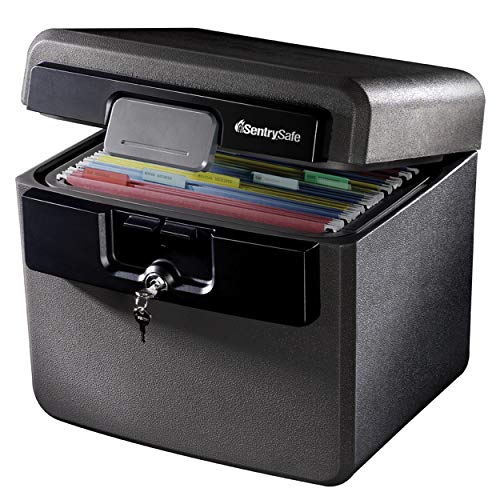
SentrySafe Black Fireproof and Waterproof Safe, File Folder and Document Box with Key Lock, 14.3 x 15.5 x 13.5 inches, HD4100
- Fire and Flood Protection: UL and ETL verified for safety
- Spacious Interior: Fits hanging file folders and documents
- Key Lock Security: Includes two keys for secure access
As an affiliate, we earn on qualifying purchases.
As an affiliate, we earn on qualifying purchases.
Frequently Asked Questions
How Often Should Manual Key Backups Be Updated?
You should update manual key backups regularly, ideally every few months or after any significant changes to your keys. Backup frequency depends on how often you generate new keys or modify existing ones. Set consistent update intervals to guarantee your backups stay current. This way, you reduce the risk of losing access, and your backup remains reliable. Regular updates are essential for maintaining the security and integrity of your key data.
Are Physical Backups More Secure Than Digital Ones?
Physical backups are like vaults, offering tangible security, but they’re not immune to cryptography challenges or physical damage. Digital backups, when properly encrypted, provide flexible, redundant layers that can be quickly restored. You must weigh the risks of theft or loss against encryption strength. Ultimately, combining physical and digital backups guarantees backup redundancy, making your security defenses as resilient as possible against evolving threats.
What Are Common Mistakes in Manual Key Backup Processes?
You often make mistakes in manual key backup processes by neglecting digital encryption, leaving your backups vulnerable. You might also forget to implement backup redundancy, risking data loss if one backup fails. To improve, always encrypt your manual backups and create multiple copies stored in different secure locations. This guarantees your keys stay protected and accessible, even if one backup is compromised or lost.
How Do I Securely Store Multiple Backup Copies?
To securely store multiple backup copies, you should focus on key storage and backup redundancy. Use encrypted, offline storage options like hardware wallets or secure USB drives kept in different physical locations. Avoid keeping all copies in one place to prevent loss from theft or damage. Regularly test your backups to guarantee they work. Implementing layered security measures ensures your keys stay safe, even if one backup is compromised.
Can Manual Backups Prevent All Types of Key Loss?
Manual backups can’t prevent all types of key loss, especially if you don’t use digital encryption or cloud synchronization effectively. While manual backups help you retain copies, they won’t protect against hardware failures or cyberattacks. To maximize security, make sure you encrypt your backup files and synchronize them with the cloud. This way, even if a physical copy is lost or damaged, your keys remain safe and accessible.
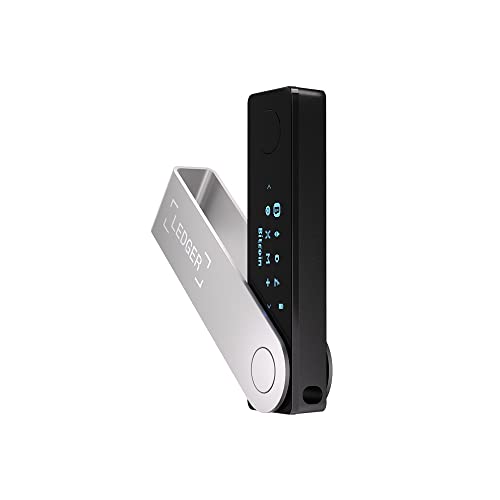
Ledger Nano X Crypto Wallet Signer – Securely Manage All Your Crypto Assets with This Bluetooth Enabled Classic – Onyx Black
- All-in-One Crypto Management: Buy, sell, send, receive, swap, stake
- Supports 15,000+ Coins & Tokens: Manage a wide range of cryptocurrencies
- Market Monitoring & Alerts: Track performance and get timely updates
As an affiliate, we earn on qualifying purchases.
As an affiliate, we earn on qualifying purchases.
Conclusion
Ultimately, whether you choose manual key backups or not depends on your comfort with risk. Did you know that over 20% of crypto users have lost access to their wallets at some point? That’s a eye-opening reminder to prioritize security measures that work for you. By understanding the debate, you can make an informed decision that balances control and safety—because losing access shouldn’t be part of your crypto journey.

EDMUED Fireproof Document Box with Combination Lock, Fireproof Water Resistant Hard Case Safe Box for Important Documents Certificates Laptop Passports
- Fireproof Material: Constructed with fire-retardant silicone-coated fiberglass
- Certified Safety: UL-94 VTM-0 fire safety certification
- Tamper-Proof Lock: 3-digit combination lock for security
As an affiliate, we earn on qualifying purchases.
As an affiliate, we earn on qualifying purchases.
NCTBNS Blue White Proctected By Video Surveillance Wireless Monitoring Battery Backup Off-Site Video Storage Warning Notice Aluminum Metal Tin 8X12 Sign Plate
- Multiple Size Options: Available in various sizes including 8×12 and 6×8 inches
- Versatile Usage: Suitable for kitchens, bars, offices, and garages
- Retro Design: Features vintage style for aesthetic safety signage
As an affiliate, we earn on qualifying purchases.
As an affiliate, we earn on qualifying purchases.