TL;DR

Get privacy and security gear delivered free with Prime
- Fast, free delivery on millions of items
- Prime Video, Amazon Music and more included
- Member-only deals all year
XDA Developers reports that TP-Link’s roughly $30 Tapo C210 indoor camera supports local ONVIF and RTSP streaming, allowing it to work with compatible recorders and software without relying on cloud video storage. Local use requires initial app setup and has trade-offs, including a limit on which recording methods can run at the same time.
TP-Link’s Tapo C210, an indoor pan-and-tilt security camera priced at about $30, supports local video access through ONVIF and RTSP, according to an October 26 report from XDA Developers. That support can let owners send the camera’s feed to compatible network video recorders, storage systems and home-automation software, including local NVR systems, instead of depending entirely on a vendor’s cloud service.
The camera still requires initial setup through the Tapo app, XDA says. After onboarding and a firmware update, owners can create a separate account for local stream authentication and connect the camera to compatible software or recording equipment. The report lists VLC, Home Assistant, Frigate, Agent DVR, network-attached storage and local network video recorders as possible parts of a local setup, provided the equipment supports the relevant protocols.
XDA says users can configure a router firewall to block the camera’s internet access while retaining local network communication. In that arrangement, a local recorder may continue receiving the stream, but online features in the Tapo app will no longer work. Owners would also need to reconnect the camera to the internet when checking for or installing firmware updates, according to the report.
There is a recording limitation: the camera supports only two of three methods at once, XDA reports. The options are Tapo Care cloud backup, microSD card recording and local NVR or RTSP recording. For example, enabling cloud backup and microSD recording disables local NVR or RTSP recording until one of the other options is turned off. That constraint affects buyers who want simultaneous backups across multiple destinations.
Local Recording Without Cloud Dependence
ONVIF and RTSP support gives buyers a route to keep video within a home network or locally managed storage system, rather than making a cloud account the only way to access recordings. For people who already run an NVR, NAS or home-automation system, that can make an inexpensive camera fit into an existing setup and provide more control over where footage is stored.
It also changes the camera’s usefulness during an internet service outage. If local streaming and recording are configured correctly, a connection failure at the home’s ISP need not stop communication between the camera and a recorder on the same network. That is different from cloud-dependent features, which may become unavailable when the camera cannot reach the provider’s servers.
Local support does not automatically make a camera private or secure. Owners still need to configure authentication, maintain firmware, protect their network and understand what stops working when internet access is blocked. The C210’s value is that it offers a local option at a budget price, not that it removes every security or maintenance responsibility.
Products Worth Considering
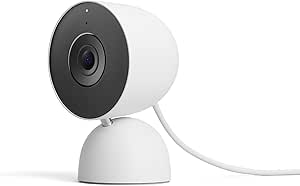
Google Nest Cam Indoor (Wired, 3rd Gen) – Security Camera – Snow
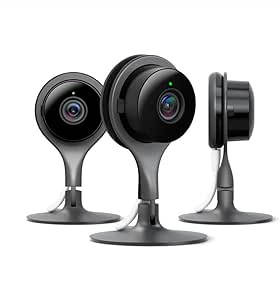
Google Nest Cam Indoor Security Camera, 3-Pack

Levoit Eleva 300X HEPA Air Purifier for Home and Bedroom
As an affiliate, we earn on qualifying purchases.
Setup Requires the Tapo App
XDA frames the C210 as an alternative for consumers who want local recording rather than making recurring cloud services central to their camera setup. Its report contrasts this approach with subscription-based camera services that may charge for features such as video history or event review. Those costs and feature limits vary by provider and plan; they are not a direct comparison of every camera’s capabilities or total ownership cost.
The local option is not fully app-free from the outset. According to XDA, owners first complete onboarding in the Tapo app, update firmware and create credentials for the local stream. The article gives the general RTSP URL structure as rtsp://username:password@camera-address:554/stream1 for HD or stream2 for SD. The actual camera address and login details must be supplied by the owner, and compatible software may require its own configuration.
Once local streaming works, users can choose whether to leave internet access enabled or block it through their router. Isolation can limit the camera’s online functions and complicate updates, so local operation involves a continuing trade-off between cloud connectivity and network control.
“The Tapo C210 supports native local protocols like ONVIF and RTSP.”
— XDA Developers
Compatibility and Feature Trade-Offs
The report does not provide independent test results covering every firmware version, router configuration or third-party recorder. Compatibility may depend on the software and equipment used, and the source material does not specify how all Tapo app features behave across different configurations. Buyers should check current product documentation and firmware details before relying on a particular local workflow.
It is also not clear from the report whether TP-Link could change protocol support or other behavior through future firmware updates. The article advises owners to keep firmware current, but doing so may require temporarily restoring internet access. The extent of security or privacy gains depends on how the camera, router, credentials and recorder are configured; local streaming alone is not proof that all data paths are private.
Owners Must Maintain Local Setup
For buyers, the next step is to confirm that their chosen NVR, NAS or software supports the C210’s local streams, then complete app onboarding and test playback before applying firewall restrictions. They should also decide which two recording methods matter most, given the camera’s reported limit, and retain a plan for firmware updates.
TP-Link has not announced a new development in the source material. The practical question for owners is whether their setup continues to work after updates and whether the loss of app functions under internet isolation is acceptable. XDA’s report presents local ONVIF and RTSP as available features, while long-term operation remains dependent on firmware, network configuration and third-party compatibility.
Key Questions
Can the Tapo C210 stream video locally?
According to XDA Developers, the camera supports ONVIF and RTSP, which can connect it to compatible local recorders and software.
Does local streaming require a cloud subscription?
The report describes local RTSP or ONVIF streaming as an option that does not require cloud video storage. It says initial setup still uses the Tapo app, and cloud features are separate from local recording.
What happens if I block the camera’s internet access?
XDA says local streaming can continue if the camera and recorder can communicate on the home network. Online features in the Tapo app stop working, and internet access may be needed to check for firmware updates.
Can the camera use cloud, microSD and local recording at the same time?
No. XDA reports that the C210 supports only two of those three methods at once. Using Tapo Care cloud backup with microSD recording disables local NVR or RTSP recording until a setting is changed.
Source: XDA Developers