When fiber or cable lines fail, a 5G home internet gateway for backup keeps your connection alive. The Cudy P5 5G Wi-Fi 6 Router stands out as the best overall choice due to its dual SIM slots, which allow seamless switching between carriers if one network suffers an outage. For those already invested in a mesh ecosystem, the Amazon eero Signal offers the most integrated experience, though it requires a subscription. Conversely, the T-Mobile 5G Gateway provides high-speed Wi-Fi 7 capabilities but locks you into a specific carrier’s ecosystem. Choosing the right device depends heavily on whether you prioritize carrier flexibility, ease of integration, or raw throughput. This guide breaks down the tradeoffs to help you secure your home network against downtime.

Get privacy and security gear delivered free with Prime
- Fast, free delivery on millions of items
- Prime Video, Amazon Music and more included
- Member-only deals all year
Key Takeaways
- Carrier-agnostic devices like the Cudy P5 offer superior resilience because they are not tied to a single network’s outage.
- Ecosystem-specific backups like the eero Signal provide easier setup but often require ongoing subscription fees for cellular data.
- Wi-Fi 7 capabilities are emerging in premium gateways but may be overkill for a backup line that primarily handles critical traffic.
- Dual SIM support is a critical differentiator for reliability, allowing automatic failover between two distinct mobile carriers.
- Business-grade renewed units offer cost-effective performance but may lack the latest consumer-friendly firmware updates and support.
| Cudy P5 5G Wi-Fi 6 Router with Dual SIM Slots |  | Best Overall for Carrier Redundancy | Cellular technology: 5G SA/NSA, Release 16 | Maximum cellular speed: 3.4 Gbps | Wi-Fi: Wi-Fi 6 AX3000 | VIEW ON AMAZON | See Our Full Breakdown |
| T-Mobile 5G Gateway & Wi-Fi Router Modem Kit, Dual-Band WiFi-7 No Contract |  | Best for T-Mobile-Ready Simplicity | Model: G5AR-1 / TMO-G5AR | Cellular connectivity: 5G | Wi-Fi generation: Title states Wi-Fi 7; detailed compatibility lists 802.11ax | VIEW ON AMAZON | See Our Full Breakdown |
| GL.iNet Spitz AX GL-X3000 5G Cellular Wi-Fi 6 Router |  | Best for Advanced Multi-WAN Setups | Cellular connectivity: 5G NR, LTE, UMTS, WCDMA | Wi-Fi: Dual-band Wi-Fi 6, up to 574 Mbps (2.4 GHz) + 2402 Mbps (5 GHz) | SIM: Dual SIM, single standby | VIEW ON AMAZON | See Our Full Breakdown |
| Amazon eero Signal 5G cellular backup for eero systems, annual eero Plus subscription is required for connectivity – available in app (newest model) |  | Best for Existing eero Households | Cellular technology: 5G RedCap and 4G LTE Cat 4 | Cellular bands: LTE bands 2, 4, 5, 12, 13, 14, 66, 71 | Carrier connection: Dynamic multicarrier eSIM | VIEW ON AMAZON | See Our Full Breakdown |
| AT&T Internet Air 5G Gateway for Business, NCM1120D2, White (Renewed) |  | Best for AT&T Business Customers | Model: NCM1120D2-D323 | Condition: Renewed | Cellular connectivity: 4G LTE and 5G | VIEW ON AMAZON | See Our Full Breakdown |
| Hitron D60 5G Cellular Router |  | Best High-Capacity Home Backup | WiFi Standard: WiFi 6 (AX3000) | Cellular Generation: 5G NSA/SA & 4G LTE | SIM Support: Nano SIM + eSIM | VIEW ON AMAZON | See Our Full Breakdown |
| Winegard Gateway 5G GW-5G01 |  | Best for RV and Off-Grid Integration | Model: GW-5G01 | Wi-Fi Generation: Wi-Fi 5 (802.11ac) | SIM Slots: 2 Mini-SIM | VIEW ON AMAZON | See Our Full Breakdown |
| Cudy LT500 4G LTE Router | 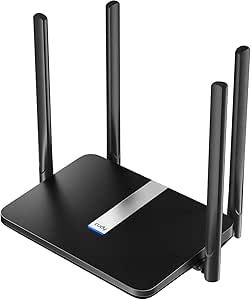 | Best Budget 4G Failover | Connectivity: 4G LTE Cat 4 | Wi-Fi Standard: Wi-Fi 5 (AC1200) | Ports: 4x Ethernet | VIEW ON AMAZON | See Our Full Breakdown |
| Inseego Wavemaker FX3100 |  | Best Premium Aesthetic & Device Density | Wi-Fi Standard: Wi-Fi 6 (AX) | Device Capacity: Up to 64 devices | Ports: 2x Ethernet WAN/LAN, 1x USB-C | VIEW ON AMAZON | See Our Full Breakdown |
| 5g home internet gateway for backup | Ports | Warranty |
|---|---|---|
| Cudy P5 5G Wi-Fi 6 Router with | 4 Gigabit Ethernet (1 WAN/LAN, 3 LAN) | 2 years |
| T-Mobile 5G Gateway & Wi-Fi Ro | 2 | — |
| GL.iNet Spitz AX GL-X3000 5G C | 2; LAN bandwidth up to 1000 Mbps | — |
| Amazon eero Signal 5G cellular | — | 3-year limited warranty |
| AT&T Internet Air 5G Gateway f | 4; Gigabit LAN | 90-day limited warranty |
| Hitron D60 5G Cellular Router | — | 3 Months |
| Winegard Gateway 5G GW-5G01 | — | — |
| Cudy LT500 4G LTE Router | 4x Ethernet | 2 Years |
| Inseego Wavemaker FX3100 | 2x Ethernet WAN/LAN, 1x USB-C | — |
More Details on Our Top Picks
Cudy P5 5G Wi-Fi 6 Router with Dual SIM Slots
The Cudy P5 is my strongest pick for a backup connection that needs to keep working if one mobile carrier falters. Its two Nano SIM slots support carrier failover, while four detachable cellular antennas give owners more placement and reception options than the fixed internal antenna on the AT&T Internet Air gateway. That flexibility is useful when a router must sit where wired service enters the home, rather than where the cellular signal is strongest. Wi-Fi 6 and four Gigabit Ethernet ports also make it practical for sharing backup service across a household and wired equipment.
The tradeoff is that the P5 does not include its own cellular service, and backup performance still depends on local coverage and the chosen plan. Compared with the GL.iNet Spitz AX, it offers a simpler set of WAN options but fewer antennas. Choose the Spitz AX if multi-WAN routing and OpenWrt customization matter more than the P5’s straightforward dual-SIM setup.
Pros:- Dual Nano SIM slots support carrier redundancy and failover.
- Four detachable SMA cellular antennas allow external antenna upgrades.
- Four Gigabit Ethernet ports provide wired connections for local devices.
- Supports Wi-Fi 6, Cudy Mesh, cloud management, and several VPN protocols.
Cons:- A separate SIM and compatible cellular plan are needed.
- Cellular speeds and reliability depend on local carrier coverage.
- Four Ethernet ports may limit larger office or equipment-heavy networks.
Best for: Households or small offices that want two-carrier cellular failover, wired device connections, and the option to improve reception with external antennas.
Not ideal for: Buyers who want a ready-to-connect backup service, or people in weak-signal locations who cannot install or position external antennas.
- Cellular technology:5G SA/NSA, Release 16
- Maximum cellular speed:3.4 Gbps
- Wi-Fi:Wi-Fi 6 AX3000
- SIM slots:2 Nano SIM
- Ports:4 Gigabit Ethernet (1 WAN/LAN, 3 LAN)
- Antennas:4 detachable SMA cellular antennas
- VPN support:WireGuard, OpenVPN, IPsec, Zerotier, PPTP, and L2TP
- Warranty:2 years
Our verdict“Choose the Cudy P5 if your backup plan depends on flexible, dual-carrier connectivity and antenna options rather than an included cellular service.”
T-Mobile 5G Gateway & Wi-Fi Router Modem Kit, Dual-Band WiFi-7 No Contract
This gateway kit is the most straightforward choice here for a buyer who wants a T-Mobile network gateway rather than a configurable cellular router. It is described as an official T-Mobile device, with Wi-Fi for common home devices and two ports for wired connections. Compared with the Cudy P5 and GL.iNet Spitz AX, it does not list dual SIM failover, detachable cellular antennas, or multi-WAN controls; its appeal is a more direct path to using the specified network, not building a resilient multi-carrier setup.
The listing’s specifications need careful reading: the title says Wi-Fi 7, while the detailed compatibility information lists 802.11ax, which is Wi-Fi 6. I would not choose it on the expectation of confirmed Wi-Fi 7 performance. Its network dependence also makes it a less flexible backup choice than the P5 if T-Mobile coverage is poor at the installation location. Check service eligibility and gateway details before relying on it as an outage plan.
Pros:- Identified as an official T-Mobile gateway device.
- Provides 5G connectivity and dual-band Wi-Fi for common home devices.
- Two ports support wired connections.
- Compact listed dimensions suit a home or office setup.
Cons:- Product information conflicts on Wi-Fi generation, listing Wi-Fi 7 in the title but 802.11ax in detailed compatibility.
- No dual-SIM failover or external cellular antenna support is specified.
- Backup usefulness depends on T-Mobile coverage and applicable service availability.
Best for: T-Mobile customers seeking a simple 5G gateway for home backup who need Wi-Fi for household devices and only a small number of wired connections.
Not ideal for: Buyers who need confirmed Wi-Fi 7 specifications, multiple-carrier failover, external antenna options, or broad carrier flexibility.
- Model:G5AR-1 / TMO-G5AR
- Cellular connectivity:5G
- Wi-Fi generation:Title states Wi-Fi 7; detailed compatibility lists 802.11ax
- Frequency bands:Dual-band listed
- Ports:2
- Maximum LAN data rate:1000 Mbps
- Security:WEP, WPA3
- Dimensions:9.25 x 7.36 x 2.59 inches
Our verdict“Pick this gateway for a simple T-Mobile-focused backup setup, but skip it if you need clear Wi-Fi 7 confirmation or carrier redundancy.”
GL.iNet Spitz AX GL-X3000 5G Cellular Wi-Fi 6 Router
The GL.iNet Spitz AX is the most adaptable pick for a backup network built around more than one connection type. Alongside cellular, it supports Ethernet, repeater, and tethering WAN options, with load balancing and failover. That gives it an advantage over the Cudy P5 when a buyer wants wired internet or phone tethering to serve as another route, not just a second SIM. Its OpenWrt-based firmware, six detachable antennas, and WireGuard and OpenVPN support also suit users who want to tune routing and remote access.
That flexibility brings setup complexity: this is less of a plug-and-play choice than the T-Mobile gateway kit. Dual SIM is listed as single standby, so do not assume both cellular connections operate at once. The listed VPN speeds also show that encrypted throughput can be lower than the headline cellular speed. Choose it for control and connection options; choose the Cudy P5 for a more direct dual-SIM failover focus.
Pros:- Supports failover and load balancing across cellular, Ethernet, repeater, and tethering connections.
- Six detachable antennas offer flexible placement and upgrade options.
- OpenWrt-based firmware allows extensive network customization.
- Includes WireGuard and OpenVPN support.
Cons:- Dual SIM is single standby rather than simultaneous active cellular service.
- Setup and configuration may be more involved than with the T-Mobile gateway kit.
- Listed maximum VPN throughput is below the cellular connection’s potential speed.
Best for: Technically confident home or small-office users who want cellular failover alongside Ethernet, tethering, or repeater WAN options.
Not ideal for: Buyers seeking a simple, low-configuration gateway or expecting simultaneous active connections from both SIMs.
- Cellular connectivity:5G NR, LTE, UMTS, WCDMA
- Wi-Fi:Dual-band Wi-Fi 6, up to 574 Mbps (2.4 GHz) + 2402 Mbps (5 GHz)
- SIM:Dual SIM, single standby
- WAN options:Ethernet, repeater, cellular, tethering
- Antennas:6 detachable antennas
- VPN throughput:Up to 150 Mbps OpenVPN; 300 Mbps WireGuard
- Ports:2; LAN bandwidth up to 1000 Mbps
- Firmware:OpenWrt-based v21.02
Our verdict“Choose the Spitz AX if you want to route backup across several connection types and are comfortable managing a more configurable router.”
Amazon eero Signal 5G cellular backup for eero systems, annual eero Plus subscription is required for connectivity – available in app (newest model)
The eero Signal takes a different approach from the Cudy P5 and Spitz AX: it is a cellular failover accessory for a compatible eero network, not a standalone Wi-Fi router. When wired internet drops, it switches the eero system to 5G RedCap or 4G LTE and returns to the wired connection when service comes back. Its multicarrier eSIM and app-guided setup avoid choosing and inserting a separate SIM, making it the easiest option here for owners already using compatible USB-C-powered eero equipment.
The main tradeoff is that connectivity requires a qualifying subscription, and the included annual eero Plus data allowance is 10 GB; heavier outages call for the 100 GB monthly option. That makes it less suitable for extended disruptions than a separately planned cellular router such as the GL.iNet Spitz AX. Compatibility is limited to supported eero models, so this is a poor fit for households using another mesh system or PoE-only eero equipment.
Pros:- Automatically switches to cellular backup when the wired connection fails.
- Multicarrier eSIM can select a local cellular network without a separate SIM setup.
- Provides backup connectivity to the compatible eero network rather than one device alone.
- Includes a three-year limited warranty.
Cons:- Requires an annual eero Plus subscription or an eligible provider plan for connectivity.
- The standard annual plan includes 10 GB of backup data, which may not cover prolonged outages.
- Works only with compatible eero systems and does not support eero devices powered exclusively by PoE.
Best for: Owners of compatible USB-C-powered eero Wi-Fi 6-or-newer systems who want automatic cellular backup managed in the eero app.
Not ideal for: Households without compatible eero equipment, users who need a standalone hotspot, or anyone unwilling to rely on a subscription and its data allowance.
- Cellular technology:5G RedCap and 4G LTE Cat 4
- Cellular bands:LTE bands 2, 4, 5, 12, 13, 14, 66, 71
- Carrier connection:Dynamic multicarrier eSIM
- Compatible systems:USB-C-powered Wi-Fi 6-or-newer eero devices and eero PoE Gateway
- Standard backup data:10 GB per year with annual eero Plus
- Alternative backup data:100 GB per month with eero Plus 100
- Power:USB-C
- Warranty:3-year limited warranty
Our verdict“Choose eero Signal if you already run a compatible eero network and value automatic, app-managed failover over independent router flexibility.”
AT&T Internet Air 5G Gateway for Business, NCM1120D2, White (Renewed)
This renewed AT&T Internet Air gateway is a practical match for a small business that already plans to use an AT&T Business Data Plan. It combines 4G LTE and 5G with dual-band Wi-Fi 6 and four ports, giving it more wired connection capacity than the two-port T-Mobile kit. App controls and a web interface also make it a more conventional gateway choice than the eero Signal, which depends on a compatible eero system and subscription for backup.
Its limits are tied to that business-focused setup. The AT&T Business Data Plan and Nano SIM are not included, and the internal antenna offers less reception-tuning flexibility than the detachable antennas on the Cudy P5 or Spitz AX. It is also a renewed unit with a 90-day limited warranty, so it is not my first pick for buyers seeking a longer listed warranty or carrier-independent backup. Confirm plan and device compatibility before making it the center of an outage plan.
Pros:- Supports both 4G LTE and 5G cellular connectivity.
- Four ports provide more wired connections than the two-port T-Mobile gateway kit.
- Dual-band Wi-Fi 6 supports current home and office devices.
- Offers app-based controls and an intuitive web interface.
Cons:- Requires an AT&T Business Data Plan and a Nano SIM, neither of which is included.
- Internal antennas cannot be upgraded or repositioned independently.
- Renewed condition and a 90-day limited warranty may not suit buyers seeking longer-term assurance.
Best for: Small businesses with an AT&T Business Data Plan that want a renewed 5G gateway with Wi-Fi 6 and several wired ports.
Not ideal for: Buyers who need service included, external antenna upgrades, carrier failover, or a longer listed warranty.
- Model:NCM1120D2-D323
- Condition:Renewed
- Cellular connectivity:4G LTE and 5G
- Wi-Fi:Dual-band Wi-Fi 6 (802.11ax), Wi-Fi 7 ready
- SIM:Single Nano SIM slot; SIM not included
- Ports:4; Gigabit LAN
- Antenna:Internal
- Service requirement:AT&T Business Data Plan
- Warranty:90-day limited warranty
Our verdict“Choose this gateway if you already have an AT&T Business Data Plan and want a renewed unit with Wi-Fi 6 and four ports.”
Hitron D60 5G Cellular Router
This router stands out for its AX3000 WiFi 6 capability, offering significantly more bandwidth than basic 4G options like the Cudy LT500. Its dual failover support (Nano SIM and eSIM) is a critical feature for home users who need redundancy without swapping physical cards during an outage. While the Inseego Wavemaker FX3100 offers a sleeker design, the Hitron D60 delivers higher theoretical throughput, making it better suited for households with multiple streaming devices. However, the three-month warranty is notably short compared to industry standards, requiring careful consideration for long-term reliability.
Pros:- Supports both Nano SIM and eSIM for flexible failover
- High-speed AX3000 WiFi 6 handles multiple devices
- Certified for major US carriers (T-Mobile, AT&T, US Cellular)
- Backward compatible with 4G LTE networks
Cons:- Short 3-month limited warranty
- Internal antennas may struggle in deep rural dead zones
- Limited physical port count compared to business models
Best for: Homeowners with heavy streaming usage who need robust WiFi 6 coverage and dual-SIM redundancy.
Not ideal for: Users seeking a long-term warranty or those with minimal device counts who don’t need 4×4 MIMO capacity.
- WiFi Standard:WiFi 6 (AX3000)
- Cellular Generation:5G NSA/SA & 4G LTE
- SIM Support:Nano SIM + eSIM
- Max Download Speed:3.4 Gbps (5G)
- Carrier Certification:T-Mobile, AT&T, US Cellular
- MIMO Configuration:4×4 on 5GHz
- Warranty:3 Months
Our verdict“This model is the strongest choice for homes needing high-speed, multi-device backup with modern WiFi standards.”
Winegard Gateway 5G GW-5G01
Unlike the Hitron D60, which is designed for static home use, this gateway is engineered specifically for mobile and off-grid environments. It integrates seamlessly with the Winegard Air 360+ 5G antenna, providing a unified solution for RVs that standalone routers cannot match. The inclusion of Ethernet WAN allows it to pair with Starlink, offering a hybrid backup strategy that is rare in consumer routers. However, it is strictly locked into the Winegard ecosystem, meaning it requires their specific antenna hardware to function as intended, limiting its versatility for standard home setups.
Pros:- Native integration with Winegard Air 360+ 5G antenna
- Ethernet WAN supports Starlink and other wired backhauls
- Dual Mini-SIM slots for carrier redundancy
- Built-in GPS antenna for location services
Cons:- Requires compatible Winegard antenna for full functionality
- Wi-Fi 5 (AC) standard is older than Wi-Fi 6 alternatives
- Form factor is not optimized for standard home desks
Best for: RV owners and off-grid residents who already use or plan to use Winegard Air 360+ hardware.
Not ideal for: Home users without Winegard antennas or those seeking a standalone plug-and-play device.
- Model:GW-5G01
- Wi-Fi Generation:Wi-Fi 5 (802.11ac)
- SIM Slots:2 Mini-SIM
- WAN Port:Ethernet (Starlink compatible)
- Max Upstream:900 Mbps
- Security:WPA2
- Integration:Winegard Air 360+ / RV Halo
Our verdict“This is the definitive choice for RVers who want a cohesive, antenna-integrated 5G backup system.”
Cudy LT500 4G LTE Router
This option is distinct because it does not support 5G, unlike the Hitron D60 or Inseego FX3100. It serves as a cost-effective entry point for users who only need basic connectivity for email, browsing, or security cameras during an outage. The four Ethernet ports are a practical advantage over many mobile hotspots, allowing wired connections for desktops or consoles. However, the 150 Mbps LTE Cat 4 limit means it will bottleneck high-definition streaming if multiple users are active, making it a poor match for bandwidth-heavy households compared to 5G alternatives.
Pros:- Four Ethernet ports for wired device connectivity
- Supports multiple VPN protocols for secure access
- Compact and simple to deploy
- Lower barrier to entry than 5G modems
Cons:- Limited to 4G LTE speeds (max 150 Mbps)
- Wi-Fi 5 (AC) technology is aging
- Basic firewall security features
Best for: Budget-conscious users needing basic internet backup for light tasks and wired device support.
Not ideal for: Gamers, streamers, or households with more than two active users who require high bandwidth.
- Connectivity:4G LTE Cat 4
- Wi-Fi Standard:Wi-Fi 5 (AC1200)
- Ports:4x Ethernet
- SIM Type:Nano SIM
- Max Speed:150 Mbps
- Security:WPA/WPA2/WPA3
- Warranty:2 Years
Our verdict“This router is ideal for those who prioritize wired ports and low cost over 5G speed.”
Inseego Wavemaker FX3100
The FX3100 prioritizes design and high-density connectivity, supporting up to 64 devices, which exceeds the typical capacity of routers like the Cudy LT500. Its Wi-Fi 6 implementation and advanced security features make it suitable for smart homes with numerous IoT gadgets. While the Hitron D60 offers carrier certification clarity, the Inseego requires careful verification of band compatibility for your specific carrier. The GSM Unlocked status offers flexibility, but the premium positioning means you are paying for the sleek form factor and robust management app rather than raw throughput advantages over its competitors.
Pros:- Supports up to 64 connected devices
- Sleek, low-profile design blends into home decor
- Wi-Fi 6 with advanced WPA3 security
- USB-C port for tethering flexibility
Cons:- Carrier compatibility requires manual band verification
- Premium price point for a backup-only device
- Fewer physical LAN ports than the Cudy LT500
Best for: Users with smart homes or small offices needing to connect dozens of devices with a discreet footprint.
Not ideal for: Budget buyers or those who need guaranteed plug-and-play carrier certification without checking bands.
- Wi-Fi Standard:Wi-Fi 6 (AX)
- Device Capacity:Up to 64 devices
- Ports:2x Ethernet WAN/LAN, 1x USB-C
- Connectivity:5G and LTE
- Security:WPA/WPA2/WPA3
- Management:Inseego Mobile App
- Form Factor:Low-profile indoor
Our verdict“This is the top pick for design-conscious users with complex smart-home ecosystems requiring stable, high-density connections.”
How We Picked
I evaluated these gateways based on their ability to serve as a reliable secondary line rather than a primary connection. The primary criterion was failover reliability: how quickly and seamlessly the device switches from the main connection to 5G without dropping critical tasks. I also assessed carrier flexibility, favoring unlocked devices or those with dual SIM capabilities that prevent a single carrier outage from isolating the home. Build quality and antenna design were examined to determine if the devices could maintain stable signals in typical indoor environments, where 5G penetration can vary. Finally, I considered the total cost of ownership, including any mandatory subscription services that might erode the value of a ‘backup’ solution over time.
Factors to Consider When Choosing 5g Home Internet Gateway For Backup
Selecting a backup gateway is different from choosing a primary router. You need reliability, compatibility with your existing network, and ease of automation. Here is what matters most.
Carrier Lock vs. Unlocked Flexibility
A locked gateway from a specific carrier like T-Mobile or AT&T often comes with a subsidized price tag, but it restricts your failover options. If that specific carrier experiences a regional outage, your backup line dies with it. Unlocked devices or those supporting dual SIM cards allow you to insert a SIM from a completely different provider. This geographic and network diversity is the single best way to guarantee connectivity when disasters strike. While unlocked units may have a higher upfront cost, they protect you from single-point-of-failure risks inherent in carrier-locked hardware.
Integration with Existing Mesh Systems
If you already run a mesh network like eero or Orbi, a standalone 5G gateway can create routing headaches. You might end up with double NAT issues or complex configuration requirements to make the 5G line act as a transparent backup. Devices designed to plug directly into your existing mesh router, such as the eero Signal, handle this automatically. They often require a subscription but save hours of configuration time. For users less comfortable with networking, ecosystem integration is worth the monthly fee for the sake of simplicity and automated failover.
Wi-Fi Standard: Do You Need Wi-Fi 7?
Marketing often pushes the latest Wi-Fi standards, but for a backup connection, bandwidth is rarely the bottleneck; latency and stability are. A Wi-Fi 5 or Wi-Fi 6 router is usually sufficient because most 5G home connections do not consistently push gigabit speeds indoors due to signal attenuation. Investing heavily in Wi-Fi 7 might be overkill unless you plan to use the 5G line as your primary connection occasionally. Prioritize a device with good CPU power for handling traffic shaping and failover logic over the newest radio standard.
The Hidden Cost of Subscription Services
Some modern gateways, particularly those from major tech ecosystems, require a paid subscription to enable cellular backup features. This turns a one-time hardware purchase into an ongoing operational expense. Over three to five years, these fees can exceed the cost of a standalone unlocked router. If you are technically proficient, buying a standalone device and managing your own SIM card and data plan is often more economical. However, if you value a ‘set it and forget it’ experience, the subscription might be a fair trade for professional support and simplified management.
Signal Strength and Antenna Placement
5G signals, especially higher-frequency bands, struggle to penetrate walls and roofs. A gateway placed in a basement or center of the house may perform poorly regardless of its specs. Look for devices with external antenna ports if your signal is weak, as these allow you to mount directional antennas outside. The Winegard Gateway and similar ceiling-mounted units are designed for better line-of-sight. Check your local carrier coverage map indoors before buying; a powerful router cannot fix a lack of cell tower visibility.
Frequently Asked Questions
Can I use any 5G gateway as a backup for my fiber internet?
Yes, but the ease of setup varies. Most 5G gateways work as a standalone router, but to make them a true automatic backup, they need to connect to your main router or a dedicated failover router. Devices like the Cudy P5 often have built-in failover features if configured correctly, while others may require you to manually switch cables or use a third-party router with WAN failover capabilities. Ensure the 5G gateway supports bridge mode if you want to keep your existing main router’s Wi-Fi network active.Do I need a separate data plan for my 5G backup gateway?
Generally, yes. Most 5G home internet providers offer a dedicated service for their specific hardware. If you buy an unlocked device like the Inseego Wavemaker FX3100, you will need to insert a SIM card with an active data plan from a carrier like T-Mobile, Verizon, or AT&T. Some users use mobile hotspot plans, but these may have throttling policies or data caps that differ from dedicated home internet plans. Always check the carrier’s terms regarding tethering and home use to avoid service suspension.Is Wi-Fi 6 or Wi-Fi 7 better for a backup connection?
Wi-Fi 6 is typically the sweet spot for value and performance in a backup scenario. Wi-Fi 7 offers higher potential speeds and lower latency, but these benefits are often limited by the actual 5G signal strength reaching your home. Unless you have exceptional 5G coverage (like mmWave) and plan to use the backup as a primary line, the extra cost of Wi-Fi 7 hardware is hard to justify. Wi-Fi 6 provides ample bandwidth for video calls and critical work tasks during an outage.How fast does the failover happen between my main internet and 5G?
Failover speed depends on the router’s firmware and configuration, not just the 5G gateway itself. In a well-configured dual-WAN setup, failover can happen in seconds, often unnoticed by video calls or gaming. However, if you have to manually plug in the 5G gateway after an outage, the downtime could be minutes. Dedicated mesh systems with cellular backup, like eero, are optimized for faster automatic switchover compared to manual setups. Check if your main router supports ‘failover’ or ‘load balancing’ to automate this process.Are renewed business gateways reliable for home use?
Renewed business gateways, such as the AT&T Internet Air unit, can be cost-effective and robust. However, they may lack the consumer-friendly mobile apps and easy firmware updates found in newer retail models. You might also face compatibility issues if the unit is locked to a specific business plan or requires enterprise-grade SIM authentication. Ensure the device is fully unlocked and supports the 5G bands used by your local residential carrier before purchasing a renewed business unit.Conclusion
Choosing the right 5G home internet gateway for backup comes down to balancing resilience with convenience. The Cudy P5 5G Wi-Fi 6 Router is my top recommendation for most users because its dual SIM slots provide the highest level of redundancy by allowing you to switch carriers instantly. If you are deep in the Amazon ecosystem and prefer simplicity over ownership, the Amazon eero Signal is the best value for hassle-free integration, despite the subscription requirement. For those seeking the latest technology and raw speed, the T-Mobile 5G Gateway with Wi-Fi 7 is the premium pick, provided you are comfortable with carrier lock-in. Beginners should avoid complex unlocked routers and stick with integrated solutions, while tech-savvy users will appreciate the flexibility of the GL.iNet Spitz AX for custom network configurations.