A keyless entry door lock with a keypad lets you enter a code instead of carrying a key, but models vary in connectivity, access methods, and installation needs. My best overall pick is the Philips Wi-Fi Smart Lock with Handle, which combines keypad entry with fingerprint and app access. The TEEHO TE001 is a more straightforward choice for shoppers who want a keypad deadbolt without smart-home complexity, while the Lockly Secure Pro is a stronger fit for buyers prioritizing connected access. The main tradeoffs are simple operation versus remote control, and a basic deadbolt versus a full handle set. Read on for the full breakdown and help matching a lock to your door and daily routine.

Get privacy and security gear delivered free with Prime
- Fast, free delivery on millions of items
- Prime Video, Amazon Music and more included
- Member-only deals all year
Key Takeaways
- Philips Wi-Fi Smart Lock with Handle stands out for offering keypad, fingerprint, and app access in one package; buyers who only need codes may find that feature mix unnecessary.
- The TEEHO TE001 appears in three finishes, so shoppers can choose a look without changing the basic keypad-deadbolt format.
- The lineup splits between standalone keypad locks and connected models with Wi-Fi or app features; remote access adds convenience but also makes connectivity and setup part of the decision.
- Several picks combine a keypad with fingerprint entry, including Philips, Wyze, and Yamiry options, but their handle, deadbolt, and connectivity formats differ.
- A lock’s form factor matters as much as its access features: knob and handle sets may suit a full hardware replacement, while deadbolts may be a closer match for replacing a single existing lock.
| Yamiry Keypad Smart Door Knob Lock – Keyless Entry Digital Lock with Handle | 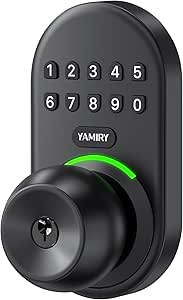 | Best for Easy DIY Installation | Lock format: Keypad door knob | Material: Aluminum alloy | Color: Matte Black | VIEW ON AMAZON | See Our Full Breakdown |
| EIYSIE WiFi Deadbolt Smart Lock, 8-in-1 Keyless Entry Door Lock, Black |  | Best for Biometric and Video Features | Model: QZDMD01 | Color: Black | Access methods: Palm vein, 3D face recognition, voice command, fingerprint, PIN, IC card, mobile app, physical key | VIEW ON AMAZON | See Our Full Breakdown |
| Philips Wi-Fi Smart Lock with Handle – Fingerprint, App & Keypad Access |  | Best for High-Capacity Households | Model: DDL220X-1HW-MB | Access methods: Fingerprint, app, keypad, mechanical keys | PIN capacity: Up to 100 codes | VIEW ON AMAZON | See Our Full Breakdown |
| TEEHO TE001 Keyless Entry Deadbolt with Keypad for Front Door, Satin Nickel |  | Best Value for Straightforward Keypad Entry | Model: TE001 | Color: Satin Nickel | Lock format: Keypad deadbolt | VIEW ON AMAZON | See Our Full Breakdown |
| Teeho TE001 Keyless Entry Deadbolt with Keypad for Front Door, Bronze |  | Best Bronze Finish Pick | Lock format: Keyless entry keypad deadbolt | Finish: Bronze | Material: Aluminum alloy | VIEW ON AMAZON | See Our Full Breakdown |
| Philips WiFi Keypad Deadbolt with Handle, Built-in WiFi, App Remote Control |  | Best for Remote Access Without a Hub | Connectivity: 2.4GHz WiFi; no hub needed | Access methods: Fingerprint, PIN code, app | Auto-lock: Customizable from 0 to 180 seconds | VIEW ON AMAZON | See Our Full Breakdown |
| Veise VE001 Keyless Entry Deadbolt – Electronic Keypad Lock, Satin Nickel |  | Best for Temporary Guest Codes | Permanent codes: Up to 20 | Temporary access: One-time codes delete after use | Auto-lock: 10–99 seconds | VIEW ON AMAZON | See Our Full Breakdown |
| Veise KS01C Keyless Entry Deadbolt Door Lock with Knobs, Satin Nickel |  | Best for Broad Door Compatibility | User codes: Up to 20, plus a master code | Door thickness: 1-3/8 to 2 inches (35–50 mm) | Hole diameter: 2-1/8 inches (54 mm) | VIEW ON AMAZON | See Our Full Breakdown |
| Smart Lock Ultra with Keypad, Fingerprint Door Lock, App Remote Control, Built-in WiFi Deadbolt, Auto Unlock, Waterproof, Easy Install, Supports Alexa and Google |  | Best for Multi-Method Smart Entry | Access and control: App, touch and voice | Access methods: Fingerprint, app and voice commands | Connectivity: Wireless | VIEW ON AMAZON | See Our Full Breakdown |
| Lockly Secure Pro Smart Deadbolt Lock with WiFi Hub |  | Best for High-Security Keypad Entry | Certification: ANSI Grade 1 | Keypad: PIN Genie digit-shuffling keypad | Fingerprint unlock: Specified at 0.3 seconds | VIEW ON AMAZON | See Our Full Breakdown |
| Nyboer Keypad Door Lock with Handle, Keyless Entry Digital Code for Front Door |  | Best for Weather Exposure | Brand / model: Nyboer H01A | Material / finish: Aluminum alloy, matte black | Weather resistance: IP65 | VIEW ON AMAZON | See Our Full Breakdown |
| Yamiry Front Door Smart Door Handle Lock with Keypad and Fingerprint |  | Best for Multiple Ways to Enter | Brand / model: Yamiry YR01 | Lock type: Smart door handle lock | Entry methods: Fingerprint, app, passcodes, key fobs, mechanical keys, and Alexa voice control with separate Wi-Fi gateway | VIEW ON AMAZON | See Our Full Breakdown |
| Wyze Auto-Lock Bolt v2 Fingerprint Keyless Entry Smart Lock with Wi-Fi |  | Best for Fingerprint and Remote Control | Brand / model: Wyze WLCKB2, Lock Bolt v2 | Lock type: Keypad deadbolt with fingerprint and app control | Connectivity: Wi-Fi | VIEW ON AMAZON | See Our Full Breakdown |
| Schlage Electronic Keypad Deadbolt Lock, Camelot Trim, Satin Nickel |  | Best for Long Battery Life | Brand / model: Schlage BE365VCAM619 | Trim / finish: Camelot, satin nickel | Lock type: Electronic keypad deadbolt | VIEW ON AMAZON | See Our Full Breakdown |
| TEEHO TE001 Keyless Entry Deadbolt with Keypad for Front Door, Matte Black |  | Best Value for a Basic Keypad Deadbolt | Brand / model: TEEHO TE001 | Material / finish: Aluminum alloy, matte black | Weather resistance: IP54 | VIEW ON AMAZON | See Our Full Breakdown |
More Details on Our Top Picks
Yamiry Keypad Smart Door Knob Lock – Keyless Entry Digital Lock with Handle
The Yamiry keypad knob is a practical pick for buyers who want coded entry without taking on a complicated installation. Its setup is described as taking under 15 minutes with a screwdriver, while the backlit keypad helps with nighttime entry and the low-battery indicator gives a useful prompt before power runs out. Up to 20 permanent codes plus one-time guest codes make it more flexible for households and visitors than a basic single-code lock. Compared with the TEEHO TE001 deadbolts, Yamiry uses a knob format rather than a deadbolt, so check that this style suits your door and security needs. The tradeoff is its Wi-Fi requirement and aluminum-alloy body, which may feel less substantial than a steel lock. Its adjustable auto-lock can also be disabled when automatic relocking does not suit your routine.
Pros:- Installation is described as taking under 15 minutes with a screwdriver.
- Backlit keypad and low-battery indicator support everyday use.
- Stores up to 20 permanent codes and one-time guest codes.
- Adjustable 5–99-second auto-lock can be disabled; two backup keys are included.
Cons:- Requires Wi-Fi, which may be unnecessary for buyers who only need local keypad access.
- Aluminum-alloy construction may feel less robust than a heavier-duty lock.
- A knob format may not suit buyers specifically looking for a deadbolt.
Best for: Renters or homeowners replacing a compatible knob who want a quick DIY installation, guest codes, and keypad access.
Not ideal for: Buyers seeking a deadbolt-style lock, a heavier-feeling body, or keypad operation without Wi-Fi.
- Lock format:Keypad door knob
- Material:Aluminum alloy
- Color:Matte Black
- Dimensions:5.62 x 2.7 x 3 inches
- User codes:Up to 20 permanent codes plus one-time guest codes
- Auto-lock timer:Adjustable from 5 to 99 seconds; can be disabled
- Weather resistance:IP54
- Backup keys:2 included
Our verdict“Choose Yamiry if quick installation and flexible guest codes matter more to you than a deadbolt format or a heavier-feeling build.”
EIYSIE WiFi Deadbolt Smart Lock, 8-in-1 Keyless Entry Door Lock, Black
The EIYSIE WiFi deadbolt suits buyers who want keypad entry as one part of a broader smart entry setup. Alongside a PIN, it offers palm-vein and face recognition, fingerprint access, IC cards, app control, voice commands, and a physical key. Its built-in HD camera and two-way talk add doorbell-style functions that the simpler TEEHO TE001 does not provide. That breadth can reduce reliance on a keypad, but it also means more setup and more features to manage than a straightforward keypad deadbolt. Check the stated door-fit limits before ordering: the door thickness range is 35–50 mm, while the front lock supports up to 40 mm. Mismatched existing holes may require extra drilling, so this is less appealing for buyers seeking a quick, low-complexity replacement.
Pros:- Combines PIN access with palm-vein, face, fingerprint, IC-card, app, voice, and key entry.
- Built-in HD camera and two-way talk add doorbell-style communication.
- Wi-Fi supports app control and Alexa and Google Assistant compatibility.
- Specified for doors 35–50 mm thick.
Cons:- Existing door holes may require additional drilling.
- Front lock thickness is limited to 40 mm, narrowing door compatibility.
- Its many access methods and camera functions add complexity compared with a basic keypad deadbolt.
Best for: Homeowners who want PIN entry alongside biometric access, app control, and an integrated camera-doorbell function.
Not ideal for: Buyers wanting a simple keypad-only replacement, minimal setup, or a lock that fits doors outside its stated thickness limits.
- Model:QZDMD01
- Color:Black
- Access methods:Palm vein, 3D face recognition, voice command, fingerprint, PIN, IC card, mobile app, physical key
- Connectivity:Wi-Fi, Alexa, Google Assistant
- Camera:HD camera with video doorbell and two-way talk
- Door thickness:35–50 mm
- Maximum front lock thickness:40 mm
- Power source:2 lithium batteries
Our verdict“Pick EIYSIE if you want a camera-equipped smart entry system with a keypad, and skip it if a simple, easy-fit deadbolt is your priority.”
Philips Wi-Fi Smart Lock with Handle – Fingerprint, App & Keypad Access
The Philips Wi-Fi Smart Lock with Handle is a strong fit for busy households, rentals, or small businesses that need to manage many separate credentials. Its capacity of 100 PIN codes and 50 fingerprints gives it considerably more room for regular users than the 20-code TEEHO TE001 deadbolt. Fingerprint access on the handle is specified to unlock in 0.3 seconds, while anti-peep PIN entry helps obscure a code from someone watching. Built-in 2.4 GHz Wi-Fi enables remote locking, alerts, schedules, and voice control without a separate hub. The tradeoff is dependence on a stable Wi-Fi connection, and installation may be more involved than fitting a standard deadbolt. Compared with the keypad-focused TEEHO, Philips offers more access management and remote features, but also asks buyers to accept a more connected setup.
Pros:- Supports up to 100 PIN codes and 50 fingerprints.
- Handle-mounted fingerprint sensor is specified for 0.3-second unlocking.
- Built-in Wi-Fi enables remote locking, alerts, schedules, and voice control without a separate hub.
- Anti-peep PIN entry helps shield codes from onlookers.
Cons:- Remote features depend on a stable 2.4 GHz Wi-Fi connection.
- Installation may be more complex than a standard deadbolt replacement.
- Its larger credential capacity may be unnecessary for households with few users.
Best for: Families, landlords, and small-business operators who need many PINs and fingerprints plus remote access and alerts.
Not ideal for: Buyers who prefer a simple offline keypad lock, have unreliable 2.4 GHz Wi-Fi, or want the easiest deadbolt-style installation.
- Model:DDL220X-1HW-MB
- Access methods:Fingerprint, app, keypad, mechanical keys
- PIN capacity:Up to 100 codes
- Fingerprint capacity:Up to 50 fingerprints
- Fingerprint unlock speed:0.3 seconds
- Connectivity:Built-in 2.4 GHz Wi-Fi
- Voice control:Alexa and Google Assistant
- Warranty:2 years
Our verdict“Choose Philips when you need high code and fingerprint capacity with remote management, rather than the simpler setup of the TEEHO TE001.”
TEEHO TE001 Keyless Entry Deadbolt with Keypad for Front Door, Satin Nickel
The TEEHO TE001 in Satin Nickel keeps the feature set focused: keypad codes, guest access, auto-lock, and a physical-key backup. Its 20 user codes and one-time guest code cover the needs of many households without the app, camera, and biometric setup found on the EIYSIE or Philips models. Anti-peep password entry helps when someone is nearby, while IP54 water resistance and a low-battery alert suit an exterior door. This deadbolt is a more direct choice than the Yamiry knob for buyers who specifically want a deadbolt format. The tradeoffs are its ANSI Grade 3 classification, four AA batteries that are not included, and a reported fit limitation for 38 mm door holes. Programming may also take more patience than its basic feature list suggests.
Pros:- Stores up to 20 user codes and includes a one-time guest code.
- Auto-lock, one-touch locking, and low-battery alerts support routine use.
- IP54 water resistance suits front and back door placement.
- Includes two backup keys and a 2-year warranty.
Cons:- Requires four AA batteries, which are not included.
- Not compatible with 38 mm door holes.
- ANSI Grade 3 classification and keypad-only smart features may not suit buyers seeking a more advanced connected lock.
Best for: Homeowners and rental hosts who want a weather-resistant keypad deadbolt with guest codes and backup keys, without relying on app features.
Not ideal for: Buyers whose doors have 38 mm holes, who want advanced app or biometric access, or who want batteries included.
- Model:TE001
- Color:Satin Nickel
- Lock format:Keypad deadbolt
- User codes:20, including one-time guest access
- Weather resistance:IP54
- Battery life:Up to 365 days
- Power source:4 AA batteries, not included
- Lock grade:ANSI Grade 3
- Warranty:2 years
Our verdict“Choose the Satin Nickel TE001 for practical keypad deadbolt access and guest codes, provided your door fits and you do not need app control.”
Teeho TE001 Keyless Entry Deadbolt with Keypad for Front Door, Bronze
The Bronze Teeho TE001 offers the same practical keypad-deadbolt approach as the Satin Nickel TE001: up to 20 access codes, one-time guest access, auto-lock, and IP54 weather resistance. The distinction in this roundup is its bronze finish, which may suit a door where a darker, warmer hardware tone fits better than satin nickel. Against the more feature-heavy Philips Wi-Fi Smart Lock, Teeho skips fingerprints, remote alerts, and app control in favor of simpler code-based entry. That means fewer connected functions to configure, but also less remote oversight. It supports the stated 2-1/8-inch door hole size, yet the listing also warns that it is not compatible with 38 mm holes. Buyers should check their door before choosing this finish. Four AA batteries are required, and the supplied data says a reset is needed before first use for optimal operation.
Pros:- Bronze finish offers an alternative to the Satin Nickel TE001.
- Supports up to 20 access codes and a one-time guest code.
- Auto-lock and one-touch locking can help prevent leaving the door unsecured.
- IP54 weather resistance and a stated battery life of up to 365 days.
Cons:- Requires four AA batteries, which are not included.
- Not compatible with 38 mm door holes, so door measurements need checking.
- Requires a reset before first use for optimal operation, according to the product data.
Best for: Homeowners replacing a keypad deadbolt who prefer bronze hardware and need guest codes and automatic locking without app features.
Not ideal for: Buyers who need remote access, fingerprint entry, included batteries, or a fit for 38 mm door holes.
- Lock format:Keyless entry keypad deadbolt
- Finish:Bronze
- Material:Aluminum alloy
- Access codes:Up to 20, plus one-time guest code
- Weather resistance:IP54
- Battery life:Up to 365 days
- Batteries:4 AA, not included
- Door-hole compatibility:Suitable for 2-1/8-inch (54 mm) door holes; not compatible with 38 mm holes
- Warranty:2 years
Our verdict“Pick the Bronze TE001 if its finish suits your door and you want basic keypad deadbolt features rather than the connected functions of Philips.”
Philips WiFi Keypad Deadbolt with Handle, Built-in WiFi, App Remote Control
I’d pick the Philips 4200 Series when keypad entry is only part of the job and I also want to manage access while away. Its built-in 2.4GHz WiFi avoids a separate hub, while PIN codes and fingerprint access give household members alternatives to carrying a key. Compared with the offline Veise VE001, it adds app-based remote control and voice-assistant compatibility, but that extra convenience brings more setup and battery dependence.
The adjustable 0–180-second auto-lock can suit different routines, though it must be turned on in the app. I’d check door handing before buying: this model is designed primarily for right-opening doors, and its fit range is narrower than the Veise KS01C’s. Batteries also aren’t included, so plan for standard alkaline replacements.
Pros:- Built-in 2.4GHz WiFi enables app access without a separate hub
- Offers fingerprint and customizable PIN-code entry
- Works with Alexa and Google Assistant
- Auto-lock delay can be adjusted from 0 to 180 seconds
Cons:- Standard alkaline batteries are not included
- Auto-lock requires manual activation in the app
- Designed primarily for right-opening doors
Best for: Households that want keypad and fingerprint entry plus app-based remote access without adding a separate WiFi hub.
Not ideal for: Buyers with left-opening doors, anyone wanting a simple offline keypad, or households that prefer batteries to be included.
- Connectivity:2.4GHz WiFi; no hub needed
- Access methods:Fingerprint, PIN code, app
- Auto-lock:Customizable from 0 to 180 seconds
- Battery life:Up to 6 months
- Batteries:Standard alkaline batteries; not included
- Door thickness:1-3/8 to 1-3/4 inches (38–50 mm)
- Voice assistants:Alexa and Google Assistant
- Model:DDL242X-1HW-L
Our verdict“Choose the Philips 4200 Series if you want keypad access with hub-free remote control and your door’s handing and measurements are compatible.”
Veise VE001 Keyless Entry Deadbolt – Electronic Keypad Lock, Satin Nickel
The Veise VE001 is a strong fit when I want to share door access without relying on an app or WiFi. It stores up to 20 permanent passcodes and supports one-time codes that delete after use, a useful distinction for occasional visitors or service providers. Compared with the connected Philips 4200 Series, the VE001 gives up remote control and fingerprint access, but its straightforward keypad approach avoids smart-home setup.
A backlit keypad, anti-peeping entry and IP55 weather resistance make it better suited to exposed exterior use than a basic indoor keypad lock. Its auto-lock timer runs from 10 to 99 seconds. The tradeoff is that access changes must be handled at the lock, and four AA batteries are not included. I’d also treat its ANSI Grade 3 rating as a residential feature set, not a commercial-grade upgrade.
Pros:- Stores up to 20 permanent passcodes
- One-time codes delete after use
- Backlit keypad and anti-peeping password entry
- IP55 weather resistance and a 10–99-second auto-lock timer
Cons:- No Bluetooth, WiFi, or smartphone integration for remote control
- Four AA batteries are not included
- ANSI Grade 3 rating is aimed at residential use rather than commercial-grade security
Best for: Homeowners who regularly give temporary access to guests or service providers and want codes managed directly on the lock.
Not ideal for: Buyers who need remote code changes, app-based entry monitoring, fingerprint access, or a connected smart-home lock.
- Permanent codes:Up to 20
- Temporary access:One-time codes delete after use
- Auto-lock:10–99 seconds
- Weather resistance:IP55
- Material:Reinforced aluminum alloy
- Battery:4 AA batteries; not included
- Battery life:Up to 13 months
- Certification:ANSI Grade 3
- Finish:Satin Nickel
Our verdict“Choose the VE001 if temporary guest codes matter more than app control or fingerprint entry.”
Veise KS01C Keyless Entry Deadbolt Door Lock with Knobs, Satin Nickel
I’d choose the Veise KS01C for a conventional keypad deadbolt when door fit and simple code entry matter more than remote features. It accepts doors from 1-3/8 to 2 inches thick, a broader range than the Philips 4200 Series, and stores up to 20 user codes alongside a master code. Compared with the VE001, it offers a similar offline, code-first approach, but its listed fit range may work for thicker doors.
The 10–99-second auto-lock, two backup keys and IP54 weather resistance add practical flexibility for an exterior entry. Its limits are just as clear: there’s no app or remote access, and ANSI/BHMA Grade 3 is residential-grade rather than a commercial-level rating. The keypad may also feel small to some users, so I’d favor a different model if large, easy-to-read buttons are a priority.
Pros:- Fits doors from 1-3/8 to 2 inches thick
- Supports up to 20 user codes plus a master code
- Includes two backup keys and a 10–99-second auto-lock timer
- IP54 weatherproofing for exterior-door use
Cons:- No smartphone app or remote access
- ANSI/BHMA Grade 3 is not commercial-grade
- Some users may find the keypad small
Best for: Homeowners replacing a standard deadbolt who need keypad access across a wider range of door thicknesses and want backup keys.
Not ideal for: Buyers seeking remote management, fingerprint unlocking, commercial-grade certification, or a larger keypad.
- User codes:Up to 20, plus a master code
- Door thickness:1-3/8 to 2 inches (35–50 mm)
- Hole diameter:2-1/8 inches (54 mm)
- Auto-lock:10–99 seconds
- Weatherproofing:IP54
- Certification:ANSI/BHMA Grade 3
- Power:4 AA batteries
- Battery life:Over 1 year
- Backup keys:2
Our verdict“Choose the KS01C for a straightforward keypad deadbolt when its wider stated door-thickness range is more useful than smart connectivity.”
Smart Lock Ultra with Keypad, Fingerprint Door Lock, App Remote Control, Built-in WiFi Deadbolt, Auto Unlock, Waterproof, Easy Install, Supports Alexa and Google
The Smart Lock Ultra suits buyers who want more ways to enter than a keypad alone: it combines fingerprint recognition, app control and voice commands. Its listed battery life of up to 12 months is longer than the Philips 4200 Series’ stated six months, making it appealing if fewer battery changes are a priority. The comparison has a caveat, though: full smart-home integration with Apple HomeKit, Alexa and Google requires a SwitchBot Hub mini, while the Philips connects directly to WiFi without a hub.
This model’s range of entry methods can help households with different preferences, but it also brings more setup than the non-connected Veise KS01C. The supplied data does not specify keypad capacity or door-thickness compatibility, so I’d verify fit and code details before choosing it for a particular door. Buyers with European locksets may need additional accessories, and setup may feel complex for anyone wanting a basic keypad deadbolt.
Pros:- Combines fingerprint, app, touch and voice control
- Listed battery life is up to 12 months
- Supports Apple Home, Alexa, Google Assistant and Siri
- DIY installation and customizable stickers are described
Cons:- SwitchBot Hub mini is required for full smart-home integration
- Setup may be complex for buyers seeking a simple keypad lock
- Door-thickness compatibility and keypad code capacity are not specified in the supplied data
Best for: Smart-home households that want fingerprint, app and voice entry options and are comfortable adding a hub for full ecosystem support.
Not ideal for: Buyers who want a simple keypad-only deadbolt, minimal setup, or confirmed compatibility with a European lockset without extra accessories.
- Access and control:App, touch and voice
- Access methods:Fingerprint, app and voice commands
- Connectivity:Wireless
- Battery life:Up to 12 months
- Smart-home compatibility:Apple Home, Alexa, Google Assistant and Siri
- Hub requirement:SwitchBot Hub mini required for full smart-home integration
- Dimensions:2.4 x 2.5 x 4.8 inches
- Weight:1.33 kg
Our verdict“Pick the Smart Lock Ultra if you value multiple smart entry methods and accept a hub requirement and extra setup.”
Lockly Secure Pro Smart Deadbolt Lock with WiFi Hub
The Lockly Secure Pro is the pick I’d examine first when keypad privacy and deadbolt certification outweigh a minimalist setup. Its PIN Genie keypad shuffles digits, making it harder for someone nearby to infer a code from finger placement, and the lock carries an ANSI Grade 1 certification. Compared with the Veise VE001, which offers a simpler offline keypad and temporary one-time codes, Lockly adds a fingerprint scanner and remote access through its included WiFi hub.
That feature set makes it more capable, but not as straightforward: the hub and app add setup steps, and some features may take familiarity with the app. The stated fingerprint unlock time is 0.3 seconds, and offline access codes provide an option when internet access is unavailable. Battery life is not specified in the supplied data, so I can’t compare its replacement interval with the Philips 4200 Series or the Veise models.
Pros:- ANSI Grade 1 certified deadbolt
- PIN Genie shuffles keypad digits to reduce code exposure
- Fingerprint scanner is specified to unlock in 0.3 seconds
- Includes WiFi hub for app-based remote access and supports Alexa and Google Assistant
Cons:- Remote access depends on setting up the included WiFi hub
- Battery life is not specified in the supplied product data
- App-based features may take time to learn
Best for: Security-minded homeowners or hosts who want a privacy-focused keypad, fingerprint entry and remote access through an included hub.
Not ideal for: Buyers who want a low-complexity offline lock, a clearly stated battery-life estimate, or remote features without hub setup.
- Certification:ANSI Grade 1
- Keypad:PIN Genie digit-shuffling keypad
- Fingerprint unlock:Specified at 0.3 seconds
- Remote access:App control through included WiFi hub
- Offline access:Offline access codes supported
- Voice assistants:Alexa and Google Assistant
- Cylinder:Rekeyable
- Included power and accessories:Batteries, WiFi hub, physical keys and installation hardware included
- Model:PGD728WASN
Our verdict“Choose the Lockly Secure Pro if keypad privacy and Grade 1 certification matter more than simpler setup or a published battery-life estimate.”
Nyboer Keypad Door Lock with Handle, Keyless Entry Digital Code for Front Door
The Nyboer is a strong fit for buyers who want a keypad handle lock with outdoor protection but do not need app control or fingerprint entry. Its IP65 weather resistance is a step above the TEEHO TE001’s IP54 rating, which may matter for a door exposed to rain and dust. It also supports 20 personal codes plus one-time temporary codes, so household members and short-term guests can use separate access credentials. The backlit, anti-peep keypad helps with nighttime entry, while adjustable auto-lock timing lets you choose how soon the door secures itself.
The tradeoffs are a four-AA power setup, with batteries not included, and a cap of 20 custom passwords. Compared with the Schlage Camelot, it offers temporary codes and higher stated weather protection, but Schlage has a longer stated battery life. Check your door measurements before buying, even though installation is described as requiring no drilling.
Pros:- IP65 weather resistance suits more exposed entry locations than the TEEHO TE001’s IP54 rating.
- Supports up to 20 custom passwords and one-time temporary codes.
- Backlit anti-peep keypad and adjustable auto-lock timing support practical everyday use.
- No-drill installation is specified for compatible standard doors.
Cons:- Four AA batteries are required and are not included.
- The 20-password limit may be restrictive for properties with many regular users.
- No app, fingerprint, or remote access features are specified.
Best for: Homeowners whose entry door faces rain or dust and who need temporary codes for visitors without relying on an app.
Not ideal for: Buyers who want remote access management, fingerprint entry, or a long interval between battery changes.
- Brand / model:Nyboer H01A
- Material / finish:Aluminum alloy, matte black
- Weather resistance:IP65
- Power:4 AA batteries, not included
- Stated battery life:8–12 months
- Code capacity:Up to 20 custom passwords; one-time temporary passwords
- Compatible door thickness:1-3/8 to 2 inches (35–50 mm)
- Auto-lock delay:5–99 seconds
- Backup keys:2 mechanical keys
Our verdict“Choose the Nyboer if weather resistance and temporary keypad codes matter more to you than app features or extended battery life.”
Yamiry Front Door Smart Door Handle Lock with Keypad and Fingerprint
The Yamiry YR01 suits households that want a keypad as one of several ways to get inside, rather than the only keyless method. It combines passcodes and fingerprint access with key fobs, mechanical keys, and app-based management; Alexa voice control is also listed, but requires a separate Wi-Fi gateway. That flexibility makes it more feature-rich than the Nyboer H01A or Schlage Camelot, both of which focus on keypad codes and physical backup keys rather than app-managed entry.
The extra options bring setup and equipment tradeoffs. App configuration may take more effort, and remote or voice functions depend on connectivity or the separately required gateway. The supplied description does not give a battery-life estimate, weather rating, or code capacity, so buyers comparing specs should not assume these match simpler keypad locks. Its reversible handle and quick DIY installation suit standard-door upgrades, but check fit and app requirements before choosing it for a rental or shared property.
Pros:- Offers fingerprint, passcode, app, key fob, and mechanical-key entry methods.
- App-based access management supports remote control and monitoring.
- Reversible handle accommodates left- and right-handed doors.
- Includes two key fobs, two mechanical keys, and an adjustable latch.
Cons:- Alexa voice unlock requires a separate Wi-Fi gateway.
- App setup may be more involved than using a keypad-only lock such as the Schlage Camelot.
- The supplied product data does not state battery life or a weather-resistance rating.
Best for: Homeowners and property managers who want to offer residents fingerprint, keypad, fob, and app access from one handle lock.
Not ideal for: Buyers seeking a straightforward keypad-only lock, a clearly stated weather rating, or Alexa control without purchasing a separate gateway.
- Brand / model:Yamiry YR01
- Lock type:Smart door handle lock
- Entry methods:Fingerprint, app, passcodes, key fobs, mechanical keys, and Alexa voice control with separate Wi-Fi gateway
- Included key fobs:2
- Included mechanical keys:2
- Latch:Adjustable latch included
- Handle orientation:Reversible for left- or right-handed doors
- Installation:DIY installation; described as requiring no additional drilling
Our verdict“Pick the Yamiry YR01 if your household will use its multiple entry methods and app controls, and skip it if you want a simpler keypad lock.”
Wyze Auto-Lock Bolt v2 Fingerprint Keyless Entry Smart Lock with Wi-Fi
The Wyze Lock Bolt v2 is the most technology-forward choice in this group for buyers who want a keypad backup alongside biometric entry and remote control. Its fingerprint scanner is specified to unlock in under half a second and adapt to touches over time, offering a quicker alternative to entering a code when hands are free. Built-in Wi-Fi adds remote control through the app, unlike the keypad-focused TEEHO TE001 and Schlage Camelot, which keep entry simpler and do not list remote access.
That convenience comes with more dependence on batteries and app setup: the stated battery life is about eight months, compared with Schlage’s up-to-three-year estimate. Wyze includes eight AA batteries and offers USB-C emergency power, but its IP53 rating is less suited to harsh exposure than the Nyboer’s IP65 rating. Choose it for connected, quick access rather than for the longest battery interval or strongest listed weather protection.
Pros:- Fingerprint scanner is specified to unlock in under half a second.
- Wi-Fi app control adds remote operation beyond the keypad-only Schlage Camelot and TEEHO TE001.
- Includes eight AA batteries and supports USB-C emergency power.
- BHMA Grade 2 durability is stated in the product data.
Cons:- Stated battery life is about eight months, shorter than Schlage’s estimate of up to three years.
- IP53 weather resistance is less protective than the Nyboer H01A’s IP65 rating.
- App setup or configuration may be more involved than on a basic keypad lock.
Best for: Connected-home owners who want fast fingerprint entry, keypad access, and the ability to control the deadbolt remotely.
Not ideal for: Buyers with a highly exposed exterior door or anyone who prefers a low-maintenance lock without app configuration.
- Brand / model:Wyze WLCKB2, Lock Bolt v2
- Lock type:Keypad deadbolt with fingerprint and app control
- Connectivity:Wi-Fi
- Fingerprint unlock speed:Under 0.5 seconds, as stated
- Weather resistance:IP53
- Durability grade:BHMA Grade 2
- Power:8 AA batteries included
- Stated battery life:Up to 8 months
- Emergency power:USB-C
Our verdict“Choose the Wyze if fingerprint speed and remote control outweigh battery longevity and stronger weather protection.”
Schlage Electronic Keypad Deadbolt Lock, Camelot Trim, Satin Nickel
The Schlage Camelot is the straightforward pick for buyers who want keypad entry without app setup, Wi-Fi, or a fingerprint reader. Its up-to-three-year battery life is the longest stated interval among these five products, and it includes the 9-volt battery, unlike the AA-powered Nyboer and TEEHO TE001, which require separately supplied batteries. A backlit keypad helps with nighttime use, while the patented key override preserves a physical way to open the door.
It supports up to 19 four-digit user codes, just below the 20-code capacity listed for the Nyboer and TEEHO. The Schlage also has an ANSI Grade 2 rating and installs over an existing deadbolt with a screwdriver, but it lacks the temporary codes and higher stated weather resistance offered by the Nyboer. This is a better match for buyers who value simple operation and fewer battery changes than remote access or flexible guest credentials.
Pros:- Stated battery life of up to three years is longer than the other products in this group.
- Includes a 9-volt battery and a patented key override.
- Backlit keypad supports code entry in low light.
- ANSI Grade 2 rating and screwdriver installation over an existing deadbolt are specified.
Cons:- Supports up to 19 codes, fewer than the 20 listed for the Nyboer and TEEHO TE001.
- No app, Wi-Fi, fingerprint, or temporary-code feature is specified.
- Uses a 9-volt battery that will eventually need replacement.
Best for: Homeowners who want a familiar keypad deadbolt, physical key backup, and a long stated battery interval without connected features.
Not ideal for: Buyers who need app-based remote access, temporary guest codes, or more than 19 user codes.
- Brand / model:Schlage BE365VCAM619
- Trim / finish:Camelot, satin nickel
- Lock type:Electronic keypad deadbolt
- User codes:Up to 19 four-digit codes
- Battery:9-volt battery included
- Stated battery life:Up to 3 years
- Key backup:Patented key override
Our verdict“Choose the Schlage Camelot if you want a simple keypad deadbolt with a long stated battery life, not smart-home access features.”
TEEHO TE001 Keyless Entry Deadbolt with Keypad for Front Door, Matte Black
The TEEHO TE001 makes the most sense for buyers who want the essentials: keypad codes, auto-lock, low-battery alerts, anti-peep entry, and backup keys. It supports 20 access codes, including a one-time guest code, matching the Nyboer’s listed custom-code capacity while adding a Grade 3 lock rating in its product data. Compared with the Wyze Lock Bolt v2, it gives up fingerprint entry and Wi-Fi control, but avoids relying on app setup for everyday access.
Its main fit limitation is the door bore: the listed compatibility is for a 2-1/8-inch hole, not a 38 mm hole. It also uses four AA batteries that are not included, and its IP54 rating is below the Nyboer’s IP65. Battery life is stated as up to 365 days, making it a simpler, less connected option rather than a smart lock for remote management.
Pros:- Supports 20 access codes, including a one-time guest code.
- ANSI Grade 3 rating, auto-lock, and low-battery indicator are specified.
- Anti-peep keypad and backup keys provide code-entry privacy and a mechanical fallback.
- Stated battery life is up to 365 days.
Cons:- Four AA batteries are required and are not included.
- Listed compatibility is limited to 2-1/8-inch door holes, excluding 38 mm holes.
- IP54 weather resistance is below the Nyboer H01A’s IP65 rating.
Best for: Homeowners who want a code-based deadbolt with guest access and auto-lock, and whose door has a compatible 2-1/8-inch bore.
Not ideal for: Buyers with a 38 mm door hole, a door needing stronger stated weather protection, or a need for remote app control.
- Brand / model:TEEHO TE001
- Material / finish:Aluminum alloy, matte black
- Weather resistance:IP54
- Lock grade:ANSI Grade 3
- Access codes:Up to 20, including one-time guest code
- Power:4 AA batteries, not included
- Stated battery life:Up to 365 days
- Door-hole compatibility:2-1/8 inches (54 mm)
- Features:Auto-lock, low-battery indicator, anti-peep password, backup keys
Our verdict“Pick the TEEHO TE001 for a practical keypad-and-guest-code setup if your door fits its bore requirement and you do not need app control.”

How We Picked
I compared these 15 options by how directly they meet the promise of a keypad-based keyless entry lock, then weighed the features that affect everyday use: whether the lock is a deadbolt, knob, or handle set; whether it offers physical keys or other backup entry; and whether app, Wi-Fi, or fingerprint access adds a useful alternative to codes. I also considered installation fit, finish choices, weather-related claims where specified, and how much setup a buyer may take on.
The ranking favors clear access choices and a sensible feature-to-complexity balance. Models with multiple access methods rank well when those options serve different routines, while simpler keypad deadbolts remain compelling for buyers who prefer fewer connected features. Closely related color variants are treated as finish choices rather than separate performance tiers; the three TEEHO TE001 listings, for example, do not earn different positions simply because their finishes differ. Product names and supplied feature details guide this comparison, so buyers should confirm dimensions, door compatibility, and included hardware before ordering.
Factors to Consider When Choosing Keyless Entry Door Lock With Keypad
Choosing a keypad lock is less about collecting the most features and more about matching the lock to your door, household, and tolerance for setup. I would start with the hardware format, then decide how much access flexibility you genuinely need.
Match the Lock Format to Your Existing Door
Check whether you are replacing only a deadbolt or both the lock and handle before comparing features. A deadbolt model may be simpler when the existing handle stays in place, while a knob or handle set can make sense during a broader hardware replacement. Measure the door thickness, backset, and existing bore holes against the manufacturer’s installation requirements. A mismatch can turn a seemingly easy installation into extra drilling or a return. Do not assume that a product called a “door lock” fits every door preparation. When the listing does not make compatibility clear, verify it before choosing based on app or fingerprint features.
Decide Whether Remote Access Is Worth the Setup
A keypad works locally, while app control and Wi-Fi can add remote management, notifications, or connected-home features depending on the model. Those extras matter if you need to manage access while away, but they add setup steps and make a reliable network part of the experience. Some connected locks include Wi-Fi, while others may rely on a separate hub; check the exact package rather than assuming remote access works out of the box. If you mainly want to enter a code at the door, a simpler lock can mean fewer settings to manage. Choose connectivity for a specific routine, not just because it appears on a feature list.
Choose Access Methods Around Your Household
Keypad codes suit households that share entry with family, guests, or service providers, while fingerprints can speed up entry for people who prefer not to remember or type a code. App access can help when you need to manage the lock from a phone, but it is not a substitute for a dependable way to enter if a phone is unavailable. Consider who will use the lock and whether every person can comfortably use the chosen method. A combination of methods adds flexibility, but it can also bring more setup and maintenance. For a household with varied needs, prioritize useful alternatives over the highest number of advertised functions.
Plan for Backup Entry and Power
Before buying, find out what happens if the battery runs low or a keypad or connected feature stops working. Some models list backup keys, while others may provide another emergency entry method; do not infer one from the product category. Check the manufacturer’s instructions for low-battery warnings, battery replacement, and any emergency power procedure. A physical key can be reassuring, but only if you have a practical way to store or carry it. If you choose a connected lock, think through how you would get inside during a Wi-Fi outage. This planning matters more than an extra access feature you may rarely use.
Separate Security Needs From Smart Features
App control and fingerprints are convenience features, not a complete measure of a lock’s physical security. Compare the lock’s construction, included hardware, installation requirements, and manufacturer guidance for your specific door. A connected model may suit a buyer who values remote control, while a conventional keypad deadbolt may better fit someone who wants fewer connected components. Avoid treating a long list of entry methods as proof of stronger protection. Check whether the lock’s codes, app permissions, and household access can be managed in a way that fits your needs. The right choice balances access convenience with the actual hardware and door fit.
Treat Finish and Weather Claims as Practical Details
Finish variants can help a lock match existing hardware, but a different color does not necessarily mean a different feature set. The TEEHO TE001 listings illustrate this: satin nickel, bronze, and matte black are separate appearance choices within the same named model family. For an exterior door exposed to rain or temperature swings, verify the product’s stated environmental limits and installation guidance. A weather-resistance label is useful only when it matches the exposure at your entry. Also check whether the keypad and handle finish will be easy to keep clean in your setting. Choose appearance after confirming fit and function, not before.
Frequently Asked Questions
Should I choose a keypad-only deadbolt or a lock with fingerprint and app access?
Choose a keypad-only deadbolt if codes cover your household’s routine and you prefer a simpler setup. Fingerprint access can make frequent entry quicker, while app features can help when you need to manage the lock remotely. Those additions are most useful when you can name a real situation they solve, such as letting someone in while you are away. A multi-method model like the Philips Wi-Fi Smart Lock offers more flexibility, but more features can mean more setup and upkeep. Compare access options against how your household actually enters before paying attention to the feature count.
Can I replace just my existing deadbolt, or do I need a lock with a handle?
That depends on whether your goal is to replace only the deadbolt or update the full door hardware set. Deadbolt options such as the TEEHO TE001 or Veise VE001 are worth comparing when the existing handle is staying in place. A handle or knob model may suit a project where you want the entry hardware to match as a set. Check the installation instructions and measurements for your exact door; product naming alone cannot confirm fit. If you are uncertain, measure the existing setup or ask a qualified installer before ordering.
Do I need Wi-Fi built into a keypad door lock?
No. A keypad can provide keyless entry without Wi-Fi, so connectivity is only needed for features that depend on a network, such as remote app control. Built-in Wi-Fi models, including options listed in this roundup, can reduce the need for a separate hub, but they still require setup and a compatible home network. A hub-based option such as the Lockly Secure Pro has a different package and connection arrangement, so check what is included. If you rarely manage the lock away from home, a standalone keypad may be the less complicated choice. Decide based on your access routine rather than the word “smart.”
What should I do if the batteries run low or the keypad stops working?
Check the exact model’s instructions before purchase for low-battery alerts and emergency entry steps. Some locks include backup keys, as specified for the Wyze Auto-Lock Bolt v2, while other products may use a different fallback. Do not assume every keypad lock has a key cylinder or the same emergency power procedure. Keep any physical backup accessible without leaving it in an obvious place, and follow the maker’s guidance for battery replacement. For a connected model, plan for entry during a network outage as well; Wi-Fi failure and battery failure are separate problems.
Are the three TEEHO TE001 finish listings different locks?
The roundup lists the TEEHO TE001 in satin nickel, bronze, and matte black. They are presented as finish variants of the same named keypad deadbolt, not as separate feature tiers. Choose the finish that suits your door hardware, then confirm the specific listing includes the configuration and hardware you need. Do not expect a color choice alone to change connectivity or access methods. If appearance is not a priority, compare the TE001’s keypad-focused format with connected or fingerprint models instead.
Conclusion
For the broadest mix of entry methods, my best overall choice is the Philips Wi-Fi Smart Lock with Handle, with keypad, fingerprint, and app access. For best value in simplicity, I would start with the TEEHO TE001 and choose among its three finishes, while confirming the exact fit and included hardware. The best premium-style connected pick is the Lockly Secure Pro for buyers comfortable with a Wi-Fi hub setup; the best for beginners is a straightforward keypad deadbolt such as the Veise VE001 or TEEHO TE001. If you want fingerprint entry with Wi-Fi, compare the Wyze Auto-Lock Bolt v2 and Philips options; if you need a full handle replacement, focus on the handle and knob models. Pick the simplest lock that covers your entry routine, then verify door compatibility before you buy.
Halloween Picks
halloween
As an affiliate, we earn on qualifying purchases.