Choosing the right smart lock for garage entry door requires balancing durability, connectivity, and ease of access. The Philips Upgraded Wi-Fi Smart Lock stands out as the best overall pick due to its robust fingerprint recognition and seamless app integration, making it ideal for households with frequent traffic. For those prioritizing video security, the myQ Secure View 3-in-1 offers an unmatched combination of camera and lock functionality, though at a higher price point. Conversely, the TEEHO TE001 provides a reliable, budget-friendly keyless option for users who prefer simplicity over smart home ecosystems. The main tradeoff lies between standalone convenience and integrated smart home automation. Read on to discover how these 14 models compare in build quality, battery life, and installation complexity.

Get privacy and security gear delivered free with Prime
- Fast, free delivery on millions of items
- Prime Video, Amazon Music and more included
- Member-only deals all year
Key Takeaways
- Wi-Fi built-in models like the Philips and eufy C33 eliminate the need for separate hubs, simplifying setup for standalone garage doors.
- Fingerprint sensors are increasingly common in mid-range locks but vary widely in accuracy when hands are wet or dirty, a common garage scenario.
- The myQ Secure View is the only option in this roundup that integrates a 2K video doorbell, making it the sole choice for visual verification of visitors.
- Many keypad-only models lack auto-lock features, requiring manual engagement, which can be a security risk if you frequently enter with full hands.
- Battery life estimates in this category range from 3 to 12 months, with fingerprint-heavy models draining power faster than simple PIN-code locks.




| smart lock for garage entry door | Brand | Model | Connectivity |
|---|---|---|---|
| NICE DIGI Keypad Door Lock wit | NICE DIGI | Z1A | — |
| eufy Security Smart Lock C33 | eufy Security | T85L0 | Built-in Wi-Fi |
| eufy Security Smart Lock C220 | eufy Security | — | Built-in Wi-Fi; no bridge required |
| Philips WiFi Keypad Door Lock | Philips | DDL242X-1HW | — |
| Philips Wi-Fi Smart Deadbolt L | Philips | DDL242X-1HW | Wi-Fi; 2.4 GHz required |
| Keypad Smart Door Knob Lock wi | — | YR05 | Bluetooth; optional Wi-Fi gateway for remote access |
| Philips WiFi Keypad Deadbolt w | — | DDL242X-1HW-L | 2.4GHz Wi-Fi |
| Philips Upgraded Wi-Fi Smart L | PHILIPS | DDL220X-1HW-H-NK | — |
| TEEHO TE001 Keyless Entry Dead | — | TE001 | — |
| Keypad Smart Door Knob Lock wi | — | — | — |
| Philips Wi-Fi Smart Lock with | Philips | — | Wi-Fi (2.4GHz) |
| myQ Secure View™ 3-in-1 Smart | myQ | — | — |
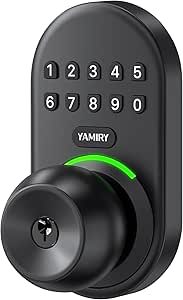
| Smart Door Handle Lock with Ke | Yamiry | — | App-based (Gateway required for Voice) |
| Philips Wi-Fi Smart Deadbolt L | Philips | DDL242X-1HW | Wi-Fi |
More Details on Our Top Picks
NICE DIGI Keypad Door Lock with Handle, Smart Keyless Entry with Code for Front Door
For a garage entry door where a dependable code matters more than remote control, the NICE DIGI Z1A keeps the setup simple: it works without an app, Wi-Fi, or Bluetooth, and stores up to 20 passcodes for household members or regular visitors. Its backlit keypad is useful when entering from a dim garage, while auto-lock can reduce the chance of leaving the door unsecured. Compared with the eufy Security Smart Lock C33, it gives up fingerprint access and remote alerts, but also avoids relying on a network or a more elaborate smart-home setup. The tradeoff is that keypad access is the only electronic control method, so you cannot check or manage the lock remotely. It also needs four AA batteries, sold separately, and its stated battery life can vary with use.
Pros:- Stores up to 20 personalized passcodes for different users.
- Operates without Wi-Fi, an app, or Bluetooth.
- Includes auto-lock, passage mode, backlit keypad, and two physical keys.
- IP54 weather resistance and DIY installation suit a range of residential or commercial doors.
Cons:- No remote access, app controls, or smart-home integration.
- Four AA batteries are not included, and battery life varies with usage.
- Keypad is the only electronic unlocking method.
Best for: Households that want shared entry codes for a garage-to-home door without app setup, Wi-Fi dependence, or smart-home features.
Not ideal for: Buyers who need remote locking, activity notifications, fingerprint entry, or voice-assistant control.
- Brand:NICE DIGI
- Model:Z1A
- Material:Aluminum alloy
- Weather resistance:IP54
- Passcode capacity:20 passcodes
- Power:4 AA batteries, not included
- Stated battery life:8–12 months
- Dimensions:5.39 x 2.79 x 2.7 inches
- Included backup access:2 physical keys
Our verdict“Choose the NICE DIGI if you want a code-operated garage entry lock with straightforward local access and no connected features.”
eufy Security Smart Lock C33 – Keypad Door Lock with Handle and Built-in Wi-Fi
The eufy Security Smart Lock C33 suits a garage entry door that needs more than keypad access: it combines fingerprint, passcode, app, and voice control with built-in Wi-Fi for remote management and notifications. That lets a homeowner respond to an access need away from home rather than relying on someone to share a code in person. Its drill-free installation and compatibility with left- or right-hand doors also make it more adaptable than the NICE DIGI Z1A, which stays offline and keypad-only. The added connectivity comes with a practical cost: the C33 requires eight AA batteries, twice the count listed for the NICE DIGI, and the product data gives no battery-life estimate. Buyers should also check that its handle-and-lock arrangement matches their existing garage entry door before choosing it.
Pros:- Built-in Wi-Fi supports app access and real-time notifications.
- Fingerprint, keypad, passcode, app, and voice controls offer several entry options.
- Drill-free installation is specified at about 15 minutes.
- Designed for left- and right-hand doors, including garage, side, office, and basement doors.
Cons:- Requires eight AA batteries, and no battery-life estimate is provided.
- Remote functions depend on Wi-Fi connectivity.
- Listed in black only, which may not suit every entry door.
Best for: Homeowners who want to grant or manage garage entry remotely and prefer fingerprint access alongside codes.
Not ideal for: Buyers seeking a low-maintenance battery setup, offline-only operation, or a lock whose compatibility with their existing door hardware is already confirmed.
- Brand:eufy Security
- Model:T85L0
- Connectivity:Built-in Wi-Fi
- Control methods:App, voice, keypad, fingerprint, and passcode
- Battery requirement:8 AA batteries
- Door compatibility:Left- and right-hand doors; garage, side, office, and basement doors
- Installation:Drill-free; about 15 minutes
- Material:Painted metal
- Warranty:18 months
Our verdict“Pick the C33 if remote access and fingerprint entry matter more than minimizing battery count or keeping the lock offline.”
eufy Security Smart Lock C220, Fingerprint Keyless Entry Door Lock
The eufy Security Smart Lock C220 is a flexible choice for a garage entry door when different household members prefer different ways to get in. Fingerprint, keypad, app, voice control, and a physical key cover quick arrivals as well as backup access; built-in Wi-Fi also avoids the need for a separate bridge for remote control. Its stated eight-month battery life gives buyers a useful planning estimate, unlike the C33 listing, which does not specify one. The C220 is a deadbolt rather than a handle-set replacement, so it may fit buyers who want to retain compatible existing hardware, but it is limited to most standard deadbolts with a bore under 54 mm. Fingerprint recognition can improve as its system learns, which also means it may take time to settle into reliable recognition.
Pros:- Offers fingerprint, keypad, app, voice, and physical-key entry.
- Built-in Wi-Fi provides remote control without a bridge.
- Stated battery life is up to eight months.
- Specified for a broad operating temperature range and carries BHMA Grade 3 certification.
Cons:- Requires eight AA batteries, and actual life can vary with use.
- Remote control requires a Wi-Fi connection.
- Self-learning fingerprint recognition may need time to optimize.
Best for: Households with a compatible standard deadbolt that want fingerprint convenience, remote app access, and a physical-key backup.
Not ideal for: Buyers replacing a complete handle set, using a nonstandard deadbolt, or unwilling to depend on Wi-Fi for remote functions.
- Brand:eufy Security
- Unlock methods:Fingerprint, keypad, app, voice, and physical key
- Connectivity:Built-in Wi-Fi; no bridge required
- Battery requirement:8 AA batteries
- Stated battery life:Up to 8 months
- Deadbolt compatibility:Most standard deadbolts; bore under 54 mm
- Operating temperature:-22°F to 158°F (-30°C to 70°C)
- Certification:BHMA Grade 3
- Installation time:About 15 minutes
Our verdict“Choose the C220 if your garage entry door has a compatible standard deadbolt and you want several access methods in one lock.”
Philips WiFi Keypad Door Lock with Handle, Built-in WiFi, App Remote Control, Voice & Fingerprint Unlock, Auto-Lock, Satin Nickel
The Philips 4200 Series Wi-Fi Smart Lock is the strongest fit here for buyers replacing a garage entry handle set, not just adding a smart deadbolt. It includes matching door levers and supports fingerprint, PIN, app, and voice access, while direct 2.4 GHz Wi-Fi connection avoids a separate hub. The adjustable auto-lock timer, set from 0 to 180 seconds, can help tailor how quickly the door secures after someone enters from the garage. Compared with the eufy C220, this Philips package includes a handle set but does not list a physical-key backup in the supplied components. Its fit is also more explicitly bounded: the door must be 38–50 mm thick, and the network must use 2.4 GHz. Eight AA batteries are required and not included.
Pros:- Includes two matching door levers and installation hardware.
- Built-in Wi-Fi connects directly without an external hub.
- Fingerprint unlocking is specified at 0.3 seconds, with multiple PIN options.
- Auto-lock timer can be adjusted from 0 to 180 seconds.
Cons:- Requires eight AA alkaline batteries, which are not included.
- Works with 2.4 GHz Wi-Fi only.
- Door thickness must fall within the specified 38–50 mm range.
Best for: Homeowners replacing a complete garage entry lever set who want fingerprint and PIN access, app control, and adjustable auto-lock.
Not ideal for: Buyers with doors outside the 38–50 mm thickness range, a 5 GHz-only network, or a preference for a listed physical-key backup.
- Brand:Philips
- Model:DDL242X-1HW
- Color:Satin nickel
- Wi-Fi frequency:2.4 GHz
- Battery requirement:8 AA alkaline batteries, not included
- Fingerprint unlock speed:0.3 seconds
- Auto-lock timer:0–180 seconds
- Door thickness:38–50 mm (1-3/8 to 1-3/4 inches)
- Included components:2 door levers, latch assembly, mounting screws, installation hardware, and smart lock unit
Our verdict“Choose this Philips model if you are replacing the garage entry handle set and your door and Wi-Fi meet its stated compatibility limits.”
Philips Wi-Fi Smart Deadbolt Lock, Keyless Entry Door Lock
This Philips Wi-Fi Smart Deadbolt is the better Philips fit for a garage entry door when the existing handle should stay in place and the deadbolt is the part being upgraded. Its listed access options include app, passcode, fingerprint, voice commands, and a physical key, with remote access, notifications, auto-lock, and away mode adding connected controls. Compared with the Philips 4200 Series, this listing is for a deadbolt rather than a package that includes two levers, so it avoids replacing the full handle set. The supplied product data, however, is much less specific: it gives no door-thickness range, battery requirement, or detailed installation dimensions. Buyers should confirm those fit and power details before choosing it. It also requires 2.4 GHz Wi-Fi and has no door sensor for detecting door position.
Pros:- Offers app, passcode, fingerprint, voice, and physical-key unlocking.
- Remote access and real-time notifications support off-site access management.
- Includes auto-lock and away mode.
- Deadbolt format can suit buyers retaining an existing handle.
Cons:- Requires a 2.4 GHz Wi-Fi network and does not support 5 GHz.
- Batteries are not included, with battery type and count unspecified in the supplied data.
- No door sensor is listed for detecting whether the door itself is open or closed.
Best for: Homeowners who want to keep their existing garage entry handle and add a connected deadbolt with fingerprint and key access.
Not ideal for: Buyers who need a complete handle-and-lock kit or want clearly specified fit, battery, and door-status details before purchase.
- Brand:Philips
- Model:DDL242X-1HW
- Lock format:Smart deadbolt
- Unlock methods:App, passcode, fingerprint, voice, and physical key
- Connectivity:Wi-Fi; 2.4 GHz required
- Remote features:Remote access and real-time notifications
- Additional functions:Auto-lock and away mode
- Door sensor:Not included
- Included components:1 door lock
Our verdict“Pick this Philips deadbolt if you want connected access while keeping your existing handle, and verify door fit and battery details first.”
Keypad Smart Door Knob Lock with Fingerprint and Keyless Entry
For a garage entry door shared by family, visitors, or workers, this knob gives you more ways to get inside than the keypad-only TEEHO TE001: fingerprint, PIN, app, key fob, and physical key are all listed. That flexibility can reduce the need to hand out a permanent code, while its aluminum body and stated weather resistance suit an exterior door better than an indoor-only knob. The tradeoff is connectivity: Bluetooth is listed, but remote access requires a separate Wi-Fi gateway, so it is less ready for away-from-home control than the built-in-Wi-Fi Philips 4200 Series. I would also verify that your door matches the stated American-standard fit before buying; broad compatibility claims do not replace checking the door prep and handing.
Pros:- Offers fingerprint, keypad, app, key fob, and physical-key entry
- Aluminum construction with stated weather resistance
- Includes two physical keys and two key fobs
- Fits most stated standard doors and is designed for screwdriver installation
Cons:- Remote access requires a separately sold Wi-Fi gateway
- Bluetooth connectivity alone does not provide direct internet access
- Compatibility is limited to American-standard doors and should be checked against the existing door
Best for: Households using a garage entry door who want fingerprint, PIN, fob, and key access for different people.
Not ideal for: Buyers who need remote control out of the box or do not want to purchase and configure an optional Wi-Fi gateway.
- Model:YR05
- Material:Aluminum
- Finish and color:Brushed finish, matte black
- Dimensions:5.62 x 2.69 x 3 inches
- Weight:1.18 kg
- Connectivity:Bluetooth; optional Wi-Fi gateway for remote access
- Control methods:App and touch
- Included keys and fobs:2 physical keys and 2 key fobs
Our verdict“Choose this knob if varied local entry methods matter more than built-in, ready-to-use remote access.”
Philips WiFi Keypad Deadbolt with Handle, Built-in WiFi, App Remote Control
The Philips 4200 Series is the clearest pick here for owners who want to manage a garage entry door when they are away: its 2.4GHz Wi-Fi connects directly, unlike the Bluetooth-based Keypad Smart Door Knob Lock, which needs an optional gateway for remote access. Fingerprint and keypad entry cover routine arrivals, while the included handle set makes this a deadbolt-and-handle replacement rather than a standalone keypad. The listed fingerprint speed is 0.3 seconds, and battery life is stated as up to six months, though alkaline batteries are not included. Auto-lock is available but must be manually enabled in the app, and this model is designed primarily for right-opening doors. Check handing and door thickness before choosing it.
Pros:- Built-in 2.4GHz Wi-Fi enables app-based remote control
- Supports both fingerprint and keypad entry
- Includes a handle set and mounting hardware
- Battery life is listed as up to six months, with low-battery alerts
Cons:- Alkaline batteries are not included
- Auto-lock requires manual activation in the app
- Designed primarily for right-opening doors
Best for: Garage-entry users who want direct Wi-Fi app control and fingerprint or PIN access without adding a separate gateway.
Not ideal for: Buyers with a left-opening door, a door outside the stated thickness range, or a preference for auto-lock that works without setup.
- Model:DDL242X-1HW-L
- Connectivity:2.4GHz Wi-Fi
- Access methods:Fingerprint, keypad, app, and voice commands
- Auto-lock:Yes; manual setup required
- Battery life:Up to 6 months
- Battery type:Standard 1.5V alkaline batteries, not included
- Supported door thickness:1-3/8 to 1-3/4 inches (38 to 50 mm)
- Fingerprint speed:0.3 seconds
Our verdict“Pick the Philips 4200 Series for direct remote management, provided its handing and door fit match your garage entry.”
Philips Upgraded Wi-Fi Smart Lock with Handle, Keyless Entry Door Lock, Fingerprint Unlock, App Remote Control, Auto-Lock, Keypad Deadbolt with Lever
This Philips model is the strongest fit for a garage entry door where knowing who came and went matters as much as convenient entry. It combines fingerprint, PIN, app, voice, and physical-key access with real-time alerts and activity logs, giving it a monitoring advantage over the Philips 4200 Series, whose supplied details emphasize direct Wi-Fi control and entry speed instead. Customizable codes and passage mode can suit a busy household or rental, while auto-lock helps address the risk of leaving the door unsecured. The downside is less certainty about day-to-day ownership: Wi-Fi is needed for remote features, installation may be harder without help, and the product data gives no battery-life figure. I would verify network coverage at the garage and plan for battery checks before making this the main entry lock.
Pros:- Combines fingerprint, PIN, app, voice, and physical-key access
- Real-time notifications and activity logs support entry monitoring
- Customizable codes and passage mode suit changing household or guest needs
- Includes a two-year warranty
Cons:- Remote features depend on a working Wi-Fi connection
- Installation may require professional help for some buyers
- Battery-life details are not provided
Best for: Households or rental hosts who need distinct access codes, entry notifications, and activity history for a garage entry door.
Not ideal for: Buyers with weak Wi-Fi near the garage or those who want a clearly stated battery-life estimate and simpler installation.
- Model:DDL220X-1HW-H-NK
- Brand:PHILIPS
- Recommended use:Home
- Access methods:Fingerprint, app, PIN, voice commands, and mechanical key
- Remote connectivity:Wi-Fi required for remote features
- Access management:Customizable access codes and activity logs
- Convenience modes:Auto-lock and passage modes
- Warranty:2 years
Our verdict“Choose this Philips when access logs and alerts are priorities, and your garage has reliable Wi-Fi.”
TEEHO TE001 Keyless Entry Deadbolt with Keypad for Front Door, Satin Nickel
The TEEHO TE001 keeps a garage entry setup simple: use a PIN rather than relying on an app, fingerprint reader, or Wi-Fi connection. Its 20 user codes and temporary guest code give a household room to assign access, while the listed battery life of up to 365 days reduces how often batteries may need attention compared with the Philips 4200 Series, which lists up to six months. Weather resistance and automatic or one-touch locking are useful on an exterior door. This simplicity comes with limits: there is no app-based remote management in the supplied details, and the lock is ANSI Grade 3 rather than a feature-rich connected model. It also requires a 2-1/8-inch door hole and four AA batteries, so check the existing prep before choosing it.
Pros:- Stores up to 20 access codes and supports a temporary guest code
- Battery life is listed as up to 365 days
- IP54 weather resistance suits an exterior entry location
- Includes automatic and one-touch locking features
Cons:- No remote app control is listed
- Four AA batteries are required and not included
- Requires a 2-1/8-inch (54 mm) door hole and has specific handing setup
Best for: Buyers who want a straightforward keypad deadbolt with separate household and temporary codes, without app-based features.
Not ideal for: People who need remote access, fingerprint entry, or compatibility with a 38 mm door hole.
- Model:TE001
- Material:Aluminum alloy
- Color:Satin nickel
- Access codes:20 user codes and a temporary guest code
- Battery life:Up to 365 days
- Battery type:4 AA batteries, not included
- Weather resistance:IP54
- Lock grade and hole size:ANSI Grade 3; 2-1/8-inch (54 mm) door hole
Our verdict“Choose the TEEHO TE001 if dependable PIN access matters more than app control or biometric entry.”
Keypad Smart Door Knob Lock with Handle
For a garage entry door where the main goal is keypad access and a predictable relocking routine, this Yamiry knob offers a useful middle ground between the code-only TEEHO TE001 and the app-connected Philips 4200 Series. It stores 20 user codes and lets you set auto-lock from 5 to 99 seconds, so you can choose a brief interval for security or allow more time to bring in bags. Its IP54 rating and aluminum-alloy construction are relevant for an exterior-facing entry. The tradeoff is a narrower feature set: the supplied details list keypad codes and two backup keys, but not fingerprint, app, or remote control. It also requires batteries, and the stated front-door focus makes it a less certain fit for unusual garage entry configurations.
Pros:- Supports 20 user codes for household access
- Auto-lock delay adjusts from 5 to 99 seconds
- IP54 weather resistance and aluminum-alloy construction
- Includes two backup keys
Cons:- Requires batteries, with no battery-life estimate supplied
- No app, Wi-Fi, or remote-control capability is listed
- Product details focus on front-door use rather than varied entry configurations
Best for: Homeowners who want multiple PINs, physical-key backup, and adjustable relocking without needing app connectivity.
Not ideal for: Buyers who need remote access, fingerprint entry, or confirmation that the lock fits a nonstandard garage door.
- Material:Aluminum alloy
- Color:Matte black
- Dimensions:5.62 x 2.7 x 3 inches
- Weight:1.18 kg
- User codes:20
- Backup keys:2
- Auto-lock delay:Adjustable from 5 to 99 seconds
- Weather resistance:IP54
Our verdict“Choose this Yamiry knob for adjustable auto-lock and PIN access, but skip it if remote management is part of your plan.”
Philips Wi-Fi Smart Lock with Handle and Keyless Entry
This Philips Wi-Fi Smart Lock stands out for its capacity to handle up to 100 user codes, a feature that distinguishes it from simpler models like the Yamiry Front Door Digital Lock. While the Yamiry offers basic access control, the Philips model provides granular permission management, making it ideal for households with multiple members or short-term rental guests. The inclusion of fingerprint and voice unlocking adds layers of convenience that go beyond simple keypads. However, this robustness comes at the cost of connectivity; it strictly requires a 2.4GHz Wi-Fi network for remote features, which can be a hurdle for older routers. Unlike the all-in-one nature of the myQ Secure View™, this lock focuses purely on access, leaving video surveillance to separate devices. It is a serious security upgrade for those who need to manage many users without compromising on entry speed or reliability.
Pros:- Supports up to 100 unique user codes for flexible access management
- Multiple entry methods including fingerprint, app, voice, and physical keys
- Auto-lock and privacy modes provide automated security enforcement
Cons:- Remote features are locked behind a 2.4GHz Wi-Fi connection
- Fingerprint sensors can struggle with wet or damaged skin
- Premium pricing compared to basic keypad-only locks
Best for: Landlords, large families, or property managers who need to assign unique codes to many users.
Not ideal for: Users with only 5GHz Wi-Fi networks or those seeking an integrated camera system.
- Brand:Philips
- Model Number:DDL220X-1HW-MB
- User Capacity:Up to 100 codes
- Connectivity:Wi-Fi (2.4GHz)
- Unlock Methods:Fingerprint, App, Password, Voice, Key
- Warranty:2 Years
- Included Components:Smart lock, Mechanical Keys, Screws, Manual
Our verdict“Choose this if you need to manage access for many people and value versatile entry options over integrated video.”
myQ Secure View™ 3-in-1 Smart Lock with 2K HDR Video Doorbell Camera, Face Access, Fingerprint, PIN & App Control
The myQ Secure View™ is an aggressive consolidation of security tools, combining a smart deadbolt, video doorbell, and camera into a single unit. This sets it apart from the Philips Wi-Fi Smart Lock, which requires separate devices for monitoring. The 2K HDR video with color night vision provides superior visibility compared to standard definition cameras, allowing you to identify visitors clearly before granting access. Facial recognition adds a futuristic layer of convenience, though it is currently limited to US and Canadian markets. The tradeoff for this integration is dependency on subscriptions for advanced AI detection and a heavier battery drain, requiring recharges every 4-6 months. If you want a single point of entry that handles both locking and seeing, this is the strongest contender, provided you accept the ongoing software costs.
Pros:- Integrates lock, camera, and doorbell into one sleek device
- 2K HDR video with color night vision offers high-quality surveillance
- Facial recognition and fingerprint scanning provide seamless entry
Cons:- AI-powered smart detection requires a paid subscription
- Face Access is geographically restricted to US and Canada
- Battery life is shorter due to power-hungry video components
Best for: Homeowners seeking a comprehensive, integrated security solution without installing multiple devices.
Not ideal for: Budget-conscious buyers who want to avoid monthly subscription fees for AI features.
- Brand:myQ
- Dimensions:2.95 x 3.84 x 6.85 inches
- Weight:4.9 pounds
- Video Quality:2K HDR with Color Night Vision
- Battery Life:4-6 Months
- Unlock Methods:Face, Fingerprint, PIN, App, Key
- Enclosure Material:Metal
Our verdict“Ideal for those who prioritize an integrated video-security experience and don’t mind subscription costs.”
Smart Door Handle Lock with Keypad and Fingerprint, Yamiry Front Door Digital Lock
The Yamiry Front Door Digital Lock targets the value segment by offering fingerprint and keypad access without the premium price tag of the Philips models. It supports key fobs and mechanical keys, ensuring you are never locked out if the battery dies or the app fails. Installation is notably straightforward, compatible with both left and right-handed doors, which simplifies the DIY process. However, this affordability comes with limitations. Unlike the myQ Secure View™, it lacks video capabilities, and unlike the Philips Wi-Fi Smart Lock, it requires a separate Wi-Fi gateway for Alexa integration. The lack of detailed battery life specifications also leaves some uncertainty regarding long-term maintenance. It is a solid choice for those who want basic smart features without complex setups or high costs.
Pros:- Affordable entry point into smart locking technology
- Includes key fobs and mechanical keys for backup access
- Reversible handle design fits both left and right-handed doors
Cons:- Alexa voice control requires a separate Wi-Fi gateway
- Battery life and durability specs are not clearly defined
- No integrated camera or video monitoring capabilities
Best for: First-time smart lock buyers or renters who need basic keyless entry without breaking the bank.
Not ideal for: Users who want seamless voice control without buying extra hubs or need detailed battery analytics.
- Brand:Yamiry
- Model Number:Yamiry YR01
- Unlock Methods:Fingerprint, App, Passcode, Key Fob, Key
- Door Compatibility:Left and Right-handed doors
- Included Components:Exterior/Interior assemblies, 2 Key Fobs, 2 Keys, Screws, Latch
- Connectivity:App-based (Gateway required for Voice)
- Usage:Indoors and Exterior doors
Our verdict“A practical, low-cost entry into smart security for users who don’t need voice integration or video.”
Philips Wi-Fi Smart Deadbolt Lock, Keyless Entry Door Lock for Front Door
This Philips Wi-Fi Smart Deadbolt focuses on speed and ecosystem compatibility, offering a 0.3-second fingerprint recognition time that feels instantaneous. It integrates smoothly with Alexa and Google Assistant, making it a stronger choice for smart home enthusiasts than the Yamiry YR01, which requires extra hardware for similar functionality. The auto-lock and tamper alarm features provide peace of mind, automatically securing the door if forgotten. However, the setup process is reportedly more complex than simpler keypad models, potentially frustrating users who prefer plug-and-play installations. Unlike the myQ Secure View™, it does not include a camera, so it serves purely as a locking mechanism. It is best suited for users who already have a robust smart home network and prioritize rapid, reliable entry over all-in-one features.
Pros:- Ultra-fast 0.3-second fingerprint recognition for quick entry
- Seamless integration with Alexa and Google Assistant
- Auto-lock and tamper alarm enhance passive security
Cons:- Complex setup process may deter non-tech-savvy users
- No integrated camera or video doorbell functionality
- Remote features depend entirely on stable Wi-Fi connectivity
Best for: Smart home users with existing Alexa or Google ecosystems who want fast, reliable biometric entry.
Not ideal for: Beginners who find complex app pairing and Wi-Fi configuration challenging.
- Brand:Philips
- Model:DDL242X-1HW
- Fingerprint Speed:0.3 Seconds
- Smart Home Integration:Alexa & Google Assistant
- Unlock Methods:Fingerprint, Passcode, Key, Voice, App
- Security Features:Auto-lock, Tamper Alarm, Low-battery Alert
- Connectivity:Wi-Fi
Our verdict“Perfect for smart home veterans who want fast biometric entry and voice control without the video clutter.”

How We Picked
To curate this list, I evaluated each lock based on its suitability for the specific environment of a garage entry door, which often faces temperature fluctuations, dust, and heavy use. I prioritized models with durable construction and weather-resistant features where applicable, as garages are not always climate-controlled. Connectivity was a major differentiator; I favored locks with built-in Wi-Fi or robust Bluetooth bridges to avoid the hassle of separate hubs. I also weighed the ease of installation, noting which models required professional help versus those suitable for DIY replacement of existing deadbolts or handlesets.
Security features such as fingerprint accuracy, tamper alarms, and auto-lock mechanisms were compared to determine which locks offer the best protection for a secondary entry point. Value was assessed by looking at the feature set relative to the market positioning, excluding those with excessive subscription costs for basic functions. The final ranking reflects a balance of reliability, smart home integration, and practical usability for a garage setting.
| smart lock for garage entry door | Brand |
|---|---|
| NICE DIGI Keypad Door Lock wit | NICE DIGI |
| eufy Security Smart Lock C33 | eufy Security |
| eufy Security Smart Lock C220 | eufy Security |
| Philips WiFi Keypad Door Lock | Philips |
| Philips Wi-Fi Smart Deadbolt L | Philips |
| Keypad Smart Door Knob Lock wi | — |
| Philips WiFi Keypad Deadbolt w | — |
| Philips Upgraded Wi-Fi Smart L | PHILIPS |
| TEEHO TE001 Keyless Entry Dead | — |
| Keypad Smart Door Knob Lock wi | — |
| Philips Wi-Fi Smart Lock with | Philips |
| myQ Secure View™ 3-in-1 Smart | myQ |
| Smart Door Handle Lock with Ke | Yamiry |
| Philips Wi-Fi Smart Deadbolt L | Philips |
Factors to Consider When Choosing Smart Lock For Garage Entry Door
Selecting a lock for a garage door is different from choosing one for a front entry. The environment, usage patterns, and security risks vary, requiring a tailored approach to your purchase.Connectivity: Built-In Wi-Fi vs. Bluetooth Bridges
Garage doors are often isolated from the main house’s Wi-Fi router, leading to connectivity issues. Built-in Wi-Fi models like the Philips and eufy C33 simplify this by connecting directly, though they may require stronger signal strength. Bluetooth-only models need a hub or a phone nearby for remote access, which can be inconvenient if you want to check if the door is locked from work. Hub-free operation is generally preferred for garage applications to reduce points of failure. Consider your home’s network layout before buying; if the garage has poor signal, a Bluetooth bridge placed near the door might be more stable than a direct Wi-Fi connection. App reliability is paramount here, as a laggy app defeats the purpose of smart access.Access Methods: Fingerprint, Code, and App Control
Garage entries are often used when hands are full with groceries, tools, or equipment. Fingerprint recognition offers the fastest entry but can struggle with wet or dirty fingers, a common issue in workshops. Keypad entry is more reliable in these conditions but requires remembering a code. Models that combine both, like the Philips Upgraded model, provide redundancy. App control is useful for granting temporary access to neighbors or dog walkers, but ensure the app allows for guest codes with time limits. If you have elderly family members or children using the garage, simpler access methods like a physical key override or large-button keypad are often better than complex biometric setups.Durability and Weather Resistance
Unlike interior doors, garage entry doors face temperature swings, humidity, and dust. IP-rated weather resistance is a key feature to look for, especially if the door is exposed to the elements. Metal construction, such as zinc alloy or stainless steel, holds up better than plastic housings, which can crack in cold weather. Check if the keypad is backlit and touch-sensitive, as physical buttons can wear out or let in moisture over time. A lock that feels flimsy in hand will likely fail prematurely in a garage environment. Corrosion resistance is also critical if you live in a coastal area, where salt air can degrade internal mechanisms quickly.Power Source and Battery Life
Changing batteries in a garage door lock can be a hassle if the door is rarely used or if the lock is high up. Look for models with low-power modes or efficient fingerprint sensors. Wi-Fi models typically consume more power than Bluetooth or keypad-only versions, potentially halving battery life. Some locks offer USB emergency power ports, allowing you to jump-start the lock if the batteries die completely. This feature is a lifesaver if you are locked out. Consider how often you are willing to maintain the device; if you prefer set-it-and-forget-it, a simple keypad lock without constant connectivity might last longer on a single set of batteries.Integration with Garage Door Openers
If you want to open both the pedestrian door and the main garage door with one app, look for locks that integrate with systems like myQ or other smart garage controllers. The myQ Secure View lock is designed specifically for this ecosystem, allowing unified control. However, most standard smart locks operate independently of your garage door opener. Smart home hubs like HomeKit, Alexa, or Google Home can bridge these devices, but this requires additional setup. If seamless automation is your goal, verify compatibility with your existing smart home platform before purchasing. Otherwise, you may end up with two separate apps and two separate interfaces, which defeats the purpose of smart convenience.Frequently Asked Questions
Can I install a smart lock on my garage door if it has a handle set instead of a deadbolt?
Yes, many models in this roundup, such as the Philips Keypad Door Lock with Handle, are designed specifically for handle sets. These locks replace the existing exterior handle and interior thumb-turn, maintaining the same form factor. However, you must measure your door’s backset (the distance from the edge of the door to the center of the hole) and cross-bore diameter before buying. If your door has a standard 2-3/8″ or 2-3/4″ backset, most universal kits will fit. Check the product specifications for compatibility with your specific door thickness, as garage doors can sometimes be thicker than interior doors.Are fingerprint smart locks reliable for garage doors where hands might be dirty or wet?
Fingerprint locks are convenient but can have reliability issues in garage environments where hands are often dirty, oily, or wet from rain. Capacitive sensors may fail to read prints under these conditions, forcing you to use the backup code or key. Some high-end models use multi-spectral sensors that handle wet fingers better, but no sensor is perfect. If you frequently enter the garage with messy hands, a keypad or app-based entry might be more consistent. Consider a hybrid model that offers multiple access methods so you are never locked out due to a sensor failure.Do I need a separate Wi-Fi hub for smart locks in the garage?
It depends on the specific model. Locks like the eufy C33 and Philips Wi-Fi models have built-in Wi-Fi radios, so they connect directly to your router without a hub. However, Bluetooth-only models require a separate bridge or hub to enable remote access and app control from outside your home. If your garage is far from your router, a Wi-Fi extender might be necessary to maintain a stable connection for built-in Wi-Fi locks. Check if the lock supports 2.4GHz Wi-Fi networks, as most smart home devices do not support 5GHz bands.What happens if the battery dies in my smart garage lock?
Most smart locks provide low-battery warnings via the app or blinking LEDs, giving you time to replace them. If the battery dies completely, many models feature a USB-C emergency power port on the exterior, allowing you to connect a power bank to temporarily power the lock for entry. Others may support a physical key override, though some keyless-only models do not. Always test the emergency power feature before you are locked out. Keeping a spare battery in your garage tool chest is a simple preventive measure to avoid being stranded outside.Is it safe to use a smart lock on a secondary garage entry door?
Smart locks are generally safe if they have strong encryption and regular firmware updates from the manufacturer. Look for models that support AES-128 or higher encryption and have a good track record for security patches. Avoid cheap, unbranded locks that may lack secure coding protocols. Additionally, enable two-factor authentication on the companion app if available. While no lock is completely hack-proof, reputable brands invest heavily in security. For a garage entry, which is less visible than a front door, physical durability and weather resistance are often more pressing concerns than advanced cyber-security features.Conclusion
Choosing the right smart lock for your garage entry door comes down to how you use that space. For most homeowners, the Philips Upgraded Wi-Fi Smart Lock offers the best balance of fingerprint convenience, app control, and build quality, making it the Best Overall choice. If you want visual verification of who is at your door, the myQ Secure View is the Best Premium option, integrating a high-quality camera with your lock. Budget-conscious buyers should look at the TEEHO TE001, which serves as the Best Value keyless entry solution without sacrificing reliability. For those who prefer simplicity and lack a complex smart home setup, the Keypad Door Lock with Handle is the Best for Beginners, offering straightforward PIN access without the need for apps or hubs. Evaluate your specific needs—whether it’s video security, fingerprint speed, or basic keyless convenience—to make the right investment for your home security.