Choosing a smart lock compatible with Apple Home requires balancing seamless Home Key integration with reliable local control. The Aqara Smart Lock U50 stands out as the best overall pick for its robust Matter support and compact design, while the Schlage Encode Plus remains a strong contender for users prioritizing established brand reliability. Buyers face a key tradeoff between newer Matter over Thread devices that offer faster response times and legacy Wi-Fi models that require less network configuration. This guide breaks down the top eleven options to help you find the right fit for your security needs and ecosystem preferences. Continue reading for a detailed comparison of features, battery efficiency, and installation complexity.

Get privacy and security gear delivered free with Prime
- Fast, free delivery on millions of items
- Prime Video, Amazon Music and more included
- Member-only deals all year
Key Takeaways
- Matter over Thread support is now the primary differentiator for future-proofing, with models like the Aqara U50 and Ultraloq Bolt SE leading this category.
- Apple Home Key via NFC is standard across all top picks, but UWB (Ultra-Wideband) support in the Aqara U400 offers a distinct hands-free advantage.
- Wi-Fi native locks often sacrifice battery life for connectivity, whereas Thread-based locks require a compatible hub but deliver longer operational duration.
- Installation complexity varies widely, with lever-style locks like the Ultraloq Latch 5 Pro offering easier retrofitting for homes with non-standard door hardware.
- Brand ecosystem lock-in is less prevalent than before, as most modern locks support both Apple Home and third-party platforms like Google Home and Alexa.
| Aqara Smart Lock U50 Keyless Entry Deadbolt with Apple Home Key, Black |  | Best for Apple Home Key Integration | Connectivity: Apple Home; Matter, Google Home, Alexa, IFTTT (with hub) | Unlock Methods: Apple Home Key, keypad, passwords, physical key | Power Source: 4 AA batteries (up to 6 months) | VIEW ON AMAZON | See Our Full Breakdown |
| ULTRALOQ Bolt SE Wi-Fi Smart Lock with Matter over Thread | 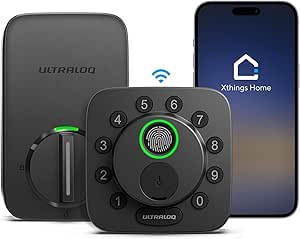 | Best Standalone Wi-Fi Performance | Connectivity: 2.4 GHz Wi-Fi; Matter over Thread | Access Methods: Fingerprint, passcode, app, web, voice, mechanical key | Battery Life: Up to 18 months | VIEW ON AMAZON | See Our Full Breakdown |
| Philips Matter Over Thread Smart Lock with Touchscreen and Fingerprint Deadbolt |  | Best for Matter-First Ecosystems | Connectivity: Matter over Thread | Unlock Methods: App, fingerprint, passcode, voice | Fingerprint Speed: 0.3 seconds | VIEW ON AMAZON | See Our Full Breakdown |
| eufy Security Smart Lock C34 Keyless Entry Deadbolt |  | Best Multi-Ecosystem Compatibility | Connectivity: Wi-Fi (2.4 GHz) | Compatible Ecosystems: Apple Home, Google Home, Alexa, SmartThings, Matter | Power Source: 8 AA batteries | VIEW ON AMAZON | See Our Full Breakdown |
| ULTRALOQ Latch 5 Pro WiFi Smart Lever Lock |  | Best for Lever-Door Compatibility | Lock Type: Smart lever lock | Connectivity: 2.4 GHz Wi-Fi, Matter over Thread | Entry Methods: Fingerprint, PIN, app, Aliro, voice, keyfob, key | VIEW ON AMAZON | See Our Full Breakdown |
| Aqara Smart Lock U100 Fingerprint Deadbolt with Apple Home Key, Gray |  | Best for Biometric Convenience | Unlock Methods: Apple Home Key, fingerprint, passwords, mechanical key | Fingerprint Capacity: Up to 50 fingerprints | Battery Life: Up to 8 months | VIEW ON AMAZON | See Our Full Breakdown |
| Schlage Encode Plus Smart WiFi Deadbolt Lock, Matte Black |  | Best for Direct WiFi Connectivity | Connectivity: Built-in WiFi | Access Codes: Up to 100 | Voice Assistants: Amazon Alexa, Google Assistant | VIEW ON AMAZON | See Our Full Breakdown |
| SMONET Smart Front Door Lock Set with Apple Home Key and Built-In Wi-Fi |  | Best Complete Handle Set | Access Methods: Apple Home Key, fingerprint, passcode, IC card, app, key | Connectivity: Built-in Wi-Fi | Weather Resistance: IP64 | VIEW ON AMAZON | See Our Full Breakdown |
| SMONET AH1 Smart Lock with Apple Home Key, Fingerprint, and Wi-Fi |  | Best for Cross-Platform Compatibility | Unlock Methods: Apple Home Key, fingerprint, passcode, IC fob, app, key | Connectivity: Built-in Wi-Fi | Weather Resistance: IP64 | VIEW ON AMAZON | See Our Full Breakdown |
| Aqara U400 UWB Smart Lock with Apple Home Key and Fingerprint Deadbolt, Black |  | Best for Hands-Free UWB Entry | Connectivity: Matter over Thread | Unlock Methods: UWB, Apple Home Key, fingerprint, passcode, app, NFC, key | Battery: Rechargeable lithium, up to 6 months | VIEW ON AMAZON | See Our Full Breakdown |
| Aqara U300 Smart Lock with Handle, Apple Home Key, Black |  | Best for Lever Lock Compatibility | Brand: Aqara | Model: DL-D02D | Lock Type: Biometric, keypad lever | VIEW ON AMAZON | See Our Full Breakdown |
| smart lock compatible with apple home | Connectivity | Warranty |
|---|---|---|
| Aqara Smart Lock U50 Keyless E | Apple Home; Matter, Google Home, Alexa, IFTTT (with hub) | — |
| ULTRALOQ Bolt SE Wi-Fi Smart L | 2.4 GHz Wi-Fi; Matter over Thread | Lifetime mechanical; 18-month electronic |
| Philips Matter Over Thread Sma | Matter over Thread | 2 years |
| eufy Security Smart Lock C34 K | Wi-Fi (2.4 GHz) | 18-month electronic; 36-month mechanical |
| ULTRALOQ Latch 5 Pro WiFi Smar | 2.4 GHz Wi-Fi, Matter over Thread | Lifetime mechanical; 18-month electronic |
| Aqara Smart Lock U100 Fingerpr | — | — |
| Schlage Encode Plus Smart WiFi | Built-in WiFi | Limited lifetime mechanical; 3-year electronics |
| SMONET Smart Front Door Lock S | Built-in Wi-Fi | 1 year |
| SMONET AH1 Smart Lock with App | Built-in Wi-Fi | — |
| Aqara U400 UWB Smart Lock with | Matter over Thread | — |
| Aqara U300 Smart Lock with Han | Matter over Thread, Bluetooth | — |
More Details on Our Top Picks
Aqara Smart Lock U50 Keyless Entry Deadbolt with Apple Home Key, Black
This model stands out for its native Apple Home Key support, allowing users to unlock doors by simply tapping an iPhone or Apple Watch without opening an app. While the ULTRALOQ Bolt SE offers more biometric options like fingerprint scanning, the U50 prioritizes seamless, contactless convenience that aligns perfectly with the Apple ecosystem. The rekeyable cylinder is a practical feature, letting you match the lock to your existing house key, which simplifies the transition if you move. However, the tradeoff is clear: advanced features like Matter integration and remote automation require a separate Aqara hub, adding complexity and cost. For pure Apple users who want a sleek, reliable deadbolt that works instantly with their devices, this is the strongest choice, provided you accept the hub dependency for full smart home functionality.
Pros:- Seamless Apple Home Key integration for tap-to-open convenience
- Rekeyable cylinder allows matching to existing house keys
- Emergency USB-C charging prevents lockouts from dead batteries
- High durability with BHMA Level 3 security rating
Cons:- Requires a separate Aqara hub for Matter and remote features
- No built-in fingerprint scanner compared to competitors
- NFC card access requires a separate purchase
Best for: Dedicated Apple users who want seamless NFC unlocking via iPhone or Apple Watch and already own or plan to buy an Aqara hub.
Not ideal for: Buyers who want a standalone Wi-Fi lock without extra hubs or those who prefer fingerprint entry over NFC tapping.
- Connectivity:Apple Home; Matter, Google Home, Alexa, IFTTT (with hub)
- Unlock Methods:Apple Home Key, keypad, passwords, physical key
- Power Source:4 AA batteries (up to 6 months)
- Emergency Power:USB-C to USB-A charging
- Weather Resistance:IPX5
- Material:Zinc alloy
Our verdict“Choose the Aqara U50 if you live entirely within the Apple ecosystem and value the speed of NFC unlocking over biometric options.”
ULTRALOQ Bolt SE Wi-Fi Smart Lock with Matter over Thread
The ULTRALOQ Bolt SE excels because it includes built-in Wi-Fi, eliminating the need for a bridge or hub for remote access and notifications. This makes it more user-friendly for beginners than the Aqara Smart Lock U50, which requires additional hardware for similar remote capabilities. The inclusion of a fingerprint sensor alongside keypad and app control offers robust entry options for families with varying needs. While it supports Matter over Thread for broader smart home compatibility, you still need a Thread border router for that specific feature. The main drawback is the 2.4 GHz Wi-Fi limitation, which can be frustrating for users on modern 5 GHz-only networks. Despite this, its ease of setup and comprehensive access methods make it a top contender for those wanting immediate smart functionality without extra devices.
Pros:- Built-in Wi-Fi enables remote control without a hub
- Fingerprint scanner provides fast, biometric entry
- Supports Matter over Thread for future-proofing
- IP65 weather resistance suits outdoor installation
Cons:- Wi-Fi connection is limited to 2.4 GHz bands
- Matter over Thread features require a separate Thread border router
- Door sensor status is not integrated into the lock itself
Best for: Homeowners who want remote access and smart home control without buying a separate hub or bridge.
Not ideal for: Users with 5 GHz-only home networks or those who dislike managing multiple connectivity protocols (Wi-Fi and Thread).
- Connectivity:2.4 GHz Wi-Fi; Matter over Thread
- Access Methods:Fingerprint, passcode, app, web, voice, mechanical key
- Battery Life:Up to 18 months
- Weather Resistance:IP65
- Fingerprint Capacity:Up to 50 users
- Installation:DIY, approx. 10 minutes
- Warranty:Lifetime mechanical; 18-month electronic
Our verdict“This is the best pick for users who prioritize immediate remote access and biometric convenience without the hassle of extra hubs.”
Philips Matter Over Thread Smart Lock with Touchscreen and Fingerprint Deadbolt
This Philips model is designed for users committed to the Matter standard, offering clean integration with Apple Home, Google Home, and Alexa via Thread. Unlike the ULTRALOQ Bolt SE, which uses Wi-Fi for standalone operation, this lock relies entirely on a Matter controller for remote features, which may limit flexibility if your hub fails. It shines with its 0.3-second fingerprint unlock, providing near-instant access that feels premium. The adjustable auto-lock timer is a subtle but valuable safety feature, preventing accidental open doors. However, the strict requirement for AA alkaline batteries and specific door dimensions means compatibility checks are essential before purchase. It is a streamlined choice for smart home enthusiasts who want a unified protocol experience but requires a compatible Matter controller to function fully.
Pros:- Native Matter over Thread for seamless multi-platform integration
- Rapid 0.3-second fingerprint recognition
- Customizable auto-lock timer for enhanced security
- Fits a wide range of standard door thicknesses
Cons:- Requires a Matter controller for remote access and setup
- No built-in Wi-Fi for hub-free operation
- Strict door dimension compatibility requirements
Best for: Smart home enthusiasts who already use a Matter-compatible hub and want a fast, biometric-centric lock.
Not ideal for: Users without a Matter controller or those who need Wi-Fi connectivity for direct app control.
- Connectivity:Matter over Thread
- Unlock Methods:App, fingerprint, passcode, voice
- Fingerprint Speed:0.3 seconds
- Power Source:AA LR6 alkaline batteries
- Door Thickness:1-3/8 to 2 inches
- Auto-Lock Timer:0–180 seconds adjustable
- Warranty:2 years
Our verdict“Ideal for those deeply invested in the Matter ecosystem who want speed and simplicity over standalone connectivity.”
eufy Security Smart Lock C34 Keyless Entry Deadbolt
The eufy Smart Lock C34 stands out for its hub-free Wi-Fi connectivity, working directly with Apple Home, Google Home, Alexa, and SmartThings without extra bridges. This versatility contrasts with the Philips Matter Over Thread lock, which demands a specific Matter controller for remote features. The C34 offers a balanced set of entry methods—app, keypad, physical key, and voice—making it adaptable for various household needs. Installation is straightforward, requiring no drilling, which appeals to renters or DIY novices. The primary tradeoff is the power consumption, as it requires eight AA batteries and offers shorter battery life (up to 8 months) compared to the ULTRALOQ Bolt SE’s 18 months. Despite the higher maintenance, its broad compatibility and ease of setup make it a strong all-rounder for mixed smart home environments.
Pros:- Works with multiple major ecosystems without a hub
- Easy 15-minute installation with no drilling
- Comprehensive entry options including voice and app
- Remote control and notifications via built-in Wi-Fi
Cons:- Requires 8 AA batteries for operation
- Battery life is shorter than competing models (up to 8 months)
- Limited product history may concern long-term support seekers
Best for: Users with mixed smart home devices who want broad compatibility and simple Wi-Fi setup without hubs.
Not ideal for: Those who want to minimize battery changes or prefer longer battery life than 8 months.
- Connectivity:Wi-Fi (2.4 GHz)
- Compatible Ecosystems:Apple Home, Google Home, Alexa, SmartThings, Matter
- Power Source:8 AA batteries
- Battery Life:Up to 8 months
- Installation:Approx. 15 minutes, no drilling
- Lock Type:Deadbolt
- Warranty:18-month electronic; 36-month mechanical
Our verdict“A flexible, easy-to-install option for households with diverse smart home platforms that prioritize convenience over battery longevity.”
ULTRALOQ Latch 5 Pro WiFi Smart Lever Lock
Most smart locks are deadbolts, but the ULTRALOQ Latch 5 Pro is a lever lock, making it the only viable option here for doors with handles instead of knobs. It supports Aliro digital keys and Matter over Thread, positioning it as a forward-looking choice for Apple Home and other modern ecosystems. While it offers similar biometric and keypad access to the ULTRALOQ Bolt SE, its form factor suits interior doors or specific exterior setups where levers are required. The tradeoff is the 2.4 GHz Wi-Fi restriction and the need for a Thread border router for Matter features. With a battery life of up to 1.5 years when using lithium batteries in Matter mode, it is efficient, but the specialized design limits its application to doors that already have lever hardware.
Pros:- Designed specifically for lever-style door handles
- Supports Aliro digital keys for next-gen Apple Home integration
- Long battery life with lithium batteries in Matter mode
- Includes emergency mechanical keys and batteries in the box
Cons:- Wi-Fi is limited to 2.4 GHz bands
- Matter over Thread requires a compatible border router
- Less common form factor limits resale or replacement options
Best for: Users with existing lever-style door handles who want smart integration and Aliro digital key support.
Not ideal for: Standard deadbolt installations or users who prefer knob-style exterior doors.
- Lock Type:Smart lever lock
- Connectivity:2.4 GHz Wi-Fi, Matter over Thread
- Entry Methods:Fingerprint, PIN, app, Aliro, voice, keyfob, key
- Battery Life:Up to 1.5 years (lithium, Matter mode)
- Door Thickness:1-3/8 to 1-3/4 inches
- Backset:2-3/8 or 2-3/4 inches
- Warranty:Lifetime mechanical; 18-month electronic
Our verdict“The definitive smart lock for lever-door owners who want modern digital key support and long battery life.”
Aqara Smart Lock U100 Fingerprint Deadbolt with Apple Home Key, Gray
This deadbolt stands out for its local fingerprint storage, keeping biometric data on-device rather than in the cloud. Compared to the Schlage Encode Plus, which relies heavily on code entry, the U100 offers a faster, hands-free entry method via its capacitive sensor. The IP65 rating ensures durability against dust and water jets, making it suitable for exposed entryways. However, users should note that full smart home integration often requires an Aqara Zigbee hub or a compatible Apple Home hub, adding complexity to the setup. While the battery life is impressive at eight months, the USB-C emergency charging port is a necessary failsafe for those who forget to monitor power levels. It is a robust choice for those prioritizing biometric speed over simple code entry.
Pros:- Stores fingerprints locally with AES encryption for enhanced privacy
- IP65-rated zinc alloy body withstands harsh outdoor conditions
- Supports multiple entry methods including Apple Home Key and passwords
Cons:- Many advanced features require an additional Zigbee or Thread hub
- NFC card access requires purchasing separate hardware
Best for: Tech-savvy homeowners who prioritize fingerprint access and live in areas with variable weather conditions.
Not ideal for: Users without a compatible hub who want a plug-and-play experience without extra hardware dependencies.
- Unlock Methods:Apple Home Key, fingerprint, passwords, mechanical key
- Fingerprint Capacity:Up to 50 fingerprints
- Battery Life:Up to 8 months
- Ingress Protection:IP65
- Material:Zinc alloy
- Security Standard:BHMA Level 3
- Emergency Power:USB-C port
Our verdict“Choose this if you want secure, local fingerprint recognition and don’t mind managing a hub for full functionality.”
Schlage Encode Plus Smart WiFi Deadbolt Lock, Matte Black
Unlike the Aqara U100, which may require a hub for certain automations, the Encode Plus connects directly to WiFi, simplifying remote monitoring without extra gateways. Its customizable alarm provides an added layer of security, triggering when forced entry is detected. The touchscreen interface is intuitive, though it lacks the fingerprint sensor found on competitors like the SMONET AH1. This model is ideal for those who value a trusted brand name and straightforward installation. The limited three-year electronics warranty is a consideration, but the lifetime mechanical warranty offers peace of mind regarding the physical lock mechanism. It remains a reliable choice for users who prefer a simple, code-and-key entry system.
Pros:- Built-in WiFi allows remote control without a separate hub
- Customizable alarm system detects forced entry attempts
- Stores up to 100 access codes for large households or rentals
Cons:- Dependent on home WiFi stability for connected features
- No fingerprint sensor, relying solely on codes and keys
Best for: Homeowners who want reliable remote access and monitoring without installing a separate smart home hub.
Not ideal for: Users who prefer fingerprint entry or need a lock that functions independently of a stable WiFi network.
- Connectivity:Built-in WiFi
- Access Codes:Up to 100
- Voice Assistants:Amazon Alexa, Google Assistant
- Door Thickness:1-3/8 in to 1-3/4 in
- Backset:2-3/8 in or 2-3/4 in
- Installation:Screwdriver required
- Warranty:Limited lifetime mechanical; 3-year electronics
Our verdict“Ideal for users who want a trusted, WiFi-connected deadbolt with robust security alerts and simple code management.”
SMONET Smart Front Door Lock Set with Apple Home Key and Built-In Wi-Fi
This model offers a complete handle set, replacing both the deadbolt and the interior handle for a unified look, unlike the standalone deadbolts like the Aqara U100. The built-in Wi-Fi eliminates the need for a hub, allowing for immediate remote access via the app. It supports an extensive range of entry methods, including IC cards and fingerprints, catering to households with varied user preferences. However, the IP64 rating is slightly lower than the IP65 found on the Aqara U400, meaning it offers less protection against water jets. Installation is designed for standard U.S. doors, so compatibility with non-standard frames may require additional adjustments. It is a strong contender for those wanting a full aesthetic upgrade.
Pros:- Includes both deadbolt and handle set for a unified appearance
- Supports multiple entry methods including IC cards and fingerprints
- Built-in Wi-Fi enables remote control without extra hubs
Cons:- IP64 rating offers less water resistance than IP65 competitors
- Compatibility is limited to standard U.S. door dimensions
Best for: Homeowners looking for a cohesive smart lock and handle replacement that supports diverse entry methods.
Not ideal for: Users with non-standard door dimensions or those seeking the highest level of weatherproofing available.
- Access Methods:Apple Home Key, fingerprint, passcode, IC card, app, key
- Connectivity:Built-in Wi-Fi
- Weather Resistance:IP64
- Door Handing:Left- or right-hand compatible
- Emergency Power:Type-C port
- Warranty:1 year
- Included Components:Lock set, fobs, keys, mounting plate
Our verdict“A comprehensive solution for those replacing their entire front door hardware with smart capabilities.”
SMONET AH1 Smart Lock with Apple Home Key, Fingerprint, and Wi-Fi
The AH1 distinguishes itself with explicit support for Android users alongside Apple Home Key, making it versatile for mixed-device households. Unlike the Schlage Encode Plus, which is heavily iOS-centric in its marketing, this lock ensures broader accessibility. The aluminum body provides a lightweight yet durable option, though it lacks the premium zinc alloy feel of the Aqara U100. Its IP64 rating is adequate for covered porches but may struggle in heavy rain. The USB-C emergency charging is a convenient failsafe, ensuring you are never locked out due to battery failure. It is a practical choice for families needing flexible access options without hub dependencies.
Pros:- Explicitly supports both iOS and Android app access
- Built-in Wi-Fi allows for remote monitoring without a hub
- USB-C emergency charging prevents lockouts from dead batteries
Cons:- Aluminum construction is less premium than zinc alloy alternatives
- IP64 rating is lower than top-tier competitors
Best for: Families with a mix of iPhone and Android devices who need flexible, hub-free smart lock access.
Not ideal for: Users in harsh climates who need superior weather resistance or premium material finishes.
- Unlock Methods:Apple Home Key, fingerprint, passcode, IC fob, app, key
- Connectivity:Built-in Wi-Fi
- Weather Resistance:IP64
- Body Material:Aluminum
- Door Thickness:1-3/8″ to 2-1/8″
- Emergency Charging:USB Type-C
- Door Handing:Left- and right-hand
Our verdict“A flexible, hub-free option for mixed-platform households seeking reliable fingerprint and app access.”
Aqara U400 UWB Smart Lock with Apple Home Key and Fingerprint Deadbolt, Black
This lock introduces Ultra-Wideband (UWB) technology, allowing for true hands-free unlocking as you approach the door, a feature absent in the Schlage Encode Plus. It uses Matter over Thread, ensuring future-proof compatibility with various smart home ecosystems. The rechargeable battery is a significant convenience over the disposable AA batteries in the Aqara U100, though it requires a charging cycle every six months. The BHMA-certified build and IP65 rating place it in the premium durability tier. However, the reliance on a Thread-enabled Apple Home hub for full functionality means it is not a standalone solution for every user. It is the top pick for those deeply integrated into the Apple ecosystem with compatible hubs.
Pros:- Hands-free UWB unlocking for seamless entry
- Matter over Thread ensures broad smart home compatibility
- Rechargeable battery eliminates frequent battery replacements
Cons:- Requires a Thread-enabled hub for full smart home features
- NFC card access requires separate purchase
Best for: Apple ecosystem power users who want hands-free UWB entry and have a Thread-compatible hub.
Not ideal for: Users without a Thread-enabled hub or those who prefer simple, standalone lock installations.
- Connectivity:Matter over Thread
- Unlock Methods:UWB, Apple Home Key, fingerprint, passcode, app, NFC, key
- Battery:Rechargeable lithium, up to 6 months
- Ingress Protection:IP65
- Certification:BHMA-certified
- Design:Rekeyable
- Included Components:Lock set, strike plate kit, mounting plate, key
Our verdict“The definitive choice for Apple users with Thread hubs seeking the ultimate hands-free convenience.”
Aqara U300 Smart Lock with Handle, Apple Home Key, Black
This model stands out primarily because it is a lever-style lock, a form factor often overlooked in the smart lock market dominated by deadbolts. While the ULTRALOQ Latch 5 Pro also offers a lever design, the Aqara U300 integrates Matter over Thread, providing broader future-proofing for Apple Home users who want seamless cross-platform compatibility. The inclusion of local fingerprint storage with AES encryption addresses privacy concerns that plague cloud-dependent competitors. However, this convenience comes at a cost: the lock requires specific Thread-enabled hubs for full Apple Home Key functionality, adding complexity compared to Wi-Fi native options like the SCHLAGE Encode Plus. Furthermore, the strict requirement for alkaline batteries means users cannot rely on rechargeable NiMH cells, limiting flexibility for those who prefer eco-friendly power solutions.
Pros:- Lever design fits doors where deadbolts are incompatible
- Matter over Thread support enables multi-ecosystem compatibility
- Local fingerprint storage enhances privacy and speed
Cons:- Requires a separate Thread border router for full features
- Strictly incompatible with rechargeable NiMH batteries
- Lever mechanisms can feel less secure than high-grade deadbolts
Best for: Homeowners with existing lever-style entry points who prioritize privacy and Matter compatibility over Wi-Fi simplicity.
Not ideal for: Users without an existing Thread border router or those who prefer rechargeable battery systems, as it strictly demands alkaline cells.
- Brand:Aqara
- Model:DL-D02D
- Lock Type:Biometric, keypad lever
- Connectivity:Matter over Thread, Bluetooth
- Fingerprint Capacity:Up to 25 fingerprints
- Power Source:4 AA alkaline batteries
- Battery Life:Up to 10 months
- Security:Local storage with AES encryption
Our verdict“Choose the Aqara U300 if your door requires a lever handle and you have a Thread network ready for Apple Home integration.”

How We Picked
I selected these eleven smart locks by evaluating their native integration depth with Apple Home, specifically focusing on the reliability of Apple Home Key functionality via NFC and UWB. Priority was given to devices supporting the Matter standard, as this ensures long-term compatibility and interoperability across different smart home hubs. I also assessed battery efficiency, distinguishing between locks that drain quickly due to constant Wi-Fi polling and those utilizing low-power Thread protocols.
Beyond technical specs, I considered physical design and ease of installation, noting that some models require significant door modifications while others are direct replacements. User feedback regarding app stability and firmware update frequency was analyzed to identify products with consistent performance. The ranking reflects a balance between cutting-edge technology and practical reliability, ensuring recommendations suit both tech enthusiasts and average homeowners seeking straightforward security upgrades.
Factors to Consider When Choosing Smart Lock Compatible With Apple Home
Selecting the right smart lock involves more than just checking for an Apple logo on the box. The following factors will help you navigate the technical specifications and physical constraints to make a confident decision.
Connectivity Protocols: Wi-Fi vs. Thread vs. Bluetooth
Understanding the connection method is the first step in choosing a smart lock. Wi-Fi native locks connect directly to your router, offering simple setup without additional hardware, but they typically consume more power and may experience latency during network congestion. Thread-based locks rely on a border router, such as an Apple TV or HomePod, to create a low-latency mesh network that is more responsive and energy-efficient. Bluetooth-only locks are the most battery-friendly but require you to be within range for remote access unless paired with a separate bridge. If you already own HomePods or Apple TVs, Thread locks like the Aqara U50 provide the best performance and battery life balance. However, if your home lacks these hubs, a Wi-Fi model offers a more plug-and-play experience despite the potential for slower response times.
The Real Value of Apple Home Key and UWB
Apple Home Key allows you to unlock doors using your iPhone or Apple Watch, even when the device is out of battery, thanks to NFC technology. This feature is now standard across most compatible locks, providing a reliable backup to physical keys. However, the introduction of Ultra-Wideband (UWB) technology in premium models like the Aqara U400 adds a layer of convenience by allowing hands-free entry as you approach the door. While NFC requires you to tap your phone against the reader, UWB detects your presence automatically. This distinction matters if you frequently carry groceries or have limited mobility. For most users, NFC is sufficient and cost-effective, but UWB represents the current peak of convenience for Apple-centric households. Consider whether the premium price for UWB is worth the marginal gain in convenience for your daily routine.
Battery Life and Charging Infrastructure
Battery management is a common pain point for smart lock owners. Many users underestimate the drain caused by frequent unlocking events and background connectivity checks. Rechargeable lithium-ion batteries are becoming more common in higher-end models, offering the convenience of USB-C charging rather than frequent AA battery replacements. However, these locks often have smaller capacities, requiring charging every three to four months. In contrast, locks using standard AA batteries may last six to twelve months but require you to keep a stock of replacements on hand. If you live in an area with extreme temperatures, note that lithium batteries can perform poorly in cold weather, whereas alkaline AAs may fail faster in heat. Choose based on your maintenance tolerance: rechargeable for convenience, replaceable for longevity and cold-weather reliability.
Physical Compatibility and Door Hardware
Not all smart locks fit all doors. Before purchasing, measure your door’s thickness and the backset (the distance from the edge of the door to the center of the cross bore). Most standard American doors accommodate deadbolt replacements, but older homes may have non-standard configurations that require additional adapters. Lever-style locks like the Ultraloq Latch 5 Pro are excellent for ADA compliance and ease of use but require a pre-drilled hole pattern that matches the manufacturer’s specifications. If your door has a single bore hole, you may be limited to deadbolt-only options. Additionally, consider the aesthetic of the exterior unit; some models offer a sleek, minimalist look that blends with modern architecture, while others have visible keypad buttons that may clash with traditional door designs. Always verify the physical dimensions against your existing hardware to avoid installation headaches.
Security Features and Physical Durability
Smart locks introduce digital attack vectors that traditional locks do not, such as Bluetooth hijacking or firmware vulnerabilities. Look for locks that support end-to-end encryption and regular security updates from reputable manufacturers. Physical durability is equally important; check for ANSI Grade 1 certification, which indicates the highest level of resistance to forced entry and pick attacks. Some models include features like auto-locking and tamper alerts, which provide peace of mind but may require specific configuration to avoid accidental lockouts. The Aqara and Schlage models generally lead in security certifications, whereas budget-friendly options may lack rigorous third-party testing. If you live in a high-risk area, prioritize locks with reinforced strike plates and anti-peep codes that allow you to enter random numbers before and after your actual code to prevent shoulder surfing.
Frequently Asked Questions
Do I need an Apple TV or HomePod to use Apple Home Key?
No, you do not need an Apple TV or HomePod to use the basic Apple Home Key feature via NFC. You can unlock the door by holding your iPhone or Apple Watch near the lock’s reader, even if your phone is off or out of battery. However, if you want to use remote access, receive notifications, or control the lock via the Apple Home app when you are away from home, you will need a home hub (Apple TV, HomePod, or iPad set up as a hub). Additionally, if you choose a Thread-based lock, a border router (which is built into newer HomePods and Apple TVs) is required for the lock to join your network. Always check if your chosen model is Wi-Fi or Thread to determine if additional hardware is necessary for full functionality.
What happens if the smart lock battery dies?
Most smart locks compatible with Apple Home include emergency power options to prevent lockouts. Many models feature USB-C emergency ports on the exterior, allowing you to jump-start the lock using a portable power bank or a USB cable connected to a phone charger. Others may have 9-volt battery contacts that provide enough power to perform a few unlock cycles. Furthermore, since Apple Home Key works via NFC, it often remains functional even when the lock’s main battery is critically low or dead, as the NFC chip can draw power from the phone. Physical keys are also typically included as a final backup. It is wise to keep a physical key in a secure, accessible location, such as a trusted neighbor’s house or a magnetic lockbox, just in case the digital and emergency methods fail.
Can I use these locks with other smart home ecosystems like Alexa?
Yes, most modern smart locks are multi-platform compatible. Because many of the top picks in this roundup support the Matter standard, they can integrate with Apple Home, Amazon Alexa, Google Home, and SmartThings simultaneously. This interoperability allows you to use voice commands across different devices or share access with family members who may not use Apple devices. However, some features may be platform-specific; for example, Apple Home Key is exclusive to Apple devices, while other biometric features might have limited support on non-Apple platforms. Check the specific product specifications to ensure that the features you value most, such as fingerprint scanning or geofencing, are fully supported in the ecosystem you plan to use primarily. Multi-ecosystem support adds flexibility but can sometimes complicate initial setup.
Are fingerprint scanners on smart locks reliable in wet conditions?
Fingerprint reliability can vary significantly based on the sensor technology and environmental conditions. Most consumer smart locks use capacitive sensors, which struggle with wet, dirty, or deeply wrinkled fingers. In rainy or snowy climates, you may find that the scanner fails frequently, forcing you to use a code or Apple Home Key instead. Higher-end models sometimes use optical sensors or incorporate algorithms that improve recognition rates, but no consumer-grade lock is perfect in adverse weather. If you live in a region with harsh winters, consider a lock that prioritizes NFC or keypad entry as primary methods, treating fingerprint scanning as a secondary convenience. Alternatively, keeping your fingers dry or using a code-based entry method might be more practical during wet seasons, making models without fingerprint scanners a viable, simpler option.
Is it difficult to install a smart lock if I am not handy?
Installation difficulty depends heavily on the type of lock and your existing door hardware. Deadbolt replacements are generally straightforward for beginners, often requiring only a screwdriver and taking 15-20 minutes. Most kits include clear video tutorials and standard templates. However, lever-style locks or models requiring a separate keypad and handle unit can be more complex, involving precise alignment of internal components. If your door has non-standard holes or if you are replacing an old, rusted lock, the process may require drilling new holes or filing down metal, which demands more skill. For those uncomfortable with DIY projects, hiring a locksmith is a reasonable investment. They can ensure the lock is aligned correctly, which is critical for the motor’s longevity and security. Always check the product’s installation video before purchasing to gauge your comfort level.
Conclusion
Selecting the right smart lock compatible with Apple Home depends on your specific ecosystem setup and convenience preferences. The Aqara Smart Lock U50 is the Best Overall choice for most users, offering a perfect blend of Matter support, Apple Home Key, and reliable performance. For those seeking Best Value, the SMONET Smart Front Door Lock Set provides essential features at a lower cost, though it may lack the premium build quality of top-tier brands. If you prioritize Best Premium features, the Aqara U400 UWB Smart Lock delivers cutting-edge Ultra-Wideband technology for hands-free entry, justifying its higher price point for tech enthusiasts. Beginners will appreciate the Philips Matter Over Thread Smart Lock for its intuitive setup and robust security certifications. Finally, for homes with ADA requirements or those preferring Best for Specific Needs, the Ultraloq Latch 5 Pro offers a sleek lever design that is easier to operate than traditional deadbolts. Evaluate your door hardware and hub availability to make the final choice.