Choosing the right monitor for home security cameras is often the overlooked step in setting up a reliable surveillance system. While the Real HD 22-Inch 1080P LED Security Monitor stands out as the best overall pick for its crisp Full HD clarity and universal compatibility, it isn’t the only strong contender. The Eyoyo 17-Inch Security Camera Monitor offers a smart middle ground for users who need more screen real estate than a tablet but less desk footprint than a standard desktop display. Meanwhile, the othoig 10.1-Inch IPS Security Monitor serves those with limited space who prioritize portability over massive viewing angles. The core tradeoff in this category usually centers on resolution versus screen size; a larger screen without sufficient pixel density can result in a blurry image that defeats the purpose of high-definition cameras. Continue reading to see how these options stack up against each other and which one fits your specific surveillance setup.

Get privacy and security gear delivered free with Prime
- Fast, free delivery on millions of items
- Prime Video, Amazon Music and more included
- Member-only deals all year
Key Takeaways
- Resolution matters more than screen size for identifying faces; a 1080p 15-inch panel often provides better clarity than a 720p 22-inch panel.
- BNC compatibility is a critical differentiator that separates dedicated security monitors from general-purpose computer displays.
- USB playback capabilities allow users to review recorded footage directly on the monitor, bypassing the need for a separate computer or DVR interface.
- Aspect ratio conflicts are common; pairing a 4:3 camera feed with a 16:9 monitor results in significant black bars or stretched images.
- Built-in speakers are a rare but useful feature on some models, allowing for audio verification of events without extra cabling.
| othoig 10.1-Inch IPS Security Monitor, 1366×768, HDMI, VGA, BNC, AV and USB |  | Best Compact Monitor for Mixed CCTV Connections | Display size: 10.1 inches | Resolution: 1366×768 | Panel: IPS | VIEW ON AMAZON | See Our Full Breakdown |
| JINSWY 10.1″ Security Monitor with 1024×600 HD Display and Multi-Input Ports |  | Best Lightweight Monitor for Tight Spaces | Screen size: 10.1 inches | Resolution: 1024×600 | Aspect ratio: 16:9 | VIEW ON AMAZON | See Our Full Breakdown |
| Eyoyo 17‑Inch Security Camera Monitor – 1280×1024 5:4 Display |  | Best for a More Detailed Multi-Feed View | Screen size: 17 inches | Resolution: 1280 x 1024 (SXGA) | Aspect ratio: 5:4 | VIEW ON AMAZON | See Our Full Breakdown |
| ZOSHING 17-Inch LED Security Monitor with USB Media Player |  | Best for USB Playback and Wall-Mount Setup | Screen size: 17 inches | Resolution: Listed as 1366 x 768 and 1680 x 1050 | Aspect ratio: 4:3 | VIEW ON AMAZON | See Our Full Breakdown |
| 5MP Wired Security Camera System – 4‑Camera Kit with 10.2″ Monitor and 500 GB HDD |  | Best All-in-One Wired Camera Kit | Included cameras: 4 | Camera resolution: 5MP (2592 x 1944) | Monitor size: 10.2 inches | VIEW ON AMAZON | See Our Full Breakdown |
| VTimes Smart Home Security Camera System – Wireless Outdoor with Monitor |  | Best Wireless All-in-One Kit | Monitor Size: 10.1″ IPS display | Connectivity: Wireless (FHSS) | Storage: 1 GB Internal (Supports up to 128 GB SD Card) | VIEW ON AMAZON | See Our Full Breakdown |
| Real HD 22-Inch 1080P LED Security Monitor for CCTV DVR/NVR |  | Best Dedicated Surveillance Display | Screen Size: 22 inches | Resolution: 1920 x 1080 (Full HD) | Contrast Ratio: 3000:1 | VIEW ON AMAZON | See Our Full Breakdown |
| Jexiop 12.5-Inch Full HD Security Monitor with Built-In Speakers |  | Best Compact Portable Monitor | Screen Size: 12.5 inches | Resolution: 1920 × 1080 (Full HD) | Weight: 0.8 kg | VIEW ON AMAZON | See Our Full Breakdown |
| Eyoyo 22-inch 1080P FHD Security Camera Monitor |  | Most Versatile Connectivity | Screen Size: 21.5 inches | Resolution: 1920 x 1080 (FHD) | Connectivity: HDMI, VGA, AV, BNC, USB | VIEW ON AMAZON | See Our Full Breakdown |
| othoig 22-Inch 1080p IPS Security Monitor |  | Best Value with Media Playback | Screen Size: 22 inches | Display Type: IPS | Resolution: 1920 × 1080 | VIEW ON AMAZON | See Our Full Breakdown |
| Jexiop 15.6-Inch LED Security Monitor with USB Playback |  | Best Mid-Size Standalone Display | Screen Size: 15.6 inches | Native Resolution: 1600 × 900 | Panel Type: TN LED | VIEW ON AMAZON | See Our Full Breakdown |
| Hiseeu Home Security System with 5MP Outdoor Bullet Cameras, Dual-Band WiFi, 4K NVR and 12″ LCD Monitor, 3TB HDD, Night Vision, IP66 | 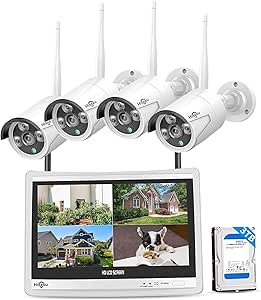 | Best Complete Turnkey System | Camera Resolution: 5MP | Monitor Size: 12 inches | Storage Capacity: 3 TB HDD | VIEW ON AMAZON | See Our Full Breakdown |
| monitor for home security camera | Connectivity | Resolution | Screen size | Mounting |
|---|---|---|---|---|
| othoig 10.1-Inch IPS Security | — | 1366×768 | — | Adjustable stand and two rear mounting holes |
| JINSWY 10.1" Security Monitor | HDMI, VGA, BNC, AV, USB | 1024×600 | 10.1 inches | VESA 75 x 75mm |
| Eyoyo 17‑Inch Security Camera | HDMI, VGA, AV, BNC, USB | 1280 x 1024 (SXGA) | 17 inches | — |
| ZOSHING 17-Inch LED Security M | — | Listed as 1366 x 768 and 1680 x 1050 | 17 inches | VESA 100 x 100mm |
| 5MP Wired Security Camera Syst | HD-Analog, wired BNC and RJ45 | — | — | — |
| VTimes Smart Home Security Cam | Wireless (FHSS) | — | — | — |
| Real HD 22-Inch 1080P LED Secu | 1x HDMI, 1x VGA | 1920 x 1080 (Full HD) | 22 inches | Wall Mount Compatible |
| Jexiop 12.5-Inch Full HD Secur | HDMI, VGA | 1920 × 1080 (Full HD) | 12.5 inches | VESA Compatible |
| Eyoyo 22-inch 1080P FHD Securi | HDMI, VGA, AV, BNC, USB | 1920 x 1080 (FHD) | 21.5 inches | — |
| othoig 22-Inch 1080p IPS Secur | — | 1920 × 1080 | 22 inches | — |
| Jexiop 15.6-Inch LED Security | HDMI, VGA, AV, USB | — | 15.6 inches | VESA 100 × 100 mm |
| Hiseeu Home Security System wi | Dual-band WiFi and Wired | — | — | — |
More Details on Our Top Picks
othoig 10.1-Inch IPS Security Monitor, 1366×768, HDMI, VGA, BNC, AV and USB
The othoig 10.1-inch monitor is a practical fit when a security station needs to stay small but still connect to older and newer equipment. Its HDMI, VGA, BNC, and AV inputs cover a wider range of CCTV hardware than a basic HDMI-only display, while the IPS panel and 1366×768 resolution give it a clearer image than the JINSWY’s 1024×600 screen. That added resolution helps when checking a camera feed up close, but the compact display is still best for viewing one or a few feeds rather than scanning a large camera grid. The adjustable metal stand, remote, and rear mounting holes make placement flexible. Compared with the 17-inch Eyoyo, it takes up less room but offers much less screen area for spotting detail across multiple views.
Pros:- HDMI, VGA, BNC, and AV inputs support a broad range of CCTV equipment.
- 1366×768 resolution is higher than the JINSWY’s 1024×600.
- IPS panel supports wider viewing angles than a basic narrow-view display.
- Adjustable metal stand, mounting holes, and remote offer flexible setup.
Cons:- The 10.1-inch screen is cramped for multi-camera layouts.
- USB functions are limited to compatible devices.
- Built-in speakers are not a substitute for a dedicated audio setup.
Best for: Homeowners setting up a compact desk or shelf monitor for a DVR or NVR with a mix of analog and HDMI outputs.
Not ideal for: People who need to watch several camera feeds at once or inspect distant details; a 10.1-inch screen is restrictive for those tasks.
- Display size:10.1 inches
- Resolution:1366×768
- Panel:IPS
- Refresh rate:60Hz
- Inputs:HDMI, VGA, BNC, AV
- Audio:Built-in speakers
- Mounting:Adjustable stand and two rear mounting holes
- Weight:2.99 pounds
Our verdict“Choose the othoig for a small monitoring station that needs broad legacy-device compatibility, but pick a larger display for sustained multi-camera viewing.”
JINSWY 10.1″ Security Monitor with 1024×600 HD Display and Multi-Input Ports
The JINSWY 10.1-inch monitor prioritizes a light, space-conscious setup: at 2.02 pounds, it is easier to reposition than the othoig, and its VESA 75 x 75mm compatibility offers a straightforward mounting route for a small monitoring nook. Its HDMI, VGA, BNC, and AV connections suit varied CCTV hardware, and the remote plus adjustable stand reduce setup fuss. The main compromise is 1024×600 resolution, which gives less image detail than the othoig’s 1366×768 panel. That difference matters when checking small activity in a feed, though it is less of a concern for a simple status view. Unlike the 17-inch Eyoyo, this model is easy to fit on a crowded desk but is not a comfortable choice for watching multiple camera windows for long periods.
Pros:- Light 2.02-pound build is convenient for repositioning.
- HDMI, VGA, BNC, and AV support mixed-generation camera systems.
- VESA 75 x 75mm compatibility supports compact wall or arm installations.
- Remote control and adjustable stand provide flexible placement.
Cons:- 1024×600 resolution is lower than the othoig’s 1366×768.
- The 10.1-inch panel limits simultaneous camera views.
- VESA mounting hardware is not included.
Best for: Renters or homeowners who need a lightweight, mountable monitor for a compact CCTV station and do not need fine image detail.
Not ideal for: Buyers who regularly inspect faces, packages, or distant activity on screen; the lower resolution and small display provide less detail.
- Screen size:10.1 inches
- Resolution:1024×600
- Aspect ratio:16:9
- Brightness:300 cd/m²
- Contrast ratio:500:1
- Connectivity:HDMI, VGA, BNC, AV, USB
- Mounting:VESA 75 x 75mm
- Weight:2.02 pounds
Our verdict“Pick the JINSWY when low weight and a small mounting footprint matter more than screen detail or multi-camera visibility.”
Eyoyo 17‑Inch Security Camera Monitor – 1280×1024 5:4 Display
The Eyoyo 17-inch monitor provides a useful middle ground between the compact 10.1-inch screens and larger desktop displays elsewhere in the roundup. Its 1280×1024 SXGA resolution and 5:4 shape give surveillance feeds more vertical room than the widescreen othoig, which can help when viewing camera layouts or older video sources. BNC, AV, VGA, and HDMI inputs also make it adaptable to mixed equipment, while the 75Hz refresh rate supports smoother motion than the 60Hz othoig and ZOSHING. The matte screen and built-in speakers keep the setup simple, and mirror-flip can help with particular camera arrangements. It remains a 17-inch display, though, so it cannot match the larger viewing area of the 22-inch options; the VESA mount is also not included.
Pros:- SXGA 1280×1024 resolution offers more vertical pixels than the compact 10.1-inch options.
- HDMI, VGA, AV, and BNC accommodate a range of CCTV equipment.
- 75Hz refresh rate supports smoother motion than the 60Hz othoig and ZOSHING.
- Mirror-flip function and built-in speakers add useful setup flexibility.
Cons:- A 17-inch screen can feel limited for a large multi-camera grid.
- VESA mount hardware is not included.
- The 5:4 aspect ratio may not suit widescreen video sources as neatly as 16:9 displays.
Best for: Home monitoring users who want a mid-size screen for a few camera feeds and need analog and digital inputs in one display.
Not ideal for: Households monitoring many cameras from a distance or wanting a ready-to-install wall mount; the screen is modest in size and the mount must be supplied separately.
- Screen size:17 inches
- Resolution:1280 x 1024 (SXGA)
- Aspect ratio:5:4
- Refresh rate:75Hz
- Brightness:250 cd/m²
- Connectivity:HDMI, VGA, AV, BNC, USB
- Viewing angle:170°
- Power consumption:15W
Our verdict“Choose the Eyoyo if you want more viewing space and vertical detail than a mini monitor without moving to a larger 22-inch display.”
ZOSHING 17-Inch LED Security Monitor with USB Media Player
The ZOSHING 17-inch monitor is a practical choice for a fixed surveillance station where USB playback and included mounting accessories matter. Alongside HDMI, VGA, and AV, it has a USB media player, built-in speakers, and a VESA 100 x 100mm mount setup; the package also lists a wall mount and remote. That makes it more ready for a wall-based installation than the Eyoyo, whose VESA mount is not included, although the Eyoyo offers a stated 1280×1024 SXGA resolution and a higher refresh rate. ZOSHING’s specifications list both 1366×768 and 1680×1050 resolutions, so buyers should verify the actual native resolution before relying on it for fine camera detail. Its 200 cd/m² brightness is also lower than the JINSWY’s listed 300 cd/m².
Pros:- HDMI, VGA, and AV inputs cover common surveillance connections.
- USB media player and built-in speakers add playback convenience.
- VESA 100 x 100mm mounting support suits a fixed installation.
- Package listing includes a remote, power accessories, HDMI cable, and wall mount.
Cons:- Resolution is listed inconsistently as both 1366×768 and 1680×1050.
- Listed brightness of 200 cd/m² is lower than the JINSWY’s 300 cd/m².
- At 17 inches, it offers less screen area than the roundup’s 22-inch monitors.
Best for: Homeowners who want a wall-mounted 17-inch monitor with USB media playback and included setup accessories for a simple CCTV station.
Not ideal for: Buyers who need unambiguous resolution specifications or a display for detailed image inspection; the listed resolution figures conflict.
- Screen size:17 inches
- Resolution:Listed as 1366 x 768 and 1680 x 1050
- Aspect ratio:4:3
- Brightness:200 cd/m²
- Refresh rate:60Hz
- Inputs:HDMI, VGA, AV, USB
- Mounting:VESA 100 x 100mm
- Audio:Built-in speakers; 3.5 mm audio input/output
Our verdict“Choose the ZOSHING for a wall-mounted setup with USB playback, but confirm its actual resolution before making image detail a priority.”
5MP Wired Security Camera System – 4‑Camera Kit with 10.2″ Monitor and 500 GB HDD
This is not just a monitor: the 4-camera wired kit pairs a 10.2-inch screen with four 5MP cameras, an 8-channel system, and a 500GB hard drive. That integrated approach suits buyers starting from scratch, since the cameras and recorder are part of one package; by contrast, the othoig is a standalone display intended to connect to equipment you already own. The cameras’ 122° field of view, IP67 weather protection, and listed 80-foot night vision support indoor and outdoor coverage, while the free app provides live view and playback without a monthly fee. The tradeoff is installation: wired connections restrict camera placement and take more work than a standalone monitor setup. At 15 fps and with a fixed 500GB drive, recording capacity and motion smoothness may be limiting for buyers who want extensive high-resolution retention.
Pros:- Four included 5MP cameras provide a complete starting system.
- 122° lenses cover a broad area from each camera position.
- IP67 protection and listed 80-foot night vision support outdoor monitoring.
- 500GB local storage and app access are listed without monthly fees.
Cons:- Wired installation takes more work and limits camera placement.
- The fixed 500GB hard drive may fill quickly with high-resolution footage.
- 15 fps is less smooth than higher-frame-rate monitoring options.
Best for: Homeowners building a wired system from scratch who want four cameras, local recording, and app access in one package.
Not ideal for: Renters or anyone needing quick, flexible camera placement, as well as buyers who need high frame rates or long retention from a fixed 500GB drive.
- Included cameras:4
- Camera resolution:5MP (2592 x 1944)
- Monitor size:10.2 inches
- Field of view:122°
- Night vision range:Up to 80 ft
- Storage:500GB HDD
- Channels:8
- Frame rate:15 fps
- Connectivity:HD-Analog, wired BNC and RJ45
Our verdict“Choose this kit if you need cameras, local recording, and a monitor together; choose a standalone display like the othoig if you already have a camera system.”
VTimes Smart Home Security Camera System – Wireless Outdoor with Monitor
This system stands out because it eliminates the need for Wi-Fi, using FHSS technology to connect cameras directly to the monitor at up to 1000 feet. Unlike the Real HD 22-Inch 1080P LED Security Monitor, which requires a separate DVR or NVR and complex wiring, the VTimes kit is a self-contained unit with a built-in 10.1″ IPS display. The AI-powered human detection is a significant upgrade over basic motion triggers, reducing false alarms from pets or swaying trees. However, the tradeoff is limited local storage; you must supply your own SD card, and the 1GB internal memory is negligible. While the Eyoyo 22-inch monitor offers more ports for wired systems, the VTimes is superior for renters or those without existing cabling infrastructure who want immediate visibility without internet dependency.
Pros:- Operates independently of Wi-Fi using reliable FHSS technology.
- Integrated AI human detection significantly reduces false alarm notifications.
- Plug-and-play setup with a built-in 10.1″ IPS monitor simplifies installation.
- IPX6 weather resistance allows for flexible outdoor camera placement.
Cons:- SD card is not included, requiring an additional purchase for recording.
- Mobile app viewing requires the main monitor unit to remain powered on.
- Limited internal memory (1GB) relies heavily on external storage for history.
Best for: Homeowners or renters who want a complete, wire-free surveillance setup without relying on home Wi-Fi or installing a separate recorder.
Not ideal for: Users who already own a wired NVR system or need extensive local storage capacity without purchasing additional SD cards.
- Monitor Size:10.1″ IPS display
- Connectivity:Wireless (FHSS)
- Storage:1 GB Internal (Supports up to 128 GB SD Card)
- Power Source:Battery Powered (5000 mAh monitor)
- Night Vision:5 meters range
- Weather Resistance:IPX6 Rated
- Channels:4 Channels
Our verdict“Choose this if you want a complete, independent surveillance ecosystem that works right out of the box without internet or complex wiring.”
Real HD 22-Inch 1080P LED Security Monitor for CCTV DVR/NVR
Designed strictly for 24/7 operation, this monitor features enhanced W-LED technology that prevents burn-in, a critical advantage over standard office monitors. Compared to the Eyoyo 22-inch monitor, which boasts broader connectivity including BNC and USB, the Real HD model is more streamlined with just HDMI and VGA, making it ideal for modern digital recorders. Its 3000:1 contrast ratio delivers deeper blacks than the 1000:1 ratios found in many budget alternatives like the othoig 22-Inch IPS, ensuring clearer detail in shadowed areas. The slim, edgeless bezel allows for seamless multi-monitor configurations, which is useful for monitoring multiple camera feeds simultaneously. However, the lack of BNC inputs means it is incompatible with older analog DVRs without an adapter, limiting its versatility in mixed-technology environments.
Pros:- Engineered for continuous 24/7 operation with anti-burn-in technology.
- High 3000:1 contrast ratio provides superior clarity in dark scenes.
- Edgeless bezel design facilitates clean multi-monitor arrangements.
- Wide 178-degree viewing angles maintain image integrity from side positions.
Cons:- Glossy screen finish can cause significant glare in brightly lit rooms.
- Absence of BNC and USB ports limits compatibility with older or hybrid systems.
- No built-in WiFi or Bluetooth means it cannot function independently of a recorder.
Best for: Users with modern digital NVR/DVR systems who need a reliable, always-on display for professional or extensive home surveillance setups.
Not ideal for: Those using legacy analog CCTV systems with BNC connectors or anyone needing wireless connectivity features.
- Screen Size:22 inches
- Resolution:1920 x 1080 (Full HD)
- Contrast Ratio:3000:1
- Refresh Rate:75 Hz
- Connectivity:1x HDMI, 1x VGA
- Mounting:Wall Mount Compatible
- Design:Edgeless Bezel
Our verdict“This is the right choice for dedicated security control rooms or home setups requiring a durable, high-contrast screen for digital recorders.”
Jexiop 12.5-Inch Full HD Security Monitor with Built-In Speakers
This 12.5-inch unit offers Full HD resolution in a portable form factor, making it ideal for temporary setups or spaces with limited desk real estate. Unlike the larger Real HD 22-Inch monitor, which is fixed to a wall or desk, the Jexiop weighs just 0.8 kg and can be easily moved or mounted using VESA hardware. The built-in stereo speakers allow for two-way audio monitoring without external peripherals, a feature shared with the othoig 22-Inch but in a much smaller package. However, the 1000:1 contrast ratio is standard for this size and may lack the depth needed for detailed night vision analysis compared to higher-end panels. While it supports HDMI and VGA, the lack of BNC inputs restricts it to digital feeds, and the single HDMI port limits daisy-chaining capabilities for complex multi-camera views.
Pros:- Compact 12.5-inch size with Full HD resolution maximizes space efficiency.
- Lightweight design allows for easy portability and flexible mounting.
- Built-in stereo speakers enable audio monitoring without extra cables.
- VESA compatibility offers secure mounting options beyond just desk use.
Cons:- Limited to one HDMI port, restricting multi-source flexibility.
- Standard 1000:1 contrast ratio may struggle with deep shadow details.
- Inconsistent interface descriptions (BNC/RCA mentioned but not in specs) create uncertainty.
Best for: Users needing a lightweight, portable display for temporary surveillance setups or small apartments with limited space.
Not ideal for: Professional installations requiring multiple simultaneous inputs or users who need a large screen for detailed facial recognition.
- Screen Size:12.5 inches
- Resolution:1920 × 1080 (Full HD)
- Weight:0.8 kg
- Connectivity:HDMI, VGA
- Audio:Built-in Stereo Speakers
- Mounting:VESA Compatible
- Viewing Angle:178°
Our verdict“Perfect for renters or temporary sites where a large, permanent monitor is impractical but high-definition clarity is still required.”
Eyoyo 22-inch 1080P FHD Security Camera Monitor
The Eyoyo monitor distinguishes itself with extensive input options, including HDMI, VGA, AV, BNC, and USB, surpassing the limited ports on the Real HD 22-Inch model. This makes it uniquely compatible with both modern digital NVRs and legacy analog DVRs, offering a future-proof solution for mixed-camera systems. The 100% sRGB color accuracy ensures that color-coded alerts or license plates are rendered faithfully, a benefit over panels with narrower color gamuts. While the VTimes System is wireless, the Eyoyo requires a wired connection, which provides a more stable signal for critical surveillance footage. The 16:10 aspect ratio is slightly taller than standard 16:9 screens, potentially offering a bit more vertical field of view for certain camera angles, though it may result in black bars when viewing standard widescreen content.
Pros:- Broad connectivity suite (HDMI, VGA, AV, BNC, USB) ensures wide compatibility.
- Optimized for 24/7 surveillance with durable construction and clear visuals.
- Includes necessary cables and built-in speakers for a complete out-of-box experience.
- Supports both desktop stand and VESA wall mounting for flexible installation.
Cons:- VESA mount hardware is not included, requiring a separate purchase for wall installation.
- 16:10 aspect ratio may not align with standard widescreen camera feeds.
- Limited to a single HDMI port despite the variety of other inputs.
Best for: Users transitioning from analog to digital systems or those who need a single monitor to handle multiple types of video inputs.
Not ideal for: Those who prefer standard 16:9 widescreen formats or users who do not have legacy BNC/AV equipment.
- Screen Size:21.5 inches
- Resolution:1920 x 1080 (FHD)
- Connectivity:HDMI, VGA, AV, BNC, USB
- Color Accuracy:100% sRGB
- Refresh Rate:75Hz
- Power Consumption:30W
- Warranty:1 Year Manufacturer
Our verdict“Select this monitor if you have a mixed surveillance setup or want the flexibility to connect various video sources to a single reliable display.”
othoig 22-Inch 1080p IPS Security Monitor
This monitor offers an IPS panel at a competitive price point, providing wider viewing angles and better color consistency than the TN panels often found in budget security displays. Unlike the Eyoyo 22-inch, which focuses on raw input variety, the othoig adds USB media playback, allowing users to review recorded video files directly from a drive without connecting to a computer or NVR. The inclusion of a remote control enhances convenience for wall-mounted setups where physical buttons are hard to reach. However, the USB port is strictly for playback and does not support computer display input, a limitation compared to full-featured computer monitors. While the Jexiop 12.5-Inch is more portable, the othoig’s larger screen and BNC/AV inputs make it a more practical choice for permanent residential installations requiring detailed overview of camera feeds.
Pros:- IPS display technology delivers consistent colors and wide viewing angles.
- USB port supports direct playback of video files from external drives.
- Includes a remote control for easy operation from a distance.
- Versatile input options (HDMI, VGA, BNC, AV) accommodate various camera systems.
Cons:- USB port cannot be used for computer video input, limiting it to media playback.
- Wall mount hardware is not included in the package.
- Compatibility with certain legacy devices may depend on specific signal formats.
Best for: Budget-conscious homeowners who want IPS color quality and the ability to view recorded files directly from USB drives.
Not ideal for: Users who need to use the monitor as a primary computer display or those requiring multiple simultaneous HDMI inputs.
- Screen Size:22 inches
- Display Type:IPS
- Resolution:1920 × 1080
- Inputs:HDMI, VGA, BNC, AV
- Extra Features:USB Media Playback, Remote Control
- VESA Mount:100 × 100 mm
- Weight:8.43 pounds
Our verdict“This is an excellent value proposition for users who prioritize screen quality and standalone media playback over advanced connectivity features.”
Jexiop 15.6-Inch LED Security Monitor with USB Playback
This monitor occupies a practical middle ground between the compact 10-inch options and the bulky 22-inch units. At 15.6 inches, it offers enough screen real estate to distinguish details without dominating a desk, making it ideal for home offices or small security stations. The USB playback feature stands out, allowing users to review recorded footage directly without connecting a separate computer or DVR, a convenience the basic JINSWY models lack. However, the 1600 × 900 resolution is a compromise; while it supports 1080p input, the native TN panel may struggle with color accuracy compared to IPS alternatives like the othoig 22-Inch. It is a solid choice for those who need a dedicated screen with media flexibility but don’t require professional-grade color fidelity.
Pros:- USB port allows direct playback of video files without a computer
- VESA mounting support enables flexible desktop or wall installation
- Built-in speakers provide audio feedback without extra cables
Cons:- Native 1600 × 900 resolution is lower than full HD competitors
- TN panel technology limits viewing angles compared to IPS models
Best for: Homeowners needing a dedicated, mid-sized display for reviewing DVR footage via USB without a PC.
Not ideal for: Users requiring precise color reproduction or wide-angle viewing from multiple seats, due to the TN panel.
- Screen Size:15.6 inches
- Native Resolution:1600 × 900
- Panel Type:TN LED
- Connectivity:HDMI, VGA, AV, USB
- Mounting:VESA 100 × 100 mm
- Audio:Built-in speakers
Our verdict“Choose this if you want a versatile mid-sized monitor that can play back footage directly via USB.”
Hiseeu Home Security System with 5MP Outdoor Bullet Cameras, Dual-Band WiFi, 4K NVR and 12″ LCD Monitor, 3TB HDD, Night Vision, IP66
Unlike the standalone monitors such as the Real HD 22-Inch, this Hiseeu package is a complete ecosystem. It includes four 5MP bullet cameras, a 4K NVR, and a 12-inch LCD monitor, removing the guesswork of component compatibility. The 3TB hard drive offers substantial local storage, reducing the need for cloud subscriptions, while AI human detection helps filter out false alarms from pets or wind. The tradeoff is installation complexity; running Ethernet cables for wired cameras is more labor-intensive than wireless setups. Additionally, the 12-inch monitor is smaller than dedicated high-resolution displays, so while convenient for a quick check, it lacks the detail clarity of larger standalone screens for forensic review.
Pros:- AI human detection significantly reduces false motion alerts
- 3TB local storage supports up to 45 days of continuous recording
- IP66-rated cameras withstand extreme weather conditions
Cons:- Wired installation requires running Ethernet cables to each camera
- One-way audio limits communication with visitors
Best for: New security system buyers who want a plug-and-play kit with cameras, recorder, and monitor included.
Not ideal for: Those who already have cameras or prefer large, high-resolution standalone monitors for detailed analysis.
- Camera Resolution:5MP
- Monitor Size:12 inches
- Storage Capacity:3 TB HDD
- Connectivity:Dual-band WiFi and Wired
- Weather Resistance:IP66
- Audio Capability:One-way talk
- Night Vision:Yes
Our verdict“This is the best choice for starting a new security setup from scratch with minimal configuration hassle.”

How We Picked
To curate this list, I evaluated each monitor based on its specific utility within a security surveillance context, not just its general display quality. Connectivity versatility was the primary filter; I prioritized units that support multiple input types such as BNC, HDMI, and VGA, ensuring they can integrate with older analog DVRs as well as modern digital NVRs. A monitor that only accepts HDMI is a liability in mixed-security environments, so those limitations weighed heavily against the ranking.
Resolution and panel technology formed the second tier of evaluation. I distinguished between true 1080p panels and upscaled lower-resolution screens, as pixel density directly impacts the ability to read license plates or identify faces. Finally, I considered ergonomics and additional features like VESA mount compatibility and built-in media players. Products were ranked based on their ability to serve as a reliable, always-on display hub, favoring durability and ease of integration over flashy consumer electronics aesthetics.
| monitor for home security camera | Mounting |
|---|---|
| othoig 10.1-Inch IPS Security | Adjustable stand and two rear mounting holes |
| JINSWY 10.1" Security Monitor | VESA 75 x 75mm |
| Eyoyo 17‑Inch Security Camera | — |
| ZOSHING 17-Inch LED Security M | VESA 100 x 100mm |
| 5MP Wired Security Camera Syst | — |
| VTimes Smart Home Security Cam | — |
| Real HD 22-Inch 1080P LED Secu | Wall Mount Compatible |
| Jexiop 12.5-Inch Full HD Secur | VESA Compatible |
| Eyoyo 22-inch 1080P FHD Securi | — |
| othoig 22-Inch 1080p IPS Secur | — |
| Jexiop 15.6-Inch LED Security | VESA 100 × 100 mm |
| Hiseeu Home Security System wi | — |
Factors to Consider When Choosing Monitor For Home Security Cameras
Selecting a display for surveillance requires a different mindset than buying a monitor for gaming or office work. Here are the key factors that should drive your decision.
Resolution vs. Screen Size
Many buyers assume bigger is better, but pixel density is the real metric for security clarity. A 22-inch monitor with a 1366×768 resolution will show significantly less detail than a 15.6-inch 1080p screen. If your primary goal is facial recognition or reading text on packages, prioritize higher resolution over physical size. For general motion detection where you just need to see if someone is in the yard, a larger, lower-resolution screen may suffice. Always match your monitor resolution to your camera output; connecting a 5MP camera to a 720p monitor wastes the camera’s potential.
Connectivity and Input Types
The type of cables your system uses dictates your monitor choice. BNC connectors are standard for analog CCTV systems, while HDMI and VGA are common for digital or hybrid setups. A common mistake is buying a consumer computer monitor that lacks BNC inputs, forcing you to buy additional converters that can introduce signal lag or degradation. Dedicated security monitors often include multiple input types, allowing you to switch between camera feeds and other video sources easily. Verify that the monitor supports the specific signal type your recorder outputs before purchasing.
Aspect Ratio Compatibility
Surveillance cameras often output in 4:3 or 16:9 aspect ratios, depending on the model and settings. If you buy a 16:9 widescreen monitor but use older 4:3 cameras, you will see large black bars on the sides or distorted, stretched images. Conversely, using a 4:3 monitor for modern widescreen cameras results in cropped views. Check your camera’s native output resolution and ensure the monitor’s aspect ratio matches it to maximize the usable viewing area. This mismatch is a frequent source of frustration for users who overlook this spec.
Mounting and Placement Options
Security monitors are rarely used as standalone desktop items; they often sit on shelves, desks, or wall mounts. Look for VESA mount compatibility if you plan to wall-mount the display to keep it out of reach of children or pets. Some units come with built-in stands that offer limited tilt or swivel, which can be annoying if you need a specific viewing angle. Consider the depth of the monitor if it will sit on a narrow shelf, as older CRT-style or thick-bezel monitors can be surprisingly deep. A slim profile is preferable for tight spaces.
Power Consumption and Heat
Unlike a computer monitor that sleeps when not in use, a security display may run 24/7. LED panels generally consume less power and generate less heat than older LCD or CCFL-backlit models. Over time, this difference impacts electricity bills and the ambient temperature of the room where the monitor resides. If the monitor is in a small, enclosed cabinet, heat buildup can damage the unit or nearby electronics. Check the power rating and ensure the unit has adequate ventilation slots if it will be housed in a confined space.
Frequently Asked Questions
Can I use a regular computer monitor for my security cameras?
You can, but only if the signal types match. Most modern computer monitors use HDMI or DisplayPort, while many older or budget security DVRs use BNC or VGA. If your DVR outputs HDMI, a computer monitor works fine. However, if you have a mixed system or an older analog setup, you will need signal converters, which add cost and potential points of failure. Dedicated security monitors usually include BNC inputs, making them a more direct and reliable plug-and-play solution for surveillance-specific tasks.
Is 1080p resolution enough for security cameras?
For most residential setups, 1080p is sufficient to identify faces and general activity. However, if you have 4K or 5MP cameras, a 1080p monitor will downscale the image, meaning you lose some detail potential on the screen itself. You will still get a clear picture, but you won’t see the full sharpness the camera captures. If you rely on digital zooming within the monitor view to see details, higher resolution monitors are preferable, but they come at a higher price point and require more powerful processing hardware.
Do I need a monitor with built-in speakers for security?
This depends on whether your cameras have microphones and if your recorder supports audio over the video signal. If you want to hear sounds like glass breaking or voices, a monitor with built-in speakers saves you from running extra audio cables. Without speakers, you will need to connect separate audio outputs from your DVR to external speakers. For systems without audio recording, this feature is unnecessary and adds cost, so skip it to save money unless you specifically plan to use audio verification.
Why does my security footage look stretched on the monitor?
This is almost always an aspect ratio mismatch. Most modern monitors are 16:9 widescreen, while some security cameras output a 4:3 standard definition signal. When a 4:3 image is forced onto a 16:9 screen, it stretches horizontally to fill the space, making people look wide and distorted. Check your monitor’s settings for an aspect ratio adjustment option, usually labeled ‘Zoom,’ ‘Fit,’ or ‘4:3.’ Setting it to ‘Fit’ or ‘4:3’ will add black bars on the sides but preserve the correct image proportions.
Can I view multiple camera feeds on one monitor?
Yes, but the monitor itself doesn’t create the split-screen; your DVR or NVR does. The monitor simply displays the output from the recorder. If your DVR supports a 4-way, 9-way, or 16-way split view, the monitor will show all feeds simultaneously. However, on smaller monitors like 10-inch or 15-inch screens, splitting the view into four quadrants makes each individual feed very small and hard to read. For multi-camera systems, larger screens like 22-inch or 24-inch models provide a much better user experience.
Conclusion
Choosing the right monitor for home security cameras ultimately depends on your existing infrastructure and viewing needs. For most users, the Real HD 22-Inch 1080P LED Security Monitor offers the best balance of clarity and size, making it the best overall pick for comprehensive surveillance monitoring. If you are working with a tight budget or limited desk space, the othoig 10.1-Inch IPS Security Monitor is the best value option, providing solid connectivity in a compact form factor. For those who need a dedicated workstation feel with larger real estate, the Eyoyo 22-inch 1080P FHD Security Camera Monitor serves as the best premium choice for detailed analysis. Beginners integrating their first system should lean toward models with multiple input types like the Jexiop 15.6-Inch LED Security Monitor to ensure compatibility with various recorders. Regardless of your choice, prioritize matching your monitor’s resolution and aspect ratio to your camera system to avoid the frustration of blurry or distorted footage.
Fall Picks

eufy Security Essential 7-Piece Alarm System
As an affiliate, we earn on qualifying purchases.