A DIY home security alarm kit can cover entry points and alert you to activity without requiring a traditional installer. I’d put the Ring Alarm 8-Piece Kit first for its familiar system and optional professional monitoring, while the Ring Alarm 14-Piece Kit suits homes that need more sensors and eufy’s 5-Piece Kit is a simpler starting point. The main tradeoffs are how much of the home a kit covers, whether it offers a backup connection, and whether you want self-monitoring or paid monitoring. Larger bundles can reduce the need to buy add-ons, but more devices take longer to place and manage. Read on for the full comparison and guidance on matching a kit to your home.

Get privacy and security gear delivered free with Prime
- Fast, free delivery on millions of items
- Prime Video, Amazon Music and more included
- Member-only deals all year
Key Takeaways
- Ring offers two distinct starting points: the 8-piece kit prioritizes a manageable system with optional professional monitoring, while the 14-piece bundle is a better fit when a home needs broader sensor coverage.
- eufy’s 5-piece kit favors a smaller footprint: it is the most focused pick here for buyers who want a basic alarm setup rather than a large assortment of sensors.
- Large 21- and 24-piece kits put device count first: their bundles may suit homes with many doors and windows, but buyers should check the included sensor mix before treating the piece count as coverage.
- Connectivity separates basic WiFi kits from backup-ready options: the GEN 2 16-piece and several 24-piece listings specify WiFi plus 4G, which may help keep alerts available during an internet outage, subject to service and setup details.
- Monitoring preferences narrow the field: Ring, SimpliSafe, and ADT Blu have recognizable monitoring-oriented ecosystems, while several other listings foreground app alerts and no monthly fee; confirm what functions work without a subscription.
| Ring Alarm 8-Piece Kit (Newest Model) – Home & Business Security System with Optional 24/7 Professional Monitoring |  | Best for App-Based Control | Included components: Base station, keypad, contact sensors, motion detector, range extender | Connectivity: Ethernet, Wi-Fi, Z-Wave, Bluetooth, cellular backup | Battery backup: Rechargeable 24-hour battery | VIEW ON AMAZON | See Our Full Breakdown |
| WiFi Door Alarm System, 8-Piece DIY Wireless Alarm Kit with Door Sensors |  | Best Subscription-Free Starter | Included kit: 8 pieces, including alarm station, door/window sensors, and remote controls | Power source: Battery powered; alarm station requires AC power | Connectivity: Wireless; 2.4GHz Wi-Fi only | VIEW ON AMAZON | See Our Full Breakdown |
| WiFi Alarm System for Home Security, DIY Wireless Alarm Kit 21PCS |  | Best for Larger Sensor Coverage | Kit size: 21 pieces | Connectivity: Wireless; 2.4GHz Wi-Fi | Control methods: App, push button, remote | VIEW ON AMAZON | See Our Full Breakdown |
| 24pcs Wireless DIY Home Burglar Alarm System, 4G WiFi GSM, No Monthly Fee, Home Security with App Alert |  | Best for Connectivity Flexibility | Kit size: 24 pieces | Connectivity: 4G, Wi-Fi, GSM, wireless | Control method: App | VIEW ON AMAZON | See Our Full Breakdown |
| SimpliSafe 8 Piece Wireless Home Security System – No Contract, Compatible with Alexa and Google Assistant | 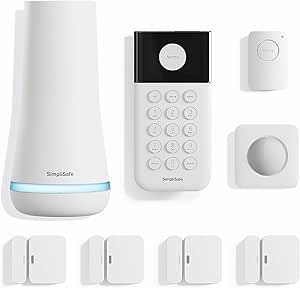 | Best for Straightforward Setup | Kit size: 8 pieces | Connectivity: Wireless | Alert type: Motion | VIEW ON AMAZON | See Our Full Breakdown |
| Wireless Home Security System Kit, 24-Piece DIY Alarm System |  | Best for Large Homes | Sensors included: 24 | Maximum sensors supported: 99 | Connectivity: WiFi and GSM/4G | VIEW ON AMAZON | See Our Full Breakdown |
| 15-Piece WiFi Home Security System, DIY Wireless Alarm Kit, No Subscription |  | Best for Subscription-Free Simplicity | Kit size: 15 pieces | Maximum sensors: 20 | Maximum remote controls: 5 | VIEW ON AMAZON | See Our Full Breakdown |
| WiFi Home Security System, 12-Piece Wireless Alarm Kit with Door Sensors |  | Best for Voice Assistant Flexibility | Kit size: 12 pieces | Maximum sensors: 20 | Connectivity: Wireless WiFi; 2.4GHz only | VIEW ON AMAZON | See Our Full Breakdown |
| GEN 2 Wireless Home Security System, 16-Piece DIY Alarm Kit with Touchscreen Hub, WiFi & 4G, Door Sensors, Motion Detectors, App Alerts, 120dB Wired Siren, No Monthly Fee |  | Best for Touchscreen Control | Kit size: 16 pieces | Connectivity: Wireless WiFi and 4G | Hub: Touchscreen | VIEW ON AMAZON | See Our Full Breakdown |
| Wireless Alarm System for Home Security, 24Pcs WiFi+4G, No Monthly Fees |  | Best for Power-Outage Backup | Sensors included: 24 | Connectivity: WiFi and GSM/4G LTE | Battery backup: 48 hours | VIEW ON AMAZON | See Our Full Breakdown |
| Home Security System Wireless, Smart WiFi Alarm Kit with Sensors, Siren & App Control |  | Best for Smart-Home Flexibility | Power source: Battery powered | Connectivity: Wireless; WiFi connection | Compatible devices: Alexa, Google Home | VIEW ON AMAZON | See Our Full Breakdown |
| eufy Security 5-Piece Home Alarm Kit, Home Security System |  | Best for Simple DIY Setup | Power source: Battery powered | Connectivity: Wireless | Compatible devices: Smartphone | VIEW ON AMAZON | See Our Full Breakdown |
| ADT Blu Home Security System Starter Kit, DIY Wireless Alarm |  | Best for Optional Professional Monitoring | Power source: Base: corded electric; accessories: battery powered | Connectivity: Wireless with cellular backup and Bluetooth | Compatible devices: Apple iOS 17.0 or later; Android 12 or later; laptop, personal computer, tablet | VIEW ON AMAZON | See Our Full Breakdown |
| Ring Alarm 14-Piece Kit (Newest Model) Wireless Smart Home Security System |  | Best for Larger Homes | Kit size: 14 pieces | Designed for: 2- to 4-bedroom homes | Connectivity: Ethernet, WiFi, Z-Wave, Bluetooth, cellular backup | VIEW ON AMAZON | See Our Full Breakdown |
| diy home security alarm kit | Connectivity | Maximum range | Power source | Kit size |
|---|---|---|---|---|
| Ring Alarm 8-Piece Kit | Ethernet, Wi-Fi, Z-Wave, Bluetooth, cellular backup | — | — | — |
| WiFi Door Alarm System | Wireless; 2.4GHz Wi-Fi only | 100 meters | Battery powered; alarm station requires AC power | — |
| WiFi Alarm System for Home Sec | Wireless; 2.4GHz Wi-Fi | 330 feet | — | 21 pieces |
| 24pcs Wireless DIY Home Burgla | 4G, Wi-Fi, GSM, wireless | 80 meters | Battery powered | 24 pieces |
| SimpliSafe 8 Piece Wireless Ho | Wireless | — | Battery powered | 8 pieces |
| Wireless Home Security System | WiFi and GSM/4G | — | — | — |
| 15-Piece WiFi Home Security Sy | Wireless, 2.4GHz WiFi | 100 feet | — | 15 pieces |
| WiFi Home Security System | Wireless WiFi; 2.4GHz only | — | Battery powered; alkaline battery cells | 12 pieces |
| GEN 2 Wireless Home Security S | Wireless WiFi and 4G | 100 feet | — | 16 pieces |
| Wireless Alarm System for Home | WiFi and GSM/4G LTE | 330 feet | — | — |
| Home Security System Wireless | Wireless; WiFi connection | 10 meters | Battery powered | — |
| eufy Security 5-Piece Home Ala | Wireless | 30 feet | Battery powered | — |
| ADT Blu Home Security System S | Wireless with cellular backup and Bluetooth | — | Base: corded electric; accessories: battery powered | — |
| Ring Alarm 14-Piece Kit | Ethernet, WiFi, Z-Wave, Bluetooth, cellular backup | — | — | 14 pieces |
More Details on Our Top Picks
Ring Alarm 8-Piece Kit (Newest Model) – Home & Business Security System with Optional 24/7 Professional Monitoring
The Ring Alarm 8-Piece Kit is a strong fit for buyers who want a familiar app to manage a small home or business alarm, with the option to add sensors as needs change. Its mix of Wi-Fi, Ethernet, Z-Wave, Bluetooth, and cellular backup offers more connection options than the Wi-Fi-only WiFi Door Alarm System, while the keypad and range extender support a more traditional alarm setup. Alexa voice control and remote status checks make day-to-day use straightforward. The main tradeoff is that professional monitoring and some features require paid plans, so it is less appealing to buyers committed to avoiding ongoing fees. Its included sensor count also suits smaller spaces better than the 21-piece WiFi Alarm System. Choose Ring for connected control and expansion, not for the largest starter coverage.
Pros:- App-based alerts and remote control
- Multiple connection options, including cellular backup
- Expandable with additional sensors
- Alexa voice-control compatibility
Cons:- Professional monitoring requires a subscription
- Some features require additional paid plans
- The included kit is aimed at smaller homes or apartments
Best for: Small-home or small-business owners who want app control, Alexa compatibility, and the option to add professional monitoring later
Not ideal for: Buyers who want a large number of sensors in the box or refuse subscriptions for monitoring and extra features
- Included components:Base station, keypad, contact sensors, motion detector, range extender
- Connectivity:Ethernet, Wi-Fi, Z-Wave, Bluetooth, cellular backup
- Battery backup:Rechargeable 24-hour battery
- Security modes:Disarmed, Away, Home
- Base station power:100–240V, 50/60Hz
- Dimensions:6.65 x 6.65 x 1.46 inches
- Installation:Wall mount or flat surface
- Operating conditions:-4°F to 104°F (-20°C to 40°C)
Our verdict“Choose Ring if app-led control and flexible connectivity matter more than subscription-free monitoring or a high sensor count.”
WiFi Door Alarm System, 8-Piece DIY Wireless Alarm Kit with Door Sensors
This 8-piece WiFi Door Alarm System keeps the setup approachable: its wireless sensors and remote controls are designed for tool-free installation, and the kit does not require a subscription. It can expand to 20 sensors and five remote controls, giving buyers room to add entry points without starting over. Compared with the Ring Alarm 8-Piece Kit, it makes a clearer case for avoiding ongoing fees, but gives up Ring’s wider connection mix and cellular backup. The alarm station also needs AC power, and its backup lasts only eight hours, so it is not the strongest choice for extended outages. Its 2.4GHz Wi-Fi limit may also matter in homes using a 5GHz-only setup. I’d pick it for basic entry alerts and a simple DIY installation, not for outage resilience.
Pros:- Designed for installation without tools
- No subscription fee
- Expandable to 20 sensors and five remote controls
- Works with Alexa and Google Assistant
Cons:- Supports 2.4GHz Wi-Fi only
- Backup battery lasts up to eight hours
- Alarm station requires AC power
Best for: Renters and first-time DIY buyers who want basic door and window alerts, easy installation, and no subscription fee
Not ideal for: Households that need 5GHz Wi-Fi support, long backup operation, or cellular connectivity during an internet outage
- Included kit:8 pieces, including alarm station, door/window sensors, and remote controls
- Power source:Battery powered; alarm station requires AC power
- Connectivity:Wireless; 2.4GHz Wi-Fi only
- Maximum range:100 meters
- Expansion:Up to 20 sensors and five remote controls
- Backup battery:Up to eight hours
- Connector type:USB Type-C
- Dimensions:9.06 x 6.69 x 1.97 inches
Our verdict“Pick this kit for simple, subscription-free entry alerts, but choose Ring if broader connectivity and cellular backup matter more.”
WiFi Alarm System for Home Security, DIY Wireless Alarm Kit 21PCS
For buyers who need more sensors in the starter box, this 21-piece WiFi Alarm System offers a broader DIY package than either the Ring or SimpliSafe 8-piece kits. Its app and remote controls provide several ways to manage the alarm, while the claimed 48-hour backup battery gives it an advantage over the WiFi Door Alarm System’s eight-hour backup during a power cut. A 110 dB siren adds a strong local alert. Those benefits come with setup compromises: the hub requires drilling, the system relies on 2.4GHz Wi-Fi with no cellular backup, and the product data notes that setup may feel complex. I’d choose it for a house with many entry points where sensor quantity matters more than a no-drill install or independent communications during an internet outage.
Pros:- 21-piece kit provides more included coverage than the 8-piece options
- Stated 48-hour backup battery
- 110 dB audible siren
- App, push-button, and remote control options
Cons:- Hub installation requires drilling
- No cellular backup and 2.4GHz Wi-Fi only
- Setup may be complex for some buyers
Best for: Owners of houses or apartments with many doors and windows who want a sensor-heavy kit and extended stated battery backup
Not ideal for: Renters who cannot drill, or households that need cellular backup or a particularly simple setup
- Kit size:21 pieces
- Connectivity:Wireless; 2.4GHz Wi-Fi
- Control methods:App, push button, remote
- Maximum range:330 feet
- Audible siren:110 dB
- Backup battery:48 hours
- Voltage:5 volts
- Dimensions:7.05 x 4.49 x 0.79 inches
Our verdict“Choose this kit when included sensor quantity and stated backup runtime outrank easy mounting and cellular resilience.”
24pcs Wireless DIY Home Burglar Alarm System, 4G WiFi GSM, No Monthly Fee, Home Security with App Alert
This 24-piece wireless alarm kit stands apart from the smaller Ring and SimpliSafe starter kits by pairing a larger sensor package with 4G, Wi-Fi, and GSM connectivity. That gives buyers more ways to receive app alerts than the 21-piece WiFi Alarm System, which has no cellular backup. Its peel-and-stick installation is also a practical advantage for people who want to avoid drilling, and the product description says there is no monthly subscription fee. The tradeoff is that wireless alerts still depend on having a SIM card or Wi-Fi connection, and batteries need replacing when depleted. The listed maximum range is 80 meters, so placement and layout may affect coverage. I’d favor this kit for buyers who want a larger DIY setup and multiple connection paths, provided they are comfortable managing batteries and connectivity.
Pros:- 24-piece kit offers broad included sensor coverage
- Supports 4G, Wi-Fi, and GSM connectivity
- Peel-and-stick installation avoids drilling
- No monthly subscription fee stated
Cons:- Requires a SIM card or Wi-Fi for operation
- Included batteries need replacement when depleted
- Maximum listed range is 80 meters
Best for: DIY homeowners or small-business owners who want a larger kit, app alerts, and the choice of Wi-Fi or 4G/GSM connectivity
Not ideal for: Buyers seeking a minimal-maintenance system, or those who do not want to arrange a SIM card or maintain replaceable batteries
- Kit size:24 pieces
- Connectivity:4G, Wi-Fi, GSM, wireless
- Control method:App
- Maximum range:80 meters
- Sensor technology:Motion sensor
- Power source:Battery powered
- Installation:Wireless peel-and-stick design
- Alerts:App alerts
Our verdict“Choose this kit for a larger sensor package and more connection options, if SIM setup and battery upkeep are acceptable.”
SimpliSafe 8 Piece Wireless Home Security System – No Contract, Compatible with Alexa and Google Assistant
The SimpliSafe 8 Piece Wireless System suits buyers who want a compact alarm with a base station, keypad, entry sensors, motion detection, and a siren, without wiring or drilling. Alexa and Google Assistant compatibility adds convenient control, while optional professional monitoring lets owners choose whether to add that service. Compared with the 21-piece WiFi Alarm System, SimpliSafe is the more approachable choice for a smaller property, but it provides less sensor coverage in the box. Its 95 dB siren is also quieter than that system’s listed 110 dB siren. The product data gives battery life as approximately 24 hours, and professional monitoring requires a subscription, so it is not a set-and-forget option for buyers who want long outage operation or no recurring service. I’d choose it for a simple starter setup, not maximum coverage.
Pros:- Wireless setup requires no wiring or drilling
- Includes entry sensors, motion detection, a base station, and keypad
- Compatible with Alexa and Google Assistant
- Optional professional monitoring without a long-term contract
Cons:- Professional monitoring requires a subscription
- Listed battery life is approximately 24 hours
- 95 dB siren is quieter than the 21-piece WiFi Alarm System’s listed siren
Best for: First-time DIY users in smaller homes who want a wireless starter kit, voice-assistant compatibility, and optional professional monitoring
Not ideal for: Owners who need many sensors out of the box, a louder siren, or extended backup battery runtime
- Kit size:8 pieces
- Connectivity:Wireless
- Alert type:Motion
- Audible siren:95 dB
- Battery life:Approximately 24 hours
- Power source:Battery powered
- Smart home compatibility:Alexa and Google Assistant
- Video capture resolution:720p
- Dimensions:12.13 x 4.44 x 12.38 inches
Our verdict“Choose SimpliSafe for a straightforward wireless starter system with optional monitoring, rather than a high-capacity sensor kit.”
Wireless Home Security System Kit, 24-Piece DIY Alarm System
For a larger home that needs room to grow, I’d shortlist this 24-piece kit for its support of up to 99 sensors—far more expansion capacity than the 15-Piece WiFi Home Security System, which tops out at 20. WiFi and GSM/4G connectivity give it two ways to communicate, while app monitoring, auto-dial and SMS notifications add options beyond a basic siren. Its 120dB alarm, tamper alerts, and delayed arming can help cover common entry points and make daily use more flexible.
The tradeoff is that this is a more connectivity-dependent setup: full features rely on WiFi or 4G, and the product details offer little information about battery backup. I’d choose it over a smaller kit when expansion matters, but not if outage resilience or a simpler setup is the priority.
Pros:- Includes 24 sensors and supports expansion up to 99 sensors.
- WiFi and GSM/4G connectivity provide two communication paths.
- Smart Life and Tuya app support enables remote monitoring and control.
- Auto-dial, SMS, tamper alerts, and two-way voice calls add notification options.
Cons:- Battery backup details are not specified.
- Full functionality depends on WiFi or 4G service.
- Does not support 5G networks.
Best for: Owners of larger homes who want to add sensors across multiple rooms and outbuildings over time.
Not ideal for: Buyers prioritizing clearly specified power-outage protection, or households without dependable WiFi or 4G service.
- Sensors included:24
- Maximum sensors supported:99
- Connectivity:WiFi and GSM/4G
- Alarm sound level:120dB
- App compatibility:Smart Life and Tuya
- Voice assistant:Alexa
- Additional functions:Tamper alarm, delayed arming/disarming, auto-dial and SMS notifications, two-way voice call
Our verdict“Choose this kit for broad, expandable sensor coverage; pick a smaller system if straightforward setup or defined backup power matters more.”
15-Piece WiFi Home Security System, DIY Wireless Alarm Kit, No Subscription
I’d point first-time DIY buyers toward this kit if their priority is app alerts without a monthly subscription. The included base station, keypad, sensors, and remotes make it a more ready-to-install package than a system that requires buyers to assemble components separately. Its 120dB siren and smartphone alerts cover the basic alarm-kit needs, while Alexa support adds voice control for households already using that assistant.
Compared with the 12-Piece WiFi Home Security System, this model lists a clear limit of 20 sensors and five remotes, but the 12-piece alternative also supports Google Assistant and specifies an eight-hour backup battery. This kit is a better fit for Alexa users who want a straightforward setup; its 2.4GHz-only WiFi, battery-powered sensors, and narrower compatibility make it less flexible for other smart-home setups.
Pros:- Includes a base station, sensors, keypad, and remote controls for a complete DIY setup.
- App alerts and remote control support day-to-day monitoring.
- Supports expansion up to 20 sensors and five remote controls.
- Alexa compatibility and no monthly subscription fees.
Cons:- Connects only to 2.4GHz WiFi.
- Sensor and remote controls require alkaline batteries.
- Compatibility is limited compared with kits that support multiple voice assistants.
Best for: Renters or first-time DIY users seeking a basic, subscription-free alarm kit with Alexa control.
Not ideal for: Households using 5GHz-only WiFi, Google Assistant, or a larger sensor layout that may exceed the 20-sensor limit.
- Kit size:15 pieces
- Maximum sensors:20
- Maximum remote controls:5
- Connectivity:Wireless, 2.4GHz WiFi
- Alarm sound level:120dB
- Maximum range:100 feet
- Compatible voice assistant:Alexa
- Power:Battery powered; alkaline battery cells
Our verdict“Pick this for a simple Alexa-friendly alarm without monthly fees, but choose the 12-Piece kit if Google Assistant support or specified backup power matters.”
WiFi Home Security System, 12-Piece Wireless Alarm Kit with Door Sensors
The 12-Piece WiFi Home Security System stands out for buyers who want Alexa and Google Assistant support in a compact DIY alarm kit. App, remote, and voice controls give household members more than one way to manage the system, and expansion up to 20 sensors leaves room to add coverage later. Unlike the 15-Piece WiFi Home Security System, which is limited to Alexa, this kit suits homes that use Google Assistant or a mix of assistants.
Its listed eight-hour backup battery is useful during a short power interruption, but that is a limited window compared with the 24-Piece WiFi+4G system’s stated 48-hour backup. The included sensors are described as basic, and the 2.4GHz-only WiFi requirement may rule it out for some networks. I’d choose it for flexible voice control, not for extended outage coverage.
Pros:- Works with Alexa and Google Assistant.
- Supports app, remote, and voice control.
- Expandable up to 20 sensors.
- Includes a specified eight-hour backup battery.
Cons:- Supports 2.4GHz WiFi only.
- Backup battery life is limited to eight hours.
- The included sensors are described as basic.
Best for: Households using Alexa and Google Assistant that want app, remote, and voice control in one starter kit.
Not ideal for: Buyers who need long-duration backup power, 4G connectivity, or a kit with more advanced sensor coverage included.
- Kit size:12 pieces
- Maximum sensors:20
- Connectivity:Wireless WiFi; 2.4GHz only
- Controls:App, remote, and voice
- Voice assistant compatibility:Alexa and Google Assistant
- Backup battery life:8 hours
- Power source:Battery powered; alkaline battery cells
Our verdict“Choose this for assistant flexibility and a defined short backup window; select the 24-Piece WiFi+4G system for longer stated backup and dual-network connectivity.”
GEN 2 Wireless Home Security System, 16-Piece DIY Alarm Kit with Touchscreen Hub, WiFi & 4G, Door Sensors, Motion Detectors, App Alerts, 120dB Wired Siren, No Monthly Fee
I’d consider this GEN 2 kit when a touchscreen hub and a mix of door/window sensors and motion detectors matter more than maximizing the sensor count. Pre-paired sensors are meant to reduce installation steps, and dual WiFi and 4G connectivity gives it a backup communication route that the 15-Piece WiFi Home Security System does not offer. App alerts and no monthly monitoring fee also make the core setup appealing to buyers who want self-managed protection.
The 4G path requires a compatible SIM card sold separately, so it is not fully ready for cellular communication straight out of the box. The wired siren may also complicate placement compared with a self-contained alarm, and the listing gives conflicting sound-level figures: the title says 120dB, while the specifications list 100dB. I’d verify the siren rating before choosing it for maximum audible output.
Pros:- Touchscreen hub provides an alternative to app-only operation.
- Includes door/window sensors and motion detectors.
- Pre-paired sensors are intended to simplify setup.
- WiFi and 4G connectivity with no monthly monitoring fee.
Cons:- A compatible 4G SIM card is sold separately.
- The wired siren may limit placement or require extra installation work.
- The listed siren level differs between the product title and specifications.
Best for: DIY buyers who prefer a touchscreen hub, pre-paired sensors, and WiFi/4G communication for self-managed alerts.
Not ideal for: People who want cellular service ready without a separate SIM purchase or who need a clearly confirmed siren rating and simple siren placement.
- Kit size:16 pieces
- Connectivity:Wireless WiFi and 4G
- Hub:Touchscreen
- Sensors:Magnetic door/window contacts, passive infrared motion detectors, RFID, wireless sensors
- Siren:Wired; title states 120dB and specifications list 100dB
- Maximum range:100 feet
- Connector:USB Type-C
- 4G requirement:Compatible SIM card sold separately
Our verdict“Choose this for a touchscreen-led, dual-connectivity DIY setup, provided you are comfortable sourcing a SIM and checking the siren specification.”
Wireless Alarm System for Home Security, 24Pcs WiFi+4G, No Monthly Fees
This 24-piece system earns its place for buyers who want a specified 48-hour battery backup alongside WiFi and 4G connectivity. That combination makes it a stronger outage-focused choice than the 12-Piece WiFi Home Security System, whose listed backup lasts eight hours and which does not specify 4G. The kit also includes a keypad, supports app control, and works with Smart Life, Tuya, and Alexa, while its stated 330-foot maximum range offers more reach on paper than the 15-Piece WiFi kit’s 100 feet.
The tradeoffs are practical: the SIM card is not included, and the listing warns that setup can feel complex without detailed instructions. Its 110dB alarm is lower than the 120dB figure listed for several alternatives, and the product data’s 1080p video-capture specification is not clearly tied to a camera included in the kit. I’d choose it for backup and coverage, not for the loudest alarm or a fully clarified video setup.
Pros:- Includes 24 sensors for broad initial coverage.
- Specified 48-hour battery backup supports operation during power outages.
- WiFi and 4G connectivity offer two communication paths.
- App control and compatibility with Alexa, Smart Life, and Tuya.
Cons:- SIM card is not included.
- Setup may be difficult without detailed instructions.
- The listed 110dB alarm is less loud than the 120dB sirens specified for some alternatives.
Best for: Homeowners seeking a larger DIY sensor kit with stated 48-hour backup and WiFi/4G communication.
Not ideal for: Buyers who want a SIM included, the loudest listed alarm, or clear confirmation that video capture hardware comes with the kit.
- Sensors included:24
- Connectivity:WiFi and GSM/4G LTE
- Battery backup:48 hours
- Alarm sound level:110dB
- Maximum range:330 feet
- Sensor technology:Magnetic contact, passive infrared motion, RFID
- Control methods:App, push button, remote
- Compatible platforms:Amazon Alexa, Smart Life, Tuya
- Connector:USB Type-C
Our verdict“Choose this when stated outage backup and dual-network connectivity matter most, but confirm the SIM and any video-related expectations before buying.”
Home Security System Wireless, Smart WiFi Alarm Kit with Sensors, Siren & App Control
This kit’s strongest case is its expandability: support for up to 100 accessories gives buyers room to add coverage as their needs change. Alexa and Google Home compatibility, app control, and real-time alerts make it a more connected choice than the straightforward eufy Security 5-Piece Home Alarm Kit. Self-adhesive installation is aimed at a quick DIY setup, without the need for heavy tools.
The tradeoff is that its wireless range is listed at just 10 meters, so placement and the layout of your home may limit where sensors can communicate. It also requires 2.4GHz WiFi, not 5GHz, and its battery-powered components need replacement over time. I’d choose it for adding smart-home integrations and future accessories, but not for a large home where sensor range is the main concern.
Pros:- Supports up to 100 accessories for a system that can grow
- Works with Alexa and Google Home
- Provides real-time app alerts and remote control
- Self-adhesive installation is suited to DIY setup
Cons:- Listed wireless range is limited to 10 meters
- Requires 2.4GHz WiFi and does not support 5GHz
- Battery-powered components require replacement over time
Best for: Smart-home owners who want app alerts, voice-assistant compatibility, and room to add many sensors over time.
Not ideal for: People with larger or multi-level homes who need a long sensor range, or households whose WiFi network only uses 5GHz.
- Power source:Battery powered
- Connectivity:Wireless; WiFi connection
- Compatible devices:Alexa, Google Home
- Maximum range:10 meters
- Installation method:Self-adhesive
- Voltage:5 volts
- Dimensions:6.3 x 3.94 x 1.18 inches
- Weight:136 g
Our verdict“Choose this kit if smart-home compatibility and accessory expansion matter more to you than long sensor range.”
eufy Security 5-Piece Home Alarm Kit, Home Security System
The five-piece set bundles entry sensors, a motion sensor, a keypad, and a HomeBase, giving first-time buyers a clear starting point without building a system piece by piece. Its DIY installation and smartphone alerts keep setup and day-to-day use approachable. Basic security has no monthly fee, which distinguishes it from the ADT Blu starter kit, where professional monitoring requires a paid plan.
This simplicity also sets a ceiling: the supplied information describes basic alerting rather than advanced security features, so buyers seeking a highly configurable setup may prefer the ADT Blu or the expandable Home Security System Wireless kit. The listed 30-foot range can also constrain sensor placement, and battery-powered sensors will need attention over time. I’d pick eufy for a contained home and uncomplicated entry monitoring, not for a broad property or an advanced alarm setup.
Pros:- Includes entry sensors, a motion sensor, a keypad, and HomeBase
- Designed for DIY installation and wireless smartphone alerts
- Basic security is available without monthly fees
- A contained five-piece setup keeps the initial system straightforward
Cons:- Listed maximum range is 30 feet and may limit sensor placement
- Battery-powered sensors need replacement over time
- Basic feature set may not suit buyers seeking advanced security
Best for: First-time DIY security buyers who want a defined sensor, keypad, and hub bundle with app alerts and no monthly fee for basic security.
Not ideal for: Owners of large homes needing broader sensor coverage, or buyers who want advanced security functions and extensive customization.
- Power source:Battery powered
- Connectivity:Wireless
- Compatible devices:Smartphone
- Maximum range:30 feet
- Included components:Entry sensors, motion sensor, keypad, and HomeBase
- Sensor technology:Wireless
- Battery cell type:Lithium Metal
- Warranty:12 months
Our verdict“Choose the eufy kit for a straightforward, fee-free basic alarm setup rather than a large or highly customizable system.”
ADT Blu Home Security System Starter Kit, DIY Wireless Alarm
ADT Blu suits buyers who want a DIY-installed alarm with a path to professional monitoring. The starter bundle includes a base hub, door/window sensors, a pet-friendly motion sensor, and visible deterrents, while the ADT+ app provides remote control. Its cellular backup separates it from the WiFi-focused Home Security System Wireless kit, offering another connection method if home internet is unavailable. The system can also grow with added cameras and sensors.
That monitoring option is not included as a free substitute for self-monitoring: 24/7 professional monitoring requires a paid subscription. The supplied battery-life figure is only 24 hours, which may be a concern during a power disruption, and the warranty is limited to 90 days. Compared with Ring Alarm’s 14-piece kit, ADT Blu is a more starter-oriented bundle; I’d choose it for the monitoring pathway, not for buyers who want to avoid recurring service costs.
Pros:- Includes a hub, entry sensors, pet-friendly motion sensor, yard sign, and window stickers
- Offers cellular backup alongside wireless connectivity
- Can expand with additional cameras and sensors
- Supports remote control through the ADT+ app
Cons:- 24/7 professional monitoring requires a paid subscription
- Listed battery average life is 24 hours
- Manufacturer warranty is limited to 90 days
Best for: DIY households that want app-based control, cellular backup, and the option to add paid professional monitoring later.
Not ideal for: Buyers who want 24/7 professional monitoring without a subscription, or who need a long battery backup period.
- Power source:Base: corded electric; accessories: battery powered
- Connectivity:Wireless with cellular backup and Bluetooth
- Compatible devices:Apple iOS 17.0 or later; Android 12 or later; laptop, personal computer, tablet
- Included components:Base hub, door/window sensors, pet-friendly motion sensor, yard sign, and window stickers
- Entry control method:App, touch
- Battery average life:24 hours
- Installation method:Self-adhesive and screw-mounted door/window sensors; wall-mounted motion sensor
- Warranty:90-day limited manufacturer warranty
Our verdict“Choose ADT Blu if you want a DIY starter system with cellular backup and the option to pay for professional monitoring.”
Ring Alarm 14-Piece Kit (Newest Model) Wireless Smart Home Security System
With a 14-piece bundle designed for two- to four-bedroom homes, this Ring kit is the most coverage-ready choice in this group. It includes a base station, keypads, contact sensors, motion detectors, and a range extender, so buyers start with more components than the eufy Security 5-Piece Home Alarm Kit. Multiple connection options—Ethernet, WiFi, Z-Wave, Bluetooth, and cellular backup—also give it a broader connectivity mix than the WiFi-focused Home Security System Wireless kit.
That larger setup comes with service tradeoffs: professional monitoring and Alexa voice control require a subscription, and some features and extra sensors are sold separately. Its 24-hour rechargeable backup helps cover a power interruption, but it does not remove the need to plan around subscription costs for paid services. I’d choose Ring for a larger household that values a fuller starting kit and expansion options, rather than for someone seeking a minimal alarm with no paid add-ons.
Pros:- 14-piece bundle includes a base station, keypads, contact sensors, motion detectors, and a range extender
- Offers Ethernet, WiFi, Z-Wave, Bluetooth, and cellular backup
- Includes a rechargeable 24-hour backup battery
- Supports app control, Alexa compatibility, and additional accessories
Cons:- Professional monitoring and Alexa voice control require a subscription
- Some features and additional sensors are sold separately
- Designed for indoor use
Best for: Households in two- to four-bedroom homes that want a larger starter bundle, multiple connectivity options, and room to add sensors.
Not ideal for: Buyers seeking subscription-free professional monitoring or Alexa voice control, or those who need a system for outdoor use.
- Kit size:14 pieces
- Designed for:2- to 4-bedroom homes
- Connectivity:Ethernet, WiFi, Z-Wave, Bluetooth, cellular backup
- Base station power:100-240V, 50/60Hz
- Backup battery:Rechargeable, 24-hour backup
- Security modes:Disarmed, Away, Home
- Base station dimensions:6.65 x 6.65 x 1.46 inches
- Operating conditions:-4°F to 104°F (-20°C to 40°C)
Our verdict“Choose this Ring kit for a larger home that can use its fuller sensor bundle, and budget separately for subscription-based features.”

How We Picked
I ranked these kits around the needs of a DIY alarm buyer: practical sensor coverage, clarity of the setup, alert and control options, connectivity, and the burden of ongoing service. I gave more weight to clearly identified system components and monitoring choices than to a large piece count alone, since a bundle only helps when its sensors match the home’s entry points. I also looked at whether the product description makes its intended use understandable to a buyer choosing between a compact starter kit and a larger system.
The order reflects how clearly each option fits a distinct buyer need, not a claim that every home will get the same result. Ring’s 8-piece kit leads as a balanced entry into a known alarm ecosystem; the 14-piece Ring and SimpliSafe kits follow for broader coverage or a different monitoring choice. Kits with high piece counts, WiFi and 4G, or no-subscription positioning may suit particular homes, but buyers should verify exact sensor contents, cellular terms, app functions, and compatibility before choosing. Where a listing supplies limited detail, I treat that uncertainty as a buying drawback rather than assuming features.
| diy home security alarm kit | Power source |
|---|---|
| Ring Alarm 8-Piece Kit | — |
| WiFi Door Alarm System | Battery powered; alarm station requires AC power |
| WiFi Alarm System for Home Sec | — |
| 24pcs Wireless DIY Home Burgla | Battery powered |
| SimpliSafe 8 Piece Wireless Ho | Battery powered |
| Wireless Home Security System | — |
| 15-Piece WiFi Home Security Sy | — |
| WiFi Home Security System | Battery powered; alkaline battery cells |
| GEN 2 Wireless Home Security S | — |
| Wireless Alarm System for Home | — |
| Home Security System Wireless | Battery powered |
| eufy Security 5-Piece Home Ala | Battery powered |
| ADT Blu Home Security System S | Base: corded electric; accessories: battery powered |
| Ring Alarm 14-Piece Kit | — |
Factors to Consider When Choosing Diy Home Security Alarm Kit
Choosing a kit is less about maximizing the number on the box and more about matching sensors, alerts, and service to how your home is laid out. I’d start with the entry points and routines that matter, then check which functions remain available if your WiFi or power fails.
Map doors and windows before choosing a bundle
Count the doors and accessible windows you actually want monitored, then note any hallway or shared space where a motion sensor would add useful coverage. A kit with many pieces may include a keypad, hub, or siren rather than a sensor for every opening, so the headline count can overstate coverage. Decide whether you want to protect the main floor first or cover several levels from day one. For an apartment or small home, a compact kit may be easier to install and less prone to nuisance alerts. Larger homes may need extra sensors, but check that add-ons are compatible and sold separately if required. Avoid placing motion sensors where pets, strong sunlight, or routine movement could trigger alerts unless the system offers settings that suit your household.
Choose self-monitoring or professional response deliberately
With self-monitoring, you typically receive app notifications and decide how to respond; this can avoid a monitoring contract but puts more responsibility on you. Professional monitoring may add a response path when you cannot check your phone, but it can carry recurring fees and service conditions. A kit advertised as having no monthly fee may still reserve particular features, such as cellular backup or expanded app functions, for a paid plan. Compare the actual services rather than relying on a “no fee” label. Ask who receives an alarm event, whether emergency dispatch is available, and what happens if a sensor loses connection. If you travel often or share responsibility with family, response arrangements may matter more than extra sensors.
Check what happens during internet and power outages
WiFi-based alerts depend on a working home network, so a router outage can interrupt remote notifications. Some systems list 4G or cellular backup, but that capability may require activation, compatible service, or a subscription. Confirm whether cellular backup applies to alarm communication or only to selected features, and check how the hub is powered during an outage. A battery-powered sensor does not necessarily mean the central hub will continue reporting events. Buyers in areas with unreliable internet should prioritize clear backup specifications over a large device bundle. If backup details are missing, ask the seller or manufacturer before relying on the system as the home’s only alarm.
Inspect the app and smart-home compatibility you will use
App control is useful only if the functions you need are included and the interface supports the people who will manage the system. Check whether multiple household members can receive alerts, whether settings can be changed remotely, and whether the alarm can be armed without a phone. Voice-assistant compatibility can add convenience, but it should not replace a reliable keypad or clearly documented disarming method. Do not assume that every kit with WiFi works with Alexa, Google Assistant, or other smart-home devices. Compatibility can vary by model and may change with software updates. If you already use a smart-home platform, verify the exact model’s support before building your alarm setup around it.
Plan installation, placement, and upkeep
DIY installation avoids scheduling an installer, but good placement still takes planning: sensors need to align, hubs need dependable signal, and sirens should be audible where people spend time. Before buying, check whether mounting hardware is included and whether the sensors use adhesive, screws, or both. Think about battery replacement and whether the app reports low battery or connection problems; small maintenance tasks can become easy to miss across many devices. A bigger kit adds more points to inspect and can be harder to move if you rent. Test alert delivery and entry delays after installation, then revisit settings when household routines change. Leave enough time for setup instead of treating a multi-room kit as a quick plug-in device.
Compare the full ownership cost, not just the kit contents
The initial bundle is only one part of the decision: optional monitoring, cellular backup, extra sensors, replacement batteries, and compatible add-ons can affect the long-term commitment. A smaller kit may be enough if it covers the openings that matter, while a larger package can make sense when it includes the specific sensors you would otherwise add. Check contract terms and what remains usable if you cancel a service. Confirm that the alarm can still sound locally and that you retain access to the app functions you depend on. For renters, portability and easy removal may matter more than a permanent, expandable setup. Write down the capabilities you need before comparing bundles so a feature list does not push you toward equipment you will not use.
Frequently Asked Questions
Is a larger DIY alarm kit automatically better for a house?
No. A larger piece count may include components that do not monitor a separate door or window, so compare the included sensor types and quantities with your home’s layout. A well-placed smaller kit can cover the main entry points more usefully than a bigger bundle with mismatched devices. Start by listing the openings and shared spaces you want protected. Then check whether compatible sensors are available if you want to expand later. Choose the larger kit when its actual contents match your coverage plan, not just because the number is higher.
Can I use a no-monthly-fee alarm kit while I’m away from home?
Often you can receive app alerts while away, but the exact service depends on the system, internet connection, and the plan attached to it. An app alert does not necessarily mean a monitoring center will contact you or request emergency help. Review what happens if your home WiFi goes offline and whether cellular backup is included or paid. Check who else can receive notifications in case you are unreachable. If you want someone to respond automatically, confirm the monitoring terms rather than relying on the phrase “no monthly fee.”
Do WiFi and 4G alarm kits keep working if my internet goes down?
They may have a cellular communication path, but the listing alone does not establish when it activates or what it supports. Confirm whether 4G backup is built in, requires a service plan, and carries alarm events or only selected notifications. Also check whether the hub has battery backup, since a working cellular connection cannot help if the control unit loses power. Ask how the system signals a connection failure and whether you will see that warning in the app. If outages are a concern, treat these as purchase questions rather than assumptions.
Should I choose an alarm kit with professional monitoring or manage alerts myself?
Self-monitoring can suit someone who checks their phone consistently and is comfortable deciding what to do when an alert arrives. Professional monitoring may be a better fit when you travel, share responsibility with others, or want an outside response path, though it can involve recurring service costs. Compare contract terms, dispatch procedures, and which features stop if you cancel. Also think about false alarms and how the system lets you cancel or confirm an event. The right choice depends on who can respond at the time an alert occurs, not simply on whether monitoring is offered.
What should renters check before installing a DIY alarm system?
Renters should check whether sensors attach with removable adhesive or require screws, and whether removal could damage paint or trim. Confirm that the hub can be taken to a new home and that the system does not rely on permanent wiring. Check whether the kit’s coverage makes sense for the unit’s doors and accessible windows, rather than paying for sensors you cannot use. Ask about transfer of app accounts, monitoring service, and cellular coverage if you move. A compact kit may be easier to relocate, while a large bundle is only useful if it can be reconfigured for the next home.
Conclusion
For a balanced starting point, I recommend the Ring Alarm 8-Piece Kit as the best overall, especially for buyers who want optional professional monitoring. The best value in practical coverage depends on your floor plan: the Ring Alarm 14-Piece Kit is the stronger fit when you need more sensors, while a smaller bundle can be better if it already covers your main entry points. For a best premium-leaning choice, compare the GEN 2 16-piece kit’s stated WiFi and 4G options with your needs for backup and its service terms. The best pick for beginners is eufy’s 5-piece kit if a compact setup is enough; choose Ring’s 8-piece kit instead if monitoring options matter more. For homes needing many sensors or connectivity alternatives, examine the 21- and 24-piece kits closely, but verify their exact contents and backup requirements before deciding.