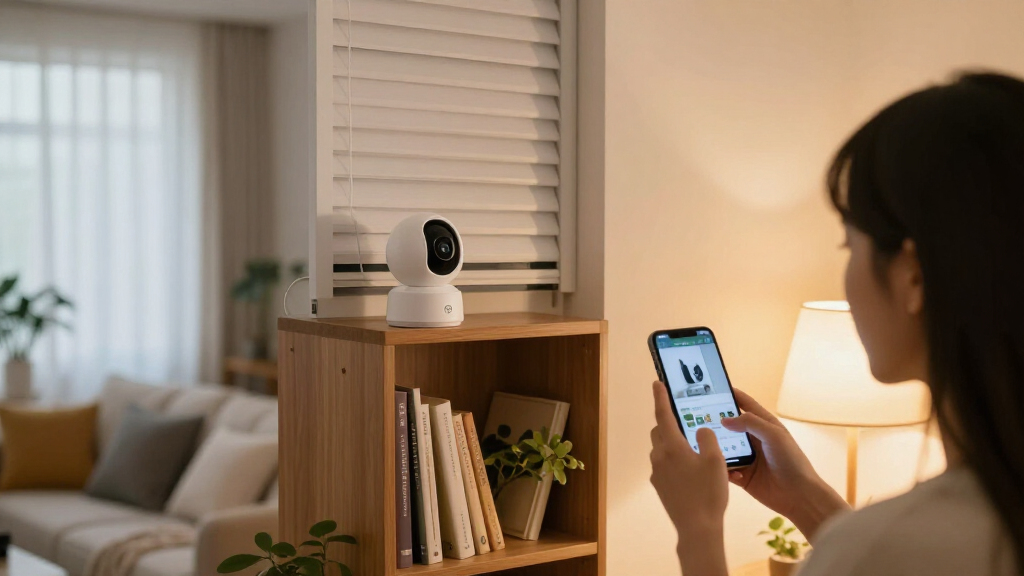

Indoor security cameras with privacy shutters let you limit when the camera can see into your home, but shutter design and camera features vary. I rank the Arlo Essential Indoor Security Camera, 2K, 2nd Gen as the best overall pick for its mix of resolution and a built-in privacy shield. The Xiaomi Smart Camera C301 stands out for buyers who want a shutter with a more budget-minded feature set, while the SimpliSafe SimpliCam may suit households already using SimpliSafe. The main tradeoffs are whether the shutter physically blocks the lens, how much coverage you need, and whether your preferred ecosystem or subscription affects daily use. Read on for the full comparison and guidance on choosing the right setup.

Get privacy and security gear delivered free — and shop member deals
- Fast, free delivery on millions of items
- Access to Prime Big Deal Days deals on October 6–7
- Prime Video, Amazon Music and more included
Key Takeaways
- The Arlo Essential Indoor 2K is my best overall pick for balancing image detail with a built-in privacy shield in a single-camera setup.
- Xiaomi’s C301 puts shutter control at the center of its appeal, while buyers should check app, network, and ecosystem compatibility before choosing it.
- The Arlo Baby Camera 2-Camera Set is aimed at monitoring more than one room; its baby-monitoring focus may be unnecessary for general security.
- Anona’s four-camera pack prioritizes broad coverage, but a multi-camera bundle is only useful if its setup and storage approach fit the household.
- Shutters are not interchangeable: compare whether each model physically covers the lens, how it is activated, and what happens when the camera is offline.
| Arlo Essential Indoor Security Camera, 2K, 2nd Gen |  | Best Overall | Resolution: 2K | Field of view: 130 degrees | Power: Wired, plug-in | VIEW LATEST PRICE | See Our Full Breakdown |
| Arlo Essential Indoor Baby Camera 2K (3rd Gen), 2-Camera Set |  | Best for Multi-Room Coverage | Camera count: 2 | Video resolution: 2K | Field of view: 130° | VIEW LATEST PRICE | See Our Full Breakdown |
| Xiaomi Smart Camera C301 2K Indoor Wi-Fi Camera with Privacy Shutter |  | Best Value for Whole-Room Coverage | Resolution: 3MP (2304 × 1296) | Pan range: 360° | Tilt range: 107° | VIEW LATEST PRICE | See Our Full Breakdown |
| Anona 4K UHD Indoor Security Camera, 4-Pack |  | Best for Full-Home Budget Coverage | Pack size: 4 cameras | Resolution: 4K, 8 MP | Pan and tilt: 360° pan; 110° tilt | VIEW LATEST PRICE | See Our Full Breakdown |
| SimpliSafe SimpliCam 1080p Wired Indoor Security Camera with Privacy Shutter | 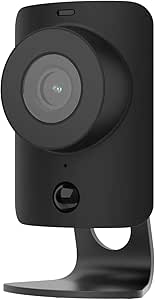 | Best for Existing SimpliSafe Systems | Resolution: 1080p HD | Field of view: 120 degrees | Power: AC power | VIEW LATEST PRICE | See Our Full Breakdown |
| LUMAISLE Indoor PTZ Security Camera, 2K 3MP, Blue |  | Best Motion Tracking | Resolution: 2K, 3MP | Pan/Tilt Range: 355° horizontal / 90° vertical | Night Vision: Color | VIEW LATEST PRICE | See Our Full Breakdown |
| indoor security cameras with privacy shutter | Resolution | Audio | Connectivity | Field of view |
|---|---|---|---|---|
| Arlo Essential Indoor Security | 2K | Two-way with noise cancellation | 2.4 GHz Wi-Fi | 130 degrees |
| Arlo Essential Indoor Baby Cam | — | — | Dual-band Wi-Fi | 130° |
| Xiaomi Smart Camera C301 2K In | 3MP (2304 × 1296) | Two-way with noise reduction | — | — |
| Anona 4K UHD Indoor Security C | 4K, 8 MP | — | — | — |
| SimpliSafe SimpliCam 1080p Wir | 1080p HD | Two-way audio | Wi-Fi | 120 degrees |
| LUMAISLE Indoor PTZ Security C | 2K, 3MP | Two-way audio | Dual-band Wi-Fi (2.4GHz and 5GHz) | — |
More Details on Our Top Picks
Arlo Essential Indoor Security Camera, 2K, 2nd Gen
The Arlo Essential Indoor 2nd Gen makes the strongest all-around case in this lineup because it balances 2K clarity, smart home flexibility, and a genuinely well-implemented automated privacy shield. Unlike the SimpliCam, whose shutter must be manually opened in the app, Arlo’s shield closes itself automatically whenever you disarm the camera — a meaningful difference for anyone who wants privacy to be the default rather than a habit. Compared with the Xiaomi C301, you give up pan-and-tilt coverage for a fixed 130-degree view, but you gain broader ecosystem support across both Alexa and Google Home. The main tradeoff is the paywall: after the trial, richer alerts and video history require an Arlo Secure plan, and the 2.4 GHz-only Wi-Fi may frustrate router setups.
Pros:- Automated privacy shield closes on its own when disarmed
- Sharp 2K video with a wide 130-degree field of view
- Works with both Alexa and Google Home
- Two-way audio with noise cancellation for clear conversations
Cons:- Key alert and video history features require a paid Arlo Secure subscription
- Wired power and 2.4 GHz-only Wi-Fi limit placement flexibility
Best for: Smart home owners who want set-and-forget privacy automation and crisp 2K footage in a single high-traffic room
Not ideal for: Budget-averse buyers unwilling to subscribe — core alert and storage features sit behind a paid plan
- Resolution:2K
- Field of view:130 degrees
- Power:Wired, plug-in
- Privacy feature:Automated privacy shield
- Night vision:Yes
- Audio:Two-way with noise cancellation
- Connectivity:2.4 GHz Wi-Fi
- Smart home compatibility:Amazon Alexa, Google Home
Our verdict“If you want one camera that nails video quality and automatic privacy without managing it daily, this is the pick — as long as you accept the subscription.”
Arlo Essential Indoor Baby Camera 2K (3rd Gen), 2-Camera Set
This two-camera bundle is the practical choice for households that need to watch more than one room — a nursery plus a playroom, for instance — without doubling the setup effort. Each unit carries the same app-controlled privacy shield and 2K resolution as the single Arlo Essential above, plus a few upgrades: dual-band Wi-Fi for cleaner connections, an integrated siren, and a 12x zoom that helps you check on a crib from across the room. Compared with the Anona 4-pack, you get fewer cameras but far more polish, including smarter alerts and broader platform support spanning Alexa, Google Home, SmartThings, and IFTTT. Just note the same subscription catch applies, and this set won’t work with an Arlo SmartHub if you already run one.
Pros:- Two matched cameras with independent app-controlled privacy shields
- Dual-band Wi-Fi improves placement over the 2nd Gen single camera
- Integrated siren adds a deterrent the C301 and SimpliCam lack
- 12x zoom is handy for detailed nursery checks
Cons:- Premium features like 60-day video history require a paid plan after the trial
- Incompatible with Arlo SmartHub and Base Stations
- Wired design with 6.5 ft cables means outlet proximity matters
Best for: Parents covering a nursery and a second room who want matching cameras, dual-band Wi-Fi, and consistent privacy controls
Not ideal for: Existing Arlo SmartHub or Base Station owners — this generation simply won’t pair with them
- Camera count:2
- Video resolution:2K
- Field of view:130°
- Zoom:12x
- Connectivity:Dual-band Wi-Fi
- Privacy feature:Automatic app-controlled privacy shield
- Features:Night vision, two-way audio, integrated siren
- Smart home compatibility:Alexa, Google Home, SmartThings, IFTTT
Our verdict“The smartest way to cover two rooms with identical privacy behavior and app control — if you’re entering the Arlo ecosystem fresh rather than expanding an older hub setup.”
Xiaomi Smart Camera C301 2K Indoor Wi-Fi Camera with Privacy Shutter
The C301 solves the fixed-lens problem most picks here share: with 360° pan and 107° tilt, one camera can sweep an entire open floor plan, which the stationary Arlo Essential simply can’t match. Its physical lens shutter is a real mechanical barrier rather than a software promise, and AES-128 encryption plus local microSD storage up to 256GB means you’re not forced into a subscription to keep footage — the biggest differentiator against both Arlo options. On-device AI person detection and motion tracking reduce junk alerts without cloud fees. The compromises are real, though: it’s stuck on 2.4 GHz Wi-Fi, smart home integration is thinner than Arlo’s, and the Mi Home app feels less polished than Arlo’s or SimpliSafe’s.
Pros:- Physical privacy shutter fully blocks the lens
- 360° pan and 107° tilt cover rooms far larger than fixed cameras
- Local microSD storage up to 256GB avoids subscription costs
- On-device AI person detection and motion tracking
Cons:- 2.4 GHz-only Wi-Fi can struggle in congested networks
- Limited smart home ecosystem support and a less refined app experience
Best for: Budget-conscious buyers who want pan-tilt coverage of a large room and fee-free local recording
Not ideal for: Smart home power users — there’s no Alexa or Google Home integration, and the Mi Home app is the only control surface
- Resolution:3MP (2304 × 1296)
- Pan range:360°
- Tilt range:107°
- Privacy:Physical lens shutter; AES-128 encryption
- Detection:Local AI person detection and motion tracking
- Storage:microSD up to 256GB plus optional cloud
- Audio:Two-way with noise reduction
- Wi-Fi:2.4 GHz
Our verdict“The best price-to-coverage ratio here for anyone who’d rather own their storage outright than rent it — provided you don’t need deep smart home ties.”
Anona 4K UHD Indoor Security Camera, 4-Pack
Four cameras, 4K resolution, and Wi-Fi 6 dual-band connectivity — on raw specs per dollar, nothing else in this lineup comes close. This set makes sense for renters or small-business owners blanketing multiple rooms at once, and the AI detection suite covering people, pets, and baby cries is broader than the Arlo Baby set’s focus. The catch is a glaring omission for this roundup’s theme: the Anona cameras don’t have a privacy shutter, so if physically blocking the lens is your reason for buying, the Xiaomi C301 or SimpliCam should rank higher on your list. Video also runs at 15 fps, which looks slightly choppy next to Arlo’s footage, and microSD cards aren’t included, so budget for four of them if you want local storage.
Pros:- Four 4K cameras cover an entire home in one purchase
- Dual-band Wi-Fi 6 beats the 2.4 GHz-only Arlo and Xiaomi options
- Person, pet, and baby-cry detection in one AI package
- Choice of encrypted cloud or microSD storage up to 512 GB per camera
Cons:- No physical privacy shutter — app disarm is your only option
- 15 fps frame rate makes motion look less smooth than competitors
- microSD cards not included, adding hidden cost
Best for: Anyone prioritizing maximum camera count and 4K detail across several rooms on a tight budget
Not ideal for: Privacy-first buyers — with no physical shutter, the lens stays exposed whenever the camera is powered
- Pack size:4 cameras
- Resolution:4K, 8 MP
- Pan and tilt:360° pan; 110° tilt
- Zoom:8x digital
- Wi-Fi:Dual-band 2.4/5 GHz Wi-Fi 6
- Detection:Person, pet, and baby-cry detection
- Storage:Cloud or microSD up to 512 GB (not included)
- Frame rate:15 fps
- Compatibility:Smartphone app, Alexa, Google Assistant
Our verdict“Unmatched coverage-per-dollar for whole-home monitoring, but it belongs on your shortlist only if software-level privacy is enough for you.”
SimpliSafe SimpliCam 1080p Wired Indoor Security Camera with Privacy Shutter
The SimpliCam plays a different game than everything else here: it’s a team player inside the SimpliSafe Gen 3 ecosystem, where its real value emerges — video verification that can speed up professional monitoring dispatch during a break-in. Its stainless steel privacy shutter only opens with explicit permission in the app, arguably the most reassuring implementation for privacy purists, even compared with the Xiaomi’s plastic sliding shutter. The tradeoffs are obvious next to the Arlo Essential: 1080p versus 2K, a narrower 120-degree view, and no standalone smart home integration outside SimpliSafe. Advanced features also require a monitoring plan. But if a SimpliSafe system already guards your doors, adding cameras anywhere else fractures your setup into two apps.
Pros:- Stainless steel shutter opens only with explicit app permission
- Deep integration with SimpliSafe Gen 3 monitoring
- Video verification can accelerate emergency dispatch
- Simple setup with dependable motion alerts and two-way audio
Cons:- 1080p resolution trails the 2K and 4K competition
- Locked into the SimpliSafe ecosystem — no Alexa or Google Home support
- Video verification and faster dispatch require a paid monitoring plan
Best for: SimpliSafe Gen 3 owners who want cameras that integrate with professional monitoring and verified alarm dispatch
Not ideal for: Standalone buyers without a SimpliSafe system — cheaper, sharper cameras like the Arlo Essential do more on their own
- Resolution:1080p HD
- Field of view:120 degrees
- Power:AC power
- Privacy feature:Stainless steel manual privacy shutter
- Audio:Two-way audio
- Connectivity:Wi-Fi
- Compatibility:SimpliSafe Gen 3 security system
Our verdict“Buy it because you already own a SimpliSafe system, not because of the spec sheet — ecosystem value, not hardware, is the whole story.”
LUMAISLE Indoor PTZ Security Camera, 2K 3MP, Blue
Where most cameras in this roundup, like the Xiaomi Smart Camera C301, keep a fixed viewpoint and rely on wide lenses to cover a room, the LUMAISLE takes the opposite approach: its 355° pan and 90° tilt range lets it physically follow a person as they move, so you’re not stuck choosing which corner to watch. That tracking ability makes it the standout pick here for large or awkwardly shaped rooms where a single fixed camera leaves blind spots. The included 32GB TF card is another advantage — unlike the Arlo Essential Indoor, which pushes you toward a subscription for recorded footage, this one records locally out of the box, and you can expand to 128GB. Color night vision and dual-band Wi-Fi round out a strong spec sheet. The tradeoffs are real, though: it needs continuous wall power, and some of its smarter features are gated behind a 30-day cloud trial rather than being permanent.
Pros:- Wide 355° pan and 90° tilt range with automatic person tracking eliminates blind spots
- 32GB TF card included for local recording, expandable to 128GB, so no subscription is needed for basic footage
- Color night vision captures detail that infrared-only cameras lose
- Dual-band Wi-Fi support reduces connection issues on crowded 2.4GHz networks
Cons:- Requires continuous wired power, limiting placement flexibility
- Advanced cloud features are only a 30-day trial, so expect upsell pressure after setup
- Privacy mode is app-controlled rather than a physical shutter, which is less reassuring than the mechanical covers on the SimpliCam or Arlo
Best for: Owners of large or open-plan homes who want one camera to actively track movement across a whole room instead of buying multiple fixed units
Not ideal for: Renters or anyone wanting flexible placement — the wired power requirement and wall mount mean it can’t sit on a shelf untethered, and it lacks the physical privacy shutter found on the SimpliCam or Xiaomi
- Resolution:2K, 3MP
- Pan/Tilt Range:355° horizontal / 90° vertical
- Night Vision:Color
- Storage:32GB TF card included; supports up to 128GB; cloud optional
- Connectivity:Dual-band Wi-Fi (2.4GHz and 5GHz)
- Privacy Mode:App-controlled
- Audio:Two-way audio
- Detection:AI person detection
- Mount Type:Wall mount
Our verdict“If you’d rather have one camera that actively follows activity across a big room than several fixed ones, this is the tracker to get — just accept the power cord and software-based privacy mode.”
How We Picked
I compared the six listed models on the factors that shape everyday privacy and monitoring: whether a shutter is specified, image resolution, coverage options, intended use, and how clearly each product fits a particular household. A physical shutter can provide a more direct barrier than relying on a camera-off setting, so I gave that distinction weight while avoiding assumptions about features that are not established by the product names. I also considered whether the product is a single camera, a multi-camera bundle, or a specialized baby-monitoring option.
The ranking favors a broadly useful balance of privacy control and camera capability. The Arlo Essential Indoor 2K leads as the general-purpose pick; Xiaomi follows for buyers drawn to an explicitly named privacy shutter. The remaining positions reflect more specific needs: SimpliSafe for households considering its ecosystem, the Arlo baby set for nursery coverage, Anona for multi-room quantity, and LUMAISLE for buyers seeking pan-tilt-zoom coverage. These roles do not mean one model suits every home, so I recommend checking each manufacturer’s current specifications for shutter operation, storage, subscriptions, and compatibility.
| indoor security cameras with privacy shutter | Privacy feature | Audio | Detection |
|---|---|---|---|
| Arlo Essential Indoor Security | Automated privacy shield | Two-way with noise cancellation | — |
| Arlo Essential Indoor Baby Cam | Automatic app-controlled privacy shield | — | — |
| Xiaomi Smart Camera C301 2K In | — | Two-way with noise reduction | Local AI person detection and motion tracking |
| Anona 4K UHD Indoor Security C | — | — | Person, pet, and baby-cry detection |
| SimpliSafe SimpliCam 1080p Wir | Stainless steel manual privacy shutter | Two-way audio | — |
| LUMAISLE Indoor PTZ Security C | — | Two-way audio | AI person detection |
Factors to Consider When Choosing Indoor Security Cameras With Privacy Shutters
A privacy shutter is only one part of a camera’s privacy story. I would decide first how and when the camera should watch, then compare shutter mechanics, coverage, connectivity, and ongoing service needs. These broader checks can prevent a mismatch that product feature lists alone may not make obvious.
Check What the Shutter Physically Covers
Product descriptions can use “privacy shutter” to refer to different kinds of controls, so verify what physically moves and whether it fully covers the lens. A lens cover offers a visible barrier; an app setting may simply stop recording or viewing while leaving the lens exposed. Ask how the shutter behaves during power loss, a network outage, or a restart, since those moments can affect whether the camera returns to monitoring. Also check whether the shutter can be operated locally if the app or account is unavailable. A small indicator light is useful, but it is not a substitute for understanding the mechanism. For a bedroom or nursery, prioritize a control whose state is clear to everyone in the household.
Decide How Much of the Room Needs Coverage
A fixed camera can work well when the entryway or play area has one obvious vantage point. For a large or irregular room, pan-and-tilt movement may reduce blind spots, though a moving lens can change what is visible over time. Multiple cameras can cover separate rooms without relying on one device to see everything, but they add setup, power, and account-management work. Avoid buying a multi-camera bundle just because it includes more units; map the useful views first. Check whether each camera needs its own outlet and whether the router can support reliable connections throughout the home. Match camera count and movement to the floor plan, not just the room count.
Treat Resolution as One Part of Identification
Higher resolution can preserve more detail in a live view, but it does not guarantee that a face or object will be identifiable. Distance, angle, lighting, motion, and compression all affect what a clip reveals. A 2K camera pointed across a bright window may be less useful than a lower-resolution model aimed at a well-lit doorway. Before choosing, consider where the camera will sit and whether it can face the area without capturing private spaces unnecessarily. Night vision and motion handling matter too, especially if the camera monitors a dim room. Think about the evidence you actually need, such as noticing an arrival or distinguishing a person at the door.
Compare Storage and Subscription Needs Before Setup
Recording features may depend on cloud plans, local storage, or a combination, and the included capabilities can vary by model and region. Check whether you can review motion events without paying for an ongoing plan and how long clips remain available. Cloud storage can make footage easier to access away from home, while local storage may better match a preference to keep recordings within the household. Each approach has tradeoffs around access, retention, and what happens if the camera or network fails. Read the current service terms before relying on a feature for security. A camera that fits your privacy needs but locks essential history behind an unwanted plan may not be the right fit.
Check Ecosystem Fit and Household Access
A camera can be a poor fit if its app, smart-home support, or account-sharing setup conflicts with the way your household manages devices. Confirm phone compatibility and any required hub or network band before ordering. If you already use a security system, a camera designed for that ecosystem may simplify alerts and routines, but it can also tie more of your setup to one provider. For shared homes, check whether other trusted adults can view the feed without sharing a password. Review how motion notifications can be scheduled so routine movement does not create unnecessary alerts. A simple, understandable setup often matters more day to day than an extra feature that nobody uses.
Frequently Asked Questions
Does a privacy shutter guarantee that an indoor camera cannot see me?
That depends on the specific shutter and how the camera handles it. A physical cover that blocks the lens gives a visible barrier, while a software privacy mode may only disable viewing or recording. Check the manufacturer’s description and instructions to see whether the lens is physically covered and whether the shutter can be controlled without an internet connection. Consider the microphone separately, since a lens shutter does not necessarily disable audio. If you need a camera to be unable to capture a room at certain times, verify both video and audio behavior before relying on it.
Should I choose a camera with a physical shutter or one with an app privacy mode?
A physical shutter is easier to verify at a glance because it visibly blocks the lens. An app mode can be more convenient for scheduled privacy or remote control, but its effect depends on how the model implements that setting. Some buyers may prefer both a physical barrier and app controls, while others mainly need a clear manual way to cover the lens. Check what happens after a restart and whether the device remembers its prior privacy state. Choose based on the moments you want privacy and how much you trust a remote control to match that need.
Is a two-camera or four-camera bundle worth choosing over one better-placed camera?
A bundle makes sense when you have distinct areas to monitor and can place cameras where they have useful views and power. One carefully positioned camera may be simpler if your goal is watching a single entry or room. More devices mean more alerts, setup steps, network use, and questions about storage and account access. Before choosing a bundle, sketch the views you need and note any areas you do not want recorded. Then confirm that the included cameras can meet those needs and that their service or storage requirements work for the whole set.
What should I check if I plan to use an indoor camera in a nursery?
Look beyond the camera’s label and confirm how its privacy control works, who can access the feed, and whether audio is captured. A baby-monitoring model may have features that suit nursery use, but a specialized set can be more than needed if you only want general room security. Check night viewing, alert behavior, and how quickly you can reach the live feed from your phone. Place the camera so it sees the intended area without pointing at more of the room than necessary. If more than one caregiver needs access, confirm the account-sharing process before installation.
Can I rely on cloud recording if I want to keep indoor footage private?
Cloud recording stores footage with a service provider, so review that provider’s account controls, retention terms, and available security settings. A local-storage option may keep recordings closer to home, though it brings its own risks if the device or card is damaged or removed. Some cameras support only certain storage methods or reserve features for paid plans, so check current terms for the exact model. Decide how long you need clips and who should be able to access them. Privacy depends on storage and account practices as well as whether the lens can be covered.
Conclusion
For most households, I would start with the Arlo Essential Indoor Security Camera, 2K, 2nd Gen as the best overall balance in this lineup. The Xiaomi Smart Camera C301 is my value-minded choice for shoppers drawn to a clearly specified shutter, while the SimpliSafe SimpliCam makes more sense for someone already considering the SimpliSafe system. Beginners who want a nursery-oriented setup can look at the Arlo Baby Camera 2-Camera Set, though its specialized focus may not suit general monitoring. Choose Anona’s four-camera pack when multiple rooms matter most, or the LUMAISLE PTZ if adjustable viewing is your priority. Before buying, confirm the shutter’s physical behavior, storage requirements, and compatibility against your own privacy expectations.
Fall Picks
fall essentials
As an affiliate, we earn on qualifying purchases.